Blog

  • WhatsApp API Pricing in Indonesia 2026: Official Rates, How to Calculate, and Money-Saving Tips

    WhatsApp API Pricing in Indonesia 2026: Official Rates, How to Calculate, and Money-Saving Tips

    Executive Summary & Value Proposition

    • Conversation-Based Pricing Model: Charges are billed per 24-hour conversation window (not per message) following Meta’s global standards.
    • Free Service Conversations: Inbound customer-initiated chats incur zero Meta conversation fees within the 24-hour service window.
    • Transparent Cost Breakdown: Clearly separates official Meta rates (Marketing, Utility, Authentication) from BSP platform subscription fees.
    • Budget Optimization Strategies: Leverages AI Agents, audience segmentation, and automation to slash operational messaging costs.

    WhatsApp has evolved into the primary communication channel for enterprises in Indonesia. With over 100 million active users nationwide, the platform has grown from a simple messaging app into essential business infrastructure for customer service, conversational sales, and marketing campaigns.

    Many organizations are adopting the WhatsApp Business API to manage large-scale customer interactions. However, understanding the true WhatsApp API pricing in Indonesia—specifically differentiating Meta’s official conversation charges from Business Solution Provider (BSP) platform fees—remains a challenge for decision-makers.

    WhatsApp API pricing operates on a conversation-based model, charging per 24-hour session rather than per individual message. Session rates vary depending on the message category: Marketing, Utility, or Authentication.

    Under Meta’s current global pricing structure, user-initiated service conversations incur $0 in Meta fees during the open 24-hour service window.

    Why Is WhatsApp Business API Critical for Enterprises?

    The WhatsApp Business API is Meta’s enterprise-grade solution built for companies handling high-volume communications that require seamless backend systems integration.

    Unlike standard business apps, the API connects messaging workflows directly into your CRM platform, ticketing systems, and omnichannel applications.

    Key business benefits include:

    • Scalable Communication: Handle thousands of concurrent customer conversations via multi-agent routing.
    • Brand Credibility: Secure an official verified business profile (Green Tick badge).
    • Service Automation: AI Agents handle repetitive customer inquiries 24/7.
    • Systems Integration: Connect directly with sales workflow automation and customer analytics dashboards.

    WhatsApp API Pricing Structure in Indonesia (2026)

    Total WhatsApp Business API operational costs consist of two primary components:

    1. Official Meta conversation charges.
    2. BSP / Omnichannel platform subscription fees.
    Conversation Category Meta Rate (USD) Estimated IDR Primary Use Cases
    Marketing $0.0492 / conversation ~IDR 780 Promotional broadcasts, product catalogs, discount campaigns.
    Utility $0.0212 / conversation ~IDR 336 Order notifications, delivery updates, payment reminders.
    Authentication $0.0190 / conversation ~IDR 301 Login OTPs, account verification, password resets.
    Service (User-Initiated) Free ($0) IDR 0 Customer service responses to user-initiated chats.

    Key Note: A single conversation session includes all messages exchanged within a 24-hour window starting from the first delivered message. Businesses can exchange unlimited messages within this window at no extra Meta fee.

    Additional Omnichannel Platform Costs

    In addition to Meta’s conversation rates, companies utilize software platforms to manage agent inboxes. Common extra cost factors include:

    • Agent Seats: Monthly licensing fees per active customer support agent.
    • Broadcast Campaign Management: Feature costs for dispatching bulk WhatsApp broadcast campaigns.
    • AI & Automation Add-ons: Licensing for artificial intelligence conversational agents.

    How to Calculate Your Monthly WhatsApp API Budget

    Estimate your monthly expenditure using this 4-step calculation framework:

    1. Estimate Monthly Conversation Volume:
      • Marketing: 1,000 conversations
      • Utility: 2,000 conversations
      • Authentication: 500 conversations
    2. Multiply by Official Meta Rates:
      • Marketing: 1,000 x IDR 780 = IDR 780,000
      • Utility: 2,000 x IDR 336 = IDR 672,000
      • Authentication: 500 x IDR 301 = IDR 150,500
    3. Sum Meta Conversation Costs:
      IDR 780,000 + IDR 672,000 + IDR 150,500 = IDR 1,602,500 / month.
    4. Add Platform Subscription Fees:
      Example: 3 support seats (3 x IDR 150,000 = IDR 450,000).
      Total Monthly Estimated Cost: IDR 1,602,500 + IDR 450,000 = IDR 2,052,500 / month.

    Effective Cost-Saving Strategies for WhatsApp API

    • Maximize Free Service Conversations: Drive organic inbound chats via website widgets or social media click-to-WhatsApp ads to leverage $0 Meta session fees.
    • Deploy AI Agents for First-Line Support: Resolve inquiries instantly within the open 24-hour window while reducing manual seat requirements.
    • Targeted Broadcast Segmentation: Avoid unsegmented mass broadcasts. Dispatch promotional templates exclusively to qualified lead segments.
    • Consolidate Utility Templates: Combine multiple order updates (e.g., receipt & tracking number) into a single concise utility message.

    Implement Cost-Effective WhatsApp API with Cekat.ai

    Navigating WhatsApp API pricing in Indonesia for 2026 requires clear visibility and the right technology partner.

    Cekat.ai offers full pricing transparency with no hidden markups. Integrate official WhatsApp Business API endpoints with powerful AI Agents, omnichannel inbox management, and CRM automation to maximize your operational ROI.

    Schedule a consultation today with Cekat.ai.


    Frequently Asked Questions (FAQ)

    1. How much does the WhatsApp API cost in Indonesia?

    WhatsApp API uses conversation-based pricing (24-hour sessions). Official Meta rates range from IDR 0 (Service), ~IDR 301 (Authentication), ~IDR 336 (Utility), to ~IDR 780 (Marketing) per conversation session.

    2. Is there an official setup fee charged by Meta?

    No. Meta does not charge an initial setup fee. Onboarding costs usually depend on the subscription plan of the BSP or omnichannel software platform you choose.

    3. What is the difference between per-message and conversation-based pricing?

    Per-message pricing charges every single message sent. Conversation-based pricing charges a single fee for an entire 24-hour thread, allowing unlimited messages within that session.

    4. How can I apply for an official WhatsApp Business API account in Indonesia?

    You can register through a verified Meta solution provider like Cekat.ai. The onboarding process requires Facebook Business Manager verification and an active phone number.


  • WhatsApp Business Green Checkmark: Requirements, Application Process, & Myths That Need Clearing Up

    WhatsApp Business Green Checkmark: Requirements, Application Process, & Myths That Need Clearing Up

    Many business owners in Indonesia want the WhatsApp Business green checkmark because it’s seen as an official symbol that boosts credibility. In reality, however, not every business qualifies, and a lot of the information out there is misleading.

    This article provides an honest, accurate, and comprehensive guide to the WA green checkmark — what it is, how to get it, who really qualifies, and the common mistakes people make.

    What Is the WhatsApp Business Green Checkmark?

    The WhatsApp Business green checkmark is a Verified Badge from Meta that indicates the WhatsApp account belongs to an official brand that has passed identity verification.

    This badge is only given to businesses that genuinely have brand recognition, not just any business using the WhatsApp API.

    In other words:
    Every green-checkmark account definitely uses the WhatsApp API. But not every WhatsApp API user will get the green checkmark.

    Why Do So Many Businesses Chase the Green Checkmark?

    Because the green checkmark makes customers:

    • Trust the business more

    • Avoid fake accounts

    • Feel safer when transacting

    • See the business as more professional

    However, chasing the green checkmark without understanding the requirements often ends in repeated rejections from Meta.

    Popular Myths About the WA Business Green Checkmark (And the Real Facts)

    ✗

    Myth 1: “The green checkmark is mandatory for the WhatsApp Business API.”

    ✓

    Fact: Not mandatory. You can use all WA API features without the green checkmark.

    ✗

    Myth 2: “Every business can get the green checkmark.”

    ✓

    Fact: Meta prioritizes brands with strong public reputation, not every business category.

    ✗

    Myth 3: “The green checkmark can be bought from certain vendors.”

    ✓

    Fact: It cannot. Meta does not sell the badge, and no vendor can guarantee approval.

    ✗

    Myth 4: “Any SME can get it if they pay.”

    ✓

    Fact: Many SMEs are rejected due to lack of media exposure, no official domain, or a brand name that isn’t unique.

    Can Every Business Get the WhatsApp Green Checkmark?

    The answer: No.

    Meta uses a reputation evaluation (business notoriety) before granting verification. Businesses with a high chance include:

    • National/international brands

    • Large startups or licensed fintech companies

    • Official media outlets

    • Government/public services

    • Companies with hundreds of thousands of customers

    Chances are lower for:

    • New SMEs

    • Businesses with no media coverage

    • Resellers, dropshippers

    • Generic business names (e.g. “Cheap Groceries”)

    • Businesses in sensitive categories

    This is why many applications get rejected even with complete legal documents.

    Requirements to Get the WhatsApp Business Green Checkmark

    To apply for a Verified Badge, a business must have:

    1. WhatsApp Business API / WhatsApp Platform

    This is an absolute requirement.

    2. A validated Meta Business Manager

    Including:

    • Legal documents (business registration/NIB, business license/SIUP, incorporation decree)

    • Consistent business name

    • Verified website domain

    3. Public reputation

    Meta evaluates:

    • Official news articles (not personal blogs)

    • Brand searches online

    • Brand consistency across marketplaces and social media

    4. An allowed business category

    Meta rejects certain industries such as:

    • Unlicensed crypto

    • MLM

    • Illegal products

    • Adult services

    • Other sensitive niches

    How to Apply for the WhatsApp Business Green Checkmark

    Here are the official steps — the simplest, easiest-to-follow version:

    1. Use the WhatsApp Business API first.

    2. Verify the business in Meta Business Manager.

    3. Make sure the domain is verified.

    4. Apply for the Verified Badge through the WhatsApp API dashboard.

    5. Meta reviews it within 1–7 business days.

    6. You’ll get a result: approved or rejected.

    If rejected, you can try again after 30 days.

    Common Cases Where Meta Rejects Applications

    Here are the most common situations:

    • New brand with no media trail: Meta cannot find evidence of reputation online.

    • Brand name doesn’t match the documents: Example: legal documents say “PT Maju Tech,” but the WA name is “MJ Gadget Store.”

    • No official domain: Meta rejects blogspot, linktree, or marketplace domains.

    • Reseller/dropship business model: Meta only verifies the primary brand, not resellers.

    Is the WhatsApp Green Checkmark Paid?

    No. The WhatsApp Business green checkmark is 100% free.
    What you pay for is the use of the WhatsApp API (such as conversation fees).

    If any vendor offers a “paid green checkmark,” it’s a scam or unofficial.

    Should SMEs Pursue the Green Checkmark?

    Not always.

    SMEs should instead focus on:

    • Building trust through fast responses

    • Creating a more polished customer experience via the WhatsApp API

    • Automating CS for efficiency

    • Building online reputation first

    The green checkmark only matters if:

    • There’s a risk of fake accounts

    • The business already has significant public exposure

    • The brand wants to build long-term trust

    If these conditions aren’t met yet, pursuing the green checkmark is often a waste of time, since it tends to get rejected.

    The WhatsApp Business green checkmark is an official badge from Meta given only to businesses with a strong public reputation. This badge increases credibility, but it isn’t mandatory for using the WhatsApp API. Not every business can get it, and applying for it is free.

    For most businesses — especially SMEs — the main focus should be on the customer experience via the WhatsApp API, not the badge itself. Once brand reputation grows, applying for the green checkmark becomes more realistic and has a much better chance of approval.

    If you want to start using the official WhatsApp API, manage chats more professionally, set up automation, and even prepare your business to qualify for the green checkmark, you need a safe, officially registered platform with Meta.

    Cekat.ai helps businesses of all sizes get started with the WhatsApp API hassle-free, complete with guidance and support for the green checkmark application process in line with Meta’s policies.

    Want to make your business WhatsApp more credible and efficient?
    Get started now with Cekat.ai.

  • Automated Business Reports: How AI Helps Management Teams Make Faster Decisions

    In a fast-moving business, a delayed decision is often just as risky as a wrong decision. The problem is, many management teams still rely on manual reports that are only finished after a problem has already occurred. Customer conversation data is scattered across many channels, CS team performance is viewed from separate spreadsheets, conversion rate isn’t always connected to chat activity, and revenue from digital channels is often only visible after being compiled at the end of the week or month.

    Yet every customer conversation holds important business signals. Chat volume can indicate rising demand. Response time can show team capacity. Conversion rate can indicate lead handling quality. CSAT score can give an indication of customer experience. Revenue from the chat channel can help management see which channel is actually generating results.

    At Cekat.ai, we see automated business reporting powered by AI for faster management decisions as an important foundation for companies that want to become more data-driven. Not just having a dashboard, but having a system that helps management understand what’s happening, spot anomalies earlier, and make decisions before problems grow bigger.

    Why Do Manual Reports Slow Down Business Decisions?

    Manual reports usually require many steps before they can be used. The team has to pull data from several channels, clean the data, unify the format, calculate metrics, build visualizations, then send a summary to the manager. This process takes time, and often the report is only read once the data is no longer fully current.

    For C-level executives and business managers, this kind of delay creates a blind spot. If conversation volume spikes dramatically today but is only seen next week, the business loses the chance to add team capacity sooner. If response time worsens but is only discovered after customers start complaining, the impact can immediately be felt in conversion and customer satisfaction. If revenue from the chat channel drops but the cause isn’t visible early on, the team will find it harder to determine corrective action.

    The core problem with manual reports isn’t just effort, it’s timing. Business decisions need data that is fast, relevant, and easy to read.

    A Real-Time Dashboard Lets Management See the Current State of the Business

    A real-time dashboard helps management see business performance without waiting for a manual report. Data that is usually scattered can be displayed in a single, more compact view, covering conversation volume, conversion rate, response time, CSAT score, and revenue from the chat channel.

    Conversation volume helps management understand how much customer demand or activity is coming in. If volume rises, the business can check whether that increase comes from a campaign, a promo, peak season, or a particular issue. Response time shows how fast the team responds to customers, which matters a great deal since response speed often has a direct effect on conversion opportunity.

    Conversion rate shows how effectively customer conversations turn into qualified leads, appointments, orders, or transactions. CSAT score helps show the quality of the customer experience after interacting with the business. Meanwhile, revenue from the chat channel gives a more concrete picture: not just how many chats came in, but how much business value was generated from those conversations.

    With a dashboard like this, management doesn’t just see activity. Management sees the relationship between activity, service quality, and business impact.

    Dashboard Preview: Metrics Management Needs to See

    An effective business dashboard doesn’t need to be packed with too many numbers. What matters most is displaying the metrics that help the management team read business conditions and make decisions.

    Dashboard Preview

    Business Area

    Key Metric

    Readable Insight

    Demand & Traffic

    Conversation Volume

    Seeing chat spikes, demand trends, and campaign impact

    Service Performance

    Response Time

    Assessing how fast the team handles customers

    Sales Efficiency

    Conversion Rate

    Measuring how effectively chats turn into leads, orders, or customers

    Customer Experience

    CSAT Score

    Monitoring customer satisfaction from service interactions

    Revenue Impact

    Revenue from Chat Channel

    Seeing the contribution of the conversation channel to revenue

    A preview like this helps C-level executives and business managers read performance quickly. If conversation volume rises but conversion rate falls, the problem might lie in handling quality or team capacity. If response time worsens and CSAT drops along with it, the team needs to evaluate SLA and workload distribution. If revenue from chat rises after a particular campaign, the business can see which channel is worth strengthening.

    Automatic Alerts Help Businesses Catch Anomalies Earlier

    A real-time dashboard becomes even more powerful when paired with automatic alerts. In day-to-day operations, management can’t continuously monitor a dashboard every minute. AI can help read patterns and give warnings when anomalies occur.

    For example, the system can send an alert when conversation volume rises far above the daily average. This could be a signal that a campaign is performing well, there’s a product issue, or there’s a demand surge that needs quick handling. Alerts can also be sent when response time exceeds the SLA threshold, so a manager can quickly add agents, reassign work, or activate an AI agent to help answer tier-1 questions.

    Anomalies can also show up in conversion rate. If conversion suddenly drops, management can check whether there’s an issue with the sales pitch script, lead quality, pricing, product availability, or sales follow-up. If CSAT drops, the team can quickly evaluate the conversations that triggered customer dissatisfaction.

    With automatic alerts, businesses are no longer just reactive after a problem shows up in the end-of-month report. Businesses can be more proactive in reading signals and taking action faster.

    Automatic Weekly and Monthly Summaries for Managers

    Not every decision needs daily monitoring. Some strategic decisions still need weekly and monthly summaries. This is where automatic weekly and monthly summaries become important.

    A weekly summary can help managers see what changed over the past week. For example, whether the number of conversations rose, whether conversion improved, whether response time stayed stable, whether any channel generated higher revenue, or whether any category of customer question increased. This summary helps the team carry out routine evaluations without having to build a report from scratch.

    A monthly summary helps C-level executives see bigger trends. Is customer acquisition from the chat channel becoming more efficient? Is the CS team able to maintain SLA? Has AI automation succeeded in reducing the burden of repetitive questions? Has revenue from customer conversations increased compared to the previous month?

    With AI, a summary isn’t just numbers. The system can help summarize insights, highlight important changes, and provide initial context that can be discussed in a management meeting.

    Data-Driven Decision Making Becomes Easier with AI

    Many companies want to be data-driven, but don’t necessarily have a data workflow that supports it. Data-driven decision making isn’t just about having a lot of data. What matters more is the ability to read the right data, at the right time, and turn it into a decision that can be executed.

    AI helps make this process easier. Customer conversation data can be read as a business signal. AI can help group question trends, detect performance patterns, find anomalies, and build summaries that are easier for management to understand.

    For example, if many customers ask about pricing after seeing a particular campaign, marketing can evaluate whether the campaign messaging is clear enough. If many customers ask about order status, operations can check whether shipping updates need to be made more transparent. If many leads drop off after asking about a promo, sales can evaluate the offer or the follow-up process.

    This way, automated business reporting doesn’t just become a reporting tool. The report becomes an intelligence system that helps the business understand customers and continuously improve its processes.

    Cekat.ai Helps Management Monitor the Business Through Customer Conversations

    Cekat.ai helps businesses connect omnichannel chat, AI agent, CRM, automation, and analytics within a single ecosystem. This means data from customer conversations doesn’t just stop as chat history, but can be turned into insight that helps management make decisions.

    Through the real-time dashboard, businesses can monitor conversation volume, response time, conversion rate, CSAT score, and revenue from the chat channel. Through automatic alerts, managers can get warnings when anomalies occur. Through weekly and monthly summaries, the management team can see performance trends without having to wait for a manual roundup from many sources.

    For C-level executives, this helps show the relationship between customer interaction and revenue. For business managers, this helps manage teams, channels, and workflows more measurably. For operational teams, this helps identify areas that need improvement faster.

    From Manual Reports to a Faster Decision-Making System

    A business cannot grow by relying only on delayed reports. The more channels there are, the greater the volume of conversations, and the more complex the customer journey, the more important it becomes for management to have real-time visibility.

    Automated business reporting powered by AI for faster management decisions helps companies move from manual reporting to a more responsive decision-making system. A real-time dashboard provides daily visibility. Automatic alerts help catch risk earlier. Weekly and monthly summaries help management see more strategic trends.

    With data that’s easier to read, decisions are no longer based only on assumptions or delayed roundups. Businesses can see actual conditions, understand the causes of change, and take more accurate action.

    Monitor your business in real time with Cekat.ai.

  • AI Customer Service for E-Commerce: Automate Chat, Tracking, & Returns

    AI Customer Service for E-Commerce: Automate Chat, Tracking, & Returns

    Executive Summary & Value Proposition

    • Operational Scalability: Seamlessly handle spikes of thousands of buyer inquiries during flash sales without expanding support headcount.
    • Automated Orders & Returns: Connect chat inquiries with real-time tracking data and structured return workflows using order automation.
    • 24/7 Instant Response Capability: Eliminate lost sales opportunities outside business hours using versatile AI Agent integrations.
    • Centralized Multi-Channel Support: Consolidate inquiries across web stores, marketplaces, and WhatsApp into a single omnichannel application.

    In the e-commerce industry, sales growth is almost always accompanied by a surging volume of customer support chats. In early stages, human support agents manage inquiries one by one. However, as order volumes scale, unread messages pile up, response SLAs degrade, and buyer satisfaction plunges.

    E-commerce business owners quickly realize that the underlying bottleneck isn’t customer volume, but the inability of manual systems to scale alongside business growth. When buyers experience long wait times just to check tracking numbers or return policies, brand trust degrades rapidly.

    This is where AI customer service for e-commerce emerges as an essential growth engine. Beyond basic rule-based chatbots, modern AI solutions handle routine queries, process order requests, and assist transactions in real-time.

    What Is E-Commerce AI Customer Service?

    AI Customer Service for E-Commerce refers to applying artificial intelligence to automate online store customer inquiries, complaints, and transactions—ranging from order status checks and return processing to personalized product recommendations—without requiring human support intervention for routine chats.

    This technology typically operates as an online store AI chatbot connected directly to inventory systems, marketplaces, and logistics APIs through an enterprise CRM application.

    Core E-Commerce Support Challenges Solved by AI

    Most online retailers face identical operational friction points as business scales. If left unaddressed, these challenges throttle long-term enterprise growth:

    1. Support Chat Surges During Peak Order Volumes

    As sales increase, support inquiry volumes grow exponentially faster than order counts. A single transaction triggers multiple chat touchpoints—from pre-purchase stock questions to post-delivery tracking. Explore industry transformation trends in our guide on e-commerce customer service revolution with AI.

    Common operational issues include:

    • Unread chat backlogs during promotional campaign hours.
    • Degraded response SLAs leading to buyer frustration.
    • Cart abandonment due to delayed pre-sales responses.
    • Support team burnout from repetitive messaging tasks.

    Deploying AI customer support for online stores resolves routine queries automatically without waiting for human agent availability.

    2. Repetitive Questions Draining Support Hours

    Daily support queues consist primarily of straightforward, repetitive queries, such as:

    • “Has my order shipped yet?”
    • “What is my tracking number?”
    • “How do I initiate an item return?”
    • “Is this discount voucher still active?”

    Answering these manually wastes valuable support hours. Implementing customer service automation to resolve 80% of routine questions eliminates this overhead significantly.

    3. Error-Prone Item Return Workflows

    Returns represent a pivotal moment in customer retention. Opaque or slow return workflows alienate buyers. Deploying a structured complaint management system streamlines return records transparently.

    4. Service Limitations Outside Business Hours

    Modern consumers shop late at night and during weekends. Lacking instant response capabilities outside business hours leads directly to abandoned orders. AI delivers true 24/7 instant support.

    7 High-Impact AI Customer Service Use Cases for Online Stores

    AI adoption delivers maximum ROI when applied to high-frequency daily store operations. Key use cases include:

    1. Instant Order Status Checks: Fetches live order statuses directly from databases without human delay.
    2. Automated Shipping Tracking: Pulls courier tracking data automatically to deliver real-time package location updates. Learn more in our article on AI order management and automated tracking.
    3. Structured Return Processing: Collects return reasons, validates image proof, and issues return shipping instructions automatically.
    4. Accurate Promotional Guidance: Explains voucher conditions, bundle discounts, and campaign expiration dates accurately.
    5. Relevant Product Recommendations: Suggests complementary products (cross-selling/upselling) based on user browse and purchase histories.
    6. Automated Review Requests: Dispatches friendly post-delivery follow-ups to gather social proof and reviews automatically.
    7. Lapsed Buyer Re-Engagement: Triggers automated follow-up messages to re-engage inactive customers with tailored offers.

    E-Commerce AI Customer Service Workflow Architecture

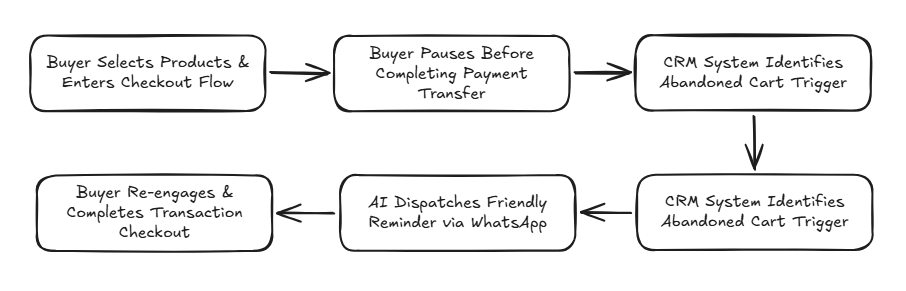
    Here is how automated AI customer support functions in practice:

    english flow

    E-Commerce Platform Integrations

    Flexible API architectures enable AI integration across modern sales ecosystems:

    • Marketplace Integrations (Shopee & Tokopedia): Synchronize buyer chats, answer stock queries instantly, and dispatch status updates.
    • Web Store Platforms (Shopify & WooCommerce): Connect web catalogs, recommend products, and run automated cart recovery sequences. Explore our complete guide on AI agents for online stores from orders to after-sales.
    • WhatsApp Commerce Channels: Manage chat-based commerce dispatches using official wa blast solutions.

    Automate Your Online Store Operations with Cekat.ai

    In competitive e-commerce markets, response speed and support consistency dictate brand success. Businesses relying on manual workflows face strict operational scaling ceilings as transaction volumes rise.

    Deploying AI customer service for e-commerce empowers your business to handle higher transaction volumes effortlessly. Beyond cost savings, automation stabilizes support SLAs across all growth phases.

    The Cekat.ai platform helps e-commerce enterprises automate customer service from first touchpoint to post-sales support. From order tracking to returns and recommendations, streamline operations without inflating team costs.

    Scale your online store operations today with Cekat.ai.


    Frequently Asked Questions (FAQ)

    1. Can AI customer service replace human support agents completely?

    No. AI is designed to resolve 70-80% of routine queries (like tracking and stock checks). Complex complaints or custom negotiations escalate seamlessly to human agents.

    2. Is AI customer service suitable for small online stores?

    Yes. Even small stores benefit immediately from automated tracking and stock answers, saving hours of manual daily repetitive typing.

    3. Can AI handle product return workflows automatically?

    Yes. AI collects return reasons, requests required media proof, and issues return shipping instructions based on your store’s predefined SOPs.

    4. How long does it take to integrate Cekat.ai with an online store?

    Integration and Knowledge Base training are straightforward, allowing your online store to go live with AI support within days without complex coding.


  • AI Agent for Creative Businesses: Event Organizers, Photographers, and Interior Designers

    Creative businesses often look flexible from the outside, but the operations behind them are extremely demanding. Event organizers have to answer prospective clients asking about dates, concepts, vendors, and budget quickly. Professional photographers have to manage session schedules, service packages, revisions, payments, and delivery of the final work. Interior designers need to understand project needs, room size, design preferences, timeline, and budget expectations before they can even give initial direction.

    The problem is, many inquiries come in while the team is in a meeting, in production, at a photoshoot, on a site visit, or handling vendors. When the response is late, prospective clients can move on to a competitor who replies faster. This is where an AI agent for creative businesses — event organizers, photographers, and interior designers becomes relevant: not just an auto-reply, but a conversation system that helps creative businesses capture interest, guide prospective clients, present their portfolio, and handle initial negotiations more smoothly.

    AI for Creative Business Is About More Than Just Replying to Chats

    In creative businesses, the first conversation often determines the quality of the opportunity. Prospective clients usually arrive with needs that aren’t fully clear yet. They want to know if a date is still available, whether their budget fits, whether the vendor’s style is a match, and whether the team can understand their vision.

    AI for creative business helps make this process more structured. An AI agent can welcome inquiries, uncover initial needs, send relevant portfolio pieces, explain service packages, record the prospective client’s preferences, and then guide them to the next step. With a flow like this, the conversation doesn’t stay just a regular chat — it becomes part of a measurable customer journey.

    At Cekat.AI, we don’t see an AI agent as just a tool for replying to messages. We see it as a workflow layer that helps creative businesses turn inquiries into a more professional sales process, without losing the personal touch that still matters so much in the creative industry.

    EO AI Agent for Qualifying Budget, Dates, and Vendor Timelines

    Event organizers often receive inquiries that open with big questions: “Is this date still available?”, “What kind of concept can we get with this budget?”, or “Can you handle a wedding, a corporate event, or a product launch?” Questions like these are simple, but if answered manually one by one, the team’s time gets eaten up before they even know whether the lead is genuinely promising.

    With an EO AI agent, the initial process can be made more efficient. An AI agent can ask about the event date, event type, number of guests, location, estimated budget, and the prospective client’s main needs. From this information, the EO team can immediately see whether the inquiry falls into the hot lead category, needs follow-up, or doesn’t match their service capacity.

    An AI agent can also help present the portfolio based on the prospective client’s needs. If a prospective client asks about a corporate gathering, the system can direct them to examples of corporate events. If what they’re looking for is an intimate wedding, the AI agent can send a more relevant portfolio. This makes the prospective client’s experience feel personal from the start, rather than just receiving a long catalog that may not even be relevant.

    Once the inquiry starts moving into the discussion stage, an AI agent can help send vendor timeline reminders, document follow-ups, or meeting reminders. The impact isn’t just a lighter admin load — coordination stays on track too. In the event business, one delayed update can affect vendors, production, and client satisfaction. An AI agent helps reduce that risk with a more consistent workflow.

    Automated Photographer Booking for Scheduling, Packages, and Delivery Notifications

    Professional photographers often face a different set of challenges. Many inquiries come from prospective clients asking about price, session concept, location, date, duration, number of photos, and estimated delivery time. If all these questions are answered manually, the photographer can lose focus on the main creative work: producing quality visuals.

    Automated photographer booking helps simplify that process. An AI agent can ask what type of session is needed, such as pre-wedding, wedding, family portrait, corporate headshot, product, or brand campaign. After that, the AI agent can help check date preferences, explain available packages, and guide the prospective client through the booking process.

    The real value lies in how quickly intent is captured. When a prospective client is actively searching for a photographer, they’re usually comparing several options within a short window. A fast, tidy, informative response can make a business look more professional from the very first contact.

    An AI agent can also help showcase the portfolio based on the style the prospective client is looking for. If they like an editorial tone, candid shots, clean product photography, or event documentation, the AI agent can direct them to the most relevant examples of work. This helps the prospective client feel more confident before moving on to a deeper conversation.

    After the session is over, the AI agent can still play a role in after-service. Delivery notifications, payment reminders, editing progress updates, and gallery link information can all be sent automatically. That way, the client’s experience isn’t just good during booking — it stays organized all the way through to receiving the final result.

    Qualifying Interior Design Projects So the Team Doesn’t Get Stuck on Raw Inquiries

    For interior designers, initial inquiries are often not clear enough to jump straight into a proposal. A prospective client might just say they want to renovate a house, design an apartment, or make a commercial space look more premium. But before moving into the concept stage, the team needs to understand the area size, room function, style preferences, budget, timeline, and whether the project is still in the exploration stage or already ready to move forward.

    Qualifying interior design projects with an AI agent helps the team filter out important information from the very start. An AI agent can ask about the project type, room size, location, desired design style, furniture needs, estimated budget, and target completion timeline. This data lets the design team enter the discussion with much more mature context.

    An AI agent can also help present the portfolio based on project category. Residential prospective clients can be directed to examples of houses, apartments, or living rooms. Commercial prospective clients can see examples of cafes, offices, showrooms, or retail spaces. With more relevant portfolio presentation, prospective clients don’t just see the work — they start imagining whether the designer’s style matches their needs.

    During an ongoing project, an AI agent can help with client progress updates. For example, sending material approval reminders, design stage updates, revision schedules, or information about the next meeting. For interior design businesses, clear communication matters a great deal because clients often need reassurance about a process they can’t see every day. An AI agent helps maintain that transparency without forcing the team to send manual updates over and over.

    An AI Agent That Can Help with Initial Negotiations Without Sacrificing Brand Value

    In the creative industry, negotiation can’t be handled too rigidly. Price is often tied to scope, level of complexity, timeline, revisions, amount of output, and client expectations. That said, it doesn’t mean every initial negotiation needs to be handled directly by the owner or senior team.

    An AI agent can help explain package ranges, service limits, add-ons, workflow, and the factors that influence price. For event organizers, an AI agent can explain that budget is affected by event scale, vendors, location, decoration, and duration. For photographers, price can be explained based on session type, output volume, location, and editing needs. For interior designers, cost can be framed around design scope, area size, level of detail, and project management needs.

    The AI agent’s role here isn’t to replace the creative team’s final decisions, but to filter early conversations so prospective clients understand the value of the service before moving into more serious negotiation. This helps the business maintain its positioning, reduces inquiries that are purely price comparisons, and lets the team focus on leads that are more ready to have a real discussion.

    Cekat.AI Helps Creative Businesses Turn Inquiries into a Workflow

    Many creative businesses aren’t short on demand. The more common problem is that demand isn’t managed with a tidy system. Inquiries come in from WhatsApp, Instagram, the website, or campaigns, but prospective client data gets scattered. Follow-up depends on the admin’s memory. Portfolios are sent manually. Progress updates happen whenever there’s time. As a result, revenue opportunities can leak — not because the service isn’t good, but because the conversation process isn’t managed.

    Cekat.AI helps creative businesses build an AI agent connected to those operational needs. From inquiry, lead qualification, and portfolio presentation, to booking, reminders, follow-up, and client updates, everything can be made more structured within a single workflow. The team still holds the creative decisions and the personal relationship with the client, while the AI agent helps maintain speed, consistency, and organization in the process.

    For event organizers, professional photographers, and interior designers, professionalism isn’t only visible in the final result. It’s also felt from the moment a prospective client first asks a question, gets a response, sees the portfolio, understands the package, makes a booking, and receives updates. An AI agent helps make sure that experience runs more consistently.

    Run Your Creative Business More Professionally with Cekat.ai

    Creative businesses need room for ideas, production, and quality execution. But they also need a system that can respond quickly, filter opportunities, keep up with follow-up, and make the customer journey tidier.

    With Cekat.AI, an AI agent for creative businesses — event organizers, photographers, and interior designers — can become part of how your business works more professionally: handling inquiries faster, showing relevant portfolios, assisting with initial negotiations, managing bookings, and keeping client communication structured.

  • Chatbot vs AI Agent: The Fundamental Difference Every Business Must Understand

    Chatbot vs AI Agent: The Fundamental Difference Every Business Must Understand

    Key Advantages:

    • Work Paradigm Shift: Chatbots focus on reactive communication (answering questions based on scripts), whereas AI Agents focus on proactive action (planning and executing operational workflows across business systems).
    • Quantitative Financial Impact: Overcomes checkout bottlenecks that trigger 17% of cart abandonments and secures sales conversions within the critical first 5-minute response window.
    • Advanced Technical Architecture: AI Agents are built on 3 core pillars: Autonomy (independent decision-making), Memory (persistent context), and Tool Use (API integrations with CRMs, ERPs, and databases).
    • Enterprise Industry Trend: According to research by Gartner, 40% of enterprise applications are projected to feature Agentic AI to automate complex business processes by the end of 2026.
    • Measurable Operational Efficiency: Significantly lowers Agent Takeover Rates and Fallback Rates for Customer Support teams.

    A Chatbot is an automated conversational system that answers inquiries based on pre-defined scripts or rules.

    Conversely, an AI Agent is artificial intelligence capable of understanding goals, planning steps, making decisions, and executing tangible actions across business systems.

    The fundamental difference between a Chatbot and an AI Agent is not merely a matter of features, but a distinct work paradigm. Chatbots focus on communication, whereas AI Agents focus on action. This distinction determines how deeply AI technology can truly assist business operations.

    Many enterprises still view these two technologies as identical, even though choosing between a chatbot and an AI Agent directly impacts operational efficiency, customer service quality, and long-term business scalability.

    How Chatbots Work

    1. Rule-Based Architecture: Conventional chatbots operate based on pre-designed conversational scenarios. When a user sends a message, the chatbot matches the input with existing keywords or patterns, then responds according to a script.
    2. LLM-Powered Chatbot: The latest generation of chatbots utilizes Large Language Models (LLMs) to generate more flexible and natural responses. However, fundamentally, a chatbot’s primary function remains focused on conversational responses rather than executing actions across external systems.

    Key Features of a Chatbot

    • Answers customer FAQs automatically 24/7.
    • Provides standard product, service, or procedural information.
    • Routes customers to the appropriate human team or agent.
    • Handles high conversation volumes simultaneously without working hour restrictions.

    Limitations of a Chatbot

    • Cannot execute direct actions on business systems (e.g., processing refunds).
    • Cannot independently update customer data inside CRMs or databases.
    • Unable to manage multi-step business workflows.
    • Conversational scenarios must be manually designed and updated.
    • Rigid and unable to adapt to contexts outside existing scripts.

    Unlike chatbots that react to inputs, AI Agents are proactive and goal-oriented. The system makes decisions based on context without requiring human guidance at every step.

    How AI Agents Work

    1. Receives a Goal or Request: Inputs can originate from customer conversations, CRM data, system triggers, or scheduled parameters.
    2. Comprehends Full Context (Memory & NLP): The AI Agent analyzes interaction history, current business conditions, and relevant parameters using Natural Language Processing and Large Language Models.
    3. Plans Action Sequences (Autonomy): The system determines optimal steps to achieve the goal, considering existing priorities and constraints.
    4. Executes Actions on Live Systems (Tool Use & API): The AI Agent performs real actions such as updating CRMs, generating support tickets, processing orders, sending notifications, or triggering other workflows via API integrations.
    5. Evaluates and Learns: The system evaluates results, learns patterns, and optimizes decision-making for future interactions.

    Chatbots and AI Agents are not direct competitors, but rather technologies with distinct roles in the business automation ecosystem. The right choice depends on the complexity of your enterprise needs and goals.

    One of the primary drivers why enterprises upgrade to AI Agents is protecting business revenue from the negative impacts of slow response times:

    • The First 5-Minute Rule: Research indicates that responding to leads within the first 5 minutes can increase sales conversion chances by up to 100 times compared to responses delayed past 30 minutes.
    • E-Commerce Checkout Experience: Cumbersome confirmation and verification flows during transaction processes are responsible for 17% of shoppers abandoning their carts. AI Agents complete order verifications and payment confirmations instantly right inside chat channels.

    When to Use a Chatbot vs. an AI Agent?

    Use a Chatbot If Your Business Requires:

    1. Automated responses for frequently recurring FAQ inquiries.
    2. Delivery of standard product, service, or procedural information.
    3. Greeting visitors on websites or digital platforms.
    4. A quick solution with a limited initial implementation budget.
    5. An additional communication channel without complex system integrations.

    Use an AI Agent If Your Business Requires:

    1. Sales process automation from lead qualification to transaction closing.
    2. Real-time synchronization and updating of customer data in CRMs.
    3. End-to-end automated customer support ticket management.
    4. Automated workflows involving multiple systems simultaneously (CRM, ERP, Payment Gateways).
    5. Context analysis and data-driven decision-making.
    6. Scalability to handle rapidly growing operational volumes.

    How Cekat.ai Implements AI Agents for Business

    Cekat.ai is an integrated AI Agent platform for enterprises designed to automate sales, customer service, and operational processes within a single unified system.

    Cekat.ai AI Agent Capabilities:

    • Sales Automation: Automates lead qualification, follow-ups, CRM pipeline updates, and transaction processing.
    • CRM Automation: The Cekat.ai CRM Application integration provides real-time customer data synchronization without manual input.
    • Customer Service Automation: Cekat.ai’s WhatsApp AI Chatbot solution handles inquiries and complaints 24/7 with smart escalation to human agents.
    • Workflow & Order Automation: Through Cekat.ai Order Automation, verification, payment, and order processing workflows are executed across multiple steps.
    • Multi-Channel Integration: Operates on the WhatsApp Business API, websites, email, and other channels within one platform.

    Advantages of the Cekat.ai Platform

    1. Rapid implementation with pre-built templates
    2. No-code interface for configuring AI Agents without dedicated technical teams
    3. Direct integration with CRMs and popular business systems
    4. Natural and contextual language processing capabilities
    5. Enterprise-grade infrastructure with standardized data security

    Chatbots and AI Agents are fundamentally different technologies.

    A chatbot is an automated communication tool effective for handling repetitive conversations and FAQs.

    Conversely, an AI Agent is an intelligent system that automates real business processes, integrates systems, and replaces manual work end-to-end.

    As digital ecosystems evolve, companies that transition to AI Agents gain a significant competitive advantage in operational efficiency and customer service quality.

    Build an AI Agent for Your Business with Cekat.ai

    Cekat.ai is an AI Agent platform designed to help enterprises automate sales, customer service, and operational processes within one integrated system.

    • View a live AI Agent demo on Cekat.ai
    • Start a free trial with no credit card required
  • Integrating WhatsApp API with a CRM

    Integrating WhatsApp API with a CRM

    A Data Architecture That Unifies Conversations and Customer Context

    Many businesses assume that connecting WhatsApp API to a CRM is simply a matter of “piping incoming chats into a CRM dashboard.” This assumption is wrong, and it’s often the root cause of failed implementations. A shallow integration actually creates fragmented data, lost customer context, and a customer service team that keeps working reactively.

    A proper WhatsApp API–CRM integration is about two-way data synchronization, not just message forwarding. This article breaks down the relevant integration architecture, common risks that are often overlooked, and technical approaches aligned with the official best practices of the WhatsApp platform under the Meta Platforms ecosystem.

    Why WhatsApp API–CRM Integration Can’t Be Simple

    A naive approach usually starts from three problematic assumptions:

    1. Chat = customer data
      In reality, a chat is just an event. Business value emerges when a chat is mapped to a customer profile, transaction history, and lifecycle stage.

    2. The CRM is always ready to receive real-time data
      Not every CRM is designed for high-frequency events like WhatsApp conversations.

    3. One-way sync is enough
      Without two-way synchronization, the CRM becomes just a passive archive, not a decision-making system.

    A mature approach treats WhatsApp API as an event source, and the CRM as the single source of truth.

    Basic Architecture for WhatsApp API–CRM Integration

    1. Event & Message Handling Layer

    WhatsApp API generates various events: inbound messages, delivery status, read receipts, and conversation category. All of these events come through the webhook.

    Key principle:
    A webhook isn’t just a technical endpoint — it’s a data validation gateway. Without filtering and normalization, the CRM will be “flooded with noise.”

    Examples of events that need to be sorted:

    • Message intent (question, complaint, follow-up)

    • Conversation window (24-hour window vs. template-based)

    • Interaction status (open, pending, resolved)

    2. CRM Webhook & Customer Data Sync

    This is where the LSI keywords crm webhook and customer data sync become truly technically relevant.

    Healthy synchronization includes:

    • Identity resolution: linking the WhatsApp number to the CRM customer ID

    • Context enrichment: adding metadata (product, order ID, SLA)

    • Bidirectional update: CRM status affects the WhatsApp flow, and vice versa

    A common mistake is saving every message as a “new ticket,” which actually damages the continuity of the customer relationship history.

    3. Data Model: Chat, Not Ticket

    A CRM forced to treat chat as a static ticket will quickly break down at scale. A more accurate approach:

    • Conversation as a stream

    • Ticket as a context aggregation

    • Customer as the primary entity

    With this model, one customer can have many conversations without losing continuity.

    Proper Data Synchronization: What Should Be Synced?

    Data That Must Be Synced:

    • Customer identity (phone, CRM ID)

    • Conversation status (open/closed/escalated)

    • Intent & sentiment (if using AI)

    • SLA timer & agent assignment

    Data That Shouldn’t Be Synced Directly:

    • All raw chat content without context

    • Heavy media without metadata

    • Non-critical delivery events

    This selective approach keeps the CRM fast, accurate, and relevant.

    The Role of AI in WhatsApp API–CRM Integration

    AI is often positioned as just a “chatbot.” This is a dangerous oversimplification.

    In the context of CRM integration, AI should:

    • Classify intent before data enters the CRM

    • Determine whether a conversation deserves to become a ticket

    • Trigger escalation rules based on context, not just keywords

    Without contextual AI integration, a CRM becomes just a data warehouse, not a decision-making system.

    Integration Risks That Are Rarely Discussed

    As a counterbalance to the optimistic narrative, there are some real risks:

    • Data duplication caused by weak identity mapping

    • Latency escalation when the CRM isn’t ready for real-time data

    • Compliance drift if templates & consent aren’t managed centrally

    Businesses that ignore these risks usually only realize there’s a problem once chat volume has already become unmanageable.

    Integrating WhatsApp API with a CRM isn’t just a technical project — it’s the design of a customer data system. Business value emerges when conversation, context, and decisions come together in one synchronized architecture. Without that, WhatsApp API is just an extra communication channel, not a growth lever.

    An Integrated Solution from Cekat.AI

    Cekat.AI helps businesses build a WhatsApp API–CRM integration that isn’t just “connected,” but aligned in data, context, and operations. With a hybrid AI and rule-based sync approach, Cekat.AI ensures every WhatsApp conversation enriches your CRM — instead of burdening it. If you want a CRM that truly understands your customers, not just logs chats, Cekat.AI is the right foundation.

  • WhatsApp API Quality Rating & How to Maintain It

    WhatsApp API Quality Rating & How to Maintain It

    Meta’s assessment of WhatsApp API message quality is based on engagement, user feedback, and policy compliance.

    Why Is WhatsApp API Quality Rating Crucial for Businesses?

    Many businesses treat WhatsApp API as nothing more than a message-sending channel. This assumption is mistaken and risky. In reality, WhatsApp API is actively evaluated by Meta through a quality rating system that directly impacts cost, deliverability, and even the continuity of a business account.

    Quality rating isn’t just a technical metric—it’s a trust indicator between a business and the WhatsApp ecosystem. Businesses with a low rating risk sending restrictions, declining campaign performance, and even account suspension.

    The question is: what is actually being evaluated, and how can it be maintained sustainably?

    What Is WhatsApp API Quality Rating?

    WhatsApp API quality rating is Meta’s internal evaluation system that assesses the quality of a business’s message interactions with users. This assessment is dynamic, updated based on the latest engagement signals and feedback.

    Generally, quality rating is influenced by:

    • User reactions to business messages

    • Relevance of message content

    • Frequency & context of sending

    • Compliance with WhatsApp Business policy

    This rating is often simplified as a quality score, although Meta does not publicly publish the detailed numbers.

    Engagement Signals: The Main Factor in Quality Rating Assessment

    A common, often mistaken assumption is that “as long as the message is delivered” it’s safe. In fact, what matters more is how the user responds to that message.

    1. Negative User Feedback

    The strongest signals that lower quality rating:

    • A user hits block

    • A user reports the message as spam

    • A user chooses to opt out

    Every piece of negative feedback is an indicator of mismatched expectations, not just a statistic.

    2. User Response & Interaction

    Conversely, positive signals include:

    • Messages being read and replied to

    • Clicks on relevant CTAs

    • Conversations continuing naturally

    This is why engagement matters more than message volume.

    3. Consistency of Message Context

    Messages that stray from their original context (for example, a user opting in for transaction notifications but receiving aggressive promotions) will worsen account quality.

    Common Mistakes That Lower Quality Score

    Many businesses see their rating drop not out of bad intent, but because of untested assumptions:

    • Over-broadcasting without segmentation
      Sending mass messages to a heterogeneous audience increases the risk of negative feedback.

    • Generic template copywriting
      Messages that feel robotic or irrelevant lower the engagement rate.

    • Not reading quality-decline signals
      Declining performance is often ignored until the account hits a limit.

    The “send first, evaluate later” approach is a fragile logic in a modern WhatsApp API system.

    Strategies to Maintain & Improve WhatsApp API Quality Rating

    1. Build Messages Based on Value, Not Just Notification

    Every message must answer one question:
    “What immediate benefit does this offer the user?”

    High-value messages tend to boost engagement and suppress negative feedback.

    2. Precise Segmentation & Timing

    Segmentation based on:

    • Interaction history

    • Funnel stage

    • User preferences

    The wrong timing is often just as bad as the wrong content.

    3. Proactively Monitor Feedback

    Quality rating isn’t something you “check once in a while.” Businesses need to:

    • Monitor opt-out trends

    • Identify underperforming templates

    • Iterate based on data

    4. Maintain Compliance with Meta’s Policies

    Changes to WhatsApp API policy are constantly evolving. Falling behind on information can directly affect account reputation.

    Quality Rating Isn’t a Technical Issue, It’s a Communication Strategy

    A perspective that is often overlooked:
    Quality rating isn’t merely an API matter—it’s a reflection of the quality of business communication.

    Businesses that focus on long-term relationships with customers almost always have:

    • A stable quality score

    • More efficient sending costs

    • A lower risk of suspension

    Conversely, a short-term opportunistic approach almost always ends in declining account quality.

    WhatsApp API Quality Rating is a quality control mechanism based on user behavior that cannot be manipulated instantly. Maintaining it requires a combination of:

    • A mature engagement strategy

    • Relevant copywriting

    • Consistent feedback monitoring

    • Compliance with Meta’s policies

    Businesses that understand this not only avoid penalties, but also build a healthier and more sustainable communication channel.

    Optimize Your WhatsApp API Quality Rating with Cekat.AI

    Manually managing WhatsApp API quality rating is often not scalable and is prone to bias. Cekat.AI helps businesses leverage AI to monitor engagement signals, analyze user feedback, and optimize messaging strategy in real time—without sacrificing the customer experience.
    If you want WhatsApp API to become a growth asset instead of an operational risk, Cekat.AI is the right foundation for building quality, sustainable business communication.

  • 7 Ways to Reduce WhatsApp API Costs: Optimizing Templates, Windows, & Automation

    7 Ways to Reduce WhatsApp API Costs: Optimizing Templates, Windows, & Automation

    Key Advantages

    • 24-Hour Window Maximization: Resolves multiple customer intents and checkout milestones within a single active conversation session without triggering redundant template fees.
    • Template Message Consolidation: Streamlines repetitive notification formats into dynamic, multi-purpose templates to eliminate unneeded paid outreach.
    • CRM-Driven Audience Segmentation: Replaces mass unsegmented broadcasting with targeted messaging to engage high-intent buyer cohorts exclusively.
    • Automated Triage via AI Auto-Reply: Resolves high-volume tier-1 questions instantly, suppressing unnecessary conversation session renewals.

    WhatsApp API expenditures often appear negligible initially, only to escalate rapidly as conversation volumes expand. Many expanding enterprises only recognize this trend when monthly billing reports arrive: message volume increases, operational costs surge, yet conversation quality and conversion rates fail to keep pace. This occurs because the WhatsApp Business API operates on a conversation-based pricing model that differs fundamentally from traditional messaging. Review the foundational pricing mechanics in our guide on WhatsApp API conversation categories.

    The issue is rarely the WhatsApp API infrastructure itself; it stems from operational governance. Without a structured strategy, unsegmented broadcasts, redundant message templates, and protracted conversation threads continuously open new chargeable sessions. Understanding the core technical framework in how the WhatsApp API differs from standard WhatsApp is the first step toward reclaiming budget control.

    Fortunately, these operational costs can be reduced substantially without compromising customer experience. Below are seven proven, practical methodologies to optimize WhatsApp API expenditures across any business scale.

    1. Streamline Message Templates to Prevent Redundant Session Charges

    Template messages represent the primary gateway for business-initiated paid conversations. Dispatching templates frequently without strategic justification directly inflates monthly invoices.

    Many organizations create excessive template variations for similar functions—such as multiple delivery status alerts that could easily be consolidated into a single dynamic template. Effective templates are concise, contextual, and dispatched strictly when necessary. Follow proven authoring guidelines in our guide to fast-approval official WhatsApp message templates. By deploying fewer, higher-utility templates, you minimize outbound messages that go unanswered.

    2. Maximize the 24-Hour Service Window for Operational Efficiency

    Each time a customer replies to an inbound or outbound message, an operational 24-hour service conversation window opens. Within this active period, your business can exchange unlimited messages without paying additional template fees.

    A frequent operational mistake is dispatching a new paid template message while the previous 24-hour window remains open. Follow-ups, order clarifications, and supplementary questions should always be resolved within the existing session. Managing conversation flows through the official WhatsApp Business API is one of the simplest levers to curb unnecessary costs.

    3. Implement Granular Audience Segmentation

    Broadcasting messages across entire, unvetted contact lists may seem convenient, but it is financially inefficient. Irrelevant promotional blasts are quickly ignored by recipients while still incurring conversation charges.

    Deploy customer segmentation software to group contacts by lifecycle stage, transaction history in your CRM application, or verified product interests. Apply proven methodologies from our guide on how to segment your WhatsApp audience to ensure every initiated conversation carries high conversion probability.

    4. Deploy AI Auto-Replies for High-Frequency Inquiries

    A significant portion of incoming WhatsApp messages consist of repetitive questions: delivery tracking, payment options, operating hours, or return policies. Handling these inquiries manually creates response latency that can push conversations beyond the 24-hour window.

    Activating WhatsApp auto-reply features and conversational WhatsApp AI chatbots resolves routine inquiries instantly and consistently. Conversations conclude faster, buyers receive prompt assistance, and additional session fees are avoided.

    5. Structure Human Escalation to Focus Exclusively on High-Value Cases

    Not every incoming conversation requires human intervention. Without clear routing logic, routine inquiries flood human support queues, extending response times and increasing operational overhead.

    Using intent and sentiment detection, conversational AI filters standard questions and escalates only complex, high-stakes negotiations or sensitive complaints to human agents. Implement these workflows using our guide on how to cut CS response times.

    6. Analyze Conversation Logs to Eliminate Cost Inefficiencies

    High API invoices typically stem from recurring operational inefficiencies: specific outbound templates with low response rates, overly complex multi-agent handoffs, or marketing campaigns that open thousands of sessions with minimal conversion.

    Regularly auditing conversational analytics allows your team to pinpoint friction points and optimize workflows based on empirical data, ensuring sustained cost reduction over the long term.

    7. Implement End-to-End Workflow Automation

    Enterprises that unify template consolidation, window management, audience segmentation, and workflow automation achieve substantial reductions in WhatsApp API expenses. Conversations become shorter, context-rich, and financially predictable.

    In practice, end-to-end automation reduces messaging overhead by double-digit percentages while noticeably improving response velocity and overall customer satisfaction.

    Frequently Asked Questions (FAQ)

    1. What is the most effective way to reduce WhatsApp API costs?

    The most effective strategy is maximizing the 24-hour conversation window, consolidating message templates into dynamic formats, segmenting contact lists via CRM data, and deploying AI chatbots to resolve repetitive inquiries instantly.

    2. What causes unexpected spikes in WhatsApp API billing?

    Cost spikes are primarily caused by unsegmented promotional broadcasts, dispatching new paid template messages while an existing 24-hour window is active, and slow support response times that allow sessions to expire before resolution.

    3. Are businesses charged for every individual incoming and outgoing message?

    No. The WhatsApp Business API utilizes conversation-based pricing billed per 24-hour session. Within an active window of the same category, businesses can exchange unlimited messages without per-message surcharges.

    Take Control of Your WhatsApp API Costs with Cekat.ai

    The WhatsApp Business API is a powerful commercial growth engine, but without disciplined operational governance, messaging overhead can escalate unnecessarily. With a structured, automated approach, every customer engagement becomes cost-effective and revenue-driven.

    The platform at Cekat.ai helps enterprises optimize WhatsApp API operations using autonomous AI Agents—from instant auto-replies and smart triage to conversational cost optimization. Explore our flexible subscription tiers on our pricing and plans page.

  • 10 Proven Benefits of AI for Business: Real Data & Examples for 2026

    10 Proven Benefits of AI for Business: Real Data & Examples for 2026

    Many businesses start using AI out of fear of being left behind. But dig a little deeper, and not everyone truly understands its real impact on day-to-day operations.

    In practice, AI isn’t just fancy technology. It works in simple, often-overlooked places, like replying to customer chats, filtering out truly promising leads, and helping teams make faster decisions without waiting for a weekly report.

    1. 24/7 Customer Response at No Extra Cost

    Many businesses lose opportunities simply by replying to chats too late. Customers today don’t wait. If they’re not answered within a few minutes, they move on to a competitor.

    AI lets a business stay responsive without adding more shifts to the team. The system works around the clock, answering repetitive questions and filtering customer needs before they reach a human team member.

    2026 data:
    More than 60 percent of customers stop buying if a response takes longer than 10 minutes.

    Example use case:
    Salons and clinics use AI to handle automatic bookings, so no chat is missed outside operating hours.

    2. Operational Cost Reduction of 30 to 40 Percent

    A large share of business costs is actually spent on repetitive work — not strategic tasks, but things that can be standardized.

    AI takes over this part of the work. The result isn’t just cost savings, but also a team that can focus more on work that truly drives growth.

    2026 data:
    Businesses that automate customer service and administration see cost efficiency gains of 30 to 40 percent.

    Example use case:
    E-commerce customer service teams have a lighter workload because basic questions are handled by AI first.

    3. Up to 10x Faster Response Speed

    Speed is often more important than a perfect answer. In many cases, customers just need a quick response to move on to the next step.

    AI doesn’t need to think for long. It responds within seconds, even during high-traffic periods.

    2026 data:
    Businesses using AI see response speed increase by up to 10 times.

    Example use case:
    Digital service platforms use AI to answer FAQs instantly, with no queue.

    4. Personalization at Scale

    The biggest problem in marketing usually isn’t a lack of data — it’s not knowing how to use it.

    AI helps read customer behavior patterns and turn them into an experience that feels personal, even when a business has thousands of customers.

    2026 data:
    About 80 percent of customers are more interested in buying from a brand that feels relevant to their needs.

    Example use case:
    Online stores provide automatic product recommendations based on browsing and purchase history.

    5. Real-Time Analytics Without Manual Reporting

    Many business decisions come too late because they wait for a report — even though market conditions have already changed.

    AI removes this bottleneck. Data is processed instantly and can be viewed at any time, without waiting for a team to compile a report.

    2026 data:
    Companies using AI analytics make decisions up to 5 times faster.

    Example use case:
    Retail businesses adjust daily promotions instantly based on automatically tracked sales performance.

    6. Automated Lead Scoring

    Not every lead is worth chasing. The problem is, many sales teams still treat every lead the same way.

    AI helps sort out which leads are genuinely promising, so the team’s energy isn’t wasted.

    2026 data:
    AI-based lead scoring increases conversion rates by up to 30 percent.

    Example use case:
    Real estate companies focus their follow-up on prospective buyers who have already shown high interest based on their interactions.

    7. Consistent Customer Onboarding

    A customer’s first experience often determines whether they stick around or not.

    If onboarding isn’t consistent, the results won’t be consistent either.

    AI ensures every customer receives the same guidance with stable quality.

    2026 data:
    Onboarding automation increases retention by up to 25 percent.

    Example use case:
    Digital apps guide new users automatically without relying on the support team.

    8. Reduced Human Error

    Small mistakes in data or communication can have a big impact, especially at high volume.

    AI works based on systems and rules, making it more consistent in repetitive processes.

    2026 data:
    AI implementation reduces operational errors by up to 70 percent.

    Example use case:
    Logistics businesses use AI to validate shipping data before it’s processed.

    9. Scalability Without Proportional Headcount Growth

    Normally, the bigger a business gets, the bigger the team it needs — which is what makes costs balloon quickly.

    AI changes this pattern. A business can serve more customers without significantly growing its team.

    2026 data:
    AI-driven companies can increase service capacity up to 5-fold without major team expansion.

    Example use case:
    Education platforms serve thousands of additional users without increasing customer support headcount.

    10. Competitive Advantage in the Indonesian Market

    In Indonesia, AI adoption is still in a growth phase. That’s actually an opportunity.

    Businesses that adopt AI faster tend to have an edge in speed, efficiency, and customer experience.

    2026 data:
    More than half of companies in Indonesia have already started using AI in their operations.

    Example use case:
    Local brands use AI to read market trends and launch products faster than competitors.

    FAQ About AI for Business

    1. Is AI only suitable for large companies?
    No. Small businesses often see the fastest impact, since their processes are still flexible and easy to optimize.

    2. Is AI implementation difficult?
    It depends on the approach. If you use a ready-to-use platform, implementation can be done without a dedicated technical team.

    3. Will AI replace employees?
    Not entirely. AI replaces repetitive work, not humans’ strategic roles.

    4. How fast can results be seen?
    Usually within a few weeks, particularly in terms of response speed and work efficiency.

    5. What’s the biggest risk of using AI?
    Not the technology itself, but poorly targeted implementation. Many businesses fail because they’re not clear about the problem they want to solve.

    6. Where should we start?
    Start with the process that happens most often and takes up the most time. That’s usually where AI has the biggest impact.

    AI isn’t a magic fix that instantly solves everything. But when applied in the right place, its impact is very real.

    Most of AI’s benefits actually come from simple things, like speeding up responses, reducing repetitive work, and helping the team focus on what matters more.

    At this point, the question is no longer whether AI benefits a business. It’s whether your business has started using it the right way.

    Start with What Makes the Biggest Impact

    If you’ve already seen how AI can improve efficiency, speed up responses, and support business growth, the next step is proper implementation.

    Cekat.ai is here to help you implement AI without the hassle. You don’t need to build a system from scratch or have a dedicated technical team. Everything is designed to be ready for real-world needs, from handling customer chats and managing leads to automating daily operations.

    With a practical, measurable approach, you can start with the single most important use case and grow from there based on your business needs.

    The sooner you start, the greater your chance of getting ahead of competitors still operating manually.