Category: Customer Service

  • Customer Service Tools for Business, Which are the Best?

    Customer Service Tools for Business, Which are the Best?

    Key Advantages

    • Customer Service Tools empower modern organizations to manage high-volume inbound inquiries across multiple touchpoints efficiently to safeguard buyer satisfaction and sales conversion rates.
    • Accelerated Response Times: Slashes customer wait times significantly through automated messaging and structured communication workflows.
    • Unified Conversation Management: Eliminates dropped messages by centralizing inquiries across WhatsApp, social channels, and web live chat.
    • Operational Cost Efficiency: Handles expanding conversation volumes without inflating frontline support headcount.
    • Real-Time Performance Analytics: Delivers precise operational metrics on support team productivity and issue resolution speed.

    In today’s fast-paced digital marketplace, customer expectations regarding support responsiveness and quality have escalated sharply. Modern buyers are no longer willing to wait hours for email replies or wait in long phone queues. They expect fast, accurate, and context-aware responses directly through their preferred messaging channels at any time.

    For scaling enterprises, relying on manual agents to juggle thousands of conversations across disconnected mobile apps is a high-risk operational model. Beyond driving team burnout, manual processes inevitably create message backlogs, slow response times, and lost revenue to faster competitors. This is where adopting specialized customer service tools becomes a foundational requirement for operational scaling.

    What Are Customer Service Tools and Why Do They Matter?

    Customer service tools represent a purpose-built ecosystem of software applications, digital workflows, and automation platforms designed to facilitate, streamline, and optimize end-to-end interactions between a business and its customers. This infrastructure spans various technical layers, from structured ticketing systems and omnichannel shared inboxes to generative AI chatbots.

    The primary objective of these tools extends far beyond sending automated autoreplies; they establish a centralized relationship management framework ensuring buyers receive consistent, high-touch experiences across every touchpoint. By deploying the right toolset, organizations transform their customer support operations from traditional cost centers into sustainable revenue drivers.

    Essential Types of Customer Service Tools for Modern Business

    To establish a resilient customer support architecture, businesses must understand the primary categories of customer service tools and their distinct functional capabilities:

    Tool Category Primary Function Core Enterprise Benefits
    Omnichannel Shared Inbox Consolidates incoming inquiries from WhatsApp, Instagram, TikTok, Telegram, and website live chat into one dashboard. Eliminates app-switching friction and fosters seamless cross-agent team collaboration.
    AI Chatbots & Conversational Automation Resolves repetitive FAQs, guides product discovery, and captures qualified prospect leads 24/7. Delivers zero-latency instant responses while cutting administrative labor overhead significantly.
    Official Messaging API Infrastructure Provides verified API gateway access to platforms like WhatsApp for official Green Tick badges and mass broadcasts. Builds brand authority, ensures enterprise data security, and prevents account ban risks.
    Helpdesk & Ticketing Systems Logs, categorizes, and routes complex customer inquiries into structured, trackable support tickets. Guarantees complex technical issues and billing inquiries resolve within strict SLA targets.
    Knowledge Base & Self-Service Portals Hosts a searchable customer repository of troubleshooting guides, technical docs, and FAQs. Empowers customers to resolve standard inquiries independently without opening support tickets.

    Strategic Benefits of Implementing Customer Service Tools

    Integrating modern customer support software delivers transformative improvements across the entire organizational value chain:

    1. True 24/7 Responsive Engagement

    Consumer buying journeys do not adhere strictly to office business hours. Significant transaction volumes occur during late evenings, weekends, and holidays. With automated workflows, your organization greets prospective buyers, presents interactive product catalogs, and logs orders continuously around the clock.

    2. Enhanced Agent Productivity and Focus

    By routing 70% to 80% of routine inquiries (such as order status checks, operating hours, and store directions) to automated assistants, human support teams dedicate their focus to high-value interactions requiring deep empathy, complex problem solving, and sales closing negotiations.

    3. Seamless Ecosystem Integration with Cekat.ai

    To establish a fully unified customer communication stack, organizations can leverage interconnected solutions from Cekat.ai:

    • Deploy an Omnichannel Application to consolidate conversations across WhatsApp, Instagram DM, and social channels into a single unified workspace.
    • Leverage the official WhatsApp Business API to secure official Green Tick verified status and execute high-volume broadcasts protected from account ban penalties.
    • Implement an intelligent WhatsApp AI Chatbot to provide human-like, context-grounded automated responses trained on internal product documentation.

    4. Data-Driven Decision Making and Operational Visibility

    Manual chat management provides zero operational visibility into support team output. Modern service platforms deliver real-time reporting dashboards that track essential Key Performance Indicators (KPIs), including:

    • First Response Time (FRT): The average time elapsed before an agent delivers the initial reply.
    • First Contact Resolution (FCR): The percentage of customer issues resolved completely within the first interaction.
    • Customer Satisfaction Score (CSAT): Direct feedback measuring buyer sentiment following support interactions.
    • Average Handling Time (AHT): The total duration required to handle and resolve an inquiry from start to finish.

    Framework for Selecting the Right Customer Service Tools

    To maximize return on investment (ROI), organizations should follow a structured evaluation methodology when selecting support technology:

    1. Identify Core Customer Touchpoints: Audit where your target buyers interact most frequently. If customer inquiries concentrate primarily on WhatsApp and Instagram, prioritize platforms engineered natively for conversational messaging.
    2. Evaluate API and Ecosystem Compatibility: Ensure candidate software integrates cleanly with internal CRM databases, e-commerce platforms, and inventory management systems.
    3. Prioritize Intuitive User Interfaces: Complex, cluttered agent interfaces prolong team onboarding curves. Select an intuitive platform so support representatives can operate productively from day one without extensive training cycles.
    4. Validate Enterprise Security and Local Support: Partner with trusted providers that comply with enterprise data encryption standards and offer responsive technical support teams.

    To explore how conversational intelligence streamlines customer operations, review the operational breakdown on AI Customer Service Architecture and Implementation.

    Frequently Asked Questions (FAQ)

    Are customer service tools suitable for small and medium-sized businesses?

    Yes. Small and growing businesses benefit substantially from support software, as automation enables small teams to handle high conversation volumes without dropping leads or burning out staff.

    Does conversational automation remove the human touch from support?

    No, when properly architected. Automation handles repetitive, transactional inquiries efficiently. When conversations require nuanced judgment or empathy, the system transfers the chat to a human representative with full conversation context.

    How long does it take to implement cloud customer service software?

    Modern cloud platforms deploy rapidly. Using solutions like Cekat.ai, organizations can connect business channels and configure automated workflows in days without complex custom coding.

    Conclusion

    Investing in the right customer service tools is no longer just a technical upgrade; it is a foundational growth strategy to drive operational efficiency and protect customer loyalty in competitive markets. By unifying messaging channels, deploying context-aware automation, and monitoring performance metrics transparently, your organization can deliver world-class customer experiences consistently.

    Prevent revenue loss from unaddressed buyer inquiries. Upgrade your customer support infrastructure today to manage every interaction from one centralized dashboard.

  • How to Register WhatsApp Business API: Official Meta Setup Guide

    How to Register WhatsApp Business API: Official Meta Setup Guide

    Executive Summary & Value Proposition

    • Official Meta Infrastructure: Secures high-volume broadcast dispatches without account ban penalties.
    • Centralized Multi-Agent Operations: Connects a single phone line across team representatives using WhatsApp multi agent software.
    • AI-Powered Workflow Automation: Integrates messaging touchpoints directly with autonomous AI Agents and internal CRM platforms.
    • Verified Brand Authority: Qualifies your business profile for official Meta Green Tick verification.

    Managing high-volume customer communications requires a resilient, enterprise-grade messaging architecture. When daily incoming inquiries exceed the operational capacity of mobile applications, learning how to register whatsapp business api becomes an essential step for scaling business operations.

    Meta’s official platform infrastructure is built specifically for organizations requiring system integrations, automated responses, and multi-agent queue management on a single phone line. Understanding these requirements is essential because architectural differences between WhatsApp API and standard WhatsApp Business impact how backend systems handle automated messaging and enterprise integrations.

    Why Growing Enterprises Adopt the WhatsApp Business Platform

    The WhatsApp Business API connects directly via backend integrations into operational dashboards. This architecture offers support and sales teams full flexibility when handling thousands of daily customer interactions.

    Key operational capabilities include:

    Document Requirements & Business Verification Checklist

    Meta enforces strict screening procedures to ensure all connected API accounts represent legitimate commercial entities.

    Before initiating the application process, assemble the following business verification assets:

    1. Corporate Registration Documents: Tax identification numbers, business registration licenses, or articles of incorporation.
    2. Meta Business Manager Account: An active corporate manager portal ready for organizational verification.
    3. Official Business Website: An operational domain displaying your company name, physical address, domain email, and contact numbers.
    4. Dedicated Phone Number: A phone line not currently registered on consumer or standard WhatsApp applications.

    Step-by-Step WhatsApp Business API Onboarding Workflow

    API onboarding is completed through a structured verification workflow in partnership with an official solution provider.

    1. Select an Official Partner (WhatsApp BSP Indonesia)

    API access cannot be downloaded directly from mobile app stores. Applications must be submitted through an approved whatsapp bsp indonesia providing API gateway access and local integration support.

    2. Configure Meta Business Manager

    Connect your commercial entity to Meta’s management portal. Fill in all corporate profiles, operational contact details, and link your verified domain.

    3. Complete Business Verification (Meta Business Manager Verification)

    Upload corporate registration certificates to complete the meta business manager verification process. Meta audits data consistency across legal documents, company ownership, and active web domains.

    4. Register and Authenticate Business Phone Line

    Input your dedicated business phone number. The system dispatches a one-time security passkey (OTP) via SMS or voice call to verify line ownership.

    5. Submit Outbound Message Templates

    Once verified, create transactional or greeting message templates adhering to official Meta WhatsApp message template guidelines prior to initiating outbound customer conversations.

    Understanding WhatsApp Business API Pricing Models

    The fee structure for whatsapp business api pricing 2026 operates on a 24-hour conversation-based model established directly by Meta.

    Primary cost components include:

    • Meta Session Fees: Per-conversation charges for 24-hour windows, varying by message category (Marketing, Utility, Authentication, or Service) according to standard regional WhatsApp API cost structures.
    • BSP Platform Fees: Monthly software subscriptions covering inbox management, server hosting, and integrated sales crm modules.

    Streamline Your API Registration with Cekat.ai

    Navigating corporate verification and technical API configurations is effortless with Cekat.ai. As a unified communication automation platform, Cekat.ai manages account registration, Meta verification, and backend CRM integration end-to-end.

    Scale your customer support capacity and sales automation with Cekat.ai today.


    Frequently Asked Questions (FAQ)

    How long does the WhatsApp Business API registration take?

    With complete corporate registration documents, Meta Business Manager verification generally completes within 3 to 7 business days.

    Can an existing mobile WhatsApp number be migrated to the API?

    Yes. However, the existing account must be deleted from the mobile WhatsApp application before registering it onto the API platform.

    Does API registration guarantee an official Green Tick badge?

    Official Business Account (Green Tick) status is evaluated separately by Meta based on brand authority. However, having an active API account is a mandatory prerequisite.

    What happens if Meta Business Manager verification is rejected?

    Rejections typically result from name mismatches on legal documents or inactive websites. Cekat.ai assists in auditing files and filing appeals directly with Meta.


  • 7 Promotional WhatsApp Marketing Strategies That Provenly Boost Conversions

    7 Promotional WhatsApp Marketing Strategies That Provenly Boost Conversions

    Executive Summary & Value Proposition

    • Higher Conversion Rates: Transform random WhatsApp blasts into a high-converting revenue channel through persuasive copywriting and tailored offers.
    • Precision Customer Segmentation: Group target audiences based on transaction history and buyer preferences to eliminate generic spam messages.
    • Automated At-Scale Personalization: Leverage an AI Agent and CRM data to dispatch deeply personalized promotional messages instantly.
    • Centralized Response Management: Manage high-volume promotional replies smoothly using an omnichannel application so zero sales leads are missed.

    Dispatching promotional communications to thousands of customers simultaneously is often viewed as the fastest shortcut to drive instant revenue. However, without a structured approach, promotional messages risk being ignored, flagged as spam, or leading to account blocks. Implementing a proven whatsapp marketing strategy ensures every outgoing message captures customer attention, fosters positive engagement, and measurably increases sales conversions.

    In modern digital marketing ecosystems, successful promotions depend not just on compelling offers, but on contextual messaging delivery. Leveraging customer data from an integrated CRM application forms the foundation for delivering targeted messaging that adds genuine value to potential buyers.

    Why Is WhatsApp Marketing Fundamentally Different?

    WhatsApp represents a deeply personal communication space for most users. Unlike email or social media where users passively browse ads, an incoming WhatsApp message feels like a direct chat from a friend or colleague. This grants WhatsApp an exceptional open rate (reaching up to 98%), but also carries high risks if businesses act aggressively or intrusively.

    Consequently, promotional campaigns on WhatsApp require permission-based and highly relevant messaging. If your copy fails to deliver immediate value or solutions, recipients can easily report your business channel as spam.

    7 Promotional WhatsApp Marketing Strategies to Drive High Conversions

    1. Segment Audiences Based on Transaction History

    Avoid sending identical promotional drafts to your entire address book. Group users into clear segments: new buyers, loyal VIP customers, or inactive leads. Tailored promotional offers matching a specific segment profile achieve significantly higher conversion rates.

    2. Craft Short, Curiosity-Inducing Opening Lines

    The first two lines of your WhatsApp message dictate whether a customer opens the conversation or immediately deletes it. Write your promotional whatsapp copy with opening hooks that highlight core benefits, exclusive perks, or urgent announcements without fluff.

    3. Apply Personalization via Dynamic Variables

    Messages addressing recipients by their official names feel warmer than generic greetings like “Dear Customer.” Incorporate dynamic variables such as recipient names, favorite product categories, or recent purchase dates to deliver an exclusive customer experience.

    4. Leverage Scarcity and Urgency Principles

    Incorporate clear time limits into your penning, such as “Exclusive 30% discount for the first 50 buyers today” or “Offer expires at 11:59 PM.” Creating urgency encourages prospective buyers to make purchasing decisions promptly rather than delaying.

    5. Include Clear Calls-to-Action (CTAs) & Interactive Buttons

    Ensure customers understand exact next steps after reading your message. Use native interactive buttons (like Quick Replies or Call-to-Action Buttons) so buyers can place orders, claim discount vouchers, or contact sales with a single tap.

    6. Optimize Dispatch Timing

    Messaging schedules heavily influence campaign success. Avoid dispatching promotional messages outside standard hours, such as late nights or early morning commute times. Optimal windows typically include lunch hours (12:00 PM – 1:00 PM) or early evening post-work hours (7:00 PM – 8:30 PM).

    7. Provide Rapid First-Line Support for Inbound Replies

    A direct result of a successful promotion is an immediate influx of reply messages from interested prospects. Delayed responses cause hot sales leads to drop off quickly. Ensure your enterprise uses an official wa blast solution backed by multi-agent routing and AI support to handle inbound buyer inquiries instantly.

    Analysis Table: High-Converting Promotional Messages vs. Spam Messages

    Messaging Element Effective Promotional Message (High Conversion) Spam Message (High Block Risk)
    Target Audience Precisely segmented based on interests & history. Random mass blasts dispatched to unverified lists.
    Greeting / Header Addresses recipients personally by name. Anonymous, impersonal, or overly rigid greetings.
    Message Length Concise, focused, and value-driven (max 3-4 short blocks). Overly long text walls cluttered with excessive emojis.
    Call-to-Action Interactive buttons / Direct links to product pages. Multiple suspicious links lacking clear instructions.
    Opt-Out Options Provides a simple way to unsubscribe. Intrusive messages with zero opt-out functionality.

    Execute Your WhatsApp Marketing Strategy with Cekat.ai

    Writing persuasive copy is step one; executing campaigns at scale requires a robust, compliant messaging infrastructure. Your organization needs official mass messaging architecture linked directly to a unified customer management ecosystem.

    Through the Cekat.ai WA Blast platform, executing these promotional strategies becomes effortless. From CRM audience segmentation and dynamic message automation to AI-driven inbound response management, Cekat.ai empowers your business to scale sales performance seamlessly.

    Boost your conversion rates and execute high-impact promotional campaigns today with Cekat.ai.


    Frequently Asked Questions (FAQ)

    1. What is the ideal message length for promotional WhatsApp communications?

    The ideal length for a promotional WhatsApp message ranges between 100 and 200 words. Keep content concise, use bullet points for multi-item offers, and conclude with a clear CTA button.

    2. Why is customer segmentation critical for WhatsApp marketing?

    Segmentation ensures delivered offers align with recipient interests. Tailored relevance increases conversion chances while reducing the risk of users flagging your business number as spam.

    3. Should I include images or video assets in promotional WhatsApp messages?

    Highly recommended. Including high-resolution product images or short video demos captures visual attention effectively and can increase user engagement rates up to 2x.

    4. How do I measure promotional campaign success on WhatsApp?

    Measure campaign ROI through key metrics: Delivery Rate (dispatched successfully), Read Rate (opened messages), Click-Through Rate/CTR (link or button taps), and Conversion Rate (completed purchases).


  • WA Blast and Regular WA Broadcast: Which Is Better for Marketing?

    WA Blast and Regular WA Broadcast: Which Is Better for Marketing?

    Executive Summary & Value Proposition

    • Messaging Scalability: Bypasses default mobile app recipient caps to reach thousands of target customers simultaneously in full compliance.
    • Unrestricted Contact Accessibility: Dispatches promotional campaigns without requiring recipients to save your corporate phone number.
    • Systems Automation & Integration: Connects bulk dispatches directly to your CRM platform and AI Agent for instant inquiry resolutions.
    • Platform Security & Compliance: Safeguards marketing continuity with official infrastructure immune to automated account suspensions.

    In modern digital marketing ecosystems, WhatsApp serves as a primary touchpoint for businesses to engage prospects quickly and personally. However, as enterprise scales grow, many business leaders realize that native messaging features on mobile apps no longer suffice. Understanding the difference between wa blast and wa broadcast workflows is a vital step toward deploying a conversation-driven marketing strategy that is efficient, scalable, and secure.

    Choosing between these two messaging methods directly impacts your campaign reach and conversion performance. To optimize end-to-end communication pipelines, deploying an omnichannel application consolidates bulk messaging and inbound replies into a single manageable dashboard.

    Understanding Regular WA Broadcast and Its Limitations

    Regular WA Broadcast is a free native feature built into standard WhatsApp personal and business mobile applications. Designed for small-scale communications between contacts who already know each other, its structural boundaries quickly become operational hurdles when applied to enterprise marketing:

    • Strict 256 Contact List Cap: Broadcast lists are capped at a maximum of 256 recipients each. Managing thousands of contacts requires manually creating and maintaining dozens of disconnected lists.
    • Mandatory Address Book Saving: Broadcast messages deliver to a recipient’s device only if they have saved your business phone number in their mobile contacts. Unsaved users never receive your dispatches.
    • Absence of Variable Personalization: Native features lack support for dynamic variables (such as recipient names or order IDs) and cannot sync automatically with external databases.
    • High Account Suspension Vulnerability: Sending bulk messages via standard apps triggers Meta’s anti-spam detection algorithms, resulting in permanent account bans.

    What Is Official API-Based WA Blast?

    Official WA Blast built on the WhatsApp Business API is an enterprise-grade messaging solution engineered specifically for high-volume corporate communications. Utilizing Meta’s cloud API infrastructure, it allows businesses to send thousands of promotional payloads simultaneously without technical barriers.

    Operating under full Meta compliance, this solution offers distinct operational advantages—including delivering messages to unsaved contacts, utilizing pre-approved message templates, and obtaining an Official Business Account (Green Tick badge) to boost buyer trust.

    Comparison Table: Regular WA Broadcast vs. Official API WA Blast

    Evaluation Feature Regular WA Broadcast (Mobile App) Official WA Blast (WhatsApp Business API)
    Recipient List Capacity Capped at 256 contacts per list. Unlimited (Aligned with Meta official limit tiers).
    Contact Requirement Recipients MUST save your business number. Recipients DO NOT need to save your number.
    Message Personalization Static text sent identically to all recipients. Dynamic variables (Names, Order IDs, Specific Promos).
    Official Green Tick Badge Ineligible for mobile app numbers. Eligible to apply for Official Green Tick status.
    Multi-Agent Inbox Access Restricted to 1-4 connected devices. Accessible by dozens of support agents concurrently.
    Analytics & Reporting Basic manual delivery read receipts. Comprehensive dashboards (Delivery, Read, CTR).

    Which Is Better for Your Business Marketing Strategy?

    The effectiveness of each method depends on your business maturity and campaign objectives. If you operate a small local business with fewer than 100 clients who all have your contact saved, regular WA Broadcast may satisfy basic operational announcements.

    However, if your objective is driving aggressive sales growth, reaching cold lead databases at scale, and maintaining brand authority, official API-driven WA Blast is vastly superior. Combining scalable dispatches with best practices outlined in our how to broadcast whatsapp guide ensures campaign deliverability without risking account suspensions.

    Reach Thousands of Customers Safely with Cekat.ai

    Understanding the difference between wa blast and wa broadcast empowers you to abandon manual messaging limitations. Upgrade your marketing efficiency with a scalable, compliant, and enterprise-grade messaging infrastructure.

    The Cekat.ai WA Blast platform enables safe, highly personalized bulk dispatches backed by real-time analytics, unified inbox routing, and deep CRM integration.

    Transform your WhatsApp marketing strategy today with Cekat.ai.


    Frequently Asked Questions (FAQ)

    1. Will official WA Blast messages deliver if recipients haven’t saved our number?

    Yes. Official WA Blast leveraging the WhatsApp Business API delivers messages directly to recipient inboxes regardless of whether your phone number is saved in their address book.

    2. Why does regular WhatsApp broadcast cap lists at 256 contacts?

    Meta enforces this recipient limit on standard mobile applications to prevent mass spamming on personal accounts and maintain platform communication quality.

    3. Is official WA Blast safe from account bans?

    Yes. Operating via Meta’s official WhatsApp Business API, utilizing pre-approved message templates, and honoring opt-in consent protects your account from automatic suspensions.

    4. How can I integrate WA Blast with an existing CRM system?

    API-driven WA Blast features open integration endpoints that connect seamlessly with CRM platforms like Cekat.ai for real-time customer data synchronization.


  • 10 Best Telesales Software and Telemarketing CRMs for Business

    10 Best Telesales Software and Telemarketing CRMs for Business

    Executive Summary & Evaluation Framework

    • Accelerated Deal Closing Rates: Choosing software that enables sales reps to update deal stages and execute follow-ups seamlessly.
    • Unified Voice & Messaging Integration: Combining voice calling functionality with instant messaging channels like WhatsApp in a single workspace.
    • Automated Lead Qualification: Utilizing AI capabilities to filter high-intent prospects before sales reps initiate call contact.
    • Automated Recording & Summarization: Allowing sales managers to review call quality and pipeline compliance in real time.

    Managing remote sales teams effectively requires robust telesales software capable of streamlining call workflows and deal tracking. In today’s digital environment, traditional telemarketing approaches relying on manual dialing without centralized CRM logging result in high decline rates and wasted operational time.

    Growing companies are transforming their outbound sales operations by adopting dedicated telemarketing CRM software. These systems move beyond basic contact storage to consolidate voice call histories and instant chat workflows into a transparent sales pipeline.

    Key Differences Between Telesales and Telemarketing

    While often used interchangeably, these two operational functions serve distinct primary goals within the sales lifecycle:

    • Telemarketing: Focuses on generating brand awareness, conducting initial outreach, collecting market data, and building prospective lead lists.
    • Telesales: Focuses on converting qualified leads into paying customers, negotiating terms, closing deals, and driving repeat orders.

    Modern platforms integrate both functions into a cohesive omnichannel customer service and sales ecosystem, allowing leads generated through telemarketing campaigns to hand off instantly to telesales reps.

    7 Must-Have Features in Modern Telemarketing CRM Software

    When evaluating prospective telemarketing software and telesales platforms, ensure candidate solutions include these seven core capabilities:

    1. Automatic Call Distribution (ACD): Fair and efficient routing of incoming calls or chats to active team members.
    2. WhatsApp & Voice Integration: The ability to transition smoothly from a voice call to a WhatsApp conversation without losing context.
    3. AI Call Summarization: Automated transcription and call summaries that eliminate manual post-call logging.
    4. Visual Sales Pipeline: Kanban-style deal tracking to monitor prospect progression from initial call to final close.
    5. Click-to-Dial & Auto-Dialers: Enabling representatives to launch calls directly from the CRM interface without manual dialing.
    6. Database Tagging & Segmentation: Categorizing prospects based on profile attributes, preferences, and purchase intent.
    7. Real-Time Performance Analytics: Comprehensive dashboards tracking call durations, conversion rates, and quota attainment.

    Top 10 Telesales and Telemarketing Software Platforms

    Here is an in-depth comparison of leading telesales software and telemarketing CRM platforms:

    1. Cekat.ai

    Cekat.ai delivers a modern solution for telesales and outbound teams by combining WhatsApp Call AI with an omnichannel application. The platform allows sales teams to manage voice calls, generate AI-driven automated call summaries, and track deal stages within a single workspace. Cekat.ai is particularly effective for companies looking to bridge voice calling with instant messaging workflows seamlessly.

    2. HubSpot Sales Hub

    HubSpot provides robust sales pipeline management and call activity tracking. Its automated email sequences and task reminders help telesales reps maintain structured follow-up routines with prospects.

    3. Salesforce Sales Cloud

    Salesforce offers an enterprise-grade platform with extensive contact center and telesales modules. It is ideal for large corporations requiring high-volume call workflow customization and complex Computer Telephony Integration (CTI).

    4. Mekari Qontak

    Mekari Qontak provides a local CRM solution integrated with phone calling and the Official WhatsApp API, commonly used by sales teams to maintain contact databases and log daily call metrics.

    5. Zoho CRM & Telephony

    Zoho combines CRM functionality with cloud telephony integration. Its AI assistant (Zia) helps sales teams identify optimal times to contact prospects based on past engagement history.

    6. Bitrix24

    Bitrix24 offers an all-in-one suite combining CRM, built-in telephony, and task management. It enables representatives to place outbound calls directly from the browser while automatically archiving call recordings.

    7. Freshsales

    Freshsales features an intuitive interface paired with built-in cloud telephony (Freshcaller). It allows mid-market telesales teams to manage automated dialers and AI-based lead scoring efficiently.

    8. Aircall

    Aircall is a premier cloud telephony platform designed to integrate seamlessly with popular CRM systems. It focuses heavily on call quality, conversational analytics, and rapid contact center setup.

    9. CloudTalk

    CloudTalk delivers intelligent calling software tailored for telesales and support teams, offering Power Dialer and Smart Dialer features to increase daily outbound call efficiency.

    10. Talkdesk

    Talkdesk is a cloud contact center platform leveraging AI to help telemarketing teams manage voice call flows and analyze customer sentiment in real time.

    Feature Comparison Table of Top Telesales Software

    Below is a summary comparing core features across leading telesales and telemarketing platforms:

    Platform Telephony / Calling Features AI Automation & Transcription WhatsApp Chat Integration Primary Distinction
    Cekat.ai WhatsApp Call AI & Voice Summaries Yes (Native Agentic AI) Native WhatsApp API Unified AI Voice Calling + Chat Automation + CRM Pipeline
    HubSpot Integrated Calling / CTI Predictive Lead Scoring Via 3rd-Party Integration Comprehensive Inbound & Outbound Sales Ecosystem
    Salesforce Enterprise CTI Integration Einstein Voice Analytics Via AppExchange Enterprise-Grade Customization at Scale
    Aircall Native Cloud Telephony AI Call Analytics Via CRM Integration Focus on High Call Quality & Deep CRM Integrations
    CloudTalk Power & Smart Dialers Basic Call Analytics Via Add-on Integration Optimized for High Outbound Call Volume Efficiency

    Improving Telesales Efficiency with AI Technology

    Deploying artificial intelligence within telesales operations yields significant performance improvements through three practical steps:

    • Automated Pre-Qualification: Utilizing agentic AI tools to vet leads via messaging before reps initiate phone calls.
    • Automated Call Summarization: Eliminating manual post-call logging by generating instant transcriptions and summaries.
    • Conversation Flow Analysis: Reviewing call data and interaction analytics to refine closing strategies across the sales team.

    Adopting the right software transforms voice calling from cold outbound outreach into a responsive, measurable sales channel. Explore our guide on customer service software applications to align your end-to-end customer communication workflows.

    Elevate your telesales performance and conversion rates today with Cekat.ai.


    Frequently Asked Questions (FAQ)

    1. What is the main difference between telesales software and telemarketing software?

    Telemarketing software focuses primarily on managing outbound promotional campaigns, lead generation, and initial data collection. Telesales software focuses on managing sales deal pipelines, tracking negotiation stages, and driving closing conversions.

    2. Should modern telesales software integrate with WhatsApp?

    Yes. In many markets, prospective buyers contacted over the phone frequently request quote details or product catalogs via WhatsApp. Native integration ensures call records and chat histories remain connected under a single customer profile.

    3. How does AI improve telesales team performance?

    AI assists by analyzing conversation sentiment, automatically summarizing call transcriptions, and scoring lead potential so sales representatives can prioritize high-intent prospects.

    4. Is cloud-based telesales software suitable for remote sales teams?

    Yes. Cloud-based platforms enable team members to place calls, update deal statuses, and access CRM databases from any location in real time without being tied to physical office hardware.


  • Official WhatsApp Broadcast for Business: Compliance & High-Converting Strategies

    Official WhatsApp Broadcast for Business: Compliance & High-Converting Strategies

    Key Advantages

    • Guaranteed Phone Number Safety: Mass messaging utilizing Meta’s official WhatsApp Business API carries virtually zero risk of account bans.
    • Exceptional Open Rates: Deliver promotional messages and transaction updates straight to customer inboxes with open rates up to 98%.
    • Scalable Personalization & Segmentation: Supports dynamic placeholder variables such as names, order statuses, and audience-specific vouchers.
    • Integrated Ecosystem Architecture: Connects seamlessly with CRM software, e-commerce databases, and automated AI chat agents.

    WhatsApp stands as one of the most powerful business communication channels globally. With a massive active user base, this instant messaging platform enables brands to connect with customers directly through fast, personalized, and highly relevant interactions.

    Numerous enterprises leverage WhatsApp to streamline customer support, dispatch transactional updates, and execute outbound marketing campaigns. One of the most effective outbound marketing strategies is official business WhatsApp broadcasting—sending mass messages to thousands of opt-in customers simultaneously using official infrastructure provided by WhatsApp.

    However, not all mass messaging tools protect corporate reputations. Using unofficial WhatsApp blast tools flooding the market carries severe risks of permanent phone number bans by Meta. Therefore, management must understand how to execute an official WhatsApp broadcast using the WhatsApp Business API infrastructure to drive conversion without suspension risks.

    What Is an Official WhatsApp Broadcast for Business?

    An official WhatsApp broadcast is a bulk messaging feature powered by Meta’s official WhatsApp Business API infrastructure. Engineered specifically for mid-market and enterprise operations, it stands apart from illegal bulk spammers that compromise account health.

    Leveraging official APIs allows enterprises to dispatch tens of thousands or even millions of messages per month to opted-in users. Campaigns utilize pre-approved templates ensuring high delivery rates and enterprise-grade data privacy.

    Core Characteristics of Official WhatsApp Broadcasts

    • Direct Server Connection: Connects directly to Meta cloud endpoints without intermediary software modifications or physical SIM gateways.
    • Pre-Approved Message Templates: Employs structured message templates vetted by Meta algorithms to preserve platform quality.
    • Dynamic Variable Placeholders: Supports granular data personalization including client names, purchase details, and unique discount codes.
    • High Delivery & Read Rates: Ensures messages deliver straight to primary buyer inboxes instantly without landing in spam folders.
    • Centralized Systems Integration: Native compatibility with CRM applications and multi-agent customer service inboxes.

    Official WA Broadcast vs. Unofficial Blast: Key Differences & Risks

    Many business owners get tempted by unofficial WhatsApp software due to low upfront fees and zero verification requirements. However, this approach threatens business continuity and operational stability.

    Here is an in-depth comparison between official API broadcasting and illegal blast tools:

    Evaluation Aspect Official WA Broadcast (API) Unofficial WA Blast (Scraper Tools)
    System Infrastructure Official WhatsApp Business API from Meta Modified apps, browser scraping, or SIM card bots
    Phone Number Safety Highly secure under Meta usage guidelines Extremely high risk of permanent account bans
    Personalization Capabilities Supports dynamic placeholders per user Generic, rigid, and unpersonalized text blocks
    Daily Messaging Volumes Highly scalable (1,000 to unlimited per day) Severely limited and easily flagged as spam
    CRM & Systems Integration Integrates with CRM, Webhooks, and AI Agents Standalone application with zero API compatibility
    Brand Reputation Impact Professional, building high buyer trust Damages brand image due to unsolicited spamming

    Relying on official WhatsApp broadcasting represents a long-term investment that is safer, scalable, and far more professional for your business.

    Use Case Examples Across Industries

    WhatsApp API broadcasting provides versatile operational capabilities across various marketing and support workflows:

    1. Seasonal Promotions & Product Sales

    E-commerce and retail brands dispatch exclusive promotional updates to drive instantaneous purchase decisions.

    Sample Copy:
    “Hi Budi, enjoy an exclusive 25% discount on your favorite product collections today. Click the button below to claim your promo before stock runs out.”

    2. Payment Reminders

    Financial, subscription, and education providers automate broadcast reminders regarding upcoming invoice due dates.

    Sample Copy:
    “Hi Rina, your subscription invoice is due tomorrow. Complete your payment today to maintain uninterrupted service access.”

    3. Order & Delivery Tracking Updates

    Automated transactional notifications providing real-time shipment transparency to buyers.

    Sample Copy:
    “Order #10243 has been handed over to our courier partner and is on its way. Track your package shipment using the button below.”

    High-Converting WhatsApp Broadcast Templates (High CTR)

    The secret to high Click-Through Rate (CTR) broadcast messages lies in concise, relevant copy equipped with clear Call-to-Action (CTA) buttons.

    Sales Promotional Template

    Hi {{name}},
    Unlock an exclusive 30% discount today on your favorite items. Limited stock available!
    Tap the button below to shop now.

    Payment Reminder Template

    Hi {{name}},
    A friendly reminder that your subscription invoice is due on {{date}}.
    Please complete your payment promptly to avoid temporary service suspension.

    New Product Launch Template

    Hi {{name}},
    We just launched our latest product innovation tailored specifically to your needs.
    Explore the complete product catalog via the link below.

    Passive Customer Re-Engagement Template

    Hi {{name}},
    We miss you! Enjoy a $10 shopping voucher applied automatically to your next order this week.
    Use promo code: WELCOME10.

    5 Effective Strategies to Maximize Broadcast Engagement

    Simply dispatching bulk messages does not guarantee revenue growth. Apply these five operational strategies to optimize campaign ROI:

    1. Segment Your Contacts: Group buyers based on purchase history, interest categories, or geography. Avoid sending irrelevant offers to mismatched audience segments.
    2. Leverage Dynamic Variables: Incorporate recipient names or specific order details to create a friendly, human-centric tone.
    3. Include Clear CTAs (Call-to-Action): Utilize native interactive buttons like “Shop Now”, “Claim Voucher”, or “Contact Support” to streamline user action.
    4. Optimize Dispatch Schedules: Send broadcasts during peak engagement hours or lunch breaks (e.g., 11:00 AM – 1:00 PM).
    5. Integrate AI Support Agents: Ensure post-broadcast reply spikes are managed instantly using an agentic AI agent to prevent chat backlogs.

    Understanding the WhatsApp Business API Cost Model

    Unlike standard messaging apps, official API usage operates under a Conversation-Based Pricing model established by Meta. Pricing is calculated per 24-hour conversation session across four primary categories:

    • Marketing Conversations: Promotional dispatches, product announcements, and discount offers.
    • Utility Conversations: Transactional order updates, shipping alerts, and payment receipts.
    • Authentication Conversations: One-Time Passwords (OTPs) and account security verification messages.
    • Service Conversations: User-initiated conversations when customers reach out to support.

    Start Official WhatsApp Broadcasting with Cekat.ai

    If your enterprise aims to broadcast WhatsApp messages to thousands of customers safely and at scale, adopting Meta’s official API via a unified platform is the ultimate strategic move.

    Through the Cekat.ai omnichannel application, your enterprise can:

    • Access official WhatsApp Business API endpoints with streamlined business verification.
    • Execute bulk WhatsApp broadcasts safely without phone number ban risks.
    • Manage all inbound reply conversations inside a centralized agent inbox.
    • Deploy automated AI Agents to handle follow-up buyer inquiries 24/7 instantly.
    • Track delivery rates, read rates, and conversion performance transparently.

    The Cekat.ai team is ready to guide your verification process from setup through your first live official broadcast campaign.

    Accelerate your customer engagement and enterprise sales today with Cekat.ai.


    Frequently Asked Questions (FAQ)

    1. Can an official WhatsApp Business API phone number get banned?

    If a business operates via the official WhatsApp Business API and complies with Meta messaging policies (such as sending messages strictly to opted-in users), the risk of phone number bans is virtually non-existent.

    2. What is the maximum number of broadcast messages allowed per day?

    Messaging tier limits are determined by your Meta business account reputation, scaling from Tier 1 (1,000 recipients/24h), Tier 2 (10,000 recipients), Tier 3 (100,000 recipients), up to Unlimited.

    3. Why do official WhatsApp API broadcasts require pre-approved message templates?

    Meta enforces pre-approved templates for Marketing, Utility, and Authentication categories to protect the user ecosystem from unsolicited spam and preserve platform quality.

    4. What does “opt-in” mean in WhatsApp broadcasting?

    An opt-in is explicit consent provided by a customer stating they agree to receive communications or promotional updates from your business via WhatsApp.


  • WhatsApp API in the Customer Journey Funnel

    WhatsApp API in the Customer Journey Funnel

    Executive Summary & Value Proposition

    • Integrated Conversational Layer: Connects lead acquisition, buyer consideration, and customer retention touchpoints into a unified flow.
    • Frictionless Buyer Conversion: Replaces long signup forms with interactive chat experiences that accelerate lead qualification.
    • 24/7 Proactive Engagement: Drives post-purchase retention and lifetime customer value via automated follow-up messaging.
    • Centralized CRM Integration: Consolidates multi-channel chat logs into a unified enterprise CRM application.

    WhatsApp has become an integral part of daily consumer life. However, many organizations still utilize it narrowly—restricted to transactional alerts or reactive customer service. This passive approach overlooks the immense potential of the WhatsApp API as a primary bridge connecting acquisition, purchase decisions, and long-term buyer retention.

    This article explores how to position the WhatsApp API strategically across your customer journey funnel. Rather than treating it as an isolated communication add-on, discover how to deploy it as an overarching conversational layer that sustains customer relationships. Explore official technical capabilities in our guide on the WhatsApp Business API for enterprise scale.

    WhatsApp API: Beyond a Basic Messaging Channel

    Meta’s official WhatsApp API is engineered specifically for deep backend integration and high-volume scalability. Consequently, it operates most effectively when connected directly to customer databases, business logic, and structured communication flows.

    Within a modern marketing funnel, the WhatsApp API functions to:

    • Unify every customer touchpoint seamlessly from initial awareness to post-sale support.
    • Maintain highly relevant, contextual, and personalized dialogue.
    • Eliminate friction and delay between customer buying intent and business response.

    Without an intentional funnel design, messaging channels quickly devolve into noisy broadcast outlets. With the right architecture, WhatsApp becomes a high-converting driver of customer experience.

    1. Acquisition Stage: From Interest to Consent-Based Contact

    WhatsApp is rarely where consumers first discover a brand. However, it is extraordinarily effective once initial interest emerges—such as after viewing a digital ad, browsing a website, or exploring an e-commerce storefront.

    During the acquisition phase, the WhatsApp API helps:

    • Convert passive interest into permission-based (opt-in) contacts securely.
    • Eliminate friction compared to cumbersome web registration forms.
    • Capture initial customer intent instantly using an intelligent AI chatbot.

    Instead of forcing users through lengthy forms, businesses open natural, lightweight conversations. The output is not just a raw lead list, but the foundation of an ongoing relationship.

    2. Consideration Stage: Maintaining Contextual Relevance

    Many sales funnels stall because follow-up communications lack context. Dispatches feel overly generic, push for immediate sales prematurely, or fail to address the prospect’s actual questions.

    By leveraging the WhatsApp API, organizations can:

    • Tailor nurturing messages based on user behavior and explicit chat responses.
    • Deliver progressive product education matched to the buyer’s stage of interest.
    • Prevent messaging fatigue that triggers opt-outs or block rates.

    At the consideration touchpoint, WhatsApp acts as an intuitive guide. Thoughtfully timed conversations make prospects feel understood rather than pressured.

    3. Conversion Stage: Assisting Buyer Decision-Making

    Purchase decisions are rarely driven by discount codes alone. Transactions occur when buyers feel confident, supported, and clear on value.

    The WhatsApp API facilitates smooth conversion mechanics through:

    • Instant order confirmations and transparent product detail breakdowns.
    • Real-time assistance from an AI Agent when buyers hesitate at checkout.
    • Seamless handoffs to human specialists via an omnichannel application for complex queries.

    This approach transforms checkout into a frictionless, supportive experience. WhatsApp evolves from a promotional medium into an active decision companion.

    4. Retention Stage: Relationships Beyond the Transaction

    A common organizational mistake is halting communication the moment a transaction completes. However, customer lifetime value (LTV) and brand advocacy are built post-purchase.

    The WhatsApp API powers long-term retention workflows including:

    Consistent, value-driven communication keeps customers engaged positively without feeling spammed.

    Real-World Comparison: Two Brands, Two Architectures

    Consider two competing companies offering comparable products at similar price points:

    Brand A: Uses WhatsApp strictly to dispatch static shipping alerts. Once the package arrives, communication ends permanently. Customers are satisfied, but hold zero brand loyalty.

    Brand B: Embeds the WhatsApp API into an integrated customer journey funnel:

    • Initiates opt-in dialogue the moment a prospect shows interest online.
    • Provides concise product guides tailored to the buyer’s preferences.
    • Offers instant 24/7 payment assistance during checkout friction.
    • Maintains post-purchase touchpoints with relevant care instructions and reorder reminders.

    Over time, Brand B achieves higher recall, superior trust, and significantly higher repeat purchase rates. The competitive edge lies not in product features, but in how the customer journey is orchestrated.

    Operational Pitfalls to Avoid

    To maximize Return on Investment (ROI) across your WhatsApp API infrastructure, avoid these common operational errors:

    • Sending unsegmented bulk messages lacking user context or relevance.
    • Disregarding user opt-in consent and explicit communication preferences.
    • Over-relying on basic automation without human quality controls or handoff paths.
    • Failing to track response SLA metrics and customer satisfaction feedback.

    The WhatsApp API serves as a powerful funnel multiplier when positioned as an integrated connective layer. Success depends not merely on technology adoption, but on deep customer journey mapping and execution discipline.

    Orchestrate Your Customer Journey with Cekat.ai

    If your organization still uses WhatsApp purely for manual replies or isolated alerts, you are leaving substantial funnel growth untapped.

    The Cekat.ai platform empowers enterprises to design and deploy the WhatsApp API across every phase of the customer journey—from intelligent lead capture and automated nurturing to long-term buyer retention.

    Transform your WhatsApp channel into a scalable revenue and retention engine with Cekat.ai.


    Frequently Asked Questions (FAQ)

    1. What is the primary role of the WhatsApp API in a customer journey?

    The WhatsApp API acts as an overarching conversational layer connecting every funnel stage—from lead capture and product education to instant checkout assistance and post-purchase retention.

    2. How do businesses capture lead opt-ins during the acquisition stage?

    Leads can be routed from Click-to-WhatsApp ads, website chat widgets, or physical QR codes. When a user initiates a chat, automated workflows request explicit opt-in consent before proceeding.

    3. Does the WhatsApp API protect accounts from phone number bans?

    Yes. The WhatsApp API operates on official Meta infrastructure, requiring strict opt-in compliance and Meta-approved message templates for outbound dispatches, virtually eliminating ban risks for compliant businesses.

    4. How does the WhatsApp API integrate with existing enterprise CRMs?

    Platforms like Cekat.ai provide Open APIs and native CRM connectors to synchronize conversation logs, deal stage updates, and contact profiles automatically in real time.


  • AI Customer Service for E-Commerce: Automate Chat, Tracking, & Returns

    AI Customer Service for E-Commerce: Automate Chat, Tracking, & Returns

    Executive Summary & Value Proposition

    • Operational Scalability: Seamlessly handle spikes of thousands of buyer inquiries during flash sales without expanding support headcount.
    • Automated Orders & Returns: Connect chat inquiries with real-time tracking data and structured return workflows using order automation.
    • 24/7 Instant Response Capability: Eliminate lost sales opportunities outside business hours using versatile AI Agent integrations.
    • Centralized Multi-Channel Support: Consolidate inquiries across web stores, marketplaces, and WhatsApp into a single omnichannel application.

    In the e-commerce industry, sales growth is almost always accompanied by a surging volume of customer support chats. In early stages, human support agents manage inquiries one by one. However, as order volumes scale, unread messages pile up, response SLAs degrade, and buyer satisfaction plunges.

    E-commerce business owners quickly realize that the underlying bottleneck isn’t customer volume, but the inability of manual systems to scale alongside business growth. When buyers experience long wait times just to check tracking numbers or return policies, brand trust degrades rapidly.

    This is where AI customer service for e-commerce emerges as an essential growth engine. Beyond basic rule-based chatbots, modern AI solutions handle routine queries, process order requests, and assist transactions in real-time.

    What Is E-Commerce AI Customer Service?

    AI Customer Service for E-Commerce refers to applying artificial intelligence to automate online store customer inquiries, complaints, and transactions—ranging from order status checks and return processing to personalized product recommendations—without requiring human support intervention for routine chats.

    This technology typically operates as an online store AI chatbot connected directly to inventory systems, marketplaces, and logistics APIs through an enterprise CRM application.

    Core E-Commerce Support Challenges Solved by AI

    Most online retailers face identical operational friction points as business scales. If left unaddressed, these challenges throttle long-term enterprise growth:

    1. Support Chat Surges During Peak Order Volumes

    As sales increase, support inquiry volumes grow exponentially faster than order counts. A single transaction triggers multiple chat touchpoints—from pre-purchase stock questions to post-delivery tracking. Explore industry transformation trends in our guide on e-commerce customer service revolution with AI.

    Common operational issues include:

    • Unread chat backlogs during promotional campaign hours.
    • Degraded response SLAs leading to buyer frustration.
    • Cart abandonment due to delayed pre-sales responses.
    • Support team burnout from repetitive messaging tasks.

    Deploying AI customer support for online stores resolves routine queries automatically without waiting for human agent availability.

    2. Repetitive Questions Draining Support Hours

    Daily support queues consist primarily of straightforward, repetitive queries, such as:

    • “Has my order shipped yet?”
    • “What is my tracking number?”
    • “How do I initiate an item return?”
    • “Is this discount voucher still active?”

    Answering these manually wastes valuable support hours. Implementing customer service automation to resolve 80% of routine questions eliminates this overhead significantly.

    3. Error-Prone Item Return Workflows

    Returns represent a pivotal moment in customer retention. Opaque or slow return workflows alienate buyers. Deploying a structured complaint management system streamlines return records transparently.

    4. Service Limitations Outside Business Hours

    Modern consumers shop late at night and during weekends. Lacking instant response capabilities outside business hours leads directly to abandoned orders. AI delivers true 24/7 instant support.

    7 High-Impact AI Customer Service Use Cases for Online Stores

    AI adoption delivers maximum ROI when applied to high-frequency daily store operations. Key use cases include:

    1. Instant Order Status Checks: Fetches live order statuses directly from databases without human delay.
    2. Automated Shipping Tracking: Pulls courier tracking data automatically to deliver real-time package location updates. Learn more in our article on AI order management and automated tracking.
    3. Structured Return Processing: Collects return reasons, validates image proof, and issues return shipping instructions automatically.
    4. Accurate Promotional Guidance: Explains voucher conditions, bundle discounts, and campaign expiration dates accurately.
    5. Relevant Product Recommendations: Suggests complementary products (cross-selling/upselling) based on user browse and purchase histories.
    6. Automated Review Requests: Dispatches friendly post-delivery follow-ups to gather social proof and reviews automatically.
    7. Lapsed Buyer Re-Engagement: Triggers automated follow-up messages to re-engage inactive customers with tailored offers.

    E-Commerce AI Customer Service Workflow Architecture

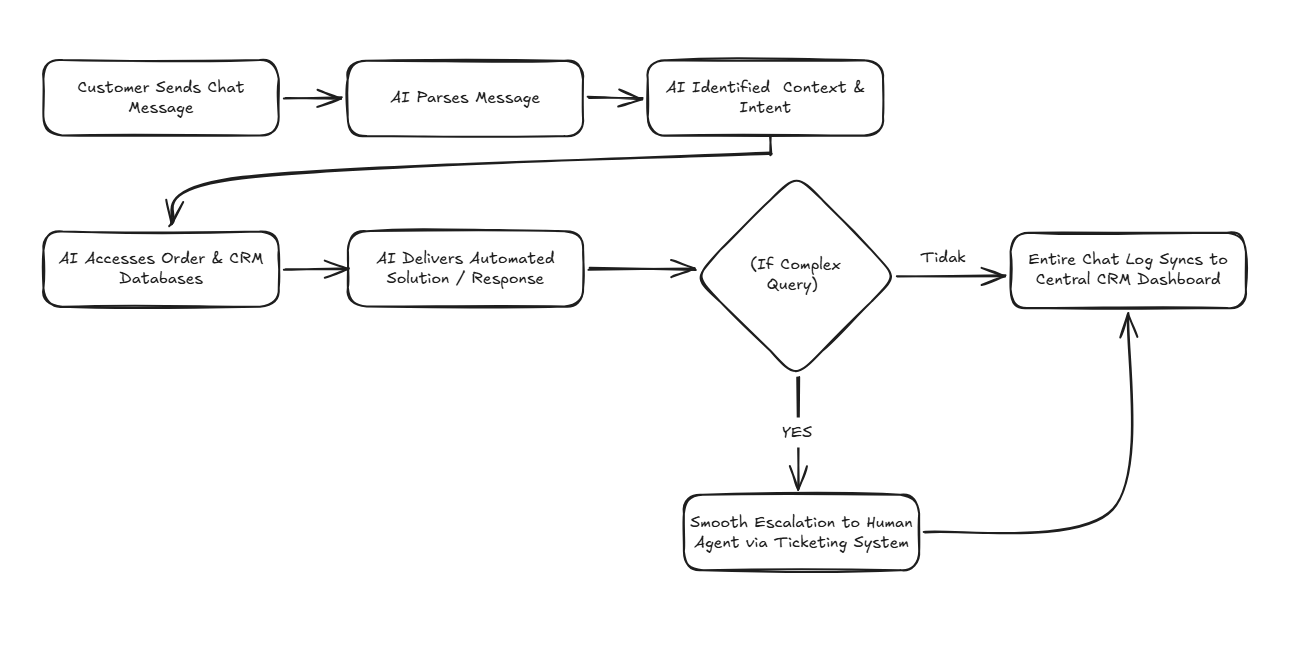
    Here is how automated AI customer support functions in practice:

    english flow

    E-Commerce Platform Integrations

    Flexible API architectures enable AI integration across modern sales ecosystems:

    • Marketplace Integrations (Shopee & Tokopedia): Synchronize buyer chats, answer stock queries instantly, and dispatch status updates.
    • Web Store Platforms (Shopify & WooCommerce): Connect web catalogs, recommend products, and run automated cart recovery sequences. Explore our complete guide on AI agents for online stores from orders to after-sales.
    • WhatsApp Commerce Channels: Manage chat-based commerce dispatches using official wa blast solutions.

    Automate Your Online Store Operations with Cekat.ai

    In competitive e-commerce markets, response speed and support consistency dictate brand success. Businesses relying on manual workflows face strict operational scaling ceilings as transaction volumes rise.

    Deploying AI customer service for e-commerce empowers your business to handle higher transaction volumes effortlessly. Beyond cost savings, automation stabilizes support SLAs across all growth phases.

    The Cekat.ai platform helps e-commerce enterprises automate customer service from first touchpoint to post-sales support. From order tracking to returns and recommendations, streamline operations without inflating team costs.

    Scale your online store operations today with Cekat.ai.


    Frequently Asked Questions (FAQ)

    1. Can AI customer service replace human support agents completely?

    No. AI is designed to resolve 70-80% of routine queries (like tracking and stock checks). Complex complaints or custom negotiations escalate seamlessly to human agents.

    2. Is AI customer service suitable for small online stores?

    Yes. Even small stores benefit immediately from automated tracking and stock answers, saving hours of manual daily repetitive typing.

    3. Can AI handle product return workflows automatically?

    Yes. AI collects return reasons, requests required media proof, and issues return shipping instructions based on your store’s predefined SOPs.

    4. How long does it take to integrate Cekat.ai with an online store?

    Integration and Knowledge Base training are straightforward, allowing your online store to go live with AI support within days without complex coding.


  • Difference between WhatsApp API and Regular WhatsApp

    Difference between WhatsApp API and Regular WhatsApp

    Executive Summary & Value Proposition

    • Programmatic Communication Infrastructure: Connects directly with backend systems, CRMs, and artificial intelligence (AI) without requiring manual smartphone input.
    • Enterprise-Scale Automation: Capable of managing thousands of concurrent conversations, OTP dispatches, transactional notifications, and instant lead qualification.
    • Official & Ban-Safe: Complies with Meta standards featuring official business verification (Green Tick) and secure opt-in mechanisms.
    • Conversation-Based Cost Model: Implements Meta’s Conversation-Based Pricing system based on message categories (Marketing, Utility, Authentication, Service).

    The WhatsApp API is an official application programming interface provided by Meta that enables business systems to connect directly with the WhatsApp ecosystem programmatically. Unlike the standard WhatsApp application used by individuals for manual chat, the WhatsApp API is engineered specifically for applications, backend systems, and automation—not for personal use on a mobile device.

    With the WhatsApp API, enterprises can send and receive messages automatically, measurably, and in full compliance with Meta policies via internal systems like CRMs, ERPs, e-commerce backends, or AI Agents. This is why this infrastructure is frequently referred to as the WhatsApp Business API, WhatsApp Cloud API, or Official WA API.

    Standard WhatsApp vs. WhatsApp API: Fundamental Differences

    A common misconception is treating the WhatsApp API as an “expensive version of WhatsApp” or an “upgraded WhatsApp Business App.” This assumption is architecturally incorrect.

    Evaluation Aspect WhatsApp App (Standard / Business App) WhatsApp Business API (System-to-User)
    Primary Interface Smartphone / Web Browser (Manual) Server, CRM System, Omnichannel Dashboard
    Capacity & Agent Limit Highly limited, prone to staff bottlenecks Unlimited multi-agent access, thousands of concurrent chats
    Integration Access No programmatic system integration Connects directly to CRM, OMS, ERP, & AI
    Automation Power Limited to basic greeting/away auto-replies Full automation: AI Agents, Workflows, & API Triggers
    Verification Status Standard business profile Eligible for Verified Badge (Official Green Tick)

    Why Do Businesses Need the WhatsApp API?

    As a business scales, managing operations via manual mobile applications exposes severe operational bottlenecks:

    • Support teams get overwhelmed by incoming chat spikes.
    • Customer inquiries risk being missed or delayed in response.
    • Lack of a centralized customer database or conversation history.
    • Absence of service performance metrics and team analytics.
    • Manual follow-ups and payment reminders must be remembered individually.

    The WhatsApp Business API solution directly resolves these operational hurdles in an official, scalable manner that protects numbers from suspension risks.

    Enterprise-Level WhatsApp API Use Cases

    The WhatsApp API was built to drive end-to-end business operations efficiently:

    1. Automated 24/7 Customer Support

    Routine FAQs are resolved automatically by an agentic AI, support tickets are generated automatically, and human escalations are routed via an omnichannel application only when human intervention is necessary.

    2. Transactional Notifications & Utility Messages

    Automate order status updates, payment confirmations, invoice due date reminders, and account verification One-Time Passwords (OTPs).

    3. Sales & Lead Qualification

    Trigger automated follow-ups based on website actions, qualify prospective buyers based on conversational intent, and distribute hot leads to sales representatives in real-time.

    4. Data Synchronization & System Integration

    All conversation histories and customer profiles synchronize automatically into your CRM application, granting management full visibility over the sales pipeline.

    Technical Rules & WhatsApp API Constraints

    To protect platform users from spam, Meta enforces strict operational mechanics across the WhatsApp API:

    • No Built-in Native Chat UI: There is no standard consumer app interface; chat interactions must be managed through third-party platform dashboards.
    • Message Template Rules: The initial outbound message sent to a customer must utilize a Meta-approved message template.
    • 24-Hour Customer Service Window: Businesses can send free-form session messages within a 24-hour window from the user’s last inbound message.
    • Conversation-Based Pricing Model: Meta charges per 24-hour conversation session based on category (Marketing, Utility, Authentication, and Service).

    WhatsApp Cloud API vs. On-Premise API

    Meta provides two primary infrastructure deployment architectures:

    • WhatsApp Cloud API: Hosted directly on Meta’s global cloud servers. Faster to set up, highly stable, and the standard choice for most modern enterprises.
    • On-Premise API: Hosted via local Business Solution Provider (BSP) servers. Typically used by legacy financial institutions with strict physical data sovereignty regulations.

    Transforming WhatsApp into a Business Growth Engine

    Simply having WhatsApp API access is insufficient if operational workflows inside remain unautomated. This is where Cekat.ai serves as your end-to-end platform provider.

    With Cekat.ai, connect your WhatsApp API with intelligent AI Agents, configure workflow automations, and consolidate all communication channels into a unified dashboard. Manage customer communications securely, scalably, and efficiently with Cekat.ai.


    Frequently Asked Questions (FAQ)

    What is the WhatsApp API?

    The WhatsApp API is Meta’s official programming interface that connects business systems and applications directly to WhatsApp to automate high-volume message delivery and reception.

    What is the difference between standard WhatsApp Business and WhatsApp API?

    Standard WhatsApp Business runs on a smartphone app for manual 1-on-1 chats. The WhatsApp API is app-less system infrastructure integrated into CRMs, AI Agents, or omnichannel dashboards for automated large-scale messaging.

    Can a business phone number using the WhatsApp API get banned?

    The risk of account bans is extremely low provided the business complies with Meta policies, uses approved templates for outbound messaging, and targets opted-in contacts.

    How do I get official WhatsApp Business API access?

    Enterprises can activate official WhatsApp Business API access through solution provider partners like Cekat.ai, who assist with Meta Business Manager verification and ready-to-use software integration.


  • Optimizing CRM Functionality in Clinics and Salons with Automation Technology

    Optimizing CRM Functionality in Clinics and Salons with Automation Technology

    Executive Summary & Value Proposition

    • Passive to Proactive CRM Transformation: Upgrades legacy CRMs from static record archives into proactive AI automation engines that drive repeat appointments.
    • Automated Booking & Follow-Up Workflow: Eliminates no-show risks through automated WhatsApp appointment reminders and post-treatment check-ins.
    • Centralized Multi-Channel Support: Consolidates customer chats across WhatsApp, Instagram, and Live Chat into a single omnichannel application.
    • Operational Efficiency Boost by 30%: Reduces administrative workload for clinic and salon staff using intelligent AI Agent integrations.

    In recent years, the health and beauty industry—encompassing skincare clinics, aesthetic centers, and beauty salons—has experienced rapid growth. This expansion brings heightened client expectations for services that are not only professional, but also personalized, prompt, and responsive. A core pillar in delivering exceptional service is an effective Customer Relationship Management (CRM) system. However, in practice, many business owners still rely on traditional CRMs with limited feature sets, failing to fully leverage their operational potential.

    As technology evolves, artificial intelligence solutions like Cekat.ai offer a comprehensive transformation of how CRMs should function in the digital era. By deploying AI-driven automation within an advanced CRM application, clinics and salons can manage client relationships smarter, elevate customer satisfaction, reduce administrative drag, and drive sustainable revenue growth. This article explores in detail how Cekat.ai enhances traditional CRM functionality in clinics and salons, proving why this technology is a vital strategic investment for your health & beauty enterprise.

    Common Challenges Faced by Traditional CRM Users in Clinics and Salons

    Conventional CRM systems assist in logging client information, but in most scenarios, they function merely as passive documentation archives without real-time operational integration. Core challenges frequently encountered include:

    • Lack of Personalization in Communications: Most legacy CRM software only stores basic contact fields (names, phone numbers, and treatment histories) without utilizing this data for tailored interactions. Consequently, client outreach feels rigid and impersonal.
    • Absence of Automated Reminders and Follow-Ups: Many clinics and salons still rely on manual outreach for booking reminders. This drains staff hours and introduces human error risks, leading to missed appointments and delayed post-care outreach.
    • Minimal Data Analytics and Customer Insights: Traditional CRMs display static data without predictive analytics tools that help owners identify client trends, treatment preferences, or re-booking patterns necessary for strategic decision-making.
    • Inability to Deliver Omnichannel Experiences: Modern consumers engage across WhatsApp, Instagram, Facebook Messenger, and Web Chat. Legacy CRMs struggle to consolidate these touchpoints into a unified inbox, hindering consistent, rapid responses.

    Ignoring these operational hurdles leads to lead leaks and lost revenue opportunities. Learn more about core strategies in our guide on optimizing CRM functions in clinics and salons to maintain long-term competitive advantage.

    How Cekat.ai Enhances Traditional CRM Functionality in Clinics/Salons

    Cekat.ai delivers an intelligent technological solution that acts not just as a standard CRM, but as an automated virtual assistant managing complex operational workflows across the beauty & wellness industry. Key features and business benefits include:

    1. Automated Appointment Reminders and Post-Care Follow-Ups

    Cekat.ai automates appointment lifecycle workflows from pre-visit reminders to attendance confirmations and post-care instructions via workflow automation. Integrating directly with WhatsApp, the platform dispatches real-time reminders without requiring manual staff drafting. Furthermore, Cekat.ai identifies overdue clients and automatically triggers re-booking promotional offers, significantly reducing ‘no-show’ rates while driving repeat visits.

    2. AI-Powered Communication Personalization

    Leveraging advanced AI processing, Cekat.ai dynamically analyzes client data to deliver contextual messaging. For instance, clients receiving routine hair treatments receive timely reminders for their next scheduled session. Similarly, facial treatment clients receive notifications regarding new skincare packages or loyalty rewards, cultivating emotional loyalty through hyper-relevant communications.

    3. Seamless Omnichannel Integration

    A primary strength of Cekat.ai is unifying fragmented communication channels inside a single omnichannel application. Interactions across WhatsApp, Instagram, Facebook, and Web Chat are managed centrally, ensuring swift response SLAs while eliminating the need for staff to toggle between separate messaging apps.

    4. Automated Customer Data Management & Deep Analytics

    Beyond data storage, Cekat.ai analyzes key performance metrics via its customer data management module. Clinic owners gain actionable insights on high-demand treatments, peak visit times, and booking behavior patterns. These automated reports allow management to structure high-ROI marketing promotions and optimize re-engagement campaigns effectively.

    5. Substantial Operational Cost Efficiency

    Cekat.ai automates repetitive administrative tasks, reducing staff workload by over 30%. Staf can redirect their focus toward delivering premium in-person client care while clinic operations remain lean and scalable. For deeper operational insights, explore our specialized guide on beauty clinic operational efficiency.

    Why Clinic and Salon Businesses Must Adopt AI Automation Today

    Digital transformation is no longer optional for clinic and salon operators. In a highly competitive market, response speed and service personalization determine market leadership. Implementing Cekat.ai positioning your enterprise ahead of competitors still tied to manual processes.

    Beyond cost reduction, AI automation unlocks recurring revenue opportunities through higher appointment frequencies, optimized marketing campaigns, and elevated customer retention. In today’s digital-first market, Cekat.ai serves as an essential engine for sustainable enterprise growth.

    Effective client management forms the bedrock of a prosperous clinic or salon. However, legacy CRMs functioning purely as data archives can no longer satisfy dynamic consumer demands. Through AI-driven automation, Cekat.ai upgrades traditional CRM functions into a modern, proactive growth ecosystem. From communication automation and booking reminders to behavioral analytics, Cekat.ai accelerates health & beauty business success.

    Empower your business with AI technology that simplifies daily operations while dramatically elevating the end-to-end customer experience.

    Upgrade your clinic and salon performance today with Cekat.ai. Discover how smart automation tools drive client loyalty, lower operational overhead, and scale revenue.


    Frequently Asked Questions (FAQ)

    1. Can Cekat.ai integrate with our existing clinic management and booking software?

    Yes. Cekat.ai supports flexible integrations via Open APIs and Webhooks, allowing seamless data synchronization with legacy clinic management tools, POS platforms, and booking databases.

    2. How does Cekat.ai reduce appointment no-show rates for salons?

    Cekat.ai dispatches automated 24-hour and same-day WhatsApp reminders complete with interactive reply buttons, allowing clients to confirm or reschedule appointments effortlessly.

    3. Can Cekat.ai AI Agents handle specific client questions regarding treatment prices and pre-care?

    Absolutely. Cekat.ai AI Agents are trained on your specific clinic Knowledge Base, enabling them to answer inquiries about treatment menus, pricing, location details, and pre-visit guidelines 24/7.

    4. How long does it take to deploy Cekat.ai in a beauty clinic or salon?

    Onboarding is straightforward; workflows and AI configurations can be deployed within days without requiring complex IT infrastructure overhauls.