Category: Finance

  • The Complete Guide to AI Agent Implementation: From Preparation to Go-Live

    The Complete Guide to AI Agent Implementation: From Preparation to Go-Live

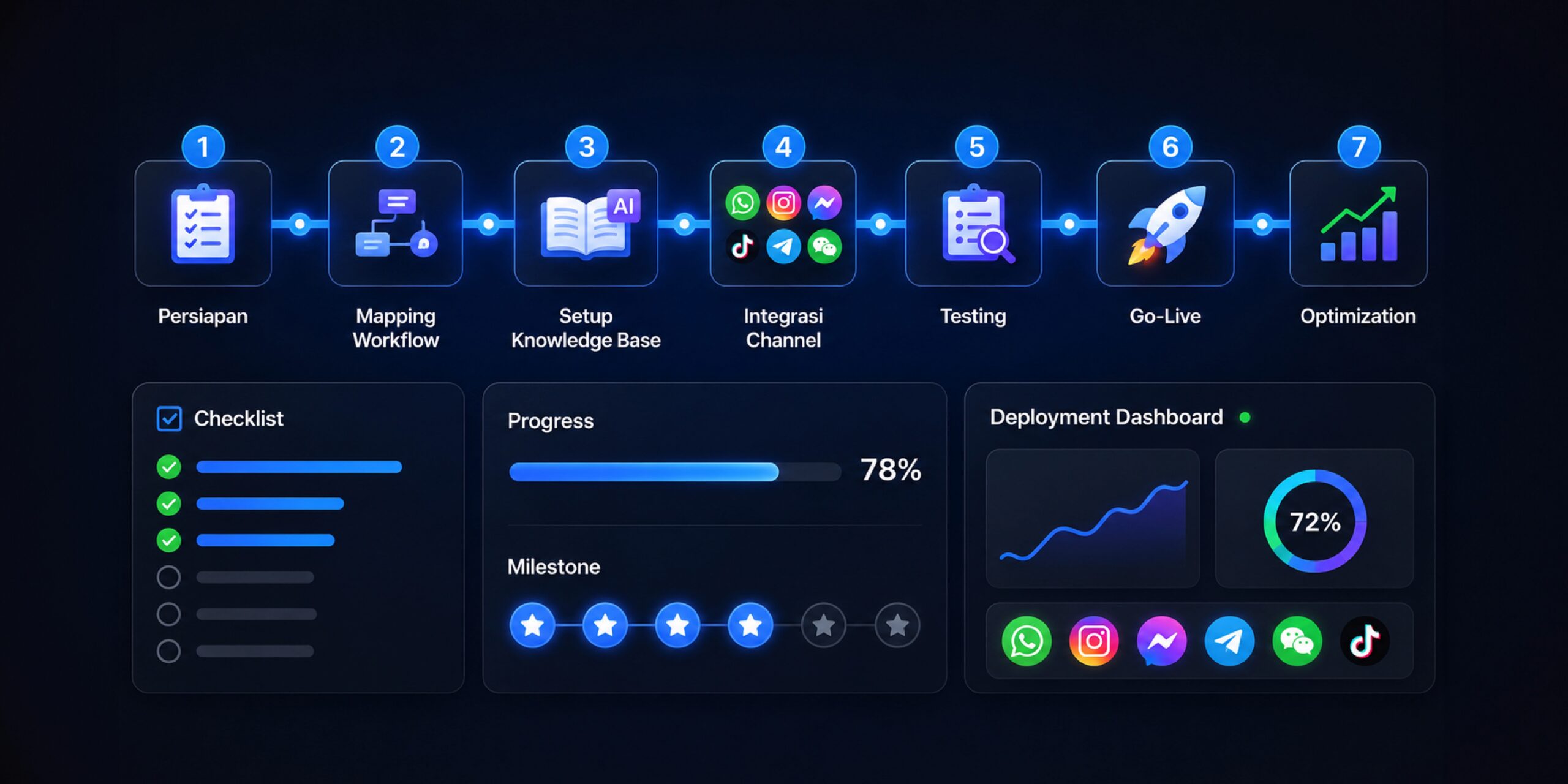
    Many businesses are becoming interested in using an AI agent because they want to respond to customers faster, reduce manual work, and make operational processes run more efficiently. However, AI agent implementation can’t just be understood as “install the tools and it runs.” For the results to genuinely impact the business, a company needs to understand the implementation process in stages, from mapping needs, choosing a platform, preparing data, training, testing performance, to making sure the AI agent is truly ready for real daily operations.

    At Cekat.AI, we believe successful AI agent implementation always starts with the right question: which business process is most repetitive, eats up the most team time, and has the biggest effect on customer experience and revenue. From there, a business can determine which area is most worth automating first. That’s why we put together this step-by-step business AI agent implementation guide — to help operations managers, IT teams, and business owners understand the stages that need to be prepared before an AI agent truly goes live.

    A good AI agent doesn’t just answer customer questions. Beyond that, an AI agent needs to be able to understand conversation context, help run workflows, log important data into a CRM, carry out follow-up, recommend the next step, and help the team make decisions faster. That means AI agent implementation needs to connect with the business’s systems, processes, and goals. Without a clear foundation, an AI agent risks becoming just an extra chatbot that answers some questions but doesn’t really help operations grow more efficiently.

    Why Businesses Need to Prepare AI Agent Implementation Seriously

    Before installing an AI agent, a business needs to understand that every customer conversation carries important information. Within a chat, there are needs, complaints, hesitations, purchase intent, price questions, schedule requests, and even signals of a prospect ready to convert. If all those conversations are still managed manually, a lot of opportunity can be missed because of delayed responses, inconsistent follow-up, unrecorded customer data, or a team struggling to read the status of every inquiry.

    This is where an AI agent becomes very relevant. An AI agent helps a business reduce repetitive workload, speed up response, maintain service consistency, and make the customer process more structured. However, these benefits can only be felt if the implementation is done with the right strategy. A business needs to know which flow it wants to improve, what data will be used, which channels will be connected, who will monitor performance, and what metrics will be used to assess success.

    For operations managers, AI agent implementation can help lower daily work bottlenecks. For IT teams, this implementation needs to be secure, integrated, and scalable. For business owners, an AI agent needs to deliver a more concrete impact: faster response, better customer experience, higher conversion rate, and more efficient operational processes. That’s why AI agent implementation should be seen as a process transformation project, not just a software installation.

    Phase 1: Audit the Business Processes That Can Be Automated

    The first stage in AI agent implementation is conducting a business process audit. In this phase, a business needs to map out which activities are still manual, repetitive, and often slow down service speed. Usually, the easiest areas to identify are customer service processes, lead qualification, prospect follow-up, customer data collection, payment reminders, order status updates, schedule booking, and product or service FAQs.

    This audit matters because not every process needs to be automated right away. An implementation that’s too broad without prioritization often makes the process complex and hard to control. Instead, a business should start from the area with the biggest impact and the most manageable risk. For example, if the customer service team is often overwhelmed answering repeated questions about price, schedule, stock, location, payment method, or order status, an AI agent can start by handling those basic questions first. Once that flow is stable, the business can move on to more complex processes such as product recommendations, customer segmentation, automatic follow-up, or CRM integration.

    During the audit phase, Cekat.AI typically helps a business look at the conversation flow from start to finish. We don’t just look at the number of incoming chats — we also understand where customers come from, which questions come up most often, where customers typically drop off, and which process eats up the most team time. From this audit, a business can determine its main AI agent use case more objectively. An AI agent isn’t installed just because the technology is trending, but because there’s a real process that can be improved.

    The audit phase is also an important moment for aligning expectations across the operations, IT, sales, marketing, and management teams. An AI agent shouldn’t be just one department’s initiative. If the AI agent will be used to handle customers, its flow needs to match operational needs. If it will connect to a CRM, its data structure needs to be understood by the sales and marketing teams. If it will access internal systems, the IT team needs to make sure integration and security work properly.

    Phase 2: Choose an AI Agent Platform and Do the Initial Setup

    Once the business processes to be automated are clear, the next step is choosing the right AI agent platform. At this stage, a business needs to make sure the chosen platform can not only answer chats, but also support broader operational needs. The ideal AI agent platform needs to be able to understand customer language naturally, build workflow automation, connect with a CRM, support multi-channel communication, and provide an analytics dashboard for monitoring performance.

    For businesses just starting out, ease of setup is an important factor. AI agent implementation shouldn’t require an overly long technical process just to run a basic use case. At Cekat.AI, we design the onboarding process so a business can get started faster with a clear implementation structure. The team doesn’t need to build everything from scratch because Cekat.AI already provides a platform that supports an omnichannel inbox, AI agent, CRM, automation, and monitoring in one ecosystem.

    Initial setup usually includes connecting communication channels, adjusting the business profile, building the main conversation flow, configuring team roles, setting up customer tagging, and defining the initial workflow. If a business uses WhatsApp, Instagram, live chat, or other channels, all of those channels need to be mapped so customer conversations can be managed more centrally. The goal isn’t just for the AI agent to be able to answer customers, but also for every interaction to flow into a system that can be monitored.

    During the setup stage, a business also needs to define the boundaries of the AI agent’s role. An AI agent doesn’t have to replace all human work. In many cases, the best approach is to clearly divide roles between AI and the human team. An AI agent can handle repeated questions, gather initial information, help screen needs, give a fast response, and run automatic follow-up. Meanwhile, the human team still handles conversations that require negotiation, deeper empathy, special decisions, or internal approval. This role division makes the implementation safer, more realistic, and easier for the team to accept.

    Phase 3: Train the AI Agent to Understand Business Context

    Once the platform is ready, the next phase is training. At this stage, the AI agent needs to be given enough information to understand the product, service, workflow, business policy, brand communication style, and customer context. Good training makes an AI agent not just fast to answer, but also relevant, consistent, and aligned with business needs.

    Training material can come from FAQs, product catalogs, customer service scripts, internal SOPs, pricing policy, promo information, payment flow, booking guides, terms of service, and even past conversation examples. The tidier and clearer the information source provided, the better the quality of the AI agent’s responses. However, a business doesn’t need to wait for all the data to be perfect before starting. Implementation can be done gradually, starting from the information customers ask about most often.

    At Cekat.AI, the AI agent training process is directed to match the business’s specific usage context. For example, an AI agent for a beauty clinic needs to understand the consultation flow, treatments, booking, and after-treatment follow-up. An AI agent for retail needs to understand stock, product recommendations, shipping, and purchase questions. An AI agent for B2B needs to understand lead qualification, company needs, pain points, and meeting scheduling. With this approach, the AI agent doesn’t work generically — it follows the business’s specific operational needs.

    Besides the content of the answers, communication tone also needs to be trained. Every brand has a different language style. Some brands want to sound formal and professional, some want to be friendly and conversational, and some want to be premium, concise, and efficient. The AI agent needs to be able to follow the brand’s communication character so the customer experience stays consistent. That’s why AI agent training isn’t just about filling in a knowledge base, it’s also about shaping how the AI interacts with customers.

    Phase 4: Test the AI Agent Before Go-Live

    Before an AI agent is used directly by customers, a business needs to run testing. This stage is very important because the AI agent will interact with real customers while carrying the brand’s name. Testing helps a business make sure the AI agent understands questions correctly, gives appropriate answers, follows the defined flow, and can hand the conversation off to a human team when needed.

    Testing should be done using realistic conversation scenarios. The team can test various types of questions, from simple questions, repeated questions, ambiguous questions, complaints, special requests, to conversations that require escalation. From each scenario, the team needs to see whether the AI agent gives an accurate answer, whether the flow is too long, whether the response feels too rigid, and whether the customer can be guided to the next step clearly.

    In AI agent implementation, testing isn’t just an IT team task. The operations, sales, customer service, and marketing teams also need to be involved because they’re the ones who best understand everyday customer behavior. The IT team can make sure integration, security, and system stability are in order. The operations team can assess whether the flow matches the SOP. The sales team can assess whether the qualification process is actually helping. The marketing team can make sure the messaging stays aligned with brand positioning.

    Cekat.AI helps businesses run the testing phase in a more directed way through a use-case-focused approach. That means testing isn’t done randomly, but based on the priority flow already defined during the audit phase. If the first use case is answering FAQs and collecting lead data, testing is focused on those two areas until they’re stable. After that, the business can expand coverage to other workflows such as automatic follow-up, segmented broadcasts, or further CRM integration.

    Phase 5: Go-Live with Clear Control

    After the AI agent has gone through training and testing, a business can move into the go-live stage. However, go-live shouldn’t be rushed. For a business just starting out, the safest way to go live is gradually. The AI agent can be activated first for a certain channel, certain hours, or certain types of questions. This approach helps the team monitor initial performance and make adjustments without disrupting the entire operation.

    During the go-live phase, a business needs to make sure the internal team understands how the AI agent works. The team needs to know when the AI will answer automatically, when the conversation gets handed off to a human, how to read customer status on the dashboard, how to tag conversations, and how to evaluate interaction results. Without good internal understanding, an AI agent can be treated as a system that runs on its own, when in reality its success still requires oversight and regular refinement.

    Cekat.AI positions go-live not as the end of implementation, but as the start of the optimization process. Once the AI agent starts being used by real customers, the business will get much richer data. From this data, the team can see the questions that come up most often, the flow that generates the most conversions, the conversation points where customers most often drop off, and the types of inquiries that still need to be handled by humans. This data becomes the basis for improving the AI agent’s performance over time.

    Good go-live still needs to maintain a balance between automation and human control. An AI agent helps speed up the process, but a business still needs to make sure the customer experience doesn’t feel rigid or lose the human touch. That’s why the escalation feature to a human team matters. An AI agent needs to know when to answer, when to ask further questions, and when to hand the conversation off to an admin, sales, or customer service.

    Phase 6: Monitor AI Agent Performance After It’s Running

    After go-live, the next stage is monitoring. Many businesses stop too soon after activating the AI agent, when in fact its performance needs to be evaluated regularly. Monitoring helps a business understand whether the AI agent is genuinely speeding up response, reducing the team’s workload, improving follow-up quality, and helping customers move toward a decision faster.

    Metrics to watch can include response time, resolution rate, the number of conversations successfully handled by AI, the number of conversations that needed to be escalated to a human, the conversion rate from inquiry to order or booking, the quality of customer data flowing into the CRM, and the effectiveness of automatic follow-up. For the operations team, these metrics help see work efficiency. For the IT team, these metrics help monitor system stability and effectiveness. For management, these metrics help connect the AI agent to a more concrete business impact.

    At Cekat.AI, the analytics dashboard is an important part of implementation because it’s not enough for a business to just know the AI agent is active. A business needs to know how the AI agent is performing, what the results are, and which parts need improvement. With a clear dashboard, the team can make data-driven decisions rather than relying on assumptions. For example, if many conversations stop after a customer asks about price, the business can improve the offer script, add a promo, or build a more relevant follow-up flow.

    Monitoring also helps a business maintain AI agent quality in the long run. Over time, products change, promos rotate, SOPs get updated, and customer behavior evolves. The AI agent needs to be updated to keep up with those changes. If the knowledge base isn’t updated, the AI agent can end up giving outdated information. That’s why monitoring needs to become an operational routine, not a one-time activity.

    A Realistic Timeline for Business AI Agent Implementation

    The timeline for AI agent implementation depends heavily on business complexity, number of channels, data readiness, integration needs, and how many use cases are being run. For a business just starting out with basic use cases like FAQs, lead qualification, and simple follow-up, implementation can move relatively fast. With a platform like Cekat.AI that has a structured onboarding process, a business can get started more efficiently because the foundation of omnichannel, CRM, AI agent, automation, and dashboard is already available in one platform.

    Realistically, the audit and planning phase can usually be done within a few working days, especially if the business already has a clear picture of its customer service flow. Platform setup and initial configuration can proceed once the channels, roles, and main workflow are defined. AI agent training can happen in parallel with gathering the knowledge base and conversation examples. Testing usually needs extra time to make sure the AI agent is ready for real customer scenarios. After that, go-live can happen gradually with daily monitoring during the early period.

    For businesses with more complex needs, such as deeper CRM integration, multi-channel support, advanced customer segmentation, approval workflows, or specific compliance needs, the implementation timeline can be longer. But the principle stays the same: start from the highest-impact use case, make sure the flow is stable, then expand coverage gradually. Good AI agent implementation doesn’t have to be big from day one. What matters most is that the business can see early results, learn from the data, and develop the system in a measurable way.

    Internal Preparation Before Installing an AI Agent

    Before actually installing an AI agent, a business needs to prepare several internal foundations. First, the business needs a clear understanding of the implementation’s purpose. Is the AI agent being installed to speed up response time, reduce admin workload, increase conversion rate, tidy up customer data, or help with automatic follow-up? This purpose will determine how the AI agent is configured and what metrics are used to measure its success.

    Second, a business needs to prepare the information the AI agent will use. This information doesn’t have to be perfect from the start, but it needs to be clear enough to answer the most common customer needs. FAQs, product details, service flow, pricing, promos, payment policy, shipping, refunds, schedules, and escalation contacts are examples of information usually needed. The tidier the information provided, the easier it is for the AI agent to give consistent responses.

    Third, a business needs to designate an internal owner. AI agent implementation will run more effectively if there’s a party responsible for overseeing the process. This owner can come from operations, customer service, sales, marketing, or IT, depending on the implementation’s main goal. Without a clear owner, knowledge base updates, performance evaluation, and workflow improvements often get delayed.

    Fourth, a business needs to prepare the team’s mindset. An AI agent isn’t a threat meant to replace the human team, it’s a system that helps the team work faster and focus on more valuable work. Admins no longer need to repeat the same answer hundreds of times. Sales can focus more on already-qualified prospects. The operations team can monitor the flow more neatly. Management can see the data more clearly. With the right internal communication, AI agent adoption will go much more smoothly.

    Common Mistakes During AI Agent Implementation

    One of the biggest mistakes in AI agent implementation is starting without a clear purpose. A business wants to use AI because the technology is trending, but doesn’t yet know which process it wants to improve. As a result, the AI agent only ends up answering simple questions without a clear contribution to efficiency or revenue. Implementations like this are usually hard to evaluate because there’s no agreed-upon baseline and metrics from the start.

    Another mistake is automating too many processes at once right away. An AI agent really can help with a lot of things, but a business just starting out shouldn’t try to fold every workflow into one implementation phase. The more flows that get automated all at once, the greater the risk of miscommunication, messy data, and a process that’s hard to control. A healthier approach is to start with one or two main use cases, then expand once the results are stable.

    Another mistake is not testing seriously. An AI agent needs to be tested with real questions, not just ideal ones. Customers often ask in messy language, with abbreviations, typos, or incomplete context. If the AI agent is only tested in overly clean scenarios, the business won’t know how it performs when facing real conversations. Strong testing helps reduce the risk of inaccurate answers at go-live.

    Finally, many businesses don’t do monitoring after the AI agent is active. Yet a good AI agent needs to be continuously optimized. Conversation data needs to be analyzed, the knowledge base needs to be updated, and the workflow needs to be adjusted to match customer behavior. Without monitoring, an AI agent can stagnate and fail to evolve with business needs.

    How Cekat.AI Helps AI Agent Implementation Go Faster and Stay on Track

    Cekat.AI is here to help businesses implement an AI agent through a process that’s faster, more structured, and relevant to operational needs. We understand that a business doesn’t just need AI technology — it also needs a system that can connect customer conversations with a CRM, automation, follow-up, and performance data. That’s why Cekat.AI doesn’t stand as a separate chatbot, but as an AI-powered customer engagement and revenue platform that helps a business manage customer interactions from start to finish.

    With Cekat.AI, a business can unify conversations from various channels, activate the AI agent to help with response and qualification, log customer data into a CRM, run workflow automation, and monitor performance through a dashboard. This approach means AI agent implementation doesn’t stop at the conversation level, but moves further toward operational efficiency and revenue growth.

    Cekat.AI’s advantage also lies in its fast onboarding process, supported by a team that understands business needs. We help businesses map out use cases, prepare flows, do the setup, support the training process, help with testing, and make sure the business is ready to move into the go-live phase. With a directed process, a company doesn’t need to spend too much time just getting the initial implementation started.

    For operations managers, Cekat.AI helps make customer handling more consistent and easier to monitor. For IT teams, Cekat.AI provides a platform that’s more ready to be integrated and managed. For business owners, Cekat.AI helps make every customer conversation more measurable, more actionable, and closer to revenue.

    Successful AI Agent Implementation Starts with the Right Steps

    An AI agent can become an important asset for a modern business, but the results depend heavily on how it’s implemented. A business needs to start with a process audit, choose the right platform, do a setup that fits its needs, train the AI agent with business context, run realistic testing, go live gradually, and monitor performance consistently. With this approach, an AI agent doesn’t just become an add-on technology, it becomes part of an operational system that helps a business work faster, tidier, and more efficiently.

    This step-by-step business AI agent implementation guide shows that success isn’t determined by how sophisticated the technology is alone, but by how clearly a business understands the process it wants to improve. When an AI agent is applied to the right flow, backed by sufficient data, and monitored regularly, a business can reduce manual work, speed up customer response, improve follow-up quality, and open up revenue opportunities that used to slip through often.

    If your business is getting ready to use an AI agent, Cekat.AI can help with the implementation process from preparation to go-live. From needs audit, platform setup, AI agent training, testing, to performance monitoring, the Cekat.AI team is ready to support you so implementation runs faster, stays on track, and has a bigger impact on your business.

    Start your implementation with the help of the Cekat.AI team and build a customer engagement system that’s faster, automated, and ready to support your business’s revenue growth.

  • AI Agent for F&B Businesses: Automating Orders, Reservations, and Customer Feedback

    AI Agent for F&B Businesses: Automating Orders, Reservations, and Customer Feedback

    In the F&B business, being busy isn’t enough. Restaurants, cafes, cloud kitchens, bakeries, catering businesses, and beverage brands need a system that can maintain service speed, order accuracy, follow-up consistency, and a customer experience from start to finish. The challenge is, the more channels customers use to interact, the greater the operational risk that arises behind the scenes. Customers might ask about the menu via WhatsApp, reserve a table through Instagram, place a pre-order from a campaign link, ask about their order status via chat, then leave a complaint or review after the transaction is done. If all of this is still handled manually, the team is easily overwhelmed, orders can be recorded incorrectly, reservations can clash, and customer feedback often goes unaddressed for too long.

    This is where an AI agent for F&B businesses becomes increasingly relevant. Not just a chatbot that answers basic questions, an AI agent can help restaurants and food-and-beverage businesses manage customer conversations more actively, in a more structured way, and connected to operational processes. With an AI agent for F&B restaurant businesses that automates orders and reservations approach, Cekat.AI helps F&B businesses capture customer intent from the start, process their needs faster, and ensure every interaction doesn’t stop as just a chat, but moves toward an order, a reservation, a visit, a repeat purchase, and feedback that can be used to improve service quality.

    Why Do Restaurants and F&B Businesses Need an AI Agent?

    F&B businesses have operational characteristics very different from many other industries. Customer decisions often happen fast, response expectations are very high, and small mistakes can immediately affect the dining experience. When a customer asks about the menu, they’re usually already in a buy-ready state. When a customer wants to make a reservation, they want certainty about the time and place. When a customer asks about their order status, they’re waiting and can easily feel disappointed if they don’t get clear information. This means every conversation in an F&B business is a moment very close to revenue.

    The problem is, many restaurants and cafes still rely on manual processes to take orders, record order details, confirm payments, manage reservations, remind customers, and ask for reviews. During busy hours, admins or cashiers often have to reply to chats while also serving customers in person. At this point, the risk of misorders rises. Orders can be missing items, special customer notes can be overlooked, a booked table can get double-booked, or a customer complaint isn’t read until it’s too late. As chat volume increases, service capacity doesn’t always increase along with it.

    An AI agent helps reduce this bottleneck by taking over repetitive processes that require speed, precision, and consistency. For F&B businesses, the main value isn’t just “replying to chats automatically” — it’s helping ensure customers get a fast response, orders are recorded more neatly, reservations are better managed, order status is more transparent, and the customer relationship keeps going after the transaction is complete. With Cekat.AI, AI for restaurants can be designed according to each business’s operational needs, whether for dine-in restaurants, cafes, cloud kitchens, F&B franchises, or food brands that rely heavily on WhatsApp as a transaction channel.

    Automated Ordering via WhatsApp: From Menu Questions to Order Confirmation

    WhatsApp is still one of the most important channels for F&B businesses in Indonesia. Many customers are more comfortable asking about the menu, checking promos, placing orders, or making pre-orders via WhatsApp because it feels fast and personal. But for restaurants, a busy WhatsApp can become a major challenge if every message has to be answered one by one by an admin — especially when customers ask repetitive things, such as available menu items, package prices, operating hours, outlet location, minimum order, payment methods, or delivery estimates.

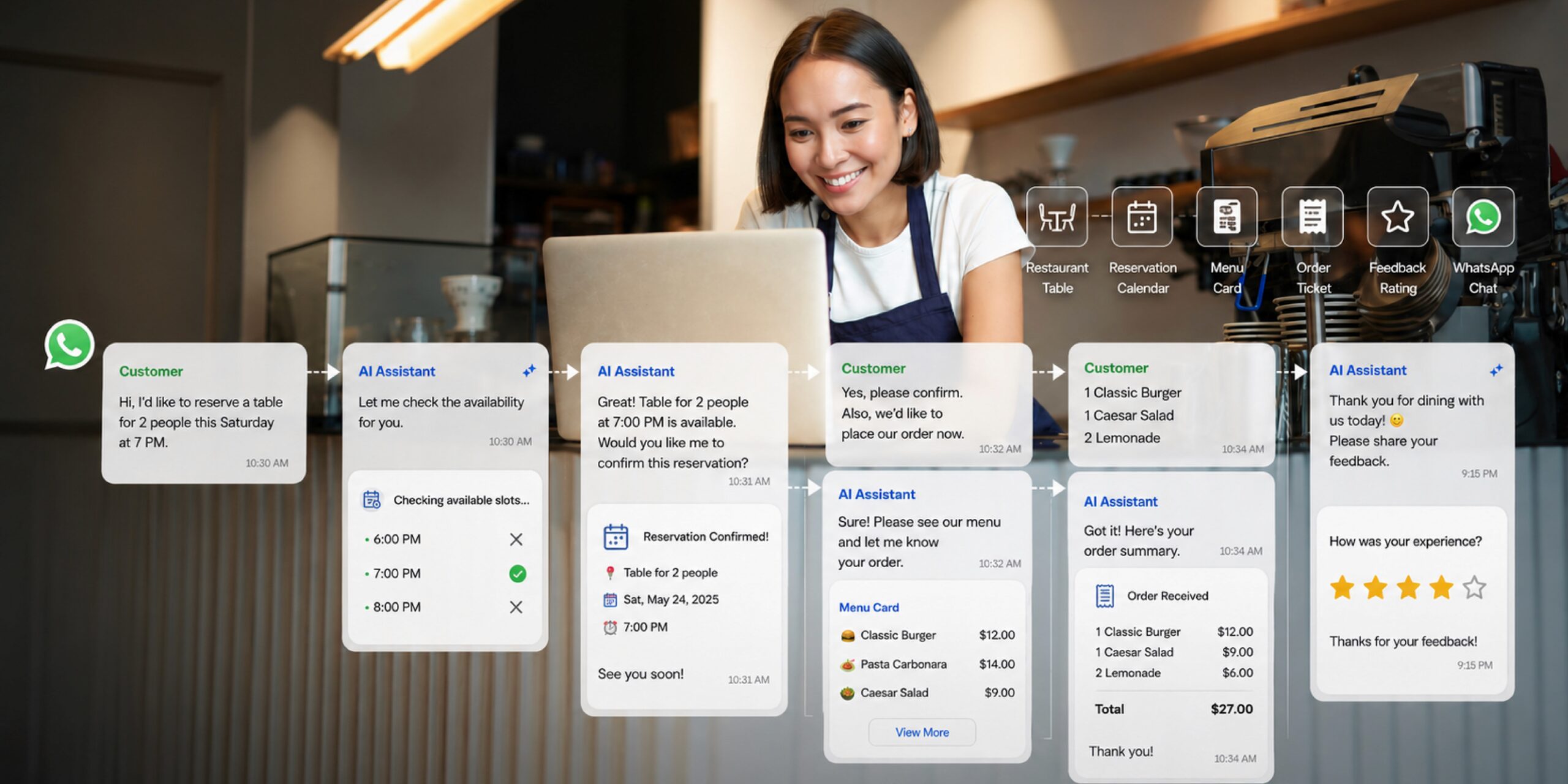
    With an AI-agent-based food ordering chatbot, this process can be made far more efficient. An AI agent can help customers choose menu items, explain product variants, provide availability information, record order quantities, capture special notes such as “not spicy,” “no onions,” or “sauce on the side,” and then guide the customer through the confirmation process. For F&B businesses, this matters a lot because many misorders happen not because the product is bad, but because the communication process wasn’t tidy. When order details are scattered across a long chat, admins can easily miss a customer’s instructions.

    Cekat.AI helps make the WhatsApp ordering process more structured. Customers still get a natural conversational experience, while the business gets order data that’s neater and easier to act on. The AI agent can be directed to collect key details before an order is processed, such as the customer’s name, destination outlet, order type, item quantity, pickup or delivery method, order time, and special notes. With a flow like this, the team no longer needs to re-read long chats just to confirm an order. They can focus on execution, quality control, and the customer experience.

    Automated F&B Reservations: Reducing Schedule Clashes and Lost Reservation Opportunities

    For dine-in restaurants, premium coffee shops, private dining, buffet restaurants, and F&B venues with limited table capacity, reservations are one of the most crucial points in the customer journey. Customers who want to make a reservation usually already have strong visit intent. If the response takes too long, they might switch to another restaurant. If the reservation isn’t recorded properly, the customer experience can be damaged even before they sit down at the table.

    Automated F&B reservations through an AI agent help restaurants keep the booking process faster and more controlled. The AI agent can ask about the visit date, arrival time, number of guests, area preferences, and special needs like a baby chair or private room, then provide confirmation based on availability. For restaurants that often receive reservations via WhatsApp or Instagram, this flow helps reduce the risk of missed messages, double bookings, or miscommunication between admins and the outlet team.

    Cekat.AI sees reservations not just as schedule recording, but as part of revenue capture. When a customer contacts a restaurant to book, the business needs to be able to provide certainty quickly. An AI agent can help confirm reservations, send reminders before arrival time, provide location information, remind customers of deposit rules if applicable, and even send follow-up if a customer hasn’t shown up or wants to change their schedule. With this process, restaurants can increase service capacity without significantly adding to admin workload.

    For F&B managers, the benefit isn’t just operational — it’s also about control. More structured reservation data helps the team understand visit patterns, busy hours, guest counts, customer preferences, and potential no-shows. From this data, restaurants can make better decisions for staffing, promotions, table management, and repeat-visit strategy.

    Order Status Notifications: Sparing Customers from Asking Repeatedly

    One of the biggest sources of friction in F&B businesses is unclear order status. Customers who have already paid want to know whether their order has been received, is being processed, is ready for pickup, is being delivered, or is complete. If there’s no update, they tend to send additional chats. On the internal side, these additional chats add to the admin’s workload, especially during busy hours. The more customers ask about order status, the less time the team has to handle new orders.

    An AI agent can help send order status notifications automatically and consistently. For F&B businesses serving takeaway, delivery, catering, pre-orders, hampers, or daily meal packages, these notifications become an important part of the customer experience. Customers feel more at ease because they get updates without having to ask. The business also looks more professional because the communication flow is clear from start to finish.

    Cekat.AI can help F&B businesses design a notification flow that fits their operational needs. For example, after a customer submits an order, the AI agent can confirm that the order has been received. While the order is being processed, the customer gets an update. When the order is ready for pickup or delivery, the customer receives relevant information again. If there’s a delay or a stock change, the AI agent can help communicate that quickly so customer expectations stay managed.

    In the food and beverage business, customer experience isn’t determined by taste alone, but also by certainty. Customers can more easily accept a queue or wait time if they receive clear communication. Conversely, a small delay can feel much bigger if the customer receives no information at all. That’s why automating notifications isn’t just a nice-to-have feature, but part of the effort to maintain trust.

    Automated Loyalty Programs: Turning One-Time Buyers into Repeat Customers

    Many F&B businesses focus too much on chasing new buyers, but don’t do enough to manage customers who have already purchased. Yet restaurant and cafe businesses rely heavily on repeat orders. Customers who have visited before, ordered before, or left a positive review have a greater chance of buying again if they’re reminded in the right way. The problem is, loyalty programs often don’t run consistently because they’re still managed manually.

    With an AI loyalty program, F&B businesses can maintain customer relationships in a more structured way. An AI agent can help send thank-you messages after a purchase, provide reminders for repeat orders, send birthday promos, activate vouchers for the next visit, or invite customers to try a new menu item based on their interaction history. For cafes, an AI agent can help encourage customers to come back on weekdays. For family restaurants, an AI agent can remind customers of weekend promos. For beverage brands, an AI agent can send bundle campaigns or seasonal menu promos to relevant customers.

    Cekat.AI helps F&B businesses build loyalty not just through discounts, but through more personal and timely communication. Customer data can be managed more neatly through a CRM, so businesses don’t treat every customer with the same message. New customers, loyal customers, customers who haven’t purchased in a while, and customers with high transaction value can all get different follow-up. This way, marketing becomes more relevant and the chance of repeat orders increases.

    Loyalty in an F&B business doesn’t always have to start with a large, complex program. Sometimes, the simplest things, like a follow-up after a visit, a reminder about a favorite menu promo, or a personal birthday message, are enough to make a brand feel closer to the customer. An AI agent helps ensure these activities happen automatically, not just when the team happens to have time.

    Collecting Reviews and Feedback: Turning Customer Comments into Business Insight

    Customer feedback is a valuable asset for F&B businesses, but it’s often not collected systematically. Many restaurants only find out about a problem after a customer has already written a negative review on Google Maps, social media, or a marketplace. Yet if feedback is collected earlier through the right channel, businesses can respond faster and prevent small issues from turning into reputation problems.

    An AI agent can help collect customer reviews and feedback after a transaction or visit is complete. After a customer eats at the restaurant, picks up an order, or receives a delivery, the AI agent can send a follow-up message asking about their experience. If the customer is satisfied, the AI agent can direct them to leave a public review. If the customer is dissatisfied, the AI agent can help capture the complaint and forward it to the relevant team for immediate follow-up.

    For Cekat.AI, feedback isn’t just a customer service activity — it’s a source of insight for business growth. From customer conversations, a restaurant can learn which menu items are most praised, which complaints come up most often, which outlets need attention, which operating hours cause the most friction, and why customers don’t complete their orders. When this data is collected within a system, F&B managers can make sharper decisions, not just ones based on assumptions.

    With an AI agent, feedback collection becomes more consistent. The team doesn’t need to remember one by one which customers need to be contacted. The system can help send follow-up at the right time, group customer responses, and flag conversations that need to be handled by a human. This helps businesses maintain service quality while also strengthening brand reputation.

    AI Agent Use Case for Dine-In Restaurants

    For dine-in restaurants, an AI agent plays an important role in managing reservations, menu questions, promo information, arrival reminders, and post-visit feedback. High-traffic restaurants often face major challenges in maintaining fast responses, especially during lunch, dinner, weekends, or promo periods. When the outlet team is focused on serving in-person customers, online customer chats often get delayed. Yet a delayed response can push a prospective customer toward a competitor.

    With Cekat.AI, dine-in restaurants can deliver a more stable reservation and communication experience. The AI agent can help answer common questions like operating hours, popular menu items, location, room capacity, smoking or non-smoking area options, and deposit rules. Once a reservation is made, customers can get an automatic reminder before their visit time. After the visit is complete, the system can send a feedback or review request. This flow helps the restaurant maintain the customer experience even before and after they arrive at the outlet.

    AI Agent Use Case for Cafes and Coffee Shops

    Cafes and coffee shops have a unique pattern of customer interaction. Many customers ask about seasonal menu items, bundle promos, seat availability, facilities like Wi-Fi or power outlets, and reservations for small meetings or community gatherings. For cafes active on Instagram, many inquiries come in via DM after customers see content about the menu, ambience, or an event. If the chat isn’t answered quickly, that customer interest can fade.

    An AI agent helps cafes respond to customers quickly without losing a personal touch. Customers can ask about recommended menu items, sharing packages, live music schedules, community events, or daily promos. The AI agent can also help direct customers toward a reservation, pre-order, or voucher purchase. For customers who’ve visited before, a loyalty program can be activated through new-menu reminders, weekday promos, or invitations to special events.

    With Cekat.AI, a cafe doesn’t just answer chats — it builds more consistent engagement. Every interaction can become data for understanding customer interests, encouraging repeat visits, and creating a more focused customer experience.

    AI Agent Use Case for Cloud Kitchens and Delivery-Based F&B

    Cloud kitchens and delivery-based F&B businesses rely heavily on speed, accuracy, and order updates. Since they don’t have a dine-in experience, communication quality becomes one of the main factors shaping customer perception. If a customer doesn’t get a clear order confirmation or delivery status, they can feel unsure even before the food arrives.

    An AI agent can help cloud kitchens take orders from WhatsApp, explain the menu, record the address, confirm payment, provide a time estimate, and send order status updates. This is very useful for businesses that receive a lot of direct orders outside a marketplace, such as daily catering, frozen food, meal plans, rice bowls, bakery pre-orders, or bottled beverage brands. With an automated, structured flow, the risk of a wrong address, wrong variant, or delayed confirmation can be reduced.

    Cekat.AI helps delivery-based F&B businesses increase service capacity without overwhelming the admin team. As orders increase, the system can still maintain the initial response, gather key details, and ensure customers get clear information.

    AI Agent Use Case for Franchise and Multi-Outlet F&B

    F&B businesses with many outlets face an additional challenge: consistency. Customers might contact the brand through a single channel, but their needs relate to a different outlet. If the system isn’t centralized, admins struggle to route inquiries to the right outlet. Customer data also becomes scattered, making it hard for management to see overall service performance.

    An AI agent for franchise and multi-outlet F&B businesses can help manage inquiries based on location, customer needs, and conversation status. Customers can be directed to the nearest outlet, get operating hours information per branch, ask about the availability of a certain menu item, or make a reservation at a specific outlet. On the management side, conversation data can become insight into which outlet receives the most inquiries, which questions come up most often, and which processes most often become bottlenecks.

    With Cekat.AI, multi-outlet F&B businesses can have a more centralized communication system. The AI agent helps maintain response consistency, while the CRM helps store customer history and segmentation. This matters for brands that want to scale without losing control over the customer experience.

    Reducing Misorders with a More Structured Conversation Flow

    Misorders are one of the most costly problems in F&B businesses. Order mistakes can mean food has to be remade, ingredients wasted, team time lost, customers disappointed, and brand reputation damaged. Misorders often don’t happen because the kitchen can’t work properly, but because information from the customer wasn’t fully recorded from the start.

    An AI agent helps reduce misorders by making the conversation flow more directed. Instead of letting customers send orders in free-form text that an admin has to interpret manually, an AI agent can help ask for details that are still missing. If a customer only writes “order 2 chicken,” the AI agent can confirm the variant, spice level, with or without rice, pickup method, and special notes. If a customer is making a reservation, the AI agent can confirm the date, time, number of guests, and the name under which the booking is made before confirming.

    With a system like this, businesses get data that’s more ready to process. Admins don’t have to ask follow-up questions as often, customers don’t feel ignored, and the operations team has clearer information. At scale, reducing misorders has a direct impact on cost efficiency and the quality of the customer experience.

    Increasing Service Capacity Without Adding to the Team’s Workload

    Many restaurant owners and F&B managers face the same dilemma: when business gets busy, chat volume increases, but adding more admin staff isn’t always the most efficient solution. On the other hand, letting customers wait too long also risks lowering conversion. An AI agent addresses this challenge by helping handle repetitive conversations, filtering customer needs, and forwarding important conversations to the human team when needed.

    Cekat.AI doesn’t replace the entire human role in an F&B business. Instead, the AI agent helps the team work with more focus. Repetitive questions, basic confirmations, reminders, status updates, and follow-up can be automated. Meanwhile, the human team can handle more sensitive cases, such as serious complaints, special requests, event partnerships, or VIP customers. The combination of an AI agent and human support makes service more scalable without losing the personal touch.

    For F&B businesses, greater service capacity means greater revenue opportunity too. If previously the team could only quickly reply to some chats, an AI agent helps ensure every inquiry gets an initial response. If customer follow-up was previously often forgotten, the system helps run it consistently. If customer data was previously scattered, a CRM helps unify the information so business decisions become more measurable.

    Cekat.AI as an AI Agent Solution for F&B Businesses

    Cekat.AI helps F&B businesses build a faster, more structured, and more integrated customer communication system. Through an AI agent, an omnichannel inbox, CRM, automation, and customizable workflows, Cekat.AI supports restaurants, cafes, cloud kitchens, franchises, and multi-outlet F&B brands in managing orders, reservations, order status, loyalty programs, and customer feedback from a single, tidier ecosystem.

    For F&B businesses, every brand’s needs aren’t always the same. Dine-in restaurants need more controlled reservations and table management. Cafes need consistent engagement from social media through to outlet visits. Cloud kitchens need a fast, accurate order flow. Franchises need cross-outlet visibility. That’s why Cekat.AI’s AI agent can be customized to fit each brand’s business flow, service type, communication channel, and operational priorities.

    This approach makes the AI agent not just a customer service tool, but part of the growth infrastructure. From the first time a customer asks about the menu, places an order, receives an update, gets a loyalty offer, through to leaving a review, the entire customer journey can be managed more consistently. As a result, businesses can reduce the risk of misorders, speed up responses, increase service capacity, strengthen retention, and gain clearer customer insight.

    It’s Time for F&B Businesses to Move from Manual to Automated

    Amid increasingly crowded competition among restaurants and F&B businesses, service speed and consistency have become an important differentiator. Great taste remains the foundation, but the customer experience doesn’t stop at the food. Customers also judge how a brand responds, records orders, provides certainty, handles complaints, and invites them back. If this process is still very manual, businesses will struggle to scale without adding operational complexity.

    An AI agent for F&B restaurant businesses that automates orders and reservations helps F&B businesses build a system better prepared to handle a growing volume of customers. With Cekat.AI, restaurants and F&B brands can turn customer conversations into a more measurable process, from ordering via WhatsApp, table reservations, order status notifications, automated loyalty programs, through to review and feedback collection.

    F&B business transformation doesn’t have to start with a complicated system. The first step is making sure every customer conversation is handled faster, more neatly, and more consistently. Together with Cekat.AI, your F&B business can move from manual operations toward customer engagement that’s more automated, scalable, and ready to deliver more measurable growth.

    Transform your F&B business with Cekat.AI and start building a customer service system that’s faster, more accurate, and more ready to scale.

    FAQ About AI Agent for F&B Businesses

    What is an AI agent for F&B businesses?

    An AI agent for F&B businesses is an AI-based system that helps restaurants, cafes, cloud kitchens, and food-and-beverage brands manage customer conversations automatically. An AI agent can help answer menu questions, take orders, manage reservations, send order status notifications, run follow-up, and collect customer feedback.

    What’s the difference between an AI agent and an ordinary chatbot for restaurants?

    An ordinary chatbot generally only answers questions based on predetermined rules or templates. An AI agent is more flexible because it can understand conversation context, help run workflows, collect customer data, forward conversations to a human team when needed, and support business processes such as orders, reservations, loyalty, and feedback.

    Can an AI agent help reduce misorders?

    Yes. An AI agent can help reduce misorders by ensuring order details are collected more completely before processing. For example, the AI agent can confirm the menu item, quantity, variant, spice level, special notes, pickup method, address, and order time so the operations team receives clearer information.

    Is an AI agent suitable for small restaurants, or only for big brands?

    An AI agent is suitable for F&B businesses of various scales, from small restaurants, independent cafes, and cloud kitchens to multi-outlet franchises. For small businesses, an AI agent helps reduce admin workload and keep responses fast. For large businesses, an AI agent helps maintain service consistency, customer data, and operations across channels or outlets.

    How does Cekat.AI help F&B businesses?

    Cekat.AI helps F&B businesses manage customer conversations through an AI agent, omnichannel inbox, CRM, automation, and customizable workflows. With Cekat.AI, businesses can automate orders via WhatsApp, table reservations, order status notifications, loyalty programs, and customer feedback collection within a single, more structured system.

  • How Much Does AI Agent Implementation Cost and How Do You Calculate Its ROI

    The most practical question that usually comes up before a business starts using an AI agent is: how much does it cost, and is the result worth the investment made? This question is very reasonable, especially for business owners, CFOs, and finance managers who don’t just look at technology in terms of how sophisticated it is, but also its impact on cost efficiency, team productivity, and revenue growth.

    At Cekat.AI, we believe the cost of AI agent implementation shouldn’t just be understood as a software subscription fee. An AI agent is part of a business’s operational infrastructure that works to respond to customers, help with follow-up, manage conversations, read intent, connect customer data, and speed up the process from inquiry to transaction. That’s why the most accurate way to assess AI agent cost is by looking at the total investment compared to the business value it generates.

    For businesses in Indonesia, AI agent implementation cost usually depends on the complexity of the needs, the number of channels used, conversation volume, the number of internal users, integration needs, and how deeply the AI agent needs to understand the business workflow. A small business may only need an AI agent to answer customer questions and help with simple follow-up. Meanwhile, a mid-sized company usually needs an AI agent connected to a CRM, sales system, performance dashboard, and more complex automation workflow.

    That’s why the question “how much does an AI agent cost?” shouldn’t stop at a monthly figure. The more strategic question is: how much operational cost can be saved, how many revenue opportunities can be rescued, and how quickly does this investment pay back through improved efficiency and conversion?

    AI Agent Implementation Cost Components to Calculate

    In general, AI agent implementation cost consists of three main components: setup cost, subscription cost, and training cost. All three need to be calculated from the start so a business can understand the total cost of ownership more realistically, rather than just comparing software prices at a surface level.

    Setup cost is the initial cost of preparing the AI agent to fit business needs. At this stage, a business needs to map out the conversation flow, the most common customer questions, the follow-up process, customer categories, assignment rules, and the conversation scenarios the AI needs to handle. If the business already has historical conversation data, FAQs, product knowledge, or customer service SOPs, the setup process can be faster and more accurate. But if all of that is still scattered across admin chats, spreadsheets, or separate documents, the setup process also includes tidying up the knowledge base so the AI agent can work contextually.

    Subscription cost is the fee for subscribing to the AI agent platform, usually billed monthly or annually. Within this component, a business needs to consider the number of users, the number of connected channels, conversation capacity, CRM features, automation, analytics, and available integrations. For CFOs and finance managers, subscription cost shouldn’t just be viewed as a software expense, but as a replacement for part of the manual workload previously handled by the customer service team, sales admin, or operations team.

    Training cost is the cost incurred to make sure the internal team can use the AI agent properly. This training isn’t just about how to open the dashboard, but also how to read customer data, evaluate AI performance, refine the workflow, build follow-up templates, and make sure the human and AI work processes run in sync. Good AI agent implementation doesn’t eliminate the human role entirely — it lets the human team focus on more valuable work, such as handling complex cases, closing high-potential customers, and analyzing revenue opportunities.

    Beyond these three main components, a business also needs to account for integration cost if the AI agent needs to be connected to other systems such as a CRM, website, WhatsApp Business API, ads platform, order system, or internal tools. The more systems that need to be unified, the greater the strategic value, but the more important it is for the implementation process to be done in a structured way.

    The Cost That’s Often Invisible: Manual Operations That Keep Leaking

    Many businesses feel AI agent cost is a new expense, when in many cases, the business is actually already spending more through invisible manual processes. Late-answered customer chats, inconsistent follow-up, unrecorded leads, an overwhelmed admin, scattered customer data, and campaigns that stall at the leads stage are all forms of hidden cost that keep chipping away at revenue potential.

    For a business receiving many inquiries every day, delayed response isn’t just a customer experience issue. Delayed response can directly impact a drop in conversion rate. Customers who already have intent can switch to a competitor simply because the business took too long to answer. From a finance perspective, this isn’t just an operational issue, it’s revenue leakage that happens after marketing cost has already been spent.

    An AI agent helps reduce this leakage by making sure customer conversations can be handled faster, intent can be read earlier, follow-up can run automatically, and customer data flows into a tidier system. That way, AI agent implementation cost can be compared against the losses that have been occurring all along from manual processes.

    How to Calculate AI Agent ROI for Business

    AI agent ROI can be calculated by comparing the financial benefit generated against the total implementation cost. This financial benefit usually comes from three main areas: customer service cost savings, increased conversion, and team time efficiency.

    The simple formula is:

    AI Agent ROI = (Total Financial Benefit – Total AI Agent Cost) / Total AI Agent Cost x 100%

    In a business context, total financial benefit shouldn’t only be calculated from additional revenue. A CFO needs to look at a more realistic contribution, such as additional gross profit from increased conversion rate, labor cost savings, reduced overtime, managerial time efficiency, and lower opportunity loss from leads that previously weren’t followed up on.

    For example, if an AI agent helps reduce customer service workload by 30%, a business doesn’t always have to interpret that as headcount reduction. In many cases, the impact can show up as the same team being able to handle a larger chat volume, faster response, and the need to add new admins being delayed. This still counts as a calculable cost efficiency.

    Beyond ROI, a business also needs to calculate the payback period — how long it takes for the AI agent investment to pay for itself. The simple formula is:

    Payback Period = Initial Setup Cost / Monthly Net Benefit

    Monthly net benefit is obtained from total monthly financial benefit minus monthly subscription cost. The shorter the payback period, the faster the AI agent delivers a noticeable financial impact for the business.

    Example AI Agent ROI Calculation for an MSME

    As a simulation, imagine an MSME in Indonesia that receives around 2,000 customer conversations per month through WhatsApp, Instagram, and its website. This business has two customer service admins with a total salary cost of around Rp9,000,000 per month. Because there are many repeated questions, most of the admins’ time is spent answering basic questions like price, stock, how to order, shipping, promos, and order status.

    After using an AI agent, the business is able to reduce its manual customer service workload by 35%. Calculated from admin cost, this efficiency is equivalent to around Rp3,150,000 per month. In addition, because responses become faster and follow-up more consistent, the conversion rate from incoming leads rises from 2% to 2.5%. If out of 1,000 potential leads per month this results in 5 additional orders, with an average order value of Rp350,000 and a 35% gross margin, the additional gross profit generated is around Rp612,500 per month.

    Time efficiency also needs to be calculated. If the AI agent saves around 20 hours of team work every month, and the value of work time is calculated at Rp25,000 per hour, that adds around Rp500,000 per month in efficiency. Altogether, the total monthly financial benefit from the AI agent reaches around Rp4,262,500.

    If the AI agent subscription cost is assumed to be Rp2,000,000 per month and the initial setup cost is Rp3,000,000, the monthly net benefit after subscription is around Rp2,262,500. With this figure, the payback period for the initial setup cost is around 1.3 months. Over one year, total financial benefit reaches around Rp51,150,000, while total AI agent cost, including setup and 12 months of subscription, reaches around Rp27,000,000. That means the annual ROI from this AI agent implementation simulation is around 89%.

    These figures are of course illustrative, but they show that an AI agent isn’t only relevant for large companies. For an MSME with a fairly active chat volume, an AI agent can be a sensible investment because it helps the business handle more customers without immediately having to add admins.

    Example AI Agent ROI Calculation for a Mid-Sized Company

    For a mid-sized company, the impact of an AI agent is usually bigger because conversation volume, number of channels, and business process complexity are also higher. For example, a company receives around 15,000 customer conversations per month from WhatsApp, Instagram, live chat, marketplaces, and its website. This company has a team of 10 customer service staff with a total cost of around Rp55,000,000 per month.

    If the AI agent can reduce manual workload by 30%, the customer service efficiency value can reach around Rp16,500,000 per month. The impact isn’t just on cost, but also on team capacity. With a more automated system, the team can handle a larger inquiry volume without having to add admins proportionally.

    On the revenue side, say the company has 4,000 qualified leads per month. Before using an AI agent, the conversion rate was 4%. After responses became faster, follow-up neater, and customer data more structured, the conversion rate rose to 4.8%. This 0.8% increase looks small on paper, but at a volume of 4,000 leads, the impact is 32 additional orders per month. If the average order value is Rp1,200,000 with a 30% gross margin, the additional gross profit generated reaches around Rp11,520,000 per month.

    In addition, the AI agent also helps save time for supervisors, sales admins, and the operations team because conversation data is easier to track, customer status is clearer, and the follow-up process no longer relies entirely on manual checking. If managerial and operational time efficiency is calculated at 40 hours per month at a value of Rp100,000 per hour, that adds around Rp4,000,000 per month in efficiency.

    Altogether, total monthly financial benefit reaches around Rp32,020,000. If the AI agent subscription cost is assumed to be Rp12,000,000 per month and the initial setup cost is Rp20,000,000, the monthly net benefit after subscription is around Rp20,020,000. The payback period for the initial setup cost is around 1 month. Over one year, total financial benefit reaches around Rp384,240,000, while total AI agent cost, including setup and 12 months of subscription, reaches around Rp164,000,000. With this simulation, the annual ROI is around 134%.

    For a mid-sized company, the biggest value of an AI agent usually isn’t just customer service cost savings. The more strategic value comes from the business’s ability to increase conversion, reduce lead leakage, maintain follow-up consistency, and provide one tidier layer of customer data for sales, marketing, and finance decisions.

    A Simple AI Agent ROI Calculator for Business

    To calculate AI agent ROI simply, a business can start from a few main inputs. First, calculate the total cost of the customer service or team currently handling customer conversations. Second, estimate the percentage of workload that can be automated by the AI agent. Third, calculate the potential increase in conversion rate once response and follow-up become faster. Fourth, enter the average order value and gross margin so additional revenue isn’t overestimated. Fifth, calculate the AI agent’s subscription and setup cost.

    The simple calculation format can be read like this:

    Calculation Component

    How to Calculate

    Monthly CS savings

    Total CS cost x percentage of workload that can be automated

    Additional gross profit

    Additional orders from the conversion increase x average order value x gross margin

    Time efficiency

    Hours of work saved x cost value per hour

    Total monthly benefit

    CS savings + additional gross profit + time efficiency

    Monthly net benefit

    Total monthly benefit – monthly subscription cost

    Payback period

    Initial setup cost / monthly net benefit

    Annual ROI

    (Total annual benefit – total annual cost) / total annual cost x 100%

    This calculation helps a business make a more objective decision. If the monthly net benefit is greater than the subscription cost, and the payback period falls within a healthy range, an AI agent can be considered an operational investment with a direct impact on efficiency and revenue.

    However, a business also needs to use a conservative scenario. Don’t just calculate the most optimistic scenario. A CFO should build three simulations: a conservative scenario, a realistic scenario, and a growth scenario. In the conservative scenario, a business can use assumptions of a small conversion increase and moderate CS efficiency. If the AI agent still generates positive ROI in the conservative scenario, the implementation decision becomes much stronger.

    Why Cekat.AI Is an Affordable AI Agent Option for Indonesian Businesses

    At Cekat.AI, we understand that Indonesian businesses need an AI agent that’s not only advanced, but also makes financial sense. Affordable doesn’t just mean cheap. Affordable means the total investment made is proportional to the value generated, easy for the team to adopt, and able to grow along with the business’s needs.

    Cekat.AI helps businesses manage customer conversations, CRM, marketing, AI agent, omnichannel, and workflow automation in one platform. With this approach, a business doesn’t need to use too many separate tools to handle chats, store customer data, run follow-ups, manage campaigns, and read performance. The more centralized the process, the lower the hidden operational cost that usually comes from scattered data, repeated manual work, and inconsistent follow-up.

    For business owners, Cekat.AI helps make sure every customer inquiry can be handled faster. For CFOs, Cekat.AI makes AI agent investment easier to calculate because its impact can be tied to cost efficiency, increased conversion rate, and payback period. For finance managers, Cekat.AI helps a business see AI not as a technology experiment, but as a system that can deliver a measurable impact on operations and revenue.

    A good AI agent shouldn’t just answer chats. An AI agent needs to help a business understand customer intent, guide the conversation to the next stage, log data to the CRM, run automatic follow-up, and provide insight that can be used for business decisions. This is what makes AI agent implementation a relevant investment for a modern business.

    When Should a Business Start Using an AI Agent?

    A business should start considering an AI agent when chat volume becomes hard to handle manually, customer response is often delayed, follow-up is inconsistent, customer data is scattered, or the team starts struggling to know which inquiries genuinely have the potential to become revenue. If a business is already spending on marketing to generate traffic and leads, but the process after a customer contacts the business is still manual, there’s a big risk of losing revenue after the click has already happened.

    An AI agent also becomes increasingly important when a business wants to scale without adding operational cost linearly. Without automation, more customers usually means more admins, more manual processes, and a bigger risk of human error. With an AI agent, a business can increase service capacity, maintain follow-up consistency, and manage customer data more neatly without having to over-expand the team.

    For CFOs and finance managers, the most important indicator is whether the AI agent can help lower cost per handled conversation, improve conversion efficiency, speed up the payback period, and make the revenue process more measurable. If the answer is yes, an AI agent is no longer just a customer service need, but part of a business’s efficiency and growth strategy.

    Conclusion: AI Agent Cost Needs to Be Viewed Through ROI, Not Just Price

    AI agent implementation cost can’t be judged just from the monthly subscription figure. A business needs to look at its overall impact on operational savings, increased conversion, time efficiency, and the ability to capture revenue that used to be lost due to manual processes.

    For an MSME, an AI agent can help handle customer chats faster without immediately having to add admins. For a mid-sized company, an AI agent can become an operational layer that helps unify customer conversation, CRM, follow-up, and analytics so the process from inquiry to revenue becomes more measurable.

    At Cekat.AI, we believe the right AI agent needs to be affordable, scalable, and have a calculable impact. Because ultimately, good technology isn’t just technology that looks sophisticated — it’s technology that can help a business save cost, boost productivity, and generate more consistent revenue.

    If your business wants to know the potential savings, conversion increase, and payback period from AI agent implementation, Cekat.AI can help calculate an ROI estimate based on your business’s current operational conditions.

    Get an ROI estimate for your business with Cekat.AI.

  • AI Agent for Education & Course Businesses: Enrollment, Follow-Up, & Class Reminders

    AI Agent for Education & Course Businesses: Enrollment, Follow-Up, & Class Reminders

    The education industry — from non-formal courses and tutoring centers to language schools — increasingly relies on fast communication and responsive service. In practice, though, many institution owners face the same problems: WhatsApp/Instagram DM chats pile up, prospective students don’t get followed up in time, and participants often forget their class schedule.

    This is where an AI Agent for education & course businesses becomes a practical solution. Not just a chatbot, but an automated assistant that can handle enrollment, schedule classes, send reminders, and even upsell programs — without needing an IT team or developers.

    This article covers how it works, its benefits, example operational flows, and the KPIs you can use to measure its impact.

    Why Do Education Businesses Need an AI Agent?

    Before getting into the technical details, let’s first evaluate a common assumption: “Educational institution communication can be handled manually.”

    In reality, there are three major problems that often get overlooked:

    1. Chats Pile Up on WhatsApp & IG DM

    Prospective students ask the same questions every day: cost, schedule, class level, and promos.
    The higher the content or ad traffic, the easier it is for the team to get overwhelmed.

    2. Inconsistent Follow-Up with Prospective Students

    As many as 40–60% of prospective students need more than two follow-ups before finally enrolling — yet most institutions only reply once.

    3. High Class “No-Show” Rates

    Forgetting the schedule, changing plans, and a lack of automatic reminders cause many participants to skip their first class — which often leads to churn.

    An AI Agent can address all three of these problems simultaneously, 24/7, with high accuracy.

    What Is an AI Agent for Education & Course Businesses?

    An AI Agent is an automated, AI-powered system that works like an admin staff member:

    • answering prospective students’ questions,

    • sending brochures,

    • collecting enrollment data,

    • checking class availability,

    • sending schedule reminders,

    • and following up with students who haven’t paid yet.

    AI Agents on platforms like Cekat.ai can run on WhatsApp, websites, Instagram, and other channels without any coding — making them a great fit for institutions that don’t have an IT team yet.

    Key Benefits of an AI Agent for Course & Education Institutions

    1. Automated Student Enrollment (End-to-End)

    An AI Agent can run the entire enrollment flow:

    1. Answering initial questions

    2. Collecting data (name, class, level, schedule preference)

    3. Sending the payment link

    4. Following up if payment hasn’t been made

    5. Sending automatic proof of enrollment

    Example AI Message:

    “Hi >name<, your enrollment for Speaking Level 1 has been received. To secure your spot, please complete payment via this link: >payment_link<.”

    2. Consistent Follow-Up with Prospective Students (Nothing Missed)

    An AI Agent sends scheduled follow-ups:

    • Day+1 after inquiry

    • Day+3 if the form hasn’t been filled out

    • Day+7 if payment hasn’t been made

    With automatic segmentation:

    • Prospective students interested in the beginner level

    • Prospective students interested in private programs

    • Leads from ads vs. leads from organic content

    Measurable KPIs:

    • Lead-to-Student Conversion

    • Response Rate

    • Payment Completion Rate

    3. Class Reminders & No-Show Reduction

    An AI Agent sends:

    • Class reminders 1 day and 3 hours before

    • Automatic Zoom links

    • Weekly assignment reminders

    • Makeup class notifications if the schedule changes

    The result:
    First-class show-up rates typically increase by 25–40%.

    Example Message:

    “Hi there, your Speaking A1 class starts tomorrow at 7:00 PM. Zoom link: … See you there!”

    4. Automated Program Upselling

    Each participant can be categorized based on:

    • The class they’re currently taking

    • Competency level

    • Learning progress

    • End-of-class feedback

    An AI Agent can promote:

    • Advanced programs

    • Long-term class packages

    • Additional classes (grammar, pronunciation, practice tests, etc.)

    Full Scenarios for Using an AI Agent in Education Businesses

    Scenario 1 — Language Course Institution

    Common problems:

    • Many prospective students ask the same question about placement level

    • Many no-shows in trial classes

    • Leads from ads don’t get followed up

    AI Agent Solution:

    • Quick placement test (automated)

    • Trial enrollment follow-up

    • Trial class reminders

    • Upselling to regular classes after the trial

    Scenario 2 — Middle/High School Tutoring

    Problems:

    • Parents need a fast response

    • Long, repetitive package explanations

    • Students often forget extra tutoring schedules

    AI Agent Solution:

    • Answering tutoring package questions

    • Helping with private class enrollment

    • Assignment and practice test schedule reminders

    • Monthly payment reminders

    Scenario 3 — Online Courses (Skills / Career)

    Problems:

    • Many participants sign up but never show up

    • Lots of technical questions (LMS access, class links)

    AI Agent Solution:

    • Sending automated onboarding

    • Answering platform FAQs

    • Push notifications for new modules

    • Follow-up to upsell advanced bootcamps

    Frequently Asked Questions (PAA)

    How can AI help course businesses?

    By automating enrollment, answering questions, sending class reminders, collecting data, and reducing daily admin workload.

    Is AI suitable for small tutoring centers?

    Yes. Small tutoring centers actually benefit the most, since they usually don’t have full-time admin staff.

    What processes can be automated?

    • Student enrollment

    • Schedule reminders

    • Payment follow-up

    • Program & pricing FAQs

    • Class onboarding

    • Advanced program upselling

    Do you need an IT team to set up an AI Agent?

    No. Platforms like Cekat.ai can be set up without coding, just drag-and-drop.

    An AI Agent delivers three major benefits for education businesses:

    1. Faster, tidier enrollment

    2. Stress-free automated follow-up

    3. Significantly higher class show-up rates

    By automating key processes — from inquiries and enrollment to reminders and upselling — course institutions can focus more on teaching quality instead of admin complexity.

    Optimize Your Education Operations with Cekat.ai

    If you run a course, tutoring center, or any training institution, the AI Agent from Cekat.ai can help you cut operational workload by up to 70%, increase enrollment conversion, and reduce class no-shows.

    Start automating today — and see how AI works as a 24/7 admin staff member for your institution.

    Try Cekat.ai for your education institution now.

  • How to Integrate WhatsApp with Your Business CRM: The Complete No-Code Guide for 2026

    How to Integrate WhatsApp with Your Business CRM: The Complete No-Code Guide for 2026

    Many businesses already rely on WhatsApp for sales and customer service. But behind that, there’s a problem often seen as “normal,” even though it’s actually costing them:

    chats pile up, follow-ups run late, customer data isn’t recorded, and the team has to repeat the same questions every day.

    If you’re experiencing this, the problem isn’t WhatsApp itself. The problem is a system that isn’t yet integrated.

    This is where integrating WhatsApp with a CRM becomes a step that genuinely changes how a business runs.

    What Is WhatsApp-to-CRM Integration?

    WhatsApp-to-CRM integration connects a business’s WhatsApp Business API account with its CRM system, so every WhatsApp conversation is automatically saved as contact data, communication history is accessible to the sales and CS teams, and follow-ups can be scheduled automatically.

    This means every incoming chat is no longer lost or scattered. Everything is recorded, actionable, and analyzable.

    Why Many Businesses Fail to Manage WhatsApp

    Before getting into how to integrate, there’s one thing that’s often overlooked.

    Many businesses think the problem lies with the team or the sheer volume of chats. But the root cause is actually a system that doesn’t support the work.

    A few patterns that commonly occur:

    • Admins have to reply to chats one by one with no prioritization

    • There’s no lead distribution across the sales team

    • Follow-up relies solely on memory

    • No way to tell which chats are likely to close

    The result is clear. Many opportunities slip by unnoticed.

    The Real Benefits of WhatsApp-to-CRM Integration

    Once WhatsApp is connected to a CRM, the change is usually felt immediately.

    • All conversations are neatly stored in one dashboard

    • Every lead is automatically added to the pipeline

    • The team knows exactly who to follow up with and when

    • No more chats that “got forgotten”

    • Customer data can be used for marketing strategy

    The most noticeable impact is usually faster response times and a higher closing rate.

    How to Integrate WhatsApp with a CRM: Step by Step

    This is the most important part. I’ve kept it as simple as possible so it can be put into practice right away, even by a non-technical team.

    Step 1: Set Up WhatsApp Business API

    To connect to a CRM, regular WhatsApp isn’t enough.

    You need WhatsApp Business API, which is usually provided through an official partner like Cekat.ai.

    What you’ll need to prepare:

    • A dedicated business number

    • Access to Meta Business Manager

    • Business data for verification

    This process is now much faster than it was a few years ago.

    Step 2: Choose a CRM That Fits Your Needs

    At this stage, don’t just pick the most popular option. Choose the one that best fits your team’s situation.

    Common options:

    • A built-in CRM like Cekat.ai for easy setup

    • CRMs like HubSpot or Zoho for more complex needs

    If your team is small or non-technical, the simpler the system, the better.

    Step 3: Connect WhatsApp to Your CRM

    This is where many people start to hesitate because it sounds technical.

    But with a no-code platform, the process is usually just:

    • Log in to the dashboard

    • Select the integration menu

    • Click connect

    No need to touch the API, no coding required.

    Step 4: Set Up the Incoming Data Flow

    This part is often seen as trivial, but it’s actually crucial.

    You need to determine:

    • What data gets saved

    • Where it goes within the CRM

    • Who will handle that lead

    A simple example:

    • Name goes into the contact record

    • Number goes into the database

    • The first chat’s content becomes a note

    • Source is tagged from a specific website

    With the right setup, your team no longer needs to input data manually.

    Step 5: Run a Test

    Don’t start using it right away without testing.

    Try sending a chat as if you were a prospective customer:

    • Does the data show up in the CRM

    • Does the team get a notification

    • Does follow-up run as expected

    If anything’s off, fix it at this stage.

    Step 6: Run and Evaluate

    Once the system is running, your work isn’t finished yet.

    This is actually where optimization begins:

    • Monitor your team’s response speed

    • Track how many leads go unfollowed

    • Refine the follow-up flow

    Businesses that optimize consistently usually end up far ahead.

    Popular WhatsApp-to-CRM Integrations

    Here’s a simple overview if you want to use a specific CRM:

    CRM

    Integration Method

    Ease of Use

    Additional Requirements

    Cekat.ai CRM

    Direct connection

    Very easy

    No other tools needed

    HubSpot

    API integration

    Medium

    An integrator like Zapier

    Salesforce

    Custom setup

    Difficult

    Developer

    Zoho CRM

    Plugin or API

    Medium

    Zoho Flow

    Freshsales

    API

    Medium

    Middleware

    If your goal is to get up and running fast without hassle, choose one that’s already ready to use.

    Integrating WhatsApp with Your Website, No Coding Required

    Besides your CRM, you can also connect WhatsApp directly to your website.

    This matters because:
    many prospective customers arrive via your website first, rather than starting a chat directly.

    The flow is simple:

    1. Create a WhatsApp widget

    2. Set the opening message

    3. Install it on your website

    4. Connect it to your CRM

    As a result, every visitor who chats goes straight into the system.

    No more leads slipping through the cracks.

    FAQ About WhatsApp-to-CRM Integration

    Does WhatsApp-to-CRM integration require a developer?

    No. With no-code tools, the process can be done without technical help.

    Which CRM is easiest to use?

    A CRM with built-in integration is usually the easiest for beginners.

    How much does WhatsApp-to-CRM integration cost?

    It depends on the platform you use. It’s generally subscription-based, billed monthly.

    Can all chats be stored in the CRM?

    Yes, including conversation history and customer data.

    Can I use a CRM I already have?

    Yes, as long as that CRM supports integration.

    Is customer data safe?

    It’s safe as long as you use an official provider and a compliant system.

    How long does setup take?

    With the right platform, it can be completed in just a few minutes.

    Many businesses lose opportunities not because of low traffic, but because they can’t manage chats well.

    WhatsApp-to-CRM integration solves this problem at the root.

    You’re not just tidying up chats, you’re also:

    • building a follow-up system

    • speeding up response times

    • increasing your closing rate

    And most importantly, all of that can now be done without complicated technical processes.

    Start Using WhatsApp as a Sales System

    Cekat.ai is designed to help businesses connect WhatsApp to a CRM and website without technical friction. You can immediately use features like automatic logging, lead distribution, AI responses, and scheduled follow-ups, all in one tidy system.

    If WhatsApp has only ever been a place to chat, now is the time to turn it into a sales engine that truly works for your business.