Category: Sales

  • AI Customer Service for E-Commerce: Automate Chat, Tracking, & Returns

    AI Customer Service for E-Commerce: Automate Chat, Tracking, & Returns

    Executive Summary & Value Proposition

    • Operational Scalability: Seamlessly handle spikes of thousands of buyer inquiries during flash sales without expanding support headcount.
    • Automated Orders & Returns: Connect chat inquiries with real-time tracking data and structured return workflows using order automation.
    • 24/7 Instant Response Capability: Eliminate lost sales opportunities outside business hours using versatile AI Agent integrations.
    • Centralized Multi-Channel Support: Consolidate inquiries across web stores, marketplaces, and WhatsApp into a single omnichannel application.

    In the e-commerce industry, sales growth is almost always accompanied by a surging volume of customer support chats. In early stages, human support agents manage inquiries one by one. However, as order volumes scale, unread messages pile up, response SLAs degrade, and buyer satisfaction plunges.

    E-commerce business owners quickly realize that the underlying bottleneck isn’t customer volume, but the inability of manual systems to scale alongside business growth. When buyers experience long wait times just to check tracking numbers or return policies, brand trust degrades rapidly.

    This is where AI customer service for e-commerce emerges as an essential growth engine. Beyond basic rule-based chatbots, modern AI solutions handle routine queries, process order requests, and assist transactions in real-time.

    What Is E-Commerce AI Customer Service?

    AI Customer Service for E-Commerce refers to applying artificial intelligence to automate online store customer inquiries, complaints, and transactions—ranging from order status checks and return processing to personalized product recommendations—without requiring human support intervention for routine chats.

    This technology typically operates as an online store AI chatbot connected directly to inventory systems, marketplaces, and logistics APIs through an enterprise CRM application.

    Core E-Commerce Support Challenges Solved by AI

    Most online retailers face identical operational friction points as business scales. If left unaddressed, these challenges throttle long-term enterprise growth:

    1. Support Chat Surges During Peak Order Volumes

    As sales increase, support inquiry volumes grow exponentially faster than order counts. A single transaction triggers multiple chat touchpoints—from pre-purchase stock questions to post-delivery tracking. Explore industry transformation trends in our guide on e-commerce customer service revolution with AI.

    Common operational issues include:

    • Unread chat backlogs during promotional campaign hours.
    • Degraded response SLAs leading to buyer frustration.
    • Cart abandonment due to delayed pre-sales responses.
    • Support team burnout from repetitive messaging tasks.

    Deploying AI customer support for online stores resolves routine queries automatically without waiting for human agent availability.

    2. Repetitive Questions Draining Support Hours

    Daily support queues consist primarily of straightforward, repetitive queries, such as:

    • “Has my order shipped yet?”
    • “What is my tracking number?”
    • “How do I initiate an item return?”
    • “Is this discount voucher still active?”

    Answering these manually wastes valuable support hours. Implementing customer service automation to resolve 80% of routine questions eliminates this overhead significantly.

    3. Error-Prone Item Return Workflows

    Returns represent a pivotal moment in customer retention. Opaque or slow return workflows alienate buyers. Deploying a structured complaint management system streamlines return records transparently.

    4. Service Limitations Outside Business Hours

    Modern consumers shop late at night and during weekends. Lacking instant response capabilities outside business hours leads directly to abandoned orders. AI delivers true 24/7 instant support.

    7 High-Impact AI Customer Service Use Cases for Online Stores

    AI adoption delivers maximum ROI when applied to high-frequency daily store operations. Key use cases include:

    1. Instant Order Status Checks: Fetches live order statuses directly from databases without human delay.
    2. Automated Shipping Tracking: Pulls courier tracking data automatically to deliver real-time package location updates. Learn more in our article on AI order management and automated tracking.
    3. Structured Return Processing: Collects return reasons, validates image proof, and issues return shipping instructions automatically.
    4. Accurate Promotional Guidance: Explains voucher conditions, bundle discounts, and campaign expiration dates accurately.
    5. Relevant Product Recommendations: Suggests complementary products (cross-selling/upselling) based on user browse and purchase histories.
    6. Automated Review Requests: Dispatches friendly post-delivery follow-ups to gather social proof and reviews automatically.
    7. Lapsed Buyer Re-Engagement: Triggers automated follow-up messages to re-engage inactive customers with tailored offers.

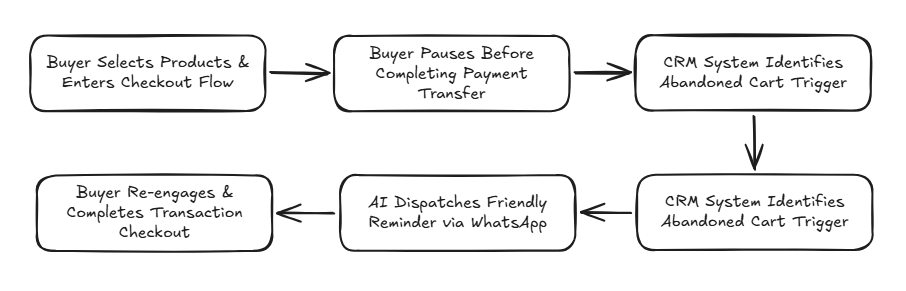
    E-Commerce AI Customer Service Workflow Architecture

    Here is how automated AI customer support functions in practice:

    english flow

    E-Commerce Platform Integrations

    Flexible API architectures enable AI integration across modern sales ecosystems:

    • Marketplace Integrations (Shopee & Tokopedia): Synchronize buyer chats, answer stock queries instantly, and dispatch status updates.
    • Web Store Platforms (Shopify & WooCommerce): Connect web catalogs, recommend products, and run automated cart recovery sequences. Explore our complete guide on AI agents for online stores from orders to after-sales.
    • WhatsApp Commerce Channels: Manage chat-based commerce dispatches using official wa blast solutions.

    Automate Your Online Store Operations with Cekat.ai

    In competitive e-commerce markets, response speed and support consistency dictate brand success. Businesses relying on manual workflows face strict operational scaling ceilings as transaction volumes rise.

    Deploying AI customer service for e-commerce empowers your business to handle higher transaction volumes effortlessly. Beyond cost savings, automation stabilizes support SLAs across all growth phases.

    The Cekat.ai platform helps e-commerce enterprises automate customer service from first touchpoint to post-sales support. From order tracking to returns and recommendations, streamline operations without inflating team costs.

    Scale your online store operations today with Cekat.ai.


    Frequently Asked Questions (FAQ)

    1. Can AI customer service replace human support agents completely?

    No. AI is designed to resolve 70-80% of routine queries (like tracking and stock checks). Complex complaints or custom negotiations escalate seamlessly to human agents.

    2. Is AI customer service suitable for small online stores?

    Yes. Even small stores benefit immediately from automated tracking and stock answers, saving hours of manual daily repetitive typing.

    3. Can AI handle product return workflows automatically?

    Yes. AI collects return reasons, requests required media proof, and issues return shipping instructions based on your store’s predefined SOPs.

    4. How long does it take to integrate Cekat.ai with an online store?

    Integration and Knowledge Base training are straightforward, allowing your online store to go live with AI support within days without complex coding.


  • Difference between WhatsApp API and Regular WhatsApp

    Difference between WhatsApp API and Regular WhatsApp

    Executive Summary & Value Proposition

    • Programmatic Communication Infrastructure: Connects directly with backend systems, CRMs, and artificial intelligence (AI) without requiring manual smartphone input.
    • Enterprise-Scale Automation: Capable of managing thousands of concurrent conversations, OTP dispatches, transactional notifications, and instant lead qualification.
    • Official & Ban-Safe: Complies with Meta standards featuring official business verification (Green Tick) and secure opt-in mechanisms.
    • Conversation-Based Cost Model: Implements Meta’s Conversation-Based Pricing system based on message categories (Marketing, Utility, Authentication, Service).

    The WhatsApp API is an official application programming interface provided by Meta that enables business systems to connect directly with the WhatsApp ecosystem programmatically. Unlike the standard WhatsApp application used by individuals for manual chat, the WhatsApp API is engineered specifically for applications, backend systems, and automation—not for personal use on a mobile device.

    With the WhatsApp API, enterprises can send and receive messages automatically, measurably, and in full compliance with Meta policies via internal systems like CRMs, ERPs, e-commerce backends, or AI Agents. This is why this infrastructure is frequently referred to as the WhatsApp Business API, WhatsApp Cloud API, or Official WA API.

    Standard WhatsApp vs. WhatsApp API: Fundamental Differences

    A common misconception is treating the WhatsApp API as an “expensive version of WhatsApp” or an “upgraded WhatsApp Business App.” This assumption is architecturally incorrect.

    Evaluation Aspect WhatsApp App (Standard / Business App) WhatsApp Business API (System-to-User)
    Primary Interface Smartphone / Web Browser (Manual) Server, CRM System, Omnichannel Dashboard
    Capacity & Agent Limit Highly limited, prone to staff bottlenecks Unlimited multi-agent access, thousands of concurrent chats
    Integration Access No programmatic system integration Connects directly to CRM, OMS, ERP, & AI
    Automation Power Limited to basic greeting/away auto-replies Full automation: AI Agents, Workflows, & API Triggers
    Verification Status Standard business profile Eligible for Verified Badge (Official Green Tick)

    Why Do Businesses Need the WhatsApp API?

    As a business scales, managing operations via manual mobile applications exposes severe operational bottlenecks:

    • Support teams get overwhelmed by incoming chat spikes.
    • Customer inquiries risk being missed or delayed in response.
    • Lack of a centralized customer database or conversation history.
    • Absence of service performance metrics and team analytics.
    • Manual follow-ups and payment reminders must be remembered individually.

    The WhatsApp Business API solution directly resolves these operational hurdles in an official, scalable manner that protects numbers from suspension risks.

    Enterprise-Level WhatsApp API Use Cases

    The WhatsApp API was built to drive end-to-end business operations efficiently:

    1. Automated 24/7 Customer Support

    Routine FAQs are resolved automatically by an agentic AI, support tickets are generated automatically, and human escalations are routed via an omnichannel application only when human intervention is necessary.

    2. Transactional Notifications & Utility Messages

    Automate order status updates, payment confirmations, invoice due date reminders, and account verification One-Time Passwords (OTPs).

    3. Sales & Lead Qualification

    Trigger automated follow-ups based on website actions, qualify prospective buyers based on conversational intent, and distribute hot leads to sales representatives in real-time.

    4. Data Synchronization & System Integration

    All conversation histories and customer profiles synchronize automatically into your CRM application, granting management full visibility over the sales pipeline.

    Technical Rules & WhatsApp API Constraints

    To protect platform users from spam, Meta enforces strict operational mechanics across the WhatsApp API:

    • No Built-in Native Chat UI: There is no standard consumer app interface; chat interactions must be managed through third-party platform dashboards.
    • Message Template Rules: The initial outbound message sent to a customer must utilize a Meta-approved message template.
    • 24-Hour Customer Service Window: Businesses can send free-form session messages within a 24-hour window from the user’s last inbound message.
    • Conversation-Based Pricing Model: Meta charges per 24-hour conversation session based on category (Marketing, Utility, Authentication, and Service).

    WhatsApp Cloud API vs. On-Premise API

    Meta provides two primary infrastructure deployment architectures:

    • WhatsApp Cloud API: Hosted directly on Meta’s global cloud servers. Faster to set up, highly stable, and the standard choice for most modern enterprises.
    • On-Premise API: Hosted via local Business Solution Provider (BSP) servers. Typically used by legacy financial institutions with strict physical data sovereignty regulations.

    Transforming WhatsApp into a Business Growth Engine

    Simply having WhatsApp API access is insufficient if operational workflows inside remain unautomated. This is where Cekat.ai serves as your end-to-end platform provider.

    With Cekat.ai, connect your WhatsApp API with intelligent AI Agents, configure workflow automations, and consolidate all communication channels into a unified dashboard. Manage customer communications securely, scalably, and efficiently with Cekat.ai.


    Frequently Asked Questions (FAQ)

    What is the WhatsApp API?

    The WhatsApp API is Meta’s official programming interface that connects business systems and applications directly to WhatsApp to automate high-volume message delivery and reception.

    What is the difference between standard WhatsApp Business and WhatsApp API?

    Standard WhatsApp Business runs on a smartphone app for manual 1-on-1 chats. The WhatsApp API is app-less system infrastructure integrated into CRMs, AI Agents, or omnichannel dashboards for automated large-scale messaging.

    Can a business phone number using the WhatsApp API get banned?

    The risk of account bans is extremely low provided the business complies with Meta policies, uses approved templates for outbound messaging, and targets opted-in contacts.

    How do I get official WhatsApp Business API access?

    Enterprises can activate official WhatsApp Business API access through solution provider partners like Cekat.ai, who assist with Meta Business Manager verification and ready-to-use software integration.


  • 15 Official WhatsApp Message Template Examples (2026 Fast Meta Approval)

    15 Official WhatsApp Message Template Examples (2026 Fast Meta Approval)

    Executive Summary & Value Proposition

    • Fast Meta Approval Speeds: Master template structure rules and variable ordering to secure automated approvals within 1–5 minutes.
    • 2026 Category Compliance: Correctly classify templates (Utility, Marketing, Authentication, & Service) to prevent rejections and optimize conversation session costs.
    • 24/7 Out-of-Session Messaging: Dispatch proactive notifications beyond the 24-hour window leveraging workflow automation.
    • High Conversion Engagement: Craft interactive buttons and dynamic placeholders integrated directly with your CRM application for superior response rates.

    If your enterprise relies on WhatsApp for customer support, transactional updates, or marketing broadcasts, official WhatsApp message templates represent the fundamental layer determining whether communications run smoothly or stall due to Meta rejections.

    Many businesses encounter identical hurdles: templates rejected without clear explanations, incorrect category selection, misaligned placeholder variables, or delayed marketing dispatches caused by structural errors.

    With precise formatting, official WhatsApp templates secure approvals within minutes, unlocking automated dispatches for notifications, booking reminders, promotions, and OTP verifications via the official WhatsApp Business API. For policy guidelines, review our guide on fast approval official WhatsApp message templates.

    What Is an Official WhatsApp Message Template?

    An official WhatsApp message template is a pre-approved, structured message format required by Meta before initiating communications with customers via the WhatsApp Business API.

    Templates allow enterprises to initiate proactive outreach outside active 24-hour customer service windows. Lacking pre-approved templates, businesses can only respond passively to incoming user messages.

    Why Are Official Templates Vital for Enterprise Operations?

    Templates extend far beyond technical parameters—they form the core engine for enterprise communication automation. Pre-approved templates enable businesses to dispatch:

    • Order confirmations and courier shipment tracking updates.
    • Appointment reminders and booking confirmations.
    • One-Time Password (OTP) security authentication codes.
    • Invoice payment due date reminders.
    • Promotional campaigns via compliant whatsapp broadcast solutions.

    Primary benefits include maintaining lean operational workflows, ensuring brand consistency, and driving measurable sales conversions.

    Official WhatsApp Template Categories (2026 Meta Update)

    Meta classifies templates into distinct categories to preserve communication quality across the ecosystem:

    1. Utility Templates

    Used for transaction updates and operational notifications requested by users, including order confirmations, delivery updates, and invoice receipts. Review conversation costs in our guide on WhatsApp API transactional messaging.

    2. Authentication Templates

    Used strictly for account security verification, such as OTP login codes and password reset requests. This category operates under stringent formatting guidelines enforced by Meta.

    3. Marketing Templates

    Used for promotional campaigns, product announcements, discount vouchers, or lapsed buyer re-engagement. Outbound marketing dispatches require explicit user consent (opt-in).

    4. Service Templates

    Used for post-sales follow-ups, customer satisfaction surveys, and support ticket updates within a ticketing management system.

    15 Official WhatsApp Message Template Examples (2026)

    Here are 15 production-ready template drafts structured for fast Meta approval:

    Marketing Templates (5 Examples)

    1. New Product Launch
    Category: Marketing
    Body: Hi {{1}}, our new product {{2}} is officially available! Enjoy a special launch discount of up to {{3}}. View full details at {{4}}.
    Approval Note: State the promotional context and product details clearly.

    2. Seasonal Sales Promotion
    Category: Marketing
    Body: Hi {{1}}, celebrate this week with up to {{2}} off on your favorite categories. Offer valid until {{3}}. Browse the catalog at {{4}}.
    Approval Note: Include clear campaign expiration dates to prevent spam flagging.

    3. Abandoned Cart Recovery
    Category: Marketing
    Body: Hi {{1}}, your saved cart items are still available. Use discount code {{2}} today to complete your purchase: {{3}}.
    Approval Note: Target users who previously added items to their shopping cart. Learn strategies in our guide on abandoned cart recovery via WhatsApp with AI.

    4. Lapsed Customer Re-Engagement
    Category: Marketing
    Body: Hi {{1}}, we miss you! Enjoy a special voucher worth {{2}} applied automatically to your next order. Valid until {{3}}.
    Approval Note: Use personalized variables to maintain a warm tone.

    5. Product Cross-Selling
    Category: Marketing
    Body: Hi {{1}}, customers who bought {{2}} also loved {{3}}. Explore exclusive bundle offers at {{4}}.
    Approval Note: Align recommendations with actual user transaction histories.

    Utility Templates (5 Examples)

    6. Order Confirmation
    Category: Utility
    Body: Hi {{1}}, your order #{{2}} has been received and is currently being processed by our team.
    Approval Note: Use specific order transaction variables.

    7. Appointment Reminder
    Category: Utility
    Body: Hi {{1}}, this is a friendly reminder for your appointment scheduled on {{2}} at {{3}}. Please reply to confirm.
    Approval Note: State date and time placeholders explicitly.

    8. Shipment Tracking Status
    Category: Utility
    Body: Order #{{1}} has been shipped via {{2}} (Tracking #: {{3}}). Estimated arrival is {{4}}.
    Approval Note: Provide transparent logistics details.

    9. Payment Received Receipt
    Category: Utility
    Body: Hi {{1}}, payment of {{2}} for order #{{3}} has been successfully processed. Thank you for shopping with us.
    Approval Note: Keep text concise and informative.

    10. Invoice Due Date Reminder
    Category: Utility
    Body: Hi {{1}}, a quick reminder that invoice #{{2}} for {{3}} is due on {{4}}. Complete your payment to maintain active service.
    Approval Note: Include accurate due dates. Explore more ideas in our guide on payment reminder WhatsApp API templates.

    Authentication Templates (3 Examples)

    11. OTP Login Verification
    Category: Authentication
    Body: Your security verification code is {{1}}. This code expires in {{2}} minutes. Do not share this code with anyone.
    Approval Note: Code expiration placeholders are mandatory.

    12. Password Reset Request
    Category: Authentication
    Body: Use verification code {{1}} to reset your account password. Code is valid for {{2}} minutes.
    Approval Note: Promotional language inside authentication templates is strictly prohibited.

    13. Account Registration Verification
    Category: Authentication
    Body: Enter security code {{1}} to complete your new account registration.
    Approval Note: Maintain neutral, security-focused wording.

    Service Templates (2 Examples)

    14. Customer Satisfaction Survey
    Category: Service
    Body: Hi {{1}}, how was your support experience today? Please share your feedback via the link below: {{2}}.
    Approval Note: Ensure links resolve to official company domains.

    15. Customer Support Follow-Up
    Category: Service
    Body: Hi {{1}}, has your inquiry regarding ticket #{{2}} been resolved to your satisfaction? Reply to this message if you need further help.
    Approval Note: Use polite, assistance-oriented tone.

    Checklist: Common Mistakes That Cause Meta Template Rejections

    Most template rejections stem from basic formatting oversights. Review this checklist before submitting drafts:

    • Selecting the wrong category (e.g., embedding promotional copy inside Utility templates).
    • Disordered placeholder numbering (e.g., placing {{2}} before {{1}}).
    • Using exaggerated marketing claims or manipulative phrasing.
    • Including unverified shortlinks or suspicious URL redirects.
    • Inconsistent language or mixing multiple languages without structural cause.

    Explore rejection causes in depth in our article on why WhatsApp API templates get rejected by Meta.

    How Long Does the WhatsApp Template Approval Process Take?

    Estimated approval timelines via Meta’s automated validation engine include:

    • Utility & Authentication: Typically approved within 1 to 5 minutes.
    • Marketing: Review timelines range from several minutes up to 24 hours.

    Build & Manage Approved Templates Effortlessly with Cekat.ai

    Deploying the right software platform allows your team to draft templates with built-in compliance guidance without exhausting trial-and-error cycles.

    Through Cekat.ai, draft templates using AI guidelines, submit them directly to Meta, and link approved assets to AI Chatbots and omnichannel inboxes seamlessly.

    Accelerate your business messaging automation today with Cekat.ai.


    Frequently Asked Questions (FAQ)

    1. How long does official WhatsApp API message template approval take?

    Utility and Authentication templates generally secure approval in 1 to 5 minutes. Marketing templates require review times ranging from a few hours up to 24 hours.

    2. Why was my WhatsApp API template rejected by Meta?

    Rejections usually stem from category misclassifications, disordered variable numbering, promotional wording inside Utility templates, or unverified shortlinks.

    3. Can I edit a WhatsApp message template after it has been approved?

    No. Once approved, template text cannot be edited directly. To modify wording or variables, you must create a new template draft and submit it for Meta approval.

    4. Is there a limit on how many templates a business account can create?

    Meta does not limit the total number of approved templates created per business account, provided every draft complies with Commerce and Messaging policies.


  • Optimizing CRM Functionality in Clinics and Salons with Automation Technology

    Optimizing CRM Functionality in Clinics and Salons with Automation Technology

    Executive Summary & Value Proposition

    • Passive to Proactive CRM Transformation: Upgrades legacy CRMs from static record archives into proactive AI automation engines that drive repeat appointments.
    • Automated Booking & Follow-Up Workflow: Eliminates no-show risks through automated WhatsApp appointment reminders and post-treatment check-ins.
    • Centralized Multi-Channel Support: Consolidates customer chats across WhatsApp, Instagram, and Live Chat into a single omnichannel application.
    • Operational Efficiency Boost by 30%: Reduces administrative workload for clinic and salon staff using intelligent AI Agent integrations.

    In recent years, the health and beauty industry—encompassing skincare clinics, aesthetic centers, and beauty salons—has experienced rapid growth. This expansion brings heightened client expectations for services that are not only professional, but also personalized, prompt, and responsive. A core pillar in delivering exceptional service is an effective Customer Relationship Management (CRM) system. However, in practice, many business owners still rely on traditional CRMs with limited feature sets, failing to fully leverage their operational potential.

    As technology evolves, artificial intelligence solutions like Cekat.ai offer a comprehensive transformation of how CRMs should function in the digital era. By deploying AI-driven automation within an advanced CRM application, clinics and salons can manage client relationships smarter, elevate customer satisfaction, reduce administrative drag, and drive sustainable revenue growth. This article explores in detail how Cekat.ai enhances traditional CRM functionality in clinics and salons, proving why this technology is a vital strategic investment for your health & beauty enterprise.

    Common Challenges Faced by Traditional CRM Users in Clinics and Salons

    Conventional CRM systems assist in logging client information, but in most scenarios, they function merely as passive documentation archives without real-time operational integration. Core challenges frequently encountered include:

    • Lack of Personalization in Communications: Most legacy CRM software only stores basic contact fields (names, phone numbers, and treatment histories) without utilizing this data for tailored interactions. Consequently, client outreach feels rigid and impersonal.
    • Absence of Automated Reminders and Follow-Ups: Many clinics and salons still rely on manual outreach for booking reminders. This drains staff hours and introduces human error risks, leading to missed appointments and delayed post-care outreach.
    • Minimal Data Analytics and Customer Insights: Traditional CRMs display static data without predictive analytics tools that help owners identify client trends, treatment preferences, or re-booking patterns necessary for strategic decision-making.
    • Inability to Deliver Omnichannel Experiences: Modern consumers engage across WhatsApp, Instagram, Facebook Messenger, and Web Chat. Legacy CRMs struggle to consolidate these touchpoints into a unified inbox, hindering consistent, rapid responses.

    Ignoring these operational hurdles leads to lead leaks and lost revenue opportunities. Learn more about core strategies in our guide on optimizing CRM functions in clinics and salons to maintain long-term competitive advantage.

    How Cekat.ai Enhances Traditional CRM Functionality in Clinics/Salons

    Cekat.ai delivers an intelligent technological solution that acts not just as a standard CRM, but as an automated virtual assistant managing complex operational workflows across the beauty & wellness industry. Key features and business benefits include:

    1. Automated Appointment Reminders and Post-Care Follow-Ups

    Cekat.ai automates appointment lifecycle workflows from pre-visit reminders to attendance confirmations and post-care instructions via workflow automation. Integrating directly with WhatsApp, the platform dispatches real-time reminders without requiring manual staff drafting. Furthermore, Cekat.ai identifies overdue clients and automatically triggers re-booking promotional offers, significantly reducing ‘no-show’ rates while driving repeat visits.

    2. AI-Powered Communication Personalization

    Leveraging advanced AI processing, Cekat.ai dynamically analyzes client data to deliver contextual messaging. For instance, clients receiving routine hair treatments receive timely reminders for their next scheduled session. Similarly, facial treatment clients receive notifications regarding new skincare packages or loyalty rewards, cultivating emotional loyalty through hyper-relevant communications.

    3. Seamless Omnichannel Integration

    A primary strength of Cekat.ai is unifying fragmented communication channels inside a single omnichannel application. Interactions across WhatsApp, Instagram, Facebook, and Web Chat are managed centrally, ensuring swift response SLAs while eliminating the need for staff to toggle between separate messaging apps.

    4. Automated Customer Data Management & Deep Analytics

    Beyond data storage, Cekat.ai analyzes key performance metrics via its customer data management module. Clinic owners gain actionable insights on high-demand treatments, peak visit times, and booking behavior patterns. These automated reports allow management to structure high-ROI marketing promotions and optimize re-engagement campaigns effectively.

    5. Substantial Operational Cost Efficiency

    Cekat.ai automates repetitive administrative tasks, reducing staff workload by over 30%. Staf can redirect their focus toward delivering premium in-person client care while clinic operations remain lean and scalable. For deeper operational insights, explore our specialized guide on beauty clinic operational efficiency.

    Why Clinic and Salon Businesses Must Adopt AI Automation Today

    Digital transformation is no longer optional for clinic and salon operators. In a highly competitive market, response speed and service personalization determine market leadership. Implementing Cekat.ai positioning your enterprise ahead of competitors still tied to manual processes.

    Beyond cost reduction, AI automation unlocks recurring revenue opportunities through higher appointment frequencies, optimized marketing campaigns, and elevated customer retention. In today’s digital-first market, Cekat.ai serves as an essential engine for sustainable enterprise growth.

    Effective client management forms the bedrock of a prosperous clinic or salon. However, legacy CRMs functioning purely as data archives can no longer satisfy dynamic consumer demands. Through AI-driven automation, Cekat.ai upgrades traditional CRM functions into a modern, proactive growth ecosystem. From communication automation and booking reminders to behavioral analytics, Cekat.ai accelerates health & beauty business success.

    Empower your business with AI technology that simplifies daily operations while dramatically elevating the end-to-end customer experience.

    Upgrade your clinic and salon performance today with Cekat.ai. Discover how smart automation tools drive client loyalty, lower operational overhead, and scale revenue.


    Frequently Asked Questions (FAQ)

    1. Can Cekat.ai integrate with our existing clinic management and booking software?

    Yes. Cekat.ai supports flexible integrations via Open APIs and Webhooks, allowing seamless data synchronization with legacy clinic management tools, POS platforms, and booking databases.

    2. How does Cekat.ai reduce appointment no-show rates for salons?

    Cekat.ai dispatches automated 24-hour and same-day WhatsApp reminders complete with interactive reply buttons, allowing clients to confirm or reschedule appointments effortlessly.

    3. Can Cekat.ai AI Agents handle specific client questions regarding treatment prices and pre-care?

    Absolutely. Cekat.ai AI Agents are trained on your specific clinic Knowledge Base, enabling them to answer inquiries about treatment menus, pricing, location details, and pre-visit guidelines 24/7.

    4. How long does it take to deploy Cekat.ai in a beauty clinic or salon?

    Onboarding is straightforward; workflows and AI configurations can be deployed within days without requiring complex IT infrastructure overhauls.


  • Official WhatsApp Broadcast for Business: Compliance & High-Converting Strategies

    Official WhatsApp Broadcast for Business: Compliance & High-Converting Strategies

    Key Advantages

    • Guaranteed Phone Number Safety: Mass messaging utilizing Meta’s official WhatsApp Business API carries virtually zero risk of account bans.
    • Exceptional Open Rates: Deliver promotional messages and transaction updates straight to customer inboxes with open rates up to 98%.
    • Scalable Personalization & Segmentation: Supports dynamic placeholder variables such as names, order statuses, and audience-specific vouchers.
    • Integrated Ecosystem Architecture: Connects seamlessly with CRM software, e-commerce databases, and automated AI chat agents.

    WhatsApp stands as one of the most powerful business communication channels globally. With a massive active user base, this instant messaging platform enables brands to connect with customers directly through fast, personalized, and highly relevant interactions.

    Numerous enterprises leverage WhatsApp to streamline customer support, dispatch transactional updates, and execute outbound marketing campaigns. One of the most effective outbound marketing strategies is official business WhatsApp broadcasting—sending mass messages to thousands of opt-in customers simultaneously using official infrastructure provided by WhatsApp.

    However, not all mass messaging tools protect corporate reputations. Using unofficial WhatsApp blast tools flooding the market carries severe risks of permanent phone number bans by Meta. Therefore, management must understand how to execute an official WhatsApp broadcast using the WhatsApp Business API infrastructure to drive conversion without suspension risks.

    What Is an Official WhatsApp Broadcast for Business?

    An official WhatsApp broadcast is a bulk messaging feature powered by Meta’s official WhatsApp Business API infrastructure. Engineered specifically for mid-market and enterprise operations, it stands apart from illegal bulk spammers that compromise account health.

    Leveraging official APIs allows enterprises to dispatch tens of thousands or even millions of messages per month to opted-in users. Campaigns utilize pre-approved templates ensuring high delivery rates and enterprise-grade data privacy.

    Core Characteristics of Official WhatsApp Broadcasts

    • Direct Server Connection: Connects directly to Meta cloud endpoints without intermediary software modifications or physical SIM gateways.
    • Pre-Approved Message Templates: Employs structured message templates vetted by Meta algorithms to preserve platform quality.
    • Dynamic Variable Placeholders: Supports granular data personalization including client names, purchase details, and unique discount codes.
    • High Delivery & Read Rates: Ensures messages deliver straight to primary buyer inboxes instantly without landing in spam folders.
    • Centralized Systems Integration: Native compatibility with CRM applications and multi-agent customer service inboxes.

    Official WA Broadcast vs. Unofficial Blast: Key Differences & Risks

    Many business owners get tempted by unofficial WhatsApp software due to low upfront fees and zero verification requirements. However, this approach threatens business continuity and operational stability.

    Here is an in-depth comparison between official API broadcasting and illegal blast tools:

    Evaluation Aspect Official WA Broadcast (API) Unofficial WA Blast (Scraper Tools)
    System Infrastructure Official WhatsApp Business API from Meta Modified apps, browser scraping, or SIM card bots
    Phone Number Safety Highly secure under Meta usage guidelines Extremely high risk of permanent account bans
    Personalization Capabilities Supports dynamic placeholders per user Generic, rigid, and unpersonalized text blocks
    Daily Messaging Volumes Highly scalable (1,000 to unlimited per day) Severely limited and easily flagged as spam
    CRM & Systems Integration Integrates with CRM, Webhooks, and AI Agents Standalone application with zero API compatibility
    Brand Reputation Impact Professional, building high buyer trust Damages brand image due to unsolicited spamming

    Relying on official WhatsApp broadcasting represents a long-term investment that is safer, scalable, and far more professional for your business.

    Use Case Examples Across Industries

    WhatsApp API broadcasting provides versatile operational capabilities across various marketing and support workflows:

    1. Seasonal Promotions & Product Sales

    E-commerce and retail brands dispatch exclusive promotional updates to drive instantaneous purchase decisions.

    Sample Copy:
    “Hi Budi, enjoy an exclusive 25% discount on your favorite product collections today. Click the button below to claim your promo before stock runs out.”

    2. Payment Reminders

    Financial, subscription, and education providers automate broadcast reminders regarding upcoming invoice due dates.

    Sample Copy:
    “Hi Rina, your subscription invoice is due tomorrow. Complete your payment today to maintain uninterrupted service access.”

    3. Order & Delivery Tracking Updates

    Automated transactional notifications providing real-time shipment transparency to buyers.

    Sample Copy:
    “Order #10243 has been handed over to our courier partner and is on its way. Track your package shipment using the button below.”

    High-Converting WhatsApp Broadcast Templates (High CTR)

    The secret to high Click-Through Rate (CTR) broadcast messages lies in concise, relevant copy equipped with clear Call-to-Action (CTA) buttons.

    Sales Promotional Template

    Hi {{name}},
    Unlock an exclusive 30% discount today on your favorite items. Limited stock available!
    Tap the button below to shop now.

    Payment Reminder Template

    Hi {{name}},
    A friendly reminder that your subscription invoice is due on {{date}}.
    Please complete your payment promptly to avoid temporary service suspension.

    New Product Launch Template

    Hi {{name}},
    We just launched our latest product innovation tailored specifically to your needs.
    Explore the complete product catalog via the link below.

    Passive Customer Re-Engagement Template

    Hi {{name}},
    We miss you! Enjoy a $10 shopping voucher applied automatically to your next order this week.
    Use promo code: WELCOME10.

    5 Effective Strategies to Maximize Broadcast Engagement

    Simply dispatching bulk messages does not guarantee revenue growth. Apply these five operational strategies to optimize campaign ROI:

    1. Segment Your Contacts: Group buyers based on purchase history, interest categories, or geography. Avoid sending irrelevant offers to mismatched audience segments.
    2. Leverage Dynamic Variables: Incorporate recipient names or specific order details to create a friendly, human-centric tone.
    3. Include Clear CTAs (Call-to-Action): Utilize native interactive buttons like “Shop Now”, “Claim Voucher”, or “Contact Support” to streamline user action.
    4. Optimize Dispatch Schedules: Send broadcasts during peak engagement hours or lunch breaks (e.g., 11:00 AM – 1:00 PM).
    5. Integrate AI Support Agents: Ensure post-broadcast reply spikes are managed instantly using an agentic AI agent to prevent chat backlogs.

    Understanding the WhatsApp Business API Cost Model

    Unlike standard messaging apps, official API usage operates under a Conversation-Based Pricing model established by Meta. Pricing is calculated per 24-hour conversation session across four primary categories:

    • Marketing Conversations: Promotional dispatches, product announcements, and discount offers.
    • Utility Conversations: Transactional order updates, shipping alerts, and payment receipts.
    • Authentication Conversations: One-Time Passwords (OTPs) and account security verification messages.
    • Service Conversations: User-initiated conversations when customers reach out to support.

    Start Official WhatsApp Broadcasting with Cekat.ai

    If your enterprise aims to broadcast WhatsApp messages to thousands of customers safely and at scale, adopting Meta’s official API via a unified platform is the ultimate strategic move.

    Through the Cekat.ai omnichannel application, your enterprise can:

    • Access official WhatsApp Business API endpoints with streamlined business verification.
    • Execute bulk WhatsApp broadcasts safely without phone number ban risks.
    • Manage all inbound reply conversations inside a centralized agent inbox.
    • Deploy automated AI Agents to handle follow-up buyer inquiries 24/7 instantly.
    • Track delivery rates, read rates, and conversion performance transparently.

    The Cekat.ai team is ready to guide your verification process from setup through your first live official broadcast campaign.

    Accelerate your customer engagement and enterprise sales today with Cekat.ai.


    Frequently Asked Questions (FAQ)

    1. Can an official WhatsApp Business API phone number get banned?

    If a business operates via the official WhatsApp Business API and complies with Meta messaging policies (such as sending messages strictly to opted-in users), the risk of phone number bans is virtually non-existent.

    2. What is the maximum number of broadcast messages allowed per day?

    Messaging tier limits are determined by your Meta business account reputation, scaling from Tier 1 (1,000 recipients/24h), Tier 2 (10,000 recipients), Tier 3 (100,000 recipients), up to Unlimited.

    3. Why do official WhatsApp API broadcasts require pre-approved message templates?

    Meta enforces pre-approved templates for Marketing, Utility, and Authentication categories to protect the user ecosystem from unsolicited spam and preserve platform quality.

    4. What does “opt-in” mean in WhatsApp broadcasting?

    An opt-in is explicit consent provided by a customer stating they agree to receive communications or promotional updates from your business via WhatsApp.