In the education industry, decisions from prospective students and parents don’t always happen in a single conversation. They usually ask first about cost, schedule, location, learning method, facilities, programs, tutors, and the results they can expect to achieve. For educational institutions such as courses, tutoring centers, schools, and private tutoring services, this early moment is crucial because every question can become an enrollment opportunity. But when the response is late, follow-up is inconsistent, or prospective student data gets scattered across multiple admins and channels, conversion opportunities can disappear before they’re even properly processed.
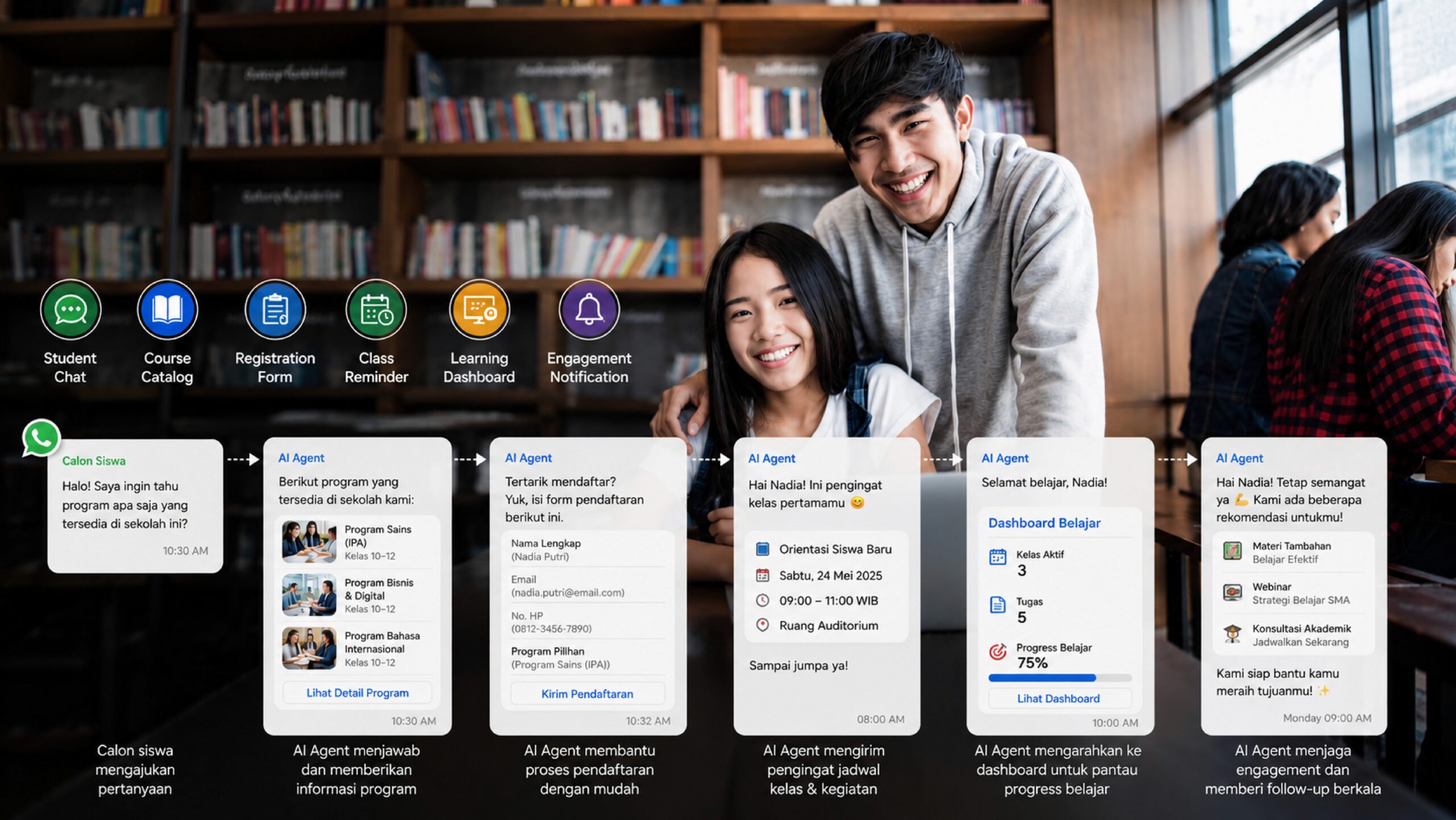
This is why an AI agent for educational institutions, courses, and tutoring centers is becoming increasingly relevant for modern education businesses. Not just as a chatbot answering simple questions, an AI agent can become a working system that helps educational institutions manage prospective students from the inquiry stage, enrollment, class reminders, engagement during the program, all the way to upselling advanced programs. At Cekat.AI, we see that the main challenge for educational institutions isn’t just getting more leads, but making sure every prospective student gets a fast response, clear information, and proper follow-up until they finally enroll and show up to class.
Today’s Educational Institution Challenge Isn’t Just Promotion — It’s Conversion
Many educational institutions are already actively promoting through Instagram, TikTok, WhatsApp, the website, referrals, and digital ads. Marketing activity can generate plenty of incoming questions, but that doesn’t mean all of them turn into enrollments. The problem usually shows up after a prospective student makes contact. There are chats left unanswered, questions answered differently by different admins, prospective students who were interested but never followed up, or students who already enrolled but forgot their class schedule.
In the course and tutoring business, response speed has a huge influence on prospective students’ interest. When someone asks about an English program, a university entrance exam class, a digital marketing course, math tutoring, or private classes for their child, they’re usually comparing several options at once. If the educational institution can’t answer quickly and convincingly, prospective students can switch to a competitor that’s more ready to respond.
This is where AI for courses and tutoring centers becomes a solution that not only helps operations, but also strengthens the student acquisition process. An AI agent can keep the conversation going, provide program information consistently, record the prospective student’s needs, and help the admissions or admin team focus on the most promising prospects.
AI Agent as the First Gateway to Student Enrollment
The enrollment process usually starts with a simple question. Prospective students or parents want to know about available classes, schedule, cost, learning method, location, payment system, promos, trial classes, and whether the program fits their needs. If all these questions are still answered manually, admins can get overwhelmed, especially during busy periods like the new school year, exam season, new batch openings, or promo campaigns.
With an AI agent-powered student enrollment chatbot, educational institutions can provide automatic responses that still feel natural and relevant. An AI agent can answer questions based on prepared program information, guide prospective students to the right class option, and help collect important data such as name, age, education level, learning goals, schedule preferences, location, and specific needs.
For an English course, an AI agent can help ask about the prospective student’s proficiency level, learning goals, and desired schedule. For a tutoring center, an AI agent can identify whether the student needs preparation for university entrance exams, school exams, olympiads, or regular tutoring support. For private tutoring, an AI agent can record the subject, home location, online or offline preference, and tutor requirements. With this process, the admissions team no longer starts the conversation from zero because initial data has already been gathered automatically.
More Consistent, Measurable Follow-Up for Prospective Students
One of the biggest leak points in educational institutions is follow-up with prospective students. Many prospective students are actually already interested, but haven’t made a decision yet because they’re still discussing it with their parents, comparing costs, waiting for a suitable schedule, or wanting to confirm program quality. If follow-up depends only on an admin’s memory, big opportunities can slip through.
An AI agent helps educational institutions build more consistent follow-up without feeling pushy. After a prospective student asks about a program, the AI agent can send a follow-up message based on the conversation’s context. For example, a prospective student who asked about cost can get a follow-up explaining the program’s value, payment options, or promo information. A prospective student interested in a trial class can be reminded to pick a schedule. A prospective student who hasn’t completed the enrollment form can be guided back with a more personal message.
For Cekat.AI, follow-up isn’t just about sending automated messages — it’s about building a communication flow that helps prospective students make a decision. Every stage of the conversation needs a clear purpose, from addressing doubts and reinforcing the program’s value, to guiding toward enrollment and making sure the prospective student actually shows up to the first class.
Automated Class Reminders to Improve Show-Up Rate
In the education business, enrollment isn’t the end of the process. The next challenge is making sure students actually show up to class. Many educational institutions run into situations where students have already signed up for a trial class, placement test, program consultation, or first class, but don’t show up because they forgot, had a schedule conflict, or didn’t get a clear enough reminder.
Automated class reminders can help improve show-up rate because students get timely reminders through the channel they use most, such as WhatsApp. An AI agent can send reminders before class starts, re-confirm the schedule, send the online class link, location, tutor’s name, materials to prepare, and additional instructions. For recurring classes, reminders can also be sent periodically to keep students disciplined about following the schedule.
For tutoring centers and courses with many batches, a manual reminder system can be exhausting. Admins have to remember many schedules, classes, students, and time changes. With an AI agent, this process can be made tidier because reminders are connected to student data and class schedules. The result: educational institutions can reduce the risk of miscommunication, maintain the student experience, and help the operations team work more efficiently.
Student Engagement Doesn’t Stop Once Class Starts
Many educational institutions focus too much on enrollment but forget that student engagement after class starts matters just as much. Students who feel looked after tend to be more active in class, more open to giving feedback, and more willing to take advanced programs. On the other hand, students who feel unsupported can lose motivation faster, skip classes, or drop out of the program.
AI-powered student engagement can help educational institutions maintain communication once a student is enrolled in a program. An AI agent can send assignment reminders, supporting materials, class information summaries, evaluation schedules, or relevant motivational messages. For parents, an AI agent can also help send specific updates such as payment reminders, meeting schedules, or program progress information.
In the context of courses and tutoring centers, good engagement doesn’t just make students feel connected — it also creates retention opportunities. When a student finishes one program, an AI agent can help offer a suitable follow-up program. For example, a student who completes a basic class can be directed to intermediate. A student who finishes a university entrance exam program can be offered additional intensive classes. A student taking math tutoring can be recommended an exam preparation program. With this approach, an AI agent doesn’t just support service — it also supports the educational institution’s revenue growth.
Upselling Advanced Programs with Better Timing
Upselling in the education business needs to be done sensitively. Prospective students and parents don’t want to feel like they’re just being sold additional programs. They want to receive recommendations that make sense based on their needs, progress, and learning goals. That’s why timing and context matter so much.
An AI agent can help educational institutions read the right moment to offer an advanced program. After a student completes a certain class, the AI agent can send a relevant recommendation based on their previous program. After a student attends a trial class, the AI agent can offer a regular package. After a parent gives positive feedback, the AI agent can guide them toward an advanced program or additional classes.
With Cekat.AI, educational institutions can build a more structured upsell flow. Not the same mass promotional message for everyone, but communication that’s more tailored to each student’s status and needs. This helps educational institutions increase repeat enrollment opportunities without sacrificing the quality of their relationship with students and parents.
Easier Feedback Collection That Gets Followed Up Faster
Feedback is one of the most important assets for an educational institution. From feedback, course, tutoring center, and school operators can understand teacher quality, material effectiveness, student satisfaction, learning obstacles, and areas that need improvement. However, feedback collection is often inconsistent because it’s done manually, too late, or sent only once without follow-up.
An AI agent can help collect feedback automatically after class, after a trial, after a program ends, or after a consultation session. Students and parents can be asked to give a quick rating, comment, or input about their learning experience. This data can then be used by the academic team, customer success, and management to make better decisions.
For educational institutions looking to grow, feedback isn’t just an evaluation tool — it’s also a source of insight for improving service quality and strengthening positioning. If many students feel helped by a particular teaching method, that insight can become marketing communication material. If a recurring obstacle keeps showing up, the team can fix the process before the issue affects student retention.
From Manual Chat to a More Scalable Admissions System
When an educational institution is still small, replying to chats manually might feel manageable. But as the number of inquiries grows, programs multiply, class batches get more complex, and communication channels become more varied, a manual system starts becoming a bottleneck. Admins can get overwhelmed, response quality drops, and prospective student data becomes hard to track.
An AI agent for educational institutions, courses, and tutoring centers helps turn the admissions process from simply replying to chats into a more scalable system. Every prospective student can enter a clearer flow, starting from the initial question, data collection, program recommendation, follow-up, enrollment, class reminders, all the way to engagement once class is underway.
Cekat.AI helps educational institutions build a tidier communication system with an AI agent, omnichannel inbox, CRM, and automation. This means conversations from various channels can be managed more centrally, prospective student data can be recorded better, and follow-up can run automatically based on need. The team no longer has to spend all its time replying to repetitive messages, but can instead focus on the prospective students most ready to enroll and the students who need more attention.
AI for Courses, Tutoring Centers, Private Tutoring, and Schools
Every educational institution has different needs, but the pattern of challenges is often similar. Courses need a system that can answer program questions, manage batch schedules, and maintain student retention. Tutoring centers need strong follow-up for prospective students and parents, especially ahead of exam season or the opening of intensive classes. Private tutoring needs to match student needs with tutor schedule and availability. Schools need tidy communication between prospective parents, the admissions admin, and the academic team.
An AI agent can be adapted to each institution’s flow. For courses, an AI agent can help explain program levels, schedules, and placement tests. For tutoring centers, an AI agent can help prospective students choose a program based on grade level and exam target. For private tutoring, an AI agent can gather learning needs and schedule preferences. For schools, an AI agent can answer questions about enrollment, cost, curriculum, facilities, open house schedule, and the admissions process.
With the right approach, an AI agent doesn’t fully replace the human role, but strengthens the team’s capacity. Admins can still handle conversations that require empathy, negotiation, or special decisions, while the AI agent handles repetitive questions, reminders, follow-up, and initial data collection.
Improving Enrollment Conversion with a Faster, Clearer Experience
Enrollment conversion isn’t only influenced by program quality, but also by the communication experience from the very start. Prospective students and parents want to feel served quickly, guided clearly, and reassured that the institution is professional. If the enrollment process feels slow, confusing, or unresponsive, trust can drop before the prospective student even tries the program.
With an AI agent, educational institutions can create a faster, more consistent experience. Questions get answered more promptly, program options get explained more clearly, prospective student data gets recorded more completely, and follow-up runs more in a structured way. This helps increase conversion opportunities because prospective students aren’t left hanging in the middle of the process.
For Cekat.AI, automation in educational institutions should be seen as part of a growth strategy. An AI agent helps educational institutions reduce repetitive work, speed up responses, improve show-up rate, strengthen student engagement, and open up opportunities to upsell advanced programs. When the communication process becomes tidier, educational institutions can capture more opportunities from the inquiries already coming in.
It’s Time to Automate Your Educational Institution
Educational institutions that want to grow can’t rely only on promotion and program quality. They also need a communication system capable of handling prospective students quickly, maintaining relationships with existing students, and making sure every enrollment opportunity isn’t lost to a manual process.
An AI agent for educational institutions, courses, and tutoring centers is the solution to these needs. With a student enrollment chatbot, automated class reminders, prospective student follow-up, AI-powered student engagement, advanced program upsell, and feedback collection, educational institutions can build an experience that’s more responsive, measurable, and scalable.
Cekat.AI helps courses, tutoring centers, schools, and other education businesses automate their communication process from the first inquiry all the way through engagement once class is underway. If your educational institution wants to improve enrollment conversion, fix show-up rate, and build more consistent student relationships, now is the time to make admissions and student engagement work more automatically.
Automate your educational institution with Cekat.AI and start managing enrollment, class reminders, follow-up, and student engagement in one smarter, faster system ready to support the growth of your education business.