Category: Marketing

  • Sales Pipeline Management: Stages, Tools & Best Practices

    Sales Pipeline Management: Stages, Tools & Best Practices

    Key Advantages

    • Real-Time Deal Visibility: Maps every active commercial opportunity transparently from initial prospect discovery to contract execution.
    • Accelerated Sales Velocity: Pinpoints operational friction and conversion bottlenecks to prevent active deals from stalling indefinitely.
    • Data-Backed Revenue Forecasting: Delivers accurate recurring cash flow projections based on stage-by-stage historical win probabilities.
    • Multi-Channel Messaging Telemetry: Synchronizes WhatsApp conversations and customer data directly with CRM pipelines without manual data entry.

    Sales leaders frequently struggle to forecast quarterly revenue targets not due to a lack of inbound leads, but because they lack operational visibility into active negotiation stages. Incoming deals often remain siloed inside personal messaging apps or manual spreadsheets without structured progression tracking. Consequently, high-value opportunities stall and slip away due to delayed follow-up execution.

    Deploying a disciplined sales pipeline management architecture provides clear visual oversight of the end-to-end commercial lifecycle. Aligning pipeline governance with dedicated lead management software ensures sales revenue remains predictable, scalable, and measurable.

    What Is a Sales Pipeline in Modern Commercial Operations?

    A sales pipeline is a systematic visual framework that maps the sequential stages a prospect navigates during the purchasing process, from initial discovery, requirement qualification, and proposal presentation to contract signing and deal closure.

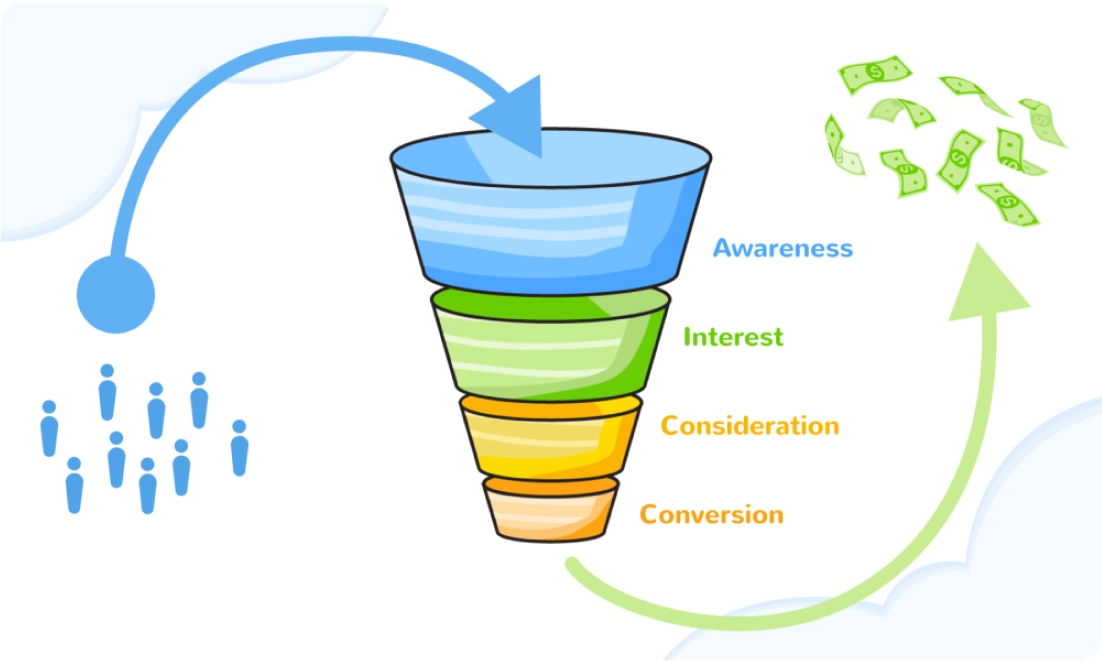
    The pipeline functions as an operational roadmap for sales representatives, defining explicit milestones required to advance opportunities forward. While a sales funnel visualizes volume attrition from the buyer’s perspective, a sales pipeline governs internal team actions across each active deal stage.

    Core Stages of a Modern Enterprise Sales Pipeline

    While specific sales cycles vary across B2B and B2C commercial models, a robust sales pipeline encompasses six foundational operational stages:

    1. Lead Ingestion & Discovery: Capturing inbound opportunities arriving via digital campaigns, website widgets, and direct messaging links.
    2. Lead Qualification: Assessing budget availability, operational fit, and purchasing authority via automated lead qualification workflows.
    3. Proposal & Solution Demo: Presenting tailored commercial proposals, software demonstrations, or product catalogs aligned with verified buyer pain points.
    4. Negotiation & Value Alignment: Resolving contract adjustments, payment schedules, and commercial service agreements.
    5. Deal Closing & Billing: Issuing digital invoices, confirming payment receipts, and finalizing onboarding documentation.
    6. Account Expansion & Retention: Nurturing post-purchase customer satisfaction to drive repurchase velocity using proven repeat order strategies.

    Comparison: Manual Spreadsheet Templates vs Dedicated Pipeline Software

    Early-stage businesses often track deals using manual spreadsheet templates. However, as transaction velocity scales, manual tracking creates data silos and tracking latency.

    Pipeline Management Dimension Manual Excel Spreadsheet Template Dedicated Pipeline Management Software
    Interaction Logging Manual input; prone to rep omission and data entry delays. Automated; synchronizes bi-directionally from chat and email.
    Follow-Up Trigger Alerts None; relies entirely on individual rep memory. Real-time automated alerts based on activity and deal dormancy.
    Team Workspace Governance Fragile; risks file version conflicts and overwritten rows. Centralized multi-agent workspace with Role-Based Access Control.
    Velocity & Win Rate Telemetry Complex to calculate; requires manual formula maintenance. Real-time reporting dashboards with closed-loop revenue metrics.

    Best Practices to Monitor and Accelerate Sales Deals

    To eliminate pipeline congestion and maintain predictable revenue velocity, implement these four operational disciplines:

    1. Establish Objective Stage Exit Criteria

    Define explicit milestones required to progress deals between stages. For example: an opportunity advances to Negotiation only after the formal commercial proposal has been reviewed and acknowledged by the verified decision-maker.

    2. Execute Routine Pipeline Cleansing

    Unresponsive deals clutter revenue forecasts and drain sales energy. Periodically reclassify inactive leads to a Nurturing queue to keep frontline reps focused on high-intent buyers. Maintain clean contact records using our guide on organizing your WhatsApp customer database.

    3. Track Core Sales Velocity Telemetry

    Measure pipeline efficiency through four core metrics: total active opportunity volume, average contract value (deal size), overall win rate percentage, and average sales cycle length from first touch to closed-won.

    4. Enforce Disciplined Conversational Follow-Up

    Deals stall primarily due to communication lapses during negotiation. Deploy proven follow-up cadences from our playbook on how to follow up on WhatsApp sales to close deals to keep buyers engaged.

    Scaling Pipeline Velocity with Autonomous AI & CRM Architecture

    Managing high-volume commercial deals manually generates excessive administrative overhead. Migrating pipeline operations to an integrated CRM application connected directly to the official WhatsApp Business API establishes an automated sales engine.

    Powered by Agentic AI technology and visual workflow automation engines, the platform automatically captures interaction logs, advances deal stages based on conversational triggers, and alerts sales reps to closing signals in real time.

    This automated coordination ensures reps focus on closing negotiations while accelerating long-term customer retention.

    Frequently Asked Questions (FAQ)

    1. What is the key difference between a sales pipeline and a sales funnel?

    A sales funnel illustrates the buyer’s conversion journey from top-of-funnel awareness to purchase, while a sales pipeline maps the specific operational actions and stages sales reps must execute to close a deal.

    2. How do you resolve deals that stall inside the sales pipeline?

    Audit the root cause of friction, share targeted educational case studies, propose adjusted packaging tiers, or conduct a structured discovery review before reclassifying the deal as closed-lost.

    3. What is the optimal number of stages in an enterprise sales pipeline?

    The optimal structure typically consists of 4 to 7 discrete stages, depending on the complexity of your commercial model (complex B2B enterprise deals require more granular stages than rapid B2C transactions).

    Scale Your Sales Pipeline Operations with Cekat.ai

    Gaining complete visual command over your commercial sales pipeline is essential for driving predictable, sustainable revenue growth. A structured sales architecture ensures your team captures and closes every viable market opportunity.

    The platform at Cekat.ai delivers conversational commerce infrastructure combining official WhatsApp Business API connectivity, automated CRM pipelines, 24/7 AI Agents, and real-time sales telemetry. Explore our subscription tiers on our pricing and plans page or schedule a discovery consultation with our solutions team today.

  • How to Transfer WhatsApp to a New Phone Without Data Loss

    How to Transfer WhatsApp to a New Phone Without Data Loss

    Key Advantages

    • Comprehensive Commercial Data Protection: Safeguards complete customer interaction histories, billing invoices, and transaction records during mobile device migrations.
    • Flexible Transfer Methodologies: Deploys direct local QR code peer-to-peer transfers or encrypted cloud backups via Google Drive and iCloud.
    • Secure Account Re-Registration: Delivers structured protocols for transferring chat histories when switching devices and updating business phone numbers concurrently.
    • Hardware-Independent Cloud Infrastructure: Scales enterprise messaging onto WhatsApp Business API endpoints to eliminate local device dependencies entirely.

    For commercial enterprises and sales teams, WhatsApp message histories represent critical corporate assets rather than casual social logs. Customer order confirmations, delivery addresses, billing receipts, and active commercial negotiations are embedded within these conversations. Losing chat histories due to migration errors when upgrading handsets creates immediate operational disruption.

    Mastering how to transfer WhatsApp to a new phone guarantees seamless conversational continuity without data loss. Implementing structured data migration protocols forms an essential foundation for organizing your WhatsApp customer database efficiently.

    Essential Prerequisites Before Initiating WhatsApp Phone Migration

    Complete these foundational operational checks prior to initiating account migration between devices:

    • Ensure Active Cellular Connection: The registered phone number must be active to receive one-time SMS verification passcodes or voice calls.
    • Synchronize Cloud Accounts: Ensure the destination smartphone is authenticated with the same Google Account (Android) or Apple ID (iPhone) used on the legacy device.
    • Verify Network Stability and Battery Levels: Connect both handsets to a stable Wi-Fi network and maintain at least 60 percent battery charge.
    • Update Messaging Applications: Ensure WhatsApp Messenger or WhatsApp Business applications on both handsets are updated to the latest official release.

    How to Back Up Business WhatsApp Data to Cloud Storage

    Creating an encrypted cloud backup serves as the standard safety protocol prior to device migration:

    1. Open WhatsApp on the primary phone, navigate to Settings > Chats > Chat Backup.
    2. Select your target Google Drive or iCloud account.
    3. Toggle on Include Videos if transaction media attachments are required for historical archiving.
    4. Tap Back Up and allow the upload process to reach 100 percent completion.

    How to Move WhatsApp Chats Using Direct Local QR Transfer

    WhatsApp provides a native peer-to-peer chat transfer protocol that bypasses cloud storage completely. This direct migration method is rapid and practical when transferring between identical operating systems (Android to Android, or iOS to iOS).

    Step-by-Step Local Chat Migration:

    1. On the source phone, navigate to Settings > Chats > Transfer Chats, then tap Start.
    2. Grant camera and local network permissions to launch the built-in QR code scanner.
    3. Download and install WhatsApp on the destination phone, verifying the identical phone number.
    4. Select Transfer chat history from old phone when prompted on the welcome screen.
    5. Scan the QR code displayed on the new phone using the camera on the old handset.
    6. Keep both handsets in close proximity and connected to local Wi-Fi until the transfer completes.

    Transferring WhatsApp Across Different Phone Numbers and Devices

    If upgrading to a new phone involves changing your primary business contact number, execute the number change on the legacy handset prior to migrating to the destination device:

    1. Insert the new SIM card into the source phone (or ensure the new number is ready to receive SMS passcodes).
    2. On the source handset, open Settings > Account > Change Number.
    3. Enter the legacy phone number in the upper field and the new business number in the lower field, then tap Next.
    4. Choose whether to broadcast number change notifications to your contact list, then complete SMS verification.
    5. Execute a complete cloud backup of the updated account.
    6. Launch WhatsApp on the destination phone and initiate the restoration process using the new phone number.

    Comparison of WhatsApp Migration Methodologies

    Migration Method Primary Advantages Operational Considerations
    Direct Transfer (QR Code) Fast local transfer; zero cloud storage bandwidth consumption. Limited strictly to identical operating systems (Android-to-Android / iOS-to-iOS).
    Cloud Backup (Drive/iCloud) Data preserved securely on cloud servers; recoverable even if the physical handset is lost. Requires stable internet bandwidth and sufficient cloud storage allocation.
    Cross-Platform Migration (Android to iOS) Official protocol for transferring data across differing mobile operating systems. Requires dedicated utility tools (e.g., Move to iOS) and factory-state devices.

    Eliminate Hardware Migration Friction with WhatsApp Business API

    Migrating chat records manually between physical mobile handsets provides a temporary solution. However, as customer inquiry volume scales into thousands of daily messages, anchoring enterprise communications to physical consumer smartphones creates operational bottlenecks and data security vulnerabilities.

    The permanent architecture for scaling commercial organizations is transitioning to the official WhatsApp Business API. Operating on cloud-hosted API infrastructure delivers distinct enterprise capabilities:

    • Hardware-Independent Cloud Archiving: Interaction logs reside securely in enterprise cloud servers, eliminating data loss risks from damaged or lost handsets.
    • Unified Multi-Agent Collaboration: Customer service teams manage conversations concurrently from a single phone number inside a WhatsApp multi-agent workspace across desktop interfaces.
    • Autonomous 24/7 Service Resolution: Deploys conversational WhatsApp AI chatbots to engage and resolve inbound customer inquiries around the clock.
    • Synchronized Enterprise CRM Telemetry: Integrates customer profile data and interaction records directly into a centralized CRM application.

    Explore foundational distinctions in our guide to how the WhatsApp API differs from standard WhatsApp to build a resilient, device-free customer communication stack.

    Frequently Asked Questions (FAQ)

    1. Why did my WhatsApp chat history fail to restore on my new phone?

    The most common causes are authenticating with a different Google Account or Apple ID than the one containing the backup file, or accidentally selecting the Skip option during the initial chat restoration setup prompt.

    2. Does registering WhatsApp on a new phone automatically log out the old device?

    Yes. Standard WhatsApp accounts operate on a single primary smartphone architecture. As soon as verification completes on the destination phone, the active session on the old handset terminates automatically.

    3. How can I transfer WhatsApp chats without scanning a QR code?

    Utilize the cloud restoration method. Create a full chat backup to Google Drive or iCloud on the source phone, then choose the Restore option when registering the phone number on the destination handset.

    Modernize Your Enterprise Messaging Stack with Cekat.ai

    Safeguarding customer conversation data is essential for preserving operational continuity and client trust. Migrating enterprise messaging to official cloud infrastructure eliminates hardware vulnerabilities while streamlining high-velocity customer communication.

    The platform at Cekat.ai provides enterprise conversational infrastructure combining official WhatsApp Business API connectivity, multi-agent workspaces, autonomous AI Agents, and centralized CRM pipelines. Explore our plan tiers on our pricing and plans page or schedule a discovery consultation with our solutions team today.

  • How to Format Official WA Me Links with Automated Text

    How to Format Official WA Me Links with Automated Text

    Key Advantages

    • Frictionless Inbound Access: Connects prospective buyers directly to active chat threads without requiring them to save your phone number first.
    • Structured Pre-Filled Messaging: Generates automated pre-populated text so sales agents immediately understand the customer inquiry context.
    • Custom Shortlink Branding: Converts long URL strings into clean, branded shortlinks optimized for social media bios and landing page CTAs.
    • Enterprise Scalability: Creates an initial entry point designed to integrate with 24/7 conversational AI and unified CRM pipelines.

    High-intent digital transactions often fail due to unnecessary communication hurdles. Potential buyers frequently abandon purchasing journeys when forced to manually copy phone numbers, save contacts to mobile address books, and search for profiles inside messaging applications. This operational friction creates drop-off points that degrade inbound marketing conversion rates.

    WhatsApp eliminates this friction through official wa me direct links, connecting businesses with customers in a single tap. Deploying direct chat links with automated pre-filled text is a foundational best practice for mastering how to sell on WhatsApp effectively and building responsive acquisition funnels.

    What Is a WA Me Link and How Does It Work?

    A wa.me link is an official Click-to-Chat utility provided by Meta. It utilizes standardized web protocols to launch the native WhatsApp mobile application or desktop WhatsApp Web client automatically without requiring contact storage.

    This official URL structure is secure, reliable, and backed by Meta infrastructure. These links can be deployed across website CTA buttons, social media bios, digital product catalogs, and print materials converted into dynamic QR codes.

    Official Syntax for WA Me Direct Links and Pre-Filled Text

    Constructing direct WhatsApp links manually is straightforward when adhering to official URL syntax guidelines:

    1. Standard Format (Direct Phone Number Routing)

    The standard syntax for a direct chat link:

    https://wa.me/<InternationalPhoneNumber>

    Key formatting rules:

    • Include the international country code (e.g., use 62 for Indonesia or 1 for the United States).
    • Omit leading zeroes at the beginning of the phone number.
    • Exclude special characters such as plus signs (+), hyphens (-), brackets, and blank spaces.

    Correct Syntax: https://wa.me/6281234567890
    Incorrect Syntax: https://wa.me/+62-812-3456-7890 or https://wa.me/081234567890

    2. Advanced Format (Embedding Automated Pre-Filled Text)

    To help prospects initiate conversations with clear commercial context, append the ?text= parameter after the destination phone number. This pre-populates the user text field automatically.

    URL encoding standards:

    • Spaces between words are encoded as %20.
    • Line breaks or enters are encoded as %0A.

    Syntax structure for pre-filled copy:

    https://wa.me/<PhoneNumber>?text=<URLEncodedText>

    Practical example: If you want prospects to initiate with: “Hello Team, I would like to order Package A”.
    The resulting URL is: https://wa.me/6281234567890?text=Hello%20Team,%20I%20would%20like%20to%20order%20Package%20A

    Managing Long URL Strings with Generators and Shortlinks

    When embedding extensive greeting messages with multiple line breaks, the resulting URL string can become excessively long. Unshortened links can appear cluttered when displayed on social profiles.

    1. Utilizing WA Wizard Generators

    To avoid encoding spaces and punctuation manually, online wa wizard generator tools automate the process. Users simply type standard prose into a text box, and the system generates an encoded link with an optional downloadable QR code.

    2. Shortening Links with Bitly

    To create clean, professional URLs for marketing campaigns, use URL shortening platforms like Bitly:

    1. Copy your generated long wa.me URL string.
    2. Open the Bitly creator dashboard and paste the destination link.
    3. Customize the back-half slug with your brand name, e.g., bit.ly/OrderCekatOfficial.
    4. Deploy the branded shortlink across your social media bios and ad campaigns.

    Strategic Placement Channels for Direct WhatsApp Links

    Placement Touchpoint Recommended Pre-Filled Copy Commercial Objective
    Instagram & TikTok Bio Links “Hi Team! I want details on the current promotion” Captures social media viewers directly into inbound sales funnels.
    Website CTA Buttons “Hi Support, I would like to consult on business solutions” Provides immediate consultative assistance to live website visitors.
    Digital Product Catalogs “Hello, I would like to place an order for SKU {{ProductName}}” Accelerates checkout workflows directly from digital storefronts.
    Print Collateral & Packaging Converted into scan-to-chat dynamic QR codes Connects retail offline buyers with digital post-purchase support.

    Managing Inbound Chat Surges with Cekat.ai Automation

    Distributing direct chat links drives significant inbound lead volume. However, relying on manual agent responses during traffic surges creates response bottlenecks that jeopardize potential deals.

    To scale messaging throughput effectively, modernize your communication stack with the official WhatsApp Business API. Integrating an intelligent WhatsApp AI chatbot with a centralized CRM application ensures incoming leads from your links are engaged instantly, qualified automatically, and logged into sales pipelines 24/7.

    Pair this acquisition framework with proven lead nurturing playbooks from our guide on effective lead follow-up strategies to drive conversions and strengthen long-term customer retention.

    Frequently Asked Questions (FAQ)

    1. Why does my wa.me link show an invalid phone number error?

    The most common cause is incorrect country code formatting, such as including a leading zero (0), a plus sign (+), hyphens, or blank spaces. Ensure the URL contains digits only preceded by the international country code (e.g., 62812xxxx).

    2. Is creating a wa.me direct chat link free of charge?

    Yes. Creating standard wa.me direct chat links and using basic shorteners is completely free with no usage caps.

    3. How do I format line breaks (enters) in automated pre-filled text?

    Insert the %0A character code wherever you want a line break to appear. For example: Hello%20Team%0AI%20need%20a%20quote will render across two separate lines inside the user message field.

    Streamline Enterprise Messaging Operations with Cekat.ai

    Simplifying customer communication through official wa.me direct links is the first step toward building frictionless sales funnels. Ensuring inbound inquiries are managed with sub-second response times preserves buyer intent and scales pipeline revenue.

    The platform at Cekat.ai delivers conversational enterprise infrastructure combining official WhatsApp Business API connectivity, autonomous AI Agents, and multi-agent CRM management. Explore subscription tiers on our pricing and plans page or consult with our growth solutions team today.

  • Customer Lifetime Value: Formula, Metrics & CLV Growth Guide

    Customer Lifetime Value: Formula, Metrics & CLV Growth Guide

    Key Advantages

    • Acquisition Cost Efficiency: Maximizing revenue from existing customer relationships is proven to be 5x more cost-effective than continuous top-of-funnel acquisition.
    • Predictable Revenue Forecasting: Provides clear long-term recurring revenue visibility to establish sustainable, data-backed marketing budgets.
    • CRM-Driven Automated Retention: Connects historical transaction data with automated engagement schedules to trigger repeat purchase cycles reliably.
    • Elevated Lifetime Profitability: Deploys consultative upselling and cross-selling workflows across 24/7 conversational messaging channels.

    Many expanding commercial organizations direct the majority of their growth capital toward capturing new prospects while neglecting post-purchase lifecycle management. As Customer Acquisition Cost (CAC) rises across paid digital channels, relying exclusively on one-time transactions systematically erodes operating profit margins.

    The foundational metric for sustainable business profitability is Customer Lifetime Value (CLV or LTV). Mastering how to calculate and optimize customer lifetime value enables enterprises to preserve buyer loyalty, accelerate repurchase velocity, and generate predictable cash flow. This operational focus aligns directly with structured customer retention strategies.

    What Is Customer Lifetime Value (CLV)?

    Customer Lifetime Value (CLV) is the total monetary revenue or net profit a business expects to earn from a single customer throughout the entire duration of their commercial relationship. Unlike single-transaction metrics, CLV aggregates all purchases across the full customer lifecycle.

    In financial performance analysis, CLV serves as the primary benchmark for evaluating acquisition sustainability. When your CLV substantially outweighs CAC (maintaining a benchmark ratio of at least 3:1), your enterprise operates on a scalable, profitable foundation.

    Key Metrics and Customer Lifetime Value Calculation Formula

    Calculating CLV accurately requires four essential sales variables:

    • Average Purchase Value (APV): Total revenue divided by total transaction volume within a given timeframe.
    • Average Purchase Frequency (APF): Total transaction volume divided by total unique customer count.
    • Customer Value (CV): The average revenue generated by a customer in a period (APV multiplied by APF).
    • Average Customer Lifespan (ACL): The average duration in years or months that a customer maintains an active relationship with your brand.

    1. Standard Customer Lifetime Value Formula

    Customer Lifetime Value (CLV) = Customer Value × Average Customer Lifespan

    Expanded formula structure:

    CLV = (Average Purchase Value × Average Purchase Frequency) × Average Customer Lifespan

    2. Step-by-Step Calculation Scenario

    Consider an e-commerce retail brand with the following operational data:

    • Average Purchase Value (APV): $50 per transaction
    • Average Purchase Frequency (APF): 4 orders per year
    • Average Customer Lifespan (ACL): 3 years

    Applying the formula:

    Customer Value = $50 × 4 = $200 per year
    CLV = $200 × 3 years = $600

    In this scenario, each acquired customer delivers an average lifetime gross value of $600 across their 3-year active relationship.

    Strategic Importance of CLV in Enterprise Scalability

    Strategic Advantage Operational Business Impact
    Acquisition Budget Optimization Establishes a defined ceiling for acquisition spend (CAC) to prevent unprofitable ad scaling.
    Retention Focus Aligns support and marketing teams around customer satisfaction and long-term account health.
    Cohort Segmentation Identifies high-value buyer segments (VIP accounts) for specialized consultative service tiers.
    Revenue Telemetry Enables leadership to forecast recurring revenue streams and lifetime margins with greater precision.

    Proven Frameworks to Increase Customer Lifetime Value

    Expanding CLV requires systematically increasing average order value, accelerating transaction frequency, or extending account lifespan.

    1. Automated Replenishment and Reorder Messaging

    Deliver timely replenishment reminders as consumable products approach typical exhaustion cycles. Deploying automated follow-up workflows ensures existing buyers receive contextual reorder prompts across messaging channels without manual sales intervention.

    2. Personalized Consultative Upselling

    Leverage historical transaction properties inside your CRM application to recommend complementary accessories or upgraded service tiers. Apply proven frameworks from our guide to effective upselling strategies to expand average basket sizes naturally.

    3. In-Chat Loyalty Programs and VIP Incentives

    Incentivize ongoing engagement with digital loyalty rewards, personalized milestone discounts, and exclusive product releases. Integrating loyalty workflows directly inside chat interfaces allows customers to review point balances and apply vouchers seamlessly.

    4. 24/7 Responsive Customer Support

    Service friction is the leading driver of account churn. Deploying a conversational WhatsApp AI chatbot powered by the official WhatsApp Business API resolves order inquiries and technical issues instantly around the clock.

    Scaling CLV with Autonomous AI Agents and CRM Telemetry

    Managing lifetime customer journeys manually across large databases leads to delayed follow-ups and missed expansion signals. Integrating Agentic AI technology with centralized CRM automation software eliminates this operational bottleneck.

    Intelligent systems evaluate customer health indicators, identify early churn signals, and trigger automated win-back workflows via customer segmentation software before accounts lapse. Combine these automated touchpoints with our comprehensive playbook on how to increase customer retention to maximize customer longevity.

    Frequently Asked Questions (FAQ)

    1. What is the fundamental difference between Customer Lifetime Value (CLV) and Customer Acquisition Cost (CAC)?

    CLV measures the total revenue or gross profit generated by a customer throughout their entire relationship with your business, whereas CAC represents the total sales and marketing expenditure required to acquire a single new customer. A healthy commercial benchmark is a CLV to CAC ratio of 3:1 or higher.

    2. What is the fastest method to increase Customer Lifetime Value?

    The fastest approach is accelerating repeat purchase frequency through automated replenishment messaging on WhatsApp, executing consultative in-cart upselling, and providing instant 24/7 customer service resolution.

    3. What factors cause Customer Lifetime Value to decline?

    CLV decreases primarily due to slow support response times, inconsistent product quality, lack of proactive post-purchase engagement, and high customer churn resulting from unaddressed complaints.

    Scale Customer Lifetime Value with Cekat.ai

    Retaining loyal customers and expanding account value over time forms the foundation of sustainable commercial growth. With structured conversational engagement and rapid support response times, existing accounts become reliable sources of high-margin recurring revenue.

    The enterprise platform at Cekat.ai delivers conversational commerce infrastructure combining the official WhatsApp Business API, 24/7 AI Agents, and automated CRM pipelines designed to maximize customer retention. Explore flexible plan options on our pricing and plans page or consult with our growth solutions team today.

  • How to Create a WhatsApp Link: Direct Chat & Auto Text Guide

    How to Create a WhatsApp Link: Direct Chat & Auto Text Guide

    Key Advantages

    • Frictionless Inbound Lead Capture: Enables prospective buyers to start a conversation with a single click without manually saving your phone number.
    • Pre-Populated Automated Greeting Copy: Structures initial inquiries with preset text parameters so sales reps instantly know which product the lead is inquiring about.
    • Multi-Channel Growth Ingestion: Deploys direct chat links across social bios, landing page CTA buttons, product catalogs, and marketing collateral.
    • Direct Enterprise Scalability: Serves as the primary entry point ready to connect with AI chatbots and centralized CRM pipelines.

    High-intent buyers frequently drop out of the purchasing funnel when confronted with unnecessary manual friction. Requiring prospects to manually copy a phone number, save it to their address book, and search for the profile in messaging apps creates drop-off points that suppress sales conversion rates.

    Official WhatsApp direct links powered by the wa.me domain eliminate this friction entirely. Incorporating direct chat links with automated pre-filled copy serves as a foundational best practice for mastering how to sell on WhatsApp effectively and scaling inbound acquisition channels.

    The Mechanics of WhatsApp Direct Chat Links

    A direct WhatsApp link utilizes official Click-to-Chat web protocols to initiate messaging sessions automatically. When clicked, the link launches the native WhatsApp mobile app or desktop WhatsApp Web client without requiring contact storage.

    The standard structure utilizes the official https://wa.me/ domain followed by an international phone number. Tapping the link opens an active chat interface populated with pre-configured greeting text ready for the customer to send.

    Manual Configuration: Formatting Syntax and Pre-Filled Text

    Direct chat links can be constructed manually by adhering to standard URL formatting guidelines.

    1. Standard Syntax (Direct Phone Number Routing)

    The core URL framework for WhatsApp direct links:

    https://wa.me/<InternationalPhoneNumber>

    Formatting rules:

    • Include the international country code (e.g., 62 for Indonesia or 1 for the United States).
    • Omit leading zeroes, plus signs (+), hyphens (-), brackets, and blank spaces.

    Correct Syntax: https://wa.me/6281234567890
    Incorrect Syntax: https://wa.me/+62-812-3456-7890 or https://wa.me/081234567890

    2. Advanced Syntax (Embedding Pre-Filled Text Copy)

    To help prospects initiate conversations with clear commercial intent, append the ?text= parameter to the destination URL. Encode spaces between words as %20 and line breaks as %0A.

    Syntax structure for pre-filled copy:

    https://wa.me/<PhoneNumber>?text=<URLEncodedText>

    For example, if you want incoming leads to initiate with: “Hello, I would like to inquire about Package A”, the resulting URL is https://wa.me/6281234567890?text=Hello,%20I%20would%20like%20to%20inquire%20about%20Package%20A.

    Streamlining Workflow with WA Link Generators

    Manually typing URL encoding codes can be tedious when dealing with multi-line messages. Utilizing an online WA link generator automates this process by instantly converting standard prose into functional, encoded links.

    Benefits of automated generator tools:

    • Eliminates syntax errors in special characters and punctuation.
    • Provides interactive previews of the user interface before deployment.
    • Generates matching QR codes for print packaging and offline marketing collateral.

    Shortening and Customizing Links with Bitly

    Long URLs containing extensive text parameters can appear untidy when displayed across digital profiles. Utilizing URL shortening services like Bitly creates clean, branded links that improve click-through rates.

    Steps to configure shortlinks:

    1. Copy your generated long WhatsApp URL.
    2. Paste the URL into your Bitly link creation dashboard.
    3. Customize the back-half slug to reflect your campaign, e.g., bit.ly/ChatCekatSales.
    4. Deploy the branded shortlink across your digital touchpoints.

    Strategic Placement Touchpoints for Inbound Links

    Placement Channel Recommended Greeting Copy Commercial Objective
    Instagram & TikTok Bio Links “Hi! I saw your promotion on social media and would like details” Converts casual social viewers into qualified inbound chat leads.
    Website CTA Buttons “Hi Support team, I need assistance choosing a subscription plan” Delivers immediate consultative support to live website visitors.
    Digital Product Catalogs “Hello, I would like to place an order for SKU {{ProductName}}” Streamlines transaction paths directly from digital storefronts.
    Offline Print & Packaging Converted to scan-to-chat dynamic QR codes Connects offline retail buyers with digital warranty and support services.

    Managing Inbound Chat Surges with WhatsApp API & AI Automation

    Generating direct WhatsApp links successfully drives inbound lead volume. However, as marketing campaigns scale, sales teams relying on manual chat handling face response bottlenecks that cause buyer drop-offs.

    Scaling message operations requires upgrading to the official WhatsApp Business API. Integrated with an intelligent WhatsApp AI chatbot and an enterprise CRM application, inbound messages from your links are engaged instantly, qualified automatically, and logged into deal stages around the clock.

    Connect this acquisition framework with structured consultative playbooks from our guide to how to follow up on WhatsApp sales to close deals to convert inbound inquiries into closed revenue.

    Frequently Asked Questions (FAQ)

    1. Why does my wa.me link return an invalid number or error message?

    The most common cause is incorrect country code formatting, such as including a leading zero (0), a plus sign (+), or hyphens. Ensure your URL contains only digits preceded by the country code (e.g., 62812xxxx for Indonesia or 1415xxxx for the US).

    2. Is creating a direct WhatsApp chat link free?

    Yes. Creating standard wa.me direct chat links and using basic URL shorteners is 100% free with no usage caps.

    3. How do I add line breaks (enters) into automated WhatsApp link text?

    Insert the %0A character code wherever you want a line break to appear. For example: Hello%20Team%0AI%20need%20a%20quote will render across two separate lines inside the user’s text field.

    Scale Inbound Messaging Operations with Cekat.ai

    Simplifying how buyers connect with your business is the first step toward accelerating sales velocity. Ensuring inbound inquiries are managed with sub-second response times preserves customer intent and scales pipeline revenue.

    The platform at Cekat.ai delivers enterprise conversational infrastructure combining official WhatsApp Business API connectivity, autonomous AI Agents, and full CRM automation. Explore plan options on our pricing and plans page or consult with our growth solutions team today.

  • Effective Lead Follow-Up Strategies: Proven Sales Guide

    Effective Lead Follow-Up Strategies: Proven Sales Guide

    Key Advantages

    • Deal Closing Acceleration: Converts hesitant prospects into active buyers through scheduled, value-first touchpoints that resolve purchase hesitation.
    • Pipeline Leak Prevention: Leverages centralized CRM records to ensure every opportunity has an explicit follow-up schedule without slipping through the cracks.
    • Sales Operational Efficiency: Combines automated inbound qualification with scheduled message sequences to save hours of manual sales outreach.
    • Contextual Buyer Experience: Eliminates aggressive sales pressure by providing educational assets that directly address the prospect’s unique operational pain points.

    Have you ever captured an inbound lead from a website form, WhatsApp thread, or post-webinar attendee list, only to experience complete silence when initiating outreach? At first, you remain optimistic. You send a courteous initial follow-up. Days pass without a reply. At that point, hesitation sets in: “Should I reach out again, or stop to avoid being intrusive?”

    Sales lead follow up challenges

    The real frustration is not merely being ignored—it is the fear of misstepping: following up too quickly feels pushy, while waiting too long risks losing the opportunity to faster competitors.

    This is where structured sales discipline matters: effective follow-up is not a matter of luck or sheer persistence, but of engineering a systematic workflow from discovery to decision. Understanding proven strategies on how to follow up on WhatsApp sales to close deals helps agents craft persuasive outreach without applying undue pressure.

    Simply defined, a lead follow-up is a strategic sequence of consultative touchpoints designed to guide prospects from “initial interest” to “decision readiness.” It is far more than asking if they remember your brand; it ensures every interaction delivers value, resolves specific objections, and establishes a clear next step.

    If you want to ensure your business follow-up workflows are organized, compliant, and automated from day one, you can consult with the solutions team at Cekat.ai.

    Understanding the Essence of Effective Lead Follow-Up

    Lead follow-up is a structured cadence focused on value delivery rather than repetitive checking-in. When someone enters your funnel, they are rarely prepared to purchase immediately. At each touchpoint, you bridge their initial interest with relevant insights that help them evaluate solutions effectively.

    • Focus on Value Over Pitching: Every touchpoint must carry a specific purpose. Adopting a consultative, value-first approach positions your brand as an expert advisor rather than an aggressive vendor. Value can take the form of practical guides, answers to core objections, or verified client case studies.
    • Deploy Frictionless, Specific CTAs: Avoid vague closing questions like “let’s connect sometime.” Use low-commitment, actionable prompts, such as inviting them to a brief 15-minute diagnostic call or offering a tailored summary document for internal review.
    • Decision Cycles Require Time: In commercial B2B environments, buyers rarely make decisions after a single contact. Stakeholders need time to compare options, align internal budgets, and review technical requirements. Consequently, follow-up must be architected as a consistent marathon rather than a one-off sprint.

    The 5-Stage High-Converting Follow-Up Workflow

    High converting lead follow up workflow

    1. Rapid First-Touch Response: Engaging inbound leads within minutes captures intent before attention shifts. You can automate top-of-funnel triage using automated lead qualification on WhatsApp.
    2. Deliver High-Value Contextual Assets: Share educational playbooks, implementation checklists, or industry case studies that address their explicit challenges to deepen trust.
    3. Deploy Multichannel Touchpoints: Do not rely exclusively on email. Combine email, WhatsApp messaging, and direct calls based on buyer comfort and communication preferences.
    4. Anchor Each Touchpoint with Clear CTAs: Conclude every message with a specific, frictionless action step that is easy for the prospect to approve.
    5. Centralize Records in a CRM Pipeline: Log every conversation and upcoming task inside dedicated lead management software or a centralized CRM application to prevent lead leakage across sales pipelines.

    Common Misconceptions That Derail Follow-Up Campaigns

    Implementing effective automated follow-up software requires dismantling several recurring assumptions that undermine deal closing rates:

    • Abandoning Outreach Too Early: Sales reps frequently stop outreach after 1 or 2 attempts out of fear of being intrusive. In reality, most high-value B2B deals close only after the 5th or 6th meaningful touchpoint.
    • Focusing Exclusively on Direct Pitches: Demanding purchase commitments repeatedly without providing fresh insights makes buyers feel pressured rather than supported.
    • Blasting Generic Copy: Copy-pasting unsegmented mass templates results in low response rates because the content fails to address the prospect’s distinct requirements.
    • Delaying Contact Out of Politeness: Stalling initial outreach dissipates buyer momentum when purchase intent is highest.
    • Equating Silence with Rejection: An unreturned message rarely signifies a definitive “no”; buyers are often evaluating alternatives, handling internal priorities, or awaiting leadership alignment.

    Step-by-Step Implementation Guide for Sales Teams

    Sales team lead follow up best practices

    To establish a consistent, predictable, and measurable follow-up process, execute these five systematic steps:

    1. Segment and Score Prospects: Organize customer contact records by adopting best practices on organizing your WhatsApp customer database to prioritize high-intent accounts while nurturing early-stage discovery leads.
    2. Structure Cadence with Sensible Intervals: Map outreach schedules with healthy spacing (e.g., Day 1, Day 3, Day 7, Day 14) to maintain visibility without overwhelming the recipient.
    3. Curate Diverse Communication Assets: Prepare multiple content formats for each stage—such as problem-solving articles, feature comparison sheets, and short demo links—to avoid repeating the same message.
    4. Deploy Intelligent Automation: Implement workflow automation to handle routine administrative tasks like calendar reminders and onboarding acknowledgments while preserving personal warmth in core sales copy.
    5. Evaluate Telemetry and Iterate: Monitor response rates, stage conversion velocity, and drop-off points regularly to refine message copy and channel timing based on real pipeline data.

    Frequently Asked Questions (FAQ)

    1. What is the optimal time interval between sales follow-up messages?

    A standard best-practice cadence spans 2 to 4 business days between touchpoints. A proven sequence includes Day 1 (immediate response), Day 3 (value asset/case study), Day 7 (probing technical question), and Day 14 (final consultative check-in).

    2. How can sales agents follow up with unresponsive leads without sounding pushy?

    Shift the conversation from demanding a purchasing decision to offering new value. Share relevant industry benchmarks, offer solutions to common operational bottlenecks, and conclude with lightweight, zero-pressure CTAs.

    3. How many follow-ups should a sales team execute before closing a file?

    In consultative and B2B sales, opportunities typically require 5 to 8 touchpoints before closing. If a prospect remains unresponsive after 6 varied attempts, send a polite “break-up” message indicating you are pausing proactive outreach while remaining available whenever they are ready.

    Engineer a Predictable Follow-Up System Today

    Mastering effective lead follow-up relies on combining rapid response times, rich value delivery, multichannel versatility, and precise Calls to Action. By institutionalizing your process through CRM pipelines and workflow automation, your team maintains consistent outreach without sacrificing authentic personalization.

    If you are ready to construct an automated, data-driven lead follow-up system that accelerates your deal closing rates, explore our subscription tiers on the pricing and subscription page or consult directly with the growth team at Cekat.ai.

  • WhatsApp Marketing Campaign: Complete Enterprise Guide

    WhatsApp Marketing Campaign: Complete Enterprise Guide

    Key Advantages

    • Structured Bilateral Dialogue: Transforms one-way marketing blasts into engaging, interactive conversations that nurture trust and guide commercial purchases.
    • Regulatory Compliance & Account Health: Enforces explicit opt-in consent, Meta-approved message categories, and 24-hour service window governance to eliminate ban risks.
    • Seamless Multi-Touchpoint Ingestion: Connects inbound acquisition funnels (CTWA ads, QR codes, web widgets) directly to CRM databases and conversational AI agents.
    • Data-Driven Scalability: Leverages verified template governance and comprehensive ROAS telemetry to scale sales performance predictably.

    Imagine planning to launch a conversational messaging strategy for your business, but your internal team immediately expresses hesitation. They worry about customer permission protocols (opt-in), message template creation, and conversation flows that appear complex at first glance. However, when broken down methodically, the entire framework is remarkably structured, logical, and highly scalable.

    In this guide, you will gain a comprehensive, practical overview of how an enterprise WhatsApp marketing campaign operates as an intentional conversation using an integrated WhatsApp marketing suite rather than an unsegmented promotional broadcast. You will also understand why foundational elements like verified customer consent, contextual greeting copy, and the 24-hour customer service window are vital to preserving brand credibility and delivery quality.

    If you want to ensure your entry points, permission frameworks, and message templates are architected accurately from day one, the conversational growth team at Cekat.ai is ready to help structure your roadmap.

    Understanding WhatsApp as a Strategic Conversational Channel

    WhatsApp is far more than a personal messaging application; it is a high-intent, measurable conversational channel for commercial enterprise. This means you do not simply “blast messages”—you initiate context-rich, bilateral conversations powered by verified opt-in consent, intelligent greeting flows, and structured message templates.

    Once this operating model is understood, executing a WhatsApp marketing campaign becomes straightforward: the objective is not to flood customer inboxes with one-way advertising, but to cultivate commercial trust through helpful, structured customer engagements.

    Standard WhatsApp Business App vs. WhatsApp Business Platform (API)

    The primary distinction between the two versions lies in operational scale and automation capabilities:

    • WhatsApp Business App: Ideal for micro-businesses handling manual, one-to-one chats on a single handset. It offers an intimate touch but becomes overwhelmed rapidly as campaign volume grows, making response consistency impossible to maintain.
    • WhatsApp Business Platform (API): Engineered for high-velocity enterprise scale. Utilizing the WhatsApp Business API enables programmatic message dispatch, workflow automations, bi-directional CRM data synchronization, and pre-approved message templates ensuring full compliance with Meta policies. Here, creative marketing concepts transform into standardized, repeatable sales funnels.

    The Three Official WhatsApp Message Categories

    On WhatsApp, message categories govern how and when a business can initiate conversation threads, as outlined in our breakdown of WhatsApp API conversation categories:

    Three official WhatsApp API conversation categories marketing utility service

    1. Marketing Messages: Outbound messages focused on promotional announcements, new product drops, personalized recommendations, or dormant account re-engagement. Because the business initiates the thread, you must deploy a Meta-approved message template.
    2. Utility Messages: Essential operational and transactional notifications requested by customers, such as order confirmations, logistics tracking updates, or payment receipts.
    3. Service Messages: Inbound customer care and support threads initiated directly by the customer. These conversations flow naturally as support agents or bots resolve inquiries.

    Mastering these categories ensures you position promotional content accurately. When categorized correctly, outbound messaging is received as valuable assistance rather than intrusive spam.

    End-to-End Campaign Architecture: Setup to Delivery

    How does a high-performing WhatsApp campaign execute from initial technical setup to customer message reception? Here is the operational workflow:

    1. Technical Infrastructure and Workspace Configuration

    Establish your foundational infrastructure by setting up a Meta Business Manager account, creating your WhatsApp Business Platform credentials, and assigning role-based team permissions. Connect WhatsApp directly to your core operational stack—such as your CRM application, POS system, or WhatsApp AI chatbot—to enable automated, dynamic personalization.

    2. Customer Entry Point Architecture

    Customer acquisition entry points for WhatsApp marketing

    Prospective buyers need intuitive pathways to discover and initiate WhatsApp threads with your brand. Common high-intent entry points include:

    • Social media bio links and story swipe-ups.
    • Click-to-WhatsApp (CTWA) ads on Meta platforms.
    • Exit-intent web modals and embedded live chat widgets.
    • Dynamic QR codes on product packaging, retail POS counters, and print collateral.
    • Direct support buttons across website help center pages.

    3. Managing Explicit Opt-Ins and Conversational Greetings

    When a prospect engages an entry point and enters the messaging thread, an automated initial greeting immediately engages them. If your campaign involves ongoing outbound promotions, ensure you capture explicit consent adhering to official WhatsApp API opt-in requirements. This initiates the 24-hour customer service window, during which two-way communication flows freely.

    4. Scaling Outbound Delivery via Approved Templates

    Once recipient consent is confirmed, deploy outbound marketing at scale using official WhatsApp message templates. Enhance message appeal with rich media elements—including product imagery, demo videos, and quick-reply action buttons.

    How to Design High-Converting, Measurable Campaigns

    To ensure your WhatsApp marketing campaign produces confirmed revenue rather than idle chat volume, apply these strategic frameworks:

    • Define Explicit Campaign Objectives: Clarify whether the campaign focuses on lead generation, mid-funnel consultative nurturing, or post-purchase repeat order activation.
    • Design Natural Conversational Flow: Craft clear, benefit-driven opening copy followed by intuitive button choices that make replying effortless for the recipient.
    • Monitor Multi-Touchpoint Telemetry: Track campaign efficiency inside a dedicated marketing analytics and ROAS dashboard, measuring core performance indicators:
      • People Reached (unique audience delivery).
      • Qualified Leads (inbound high-intent inquiries).
      • Cost per Qualified Lead (acquisition efficiency).
      • Conversions & Gross Revenue (finalized order value).
      • Cost per Conversion (customer acquisition cost).
      • Return on Investment / ROAS (aggregate financial return).

    When executing A/B split testing, isolate a single variable at a time—such as testing two CTA button texts or two distinct visual assets—to determine which element maximizes conversion rate.

    Common Operational Pitfalls to Avoid

    Common mistakes to avoid in WhatsApp marketing campaigns

    To protect your brand reputation and maintain high phone number quality ratings, eliminate these common mistakes:

    • Assuming Saved Contacts Equal Opt-In Consent: Prior commercial transactions do not grant implicit permission to send promotional broadcasts. Opt-in must be captured explicitly.
    • High-Frequency Promotional Blasting: Over-messaging leads to audience fatigue, notification muting, and elevated spam reporting rates.
    • Treating WhatsApp Like Email or SMS: WhatsApp is an interactive two-way medium. Blasting static one-way marketing links without conversational engagement yields poor response rates.
    • Disregarding the 24-Hour Service Window: Attempting to dispatch standard session messages after the 24-hour window expires without an approved template results in immediate delivery failure.
    • Mixing Marketing Copy into Active Support Tickets: Interjecting aggressive sales offers during technical troubleshooting or complaint resolution damages customer trust.

    Advanced Strategies for Long-Term Conversational Growth

    Developing an enterprise-grade messaging ecosystem is an iterative, data-driven journey. Scale your operations through these four sequential phases:

    1. Deploy automated customer segmentation on small, high-intent sample audiences before launching high-volume campaigns.
    2. Ensure end-to-end conversion tracking connects messaging sessions with closed CRM deals.
    3. Execute iterative A/B testing sprints and conduct monthly telemetry reviews.
    4. Deepen CRM data synchronization to unlock hyper-personalized, dynamic product recommendations.

    Ultimately, conversational depth and context vastly outweigh raw message volume. By treating WhatsApp as a permission-based, template-governed channel, your marketing campaigns will evolve into an intelligent, repeatable revenue engine.

    Frequently Asked Questions (FAQ)

    1. What is the fundamental difference between a WhatsApp marketing campaign and a standard broadcast blast?

    A standard broadcast blast typically pushes uniform text passively to a contact list. In contrast, a WhatsApp marketing campaign is a strategic, multi-step workflow incorporating targeted entry points, verified opt-in compliance, Meta-approved message categories, and bilateral conversational flows designed to guide prospects toward completed purchases.

    2. What is the 24-hour customer service window in the WhatsApp Business API?

    The 24-hour conversation window is an operational timeframe that opens automatically when a customer messages a business account. During this active session, businesses can exchange free-form customer service messages without incurring template messaging fees.

    3. How can businesses protect their phone numbers from being banned when executing campaigns?

    Always secure verifiable opt-in consent before initiating outreach, deploy Meta-approved templates for marketing broadcasts, segment audiences based on verified transaction behaviors, and maintain a disciplined, non-intrusive messaging frequency.

    Ready to Architect High-Converting WhatsApp Campaigns?

    If you want to construct scalable, automated, and compliant conversational marketing workflows, explore our flexible subscription tiers on the pricing and subscription page or consult directly with the solutions team at Cekat.ai.

  • How to Broadcast on WhatsApp: Complete Guide & Best Practices

    How to Broadcast on WhatsApp: Complete Guide & Best Practices

    Key Advantages

    • Private Mass Communication: Dispatches promotional updates and announcements to hundreds of contacts simultaneously without exposing recipient identities to one another.
    • Optimized Direct Engagement: Reaches customers directly in their primary chat inbox to secure rapid replies from high-intent buyers.
    • Sender Quality & Compliance: Safeguards your business line against spam reports and bans through verified opt-in consent and measured messaging cadences.
    • Scalable Expansion Roadmap: Structures foundational broadcast workflows on standard apps that seamlessly transition to the WhatsApp Business API as transaction volume scales.

    Have you ever prepared a high-volume announcement using WhatsApp broadcast software, only to feel like you threw messages into an empty void? Some customers mention they were on the list but received nothing. Others feel confused about whether to use a broadcast list or a group chat because both seem to reach multiple people. What causes the most stress is the anxiety that outbound messages will be flagged as spam, resulting in quick account bans.

    This operational friction typically stems from three root causes. First, the most overlooked technical rule: the recipient contact storage prerequisite. On the standard WhatsApp app, a broadcast message will only be delivered if the recipient has saved your business number in their personal address book. If your database is organized on your end but recipients have not saved your number, delivery results remain zero.

    Second, many assume broadcast lists and group chats serve identical purposes. In reality, their architecture is completely distinct. A broadcast is private and one-way: recipients cannot see other contacts on the list, and replies route exclusively into your private 1-on-1 inbox. Conversely, a group chat is a public forum where members interact collectively. Understanding the differences between a WhatsApp blast and regular broadcast ensures you deploy the proper communication channel.

    Third, compliance and message frequency governance. Outbound broadcasts must remain contextually relevant and permission-based. Mastering how to broadcast on WhatsApp properly ensures your campaigns deliver high engagement while strictly complying with platform policies, as detailed in our guide on how to broadcast on WhatsApp without getting banned.

    If you want to ensure your enterprise messaging strategy operates securely and compliantly through a dedicated WhatsApp marketing platform, you can consult directly with the team at Cekat.ai.

    Core Architectural Concepts: WhatsApp Broadcast Lists vs. Group Chats

    “A broadcast list sounds like mass messaging, but to the recipient, it always feels like a private 1-on-1 conversation.”

    In WhatsApp, broadcasting functions via curated broadcast lists: you select specific contacts, and the message routes to each individual handset as an isolated private chat. Recipients cannot see other contacts, preserving confidentiality and conversational intimacy.

    • When to Deploy Broadcasts: When you need to deliver informative updates without opening a public group discussion—such as seasonal sales, new collection drops via new product broadcast templates, holiday greetings, or customer feedback surveys.
    • The Core Delivery Prerequisite: Contacts only receive app broadcasts if they have saved your business phone number in their address book. This mutual contact storage rule is foundational to standard broadcast delivery.

    Strategic Advantages of WhatsApp Broadcasts for Customer Outreach

    Strategic advantages of WhatsApp broadcasts for business communication

    • Private and Confidential: Recipients receive messages in their private inbox, eliminating awkward group dynamics, protecting customer privacy, and preventing disorganized chat threads.
    • Direct Inbox Visibility: Broadcast messages land in the main conversation stream, generating exceptional read rates and faster conversion follow-ups.
    • Higher Engagement When Segmented: When contact lists are structured using proven WhatsApp marketing strategies, response rates and conversion velocity increase significantly.

    Step-by-Step Practical Blueprint: How to Broadcast via WhatsApp App

    1. Curate Recipient Lists: Open your WhatsApp Business application, navigate to Business broadcasts or New broadcast, and select contacts from your address book. Remember that standard lists enforce a limit of 256 contacts per broadcast list.
    2. Organize Audience Segments: Label each broadcast list clearly using automated customer segmentation tools (e.g., Active Clients, Pending Checkout, or New Leads). Maintain database hygiene over time by following best practices on organizing your WhatsApp customer database.

    How to Construct and Dispatch Impactful Broadcast Copy

    • Attach Meaningful Visual Media: Include high-resolution product imagery, video clips, or PDF brochures selectively so messages remain engaging without overwhelming recipient storage. You can also link products directly from your store via how to upload a product catalog to WhatsApp.
    • Draft Concise, Benefit-Driven Copy: Highlight the core value proposition in the opening sentences to ensure high engagement on mobile screens.
    • Deploy Clear Calls to Action (CTAs): Conclude with explicit action prompts, such as “Reply ‘ORDER’ to claim your voucher” or direct catalog deep links.
    • Review Previews Thoroughly: Double-check text alignment, media framing, and CTA links before hitting send.
    • Understand Template Governance: When scaling to the official API, outbound broadcast templates undergo an automated review process by Meta to ensure commercial policy compliance.

    Common Pitfalls That Lead to Delivery Failures and Spam Flags

    Common broadcast mistakes and spam prevention on WhatsApp

    • Confusing Broadcasts with Group Chats: Choosing the wrong format compromises customer data privacy and creates communication friction.
    • Ignoring the Saved-Contact Requirement: Attempting to send standard app broadcasts to numbers that have not saved your contact results in zero message delivery.
    • Broadcasting Without Explicit Opt-In Consent: Sending promotional blasts to unverified leads triggers spam reports and rapid account bans. Always enforce WhatsApp API opt-in compliance.
    • Prioritizing Message Volume Over Relevance: Bombarding inboxes with irrelevant promotions causes customer fatigue and high block rates.
    • Superficial Name Personalization: True personalization aligns message context with past purchasing behaviors rather than simply inserting first-name merge tags.
    • Relying on Manual Apps for Scaling Enterprises: Managing thousands of customer interactions manually on a single device causes response bottlenecks and lost revenue.

    When to Upgrade to the WhatsApp Business API

    • Indicators You Have Outgrown Standard Apps: Your contact base exceeds the 256-recipient limit, your support staff is overwhelmed by manual replies, and you require deep delivery telemetry.
    • Capabilities Unlocked with API Infrastructure: You can deploy high-volume WhatsApp blast campaigns to thousands of contacts without mutual phone saving requirements, utilize a collaborative WhatsApp multi-agent inbox, and synchronize data directly with a CRM application. Learn how to get started in our guide to official WhatsApp Business API registration.

    Frequently Asked Questions (FAQ)

    1. Why are some contacts not receiving my WhatsApp broadcast messages?

    On the standard WhatsApp Business app, broadcast messages are only delivered to recipients who have actively saved your business number in their personal address book. If your number is not saved, the message is automatically dropped by the network.

    2. What is the difference between a standard WhatsApp broadcast and a WhatsApp blast?

    A standard broadcast is capped at 256 contacts per list and requires mutual contact saving. In contrast, an official WhatsApp Business API blast allows mass message delivery to thousands of opted-in contacts simultaneously without the 256-recipient ceiling and without requiring recipients to save your number.

    3. How can businesses broadcast promotions without getting banned?

    Ensure all recipients have provided explicit opt-in consent, segment contact lists by verified purchasing interests, maintain a moderate dispatch cadence (1-2 times per month per cohort), and include clear opt-out instructions.

    Build Measurable, High-Impact Broadcast Workflows

    Mastering how to broadcast on WhatsApp properly relies on three foundational pillars: respecting customer privacy, verifying contact storage (or upgrading to the API), and prioritizing contextual value in every campaign. With these practices in place, your messaging becomes a reliable driver of customer retention and sales conversions.

    If you want to scale your business messaging operations using official API infrastructure paired with intelligent automations, explore our flexible tiers on the pricing and subscription page or consult directly with the growth team at Cekat.ai.

  • WhatsApp Marketing Strategy for SMEs: Complete Practical Guide

    WhatsApp Marketing Strategy for SMEs: Complete Practical Guide

    WhatsApp marketing strategies for SMEs

    Key Advantages

    • Solution-Driven Personal Engagement: Transforms rigid sales pitches into consultative, friendly conversations that resolve buyer hesitation and accelerate deal velocity.
    • Lean Operational Efficiency: Leverages built-in tools like digital catalogs and quick replies so small teams can manage dozens of concurrent inquiries consistently.
    • Sender Reputation Protection: Prevents spam flags and account bans by enforcing verified opt-in consent and behavioral audience segmentation.
    • Clear Scaling Pathway: Builds structured conversational workflows on standard apps that easily transition to the WhatsApp Business API and CRM integration as order volume grows.

    Have you ever experienced having an exciting new product and receiving inbound chats from prospective buyers, but feeling unsure about what to send and when, without appearing pushy? You also worry that frequent broadcast messages might cause contacts to view your brand as spam. This friction is common among small and medium-sized enterprises (SMEs), where operational bandwidth is limited and teams consist of only a few individuals.

    This is where a disciplined WhatsApp marketing strategy for SMEs becomes essential. WhatsApp is not merely a megaphone for blasting one-way promotional ads; it is an integrated conversational channel where you build customer relationships, showcase digital catalogs, deliver responsive support, and close transactions warmly within a single messaging thread. Understanding how to sell on WhatsApp effectively and deploying dedicated WhatsApp marketing solutions provides the baseline for structuring these interactions.

    How WhatsApp Marketing Functions in Practice

    Executing successful WhatsApp marketing requires an organized workflow from day one so customer inquiries evolve beyond simple price checks. Here is how it functions in daily operations:

    1. Establish Core Business Foundations: Deploy the WhatsApp Business App (or upgrade to the WhatsApp Business API for multi-agent capabilities). Complete your business profile with high-resolution branding, clear service descriptions, physical locations, operating hours, and direct links to your website or storefront.
    2. Capture Permission-Based Contacts (Opt-In): Secure transparent customer consent to receive promotional updates—such as during retail checkout, digital order form submissions, or loyalty program sign-ups. Avoid shortcuts like purchasing unverified phone lists, and adhere strictly to official WhatsApp API opt-in requirements.
    3. Implement Contact Segmentation: Categorize contacts using automated customer segmentation tools based on transaction history or lifecycle stages. Effective labels include: New Inquiries, Pending Payment, VIP Repeat Buyers, or Category Interest A.
    4. Deliver Value-Driven Content: Balance promotional pushes with helpful educational resources. Share product usage tips, sizing guides, or behind-the-scenes production stories before pitching seasonal discount offers.
    5. Deploy Core Conversational Automations: Utilize WhatsApp auto-reply features for immediate lead greetings, away messages outside business hours, and quick replies for recurring questions about pricing, payment details, and shipping policies.
    6. Leverage Digital Catalogs and WhatsApp Status: Curate an in-app product catalog featuring high-resolution visuals and updated pricing by following how to upload a product catalog to WhatsApp. Use WhatsApp Status as an organic showcase to encourage natural inbound chat initiation.
    7. Dispatch Measured Broadcast Campaigns: Send broadcasts thoughtfully via dedicated WhatsApp broadcast software using actionable WhatsApp broadcast tips, scheduling delivery during peak engagement windows like midday breaks or early evenings.
    8. Track Essential Campaign Telemetry: Monitor open rates, click-through rates (CTR), conversational reply ratios, and finalized sales to evaluate campaign ROI through structured WhatsApp conversion tracking.

    Actionable Steps to Build High-Converting Strategies

    Actionable steps to build a WhatsApp marketing strategy for SMEs

    To ensure your WhatsApp marketing drives consistent commercial revenue, structure your campaign execution around these five practical steps:

    • Define Explicit Campaign Objectives: Establish clear goals upfront. Is the message designed to introduce a new collection using a new product broadcast template, clear out seasonal inventory, acquire discovery leads, or stimulate repeat purchases? Your goal dictates copywriting tone and offer structures.
    • Craft Contextually Relevant Offers: Tailor messaging copy to customer behavioral profiles via strategic WhatsApp audience segmentation. If a client previously purchased skincare for dry skin, send hydrating product recommendations rather than oily skin treatments.
    • Maintain Safe Message Cadence: Regulate broadcast frequency moderately. Dispatching targeted promotional messages 1–2 times per month to refined cohorts is far safer and more effective than bombarding customer inboxes weekly.
    • Deploy Unambiguous Calls to Action (CTAs): Always conclude messages with a single explicit instruction to prevent decision fatigue. Examples of direct CTAs: “Reply ‘YES’ to claim your launch voucher” or “Tap the link below to select your variant”.
    • Iterate Based on Real Telemetry: Avoid assumptions. Monitor ad efficiency and conversion returns directly inside the marketing analytics and ROAS dashboard to optimize message spend.

    Common Pitfalls That Trigger Spam Penalties

    Many growing enterprises experience declining engagement or account suspensions due to recurring operational mistakes:

    • Assuming All Contacts Want Promotions: Storing past transaction phone numbers does not automatically grant permission to send unsegmented sales blasts. Follow verified best practices on how to broadcast on WhatsApp without getting banned to protect your business line.
    • Over-Messaging and High Frequency: Excessive broadcast frequency annoys customers, leading them to mute notifications or submit spam reports.
    • Over-Relying on Discounting: Competing solely on price cuts erodes brand equity and trains customers to delay purchases until promotions appear.
    • Replacing Human Touch Entirely with Bots: Automated greetings provide speed, but when buyers ask detailed consultative questions or express concerns, empathetic human assistance remains irreplaceable.
    • Broadcasting Generic, Unsegmented Blasts: Disagreeable, uniform copy blasted across your entire contact list makes offers feel irrelevant to the majority of recipients.

    Operational Next Steps After Initial Sales Traction

    Once your foundational WhatsApp marketing workflow generates consistent sales, execute these expansion phases to prepare your operations for scale:

    1. Optimize Chat Operations at Lean Scale: Master the standard WhatsApp Business app first. Ensure team response speed remains rapid and deploy automated follow-up tools to recover pending transactions with how to follow up on WhatsApp sales to close deals.
    2. Streamline Payment Checkout: Identify common drop-off points in buyer journeys. Activating automated payment links and a dedicated payment gateway for SMEs eliminates payment verification friction immediately.
    3. Standardize Customer Database Architecture: Organize customer records methodically through customer data management systems and best practices on organizing your WhatsApp customer database to sharpen future segmentation.
    4. Scale with Multi-Agent and CRM Capabilities: When daily chat volume reaches hundreds of conversations, transition to a WhatsApp multi-agent inbox connected directly to an integrated sales CRM.

    Summary: Core Principles of SME WhatsApp Marketing

    Core principles of WhatsApp marketing for small and medium businesses

    Sustainable WhatsApp marketing for growing enterprises rests upon three foundational pillars:

    • Value-Driven Dialogue vs. Hard-Selling: Focus on guiding buyers and resolving specific problems rather than demanding immediate one-way transactions.
    • Measured Cadence vs. High Frequency: Contextual relevance and healthy message spacing deliver far greater conversion value than uncoordinated message volume.
    • Targeted Segmentation vs. Mass Blasting: Grouping contacts by interest and purchase history yields significantly higher sales conversions than random blasts. Complement this with proven customer retention strategies to maximize lifetime value.

    Related resource: Best Omnichannel CRM for SMEs in Indonesia

    Frequently Asked Questions (FAQ)

    1. Why is WhatsApp marketing more effective for SMEs than traditional email marketing?

    In mobile-first markets, consumers check WhatsApp multiple times daily, resulting in open rates and response speeds that drastically outperform email. Furthermore, direct messaging enables immediate bilateral conversations to address buyer hesitations before checkout.

    2. How can small businesses collect customer contacts compliantly for WhatsApp marketing?

    Collect contact numbers with explicit opt-in consent during in-store POS checkouts, website order forms, or loyalty reward registrations. Clearly disclose that the phone number will be used for order receipts and relevant promotional updates.

    3. When should an SME upgrade from the standard WhatsApp Business app to WhatsApp Business API?

    An SME should upgrade to the WhatsApp Business API when daily inquiry volume overwhelms a single device, multiple customer service agents are needed to respond concurrently, or the business requires automated CRM synchronization and payment tracking.

    Structure Your Conversational Growth Today

    Developing an effective WhatsApp marketing strategy does not require massive budgets or complex software. Start by refining your business profile, responding promptly to incoming leads, and delivering offers that provide genuine value to your customers. Review flexible plan tiers on our pricing and subscription page.

    If you want to construct a structured, measurable WhatsApp marketing and automation strategy for your business, the conversational team at Cekat.ai is ready to help align your operational workflows with clear commercial KPIs.

  • How to Sell on WhatsApp: Practical Strategies to Close Sales

    How to Sell on WhatsApp: Practical Strategies to Close Sales

    Key Advantages

    • Sales Closing Acceleration: Transforms passive chat inquiries into confirmed sales through rapid responses and guided consultative dialogue.
    • Frictionless Digital Catalogs: Empowers buyers to explore and select items directly inside WhatsApp without manual image-sharing friction.
    • Systematic Follow-Up & Retention: Leverages contact labels to recover pending orders and capture high-margin repeat purchase opportunities.
    • Enterprise API Scalability: Builds an operational foundation ready to scale toward the WhatsApp Business API and automated CRM workflows.

    Inbound customer chats land in your WhatsApp inbox every day, yet you struggle with what to prioritize first, leading to interactions that feel awkward, rigid, or pushy. Product catalogs remain unorganized—every time a prospect asks about pricing, you find yourself scrambling to send product images and retyping explanations. What frustrates you most is wanting to close deals quickly, yet delayed responses and unstructured chat flows cause sales to stall.

    This is where understanding how to sell on WhatsApp effectively becomes a game-changer. It does not mean blasting random promotional messages. WhatsApp excels as a personalized direct-to-consumer sales channel because you engage in bilateral conversations with prospective buyers in real time. With a structured setup, you eliminate sales guesswork entirely.

    This article guides you from foundational mechanics to proven conversational habits that drive deal velocity, especially through structured follow-up sequences as outlined in how to follow up on WhatsApp sales to close deals. You will discover why this channel works and how to leverage WhatsApp Business features so conversations actively guide buyers toward purchasing decisions.

    If you want to ensure your conversational sales funnels operate systematically from the initial greeting to automated follow-ups, the team at Cekat.ai is ready to help map out the most practical strategy for your business.

    What Is Selling on WhatsApp and Why Does It Work?

    Selling on WhatsApp Business strategy

    Selling on WhatsApp refers to marketing, closing commercial transactions, and managing customer service directly inside messaging threads, powered primarily by WhatsApp Business capabilities. Here, WhatsApp acts as an all-in-one conversational bridge connecting specific customer pain points with tailored product solutions.

    Compared to directing buyers to passive social feeds or lengthy websites, conversational chat provides unmatched convenience. Buyers can ask specific questions regarding their unique use case, and you can deliver personalized, context-rich recommendations in seconds.

    Core benefits of this approach include:

    • Building Authentic Personal Relationships: Direct 1-on-1 conversations ensure prospects feel heard and uniquely accommodated rather than targeted with one-way advertising.
    • Strengthening Trust: Sharing authentic social proof, customer testimonials, or real product imagery mid-conversation resolves purchase anxiety instantly.
    • Accelerating Deal Velocity: Immediate replies preserve buyer enthusiasm when purchasing intent is at its peak.
    • Unlocking Repeat Order Lifetime Value: Preserved interaction histories make ongoing re-engagement and customer retention strategies seamless without incurring new acquisition ad costs.

    Related resource: What Is Upselling and How to Implement It

    How WhatsApp Business Features Power Your Sales Funnel

    To maximize revenue velocity, utilize native WhatsApp Business tools according to their distinct operational functions:

    • WhatsApp Business App vs. API: The mobile app suits micro-businesses operating on a single device. The WhatsApp Business API is engineered for scaling enterprises requiring CRM integrations, multi-agent inboxes, and automated workflows. Discover key differences in WhatsApp API is not the same as regular WhatsApp.
    • Professional Business Profiles: Displays brand identity, verified addresses, service descriptions, and operating hours to establish instant credibility.
    • Digital In-Chat Product Catalogs: An integrated display shelf where prospects explore product specs and pricing independently. Master catalog management in how to upload a product catalog to WhatsApp.
    • Quick Replies: Keyboard shortcuts to dispatch standardized answers for recurring inquiries (such as bank details, shipping options, or sizing dimensions) in seconds.
    • Automated Greeting & Away Messages: Greets incoming leads instantaneously 24/7 or manages response expectations when your office is closed.
    • Contact Labels: Categorizes contacts by deal stages, such as “New Inquiry”, “Awaiting Payment”, or “VIP Client”.
    • Direct WhatsApp Links & QR Codes: Routes traffic seamlessly from social media, landing pages, or physical packaging directly into chat threads without manual phone number saving.
    • WhatsApp Status: An organic storytelling medium to showcase inventory arrivals, behind-the-scenes production, and limited flash sales.
    • Broadcast Lists: Dispatches targeted announcements to segmented audience cohorts, especially when understanding the difference between a WhatsApp blast and broadcast.

    Step-by-Step Practical Blueprint: How to Sell on WhatsApp

    Practical steps to start selling products on WhatsApp Business

    To construct an organized, scalable sales operation from day one, execute these seven practical stages:

    1. Configure a Complete Business Profile: Separate personal and business numbers, populating your profile bio with explicit value propositions and operating hours.
    2. Curate a High-Converting Product Catalog: Organize inventory into clear collections with high-resolution visuals, clear benefit-driven copy, and transparent pricing.
    3. Enforce Contact Database Discipline: Standardize customer contact saving formats by adopting proven methods on organizing your WhatsApp customer database.
    4. Maintain a Consistent WhatsApp Status Cadence: Publish educational insights, customer reviews, and popular variant updates to preserve top-of-mind brand awareness.
    5. Deploy Unambiguous Calls to Action (CTAs): Guide prospects with clear instructions at the conclusion of every message, such as “Tap below to view catalog variants” or “Reply ‘YES’ to claim your voucher”.
    6. Standardize Response Speed: Prepare quick-reply templates for fundamental product questions to maintain first response times under 5 minutes.
    7. Execute Segmented Follow-Ups: Re-engage prospects with pending checkouts using a supportive, consultative tone rather than aggressive payment demands.

    Fatal Conversational Selling Mistakes to Avoid

    Businesses frequently experience stalled revenue growth due to recurring operational pitfalls:

    • Using Unverified Personal Numbers: Raises buyer security concerns and degrades transaction trust.
    • Blasting Unsegmented Broadcasts: Spamming contacts with generic promotions without explicit opt-in permissions triggers rapid account bans. Adopt how to broadcast on WhatsApp without getting banned to safeguard your phone number reputation.
    • Slow Response Latency: Leaving inbound inquiries unanswered for hours allows high-intent prospects to purchase from faster competitors.
    • Aggressive Hard-Selling Without Dialogue: Pitching payment links immediately before understanding the customer’s specific needs or questions.
    • Neglecting Systematic Follow-Ups: Assuming non-responsive buyers are permanently lost without attempting courteous re-engagement.

    Advanced Strategies to Scale Conversational Revenue

    Advanced strategies to accelerate WhatsApp commercial revenue

    To scale operations while preserving authentic personalization, combine consultative sales techniques with intelligent automation:

    • Funnel-Stage Segmentation: Differentiate conversational copy between first-time discovery leads, abandoned carts, and recurring VIP buyers through strategic WhatsApp marketing strategies.
    • Automated Inbound Lead Qualification: Deploy conversational AI agents to execute automated triage and lead qualification via automated lead qualification on WhatsApp before routing to human sales reps.
    • Proactive Transaction Notifications: Dispatch automated payment receipts, invoice links, and shipping tracking updates to keep buyers informed.
    • Native CRM Data Integration: Synchronize chat threads directly with commercial pipelines via dedicated WhatsApp CRM integration for real-time customer lifecycle management.

    Essential Weekly Performance Telemetry

    Evaluate sales performance using quantitative data rather than subjective impressions by tracking these seven metrics weekly:

    • Delivery Rate: Confirms outbound messages successfully reach customer devices.
    • Read Rate: Measures the percentage of broadcast or promotional messages opened by recipients.
    • Average Response Time: Evaluates team response velocity on initial inbound inquiries.
    • Chat-to-Sale Conversion Rate: The percentage of inbound conversation sessions that conclude in confirmed revenue, tracked through WhatsApp conversion tracking.
    • Follow-Up Recovery Efficiency: The total transaction volume rescued through scheduled reminder sequences.
    • New Lead Database Growth: The weekly acquisition velocity of newly captured contact numbers.
    • Repeat Purchase Rate: The percentage of existing buyers returning to purchase via WhatsApp.

    Frequently Asked Questions (FAQ)

    1. What is the fundamental difference between standard WhatsApp and WhatsApp Business for sales?

    Standard WhatsApp is designed purely for personal communication. WhatsApp Business provides commercial tools such as verified business profiles, integrated digital product catalogs, quick replies, automated greeting/away messaging, and contact labels to manage sales pipelines.

    2. How can sales agents respond without sounding aggressive or pushy (hard-selling)?

    Adopt a consultative mindset. Listen to the prospect’s specific pain points first, recommend tailored product solutions with clear reasoning, and conclude with frictionless Calls to Action (CTAs), such as offering assistance with sizing choices or calculating shipping rates.

    3. What is the optimal frequency for following up with WhatsApp leads?

    The recommended benchmark is 2 to 3 follow-ups spaced across sensible intervals (e.g., initial reminder after 2–4 hours, and a second check-in the following business day). Ensure each touchpoint delivers value or helpful assistance rather than merely demanding payment.

    Conclusion: Winning on WhatsApp Relies on Speed and Relevance

    Success in conversational selling on WhatsApp centers on two fundamental pillars: response velocity and contextual relevance in every interaction. When your business profile is polished, catalogs are intuitive, and conversations are tailored to buyer needs, sales flow naturally without feeling forced.

    Audit your weekly telemetry with discipline, refine your quick replies, and ensure every chat is managed as an opportunity to cultivate long-term customer relationships.

    The team at Cekat.ai is ready to help you architect intelligent chat automations, lead qualification workflows, and CRM integrations to maximize your sales conversions today.