Category: Marketing

  • How to Measure WhatsApp Ad ROAS: Calculation & Tracking

    How to Measure WhatsApp Ad ROAS: Calculation & Tracking

    Imagine seeing incoming traffic from your Click-to-WhatsApp ads every single day, with plenty of conversations entering your inbox and eventual sales closing. The lingering headache, however, is that you are never entirely certain whether that generated revenue truly justifies your ad spend, or if it was merely a lucky streak of inbound volume.

    This is where understanding how to measure WhatsApp ad ROAS becomes critical. Measuring returns on WhatsApp messaging campaigns is not as straightforward as standard e-commerce checkouts due to the conversational latency before a transaction finalizes. Without an accurate measurement methodology, you risk burning ad budget on campaigns that look busy on chat volume but actually operate at a net loss.

    If you want to ensure your WhatsApp ad tracking infrastructure and conversion definitions are structured accurately from day one, you can consult with the conversational data team at Cekat.ai.

    What Is ROAS and Why Is It Applied to WhatsApp?

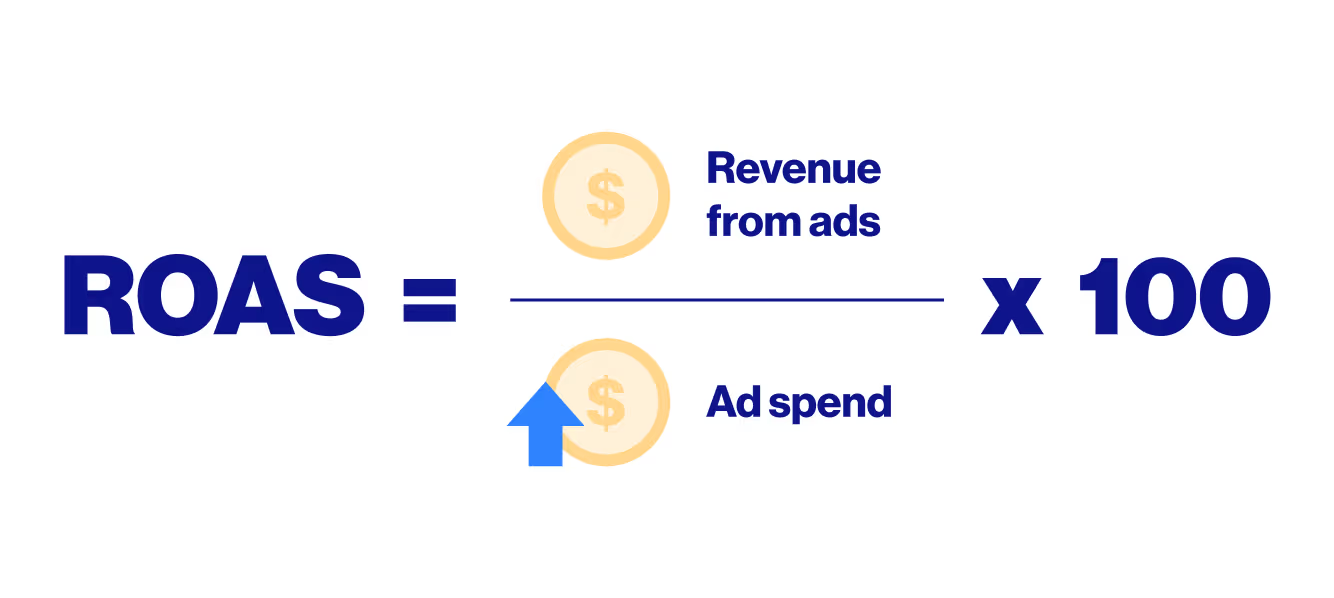
    ROAS (Return on Ad Spend) is a financial efficiency metric comparing total gross revenue generated from advertising against the total ad spend incurred. In short, ROAS answers the fundamental question: “For every $1 invested in advertising, how much revenue is returned?”

    Many marketers still confuse ROAS with ROI (Return on Investment):

    • ROAS focuses strictly on direct advertising efficiency against top-line gross revenue.
    • ROI evaluates broader business profitability by factoring in all operational expenditures, cost of goods sold (COGS), software subscriptions, and team payroll.

    Within the WhatsApp ecosystem, ROAS serves as your primary compass because conversational sales funnels operate uniquely. Ads do not instantly trigger a web checkout; instead, they route prospective buyers into private chat threads. That bilateral dialogue is where commercial transactions finalize. Measuring ROAS helps you determine whether your paid acquisition costs translate into sufficient closed-won revenue from those chat interactions.

    How WhatsApp Ad ROAS Measurement Operates

    Measuring ROAS across conversational pipelines requires tight telemetry integration between your ad management platforms and backend sales records:

    1. Establish Clear Conversion Definitions: Define the exact transaction events counted as revenue (such as confirmed bank transfers or completed payment gateway settlements verified by sales agents).
    2. Consolidate Multi-Channel Data Sources: Implement UTM parameters on your Click-to-WhatsApp ad links to trace campaign origins, cross-referencing metrics within Meta Ads Manager.
    3. Bridge Chat Conversations with CRM Transactions: Because checkout happens inside chat threads, you must match incoming phone numbers or customer IDs with verified transaction cards inside your CRM database.
    4. Implement the Appropriate Attribution Model: WhatsApp buyers rarely convert on their first message touchpoint. Multi-touch attribution frameworks distribute revenue credit equitably when buyers engage with multiple ad variations before purchasing.
    5. Calculate, Analyze, and Scale: Once verified revenue and total ad costs aggregate, calculate your ROAS to reallocate budget toward your most profitable ad sets.

    Step-by-Step Guide: Calculating WhatsApp Ad ROAS

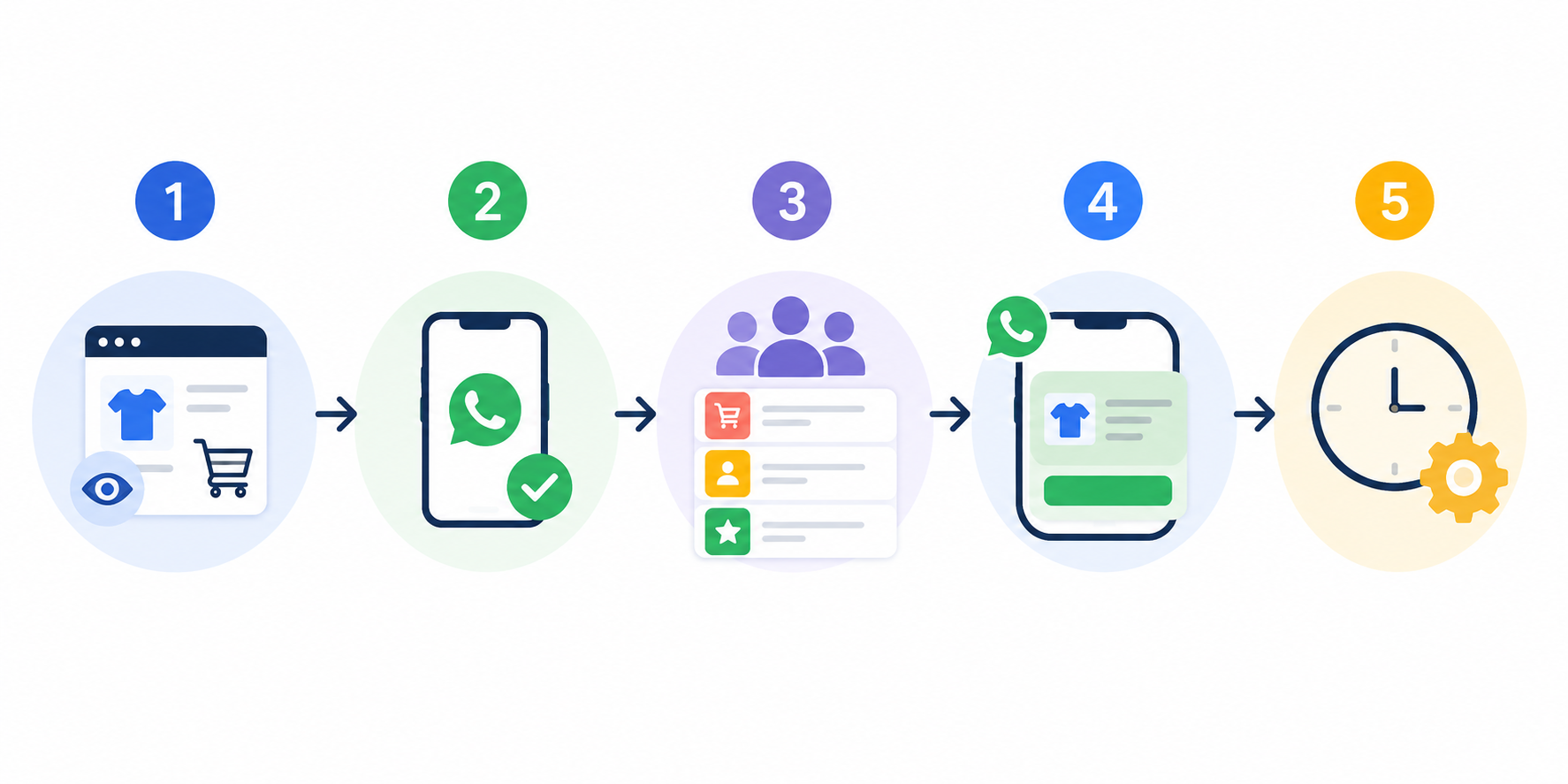
    Follow these five practical steps to implement accurate WhatsApp ad ROAS measurement:

    Step-by-step calculation workflow for WhatsApp ad ROAS

    1. Apply the Core ROAS Formula:
      The fundamental formula is:
      $$\text{ROAS} = \frac{\text{Total Revenue from Ads}}{\text{Total Ad Spend}}$$
      Example: If you spend $1,000 on Meta Ads and generate $4,000 in confirmed revenue, your ROAS is 4.0 (or 4x / 400%).
    2. Account for Full Advertising Costs Transparently: Do not limit your spend calculation solely to the ad network invoice. Include creative asset production (graphic/video design), affiliate commissions, and supporting martech software fees.
    3. Verify WhatsApp Revenue Attribution: Ensure you strictly count sales finalized from customers possessing verified tracking trails originating from Click-to-WhatsApp ad links.
    4. Reconcile Sales Ledgers with Bank Inflows: Cross-reference recorded dashboard orders against actual bank account clearings to prevent data inflation and phantom conversions.
    5. Interpret Multipliers Against Profit Margins: A ROAS of 1 represents break-even at the ad level. If your product net margin is 25%, you require a minimum break-even ROAS of 4x to ensure your ad campaigns do not incur net operational losses.

    What Is a Good ROAS and How Should You Interpret It?

    There is no universal benchmark for a “good” ROAS because targets depend heavily on gross margins and campaign objectives:

    • ROAS < 1: The ad campaign is unprofitable (ad spend exceeds gross revenue).
    • ROAS = 1: Break-even on ad spend (likely operating at a net loss once COGS is included).
    • ROAS > 1: The campaign generates top-line revenue exceeding direct advertising costs.

    As a general commercial benchmark in retail, a ROAS between 3x and 4x is commonly considered a healthy buffer to protect profitability. However, for campaigns designed to acquire high-value B2B opportunities or consultative leads (lead generation), initial ROAS multipliers may appear lower because full transaction realization occurs over protracted multi-month follow-up cycles.

    Common Pitfalls When Measuring WhatsApp Ad ROAS

    Several frequent tracking mistakes introduce severe bias into your ROAS calculations:

    • Equating High ROAS with True Net Profit: High ROAS figures can be deceptive if product overhead, shipping subsidies, or operational costs are excessive.
    • Defining Ad Spend Too Narrowly: Excluding creator content fees, copywriter retainers, and specialized tool costs from your total acquisition expenditures.
    • Relying Rigidly on Last-Click Attribution: Last-click models often devalue top-of-funnel WhatsApp awareness ads, ignoring the campaigns that initially introduced the buyer to your pipeline.
    • Blaming Ad Campaigns for Slow Sales Agent Responses: On WhatsApp, response speed and conversation quality directly dictate conversion rates. Outstanding ad targeting yields terrible ROAS if inbound chat leads sit unaddressed for hours.
    • Auditing ROAS Without Regular Evaluation: Reviewing performance metrics only at the end of the month rather than conducting weekly or daily pacing audits.

    Advanced Practices Used by Growth Practitioners

    Advanced telemetry, attribution models, and ROAS optimization

    Performance marketing practitioners deploy advanced data strategies to ensure dashboard statistics reflect underlying business health accurately:

    • Multi-Touch Attribution Deployment: Distributes fractional conversion credit across multiple customer touchpoints (e.g., discovery ad, WhatsApp consultation, and retargeting reminder) so no touchpoint is misvalued.
    • Customer Lifetime Value (LTV) Incorporation: Calculates ROAS taking into account expected repeat purchase value over a 3 to 6-month window from buyers acquired via WhatsApp.
    • Rigorous A/B Testing: Continuously splits tests across ad creative hooks, conversational agent closing scripts, and landing page UX to isolate the highest-converting funnel variations.
    • Automated Bi-Directional CRM Synchronization: Deploys automation systems to sync WhatsApp conversation statuses directly into sales databases, eliminating manual spreadsheet logging errors.

    Actionable Next Steps After Establishing Your ROAS Baseline

    Calculating your baseline ROAS is merely step one. Leverage that intelligence to optimize marketing efficiency across five actionable steps:

    1. Revalidate your conversion definitions to ensure WhatsApp revenue logging captures verified payments accurately.
    2. Incorporate all indirect acquisition expenses into your centralized ad spend ledgers.
    3. Audit your attribution windows if WhatsApp sales cycles typically require multiple days of consultation.
    4. Execute structured optimization sprints on low-performing ad sets by adjusting targeting parameters, messaging creative, and sales rep response velocity.
    5. Track your performance telemetry continuously to maintain long-term capital efficiency across paid channels.

    If you want to ensure your WhatsApp ad ROAS telemetry and conversational tracking infrastructure are reliable and actionable, the team at Cekat.ai is ready to help you architect the ideal measurement strategy.

  • How to Track WhatsApp Conversions: Step-by-Step Setup Guide

    How to Track WhatsApp Conversions: Step-by-Step Setup Guide

    Imagine your digital ad campaigns looking exceptionally successful on paper because your Click-Through Rate (CTR) is surging and visitors constantly click the WhatsApp CTA button. However, your sales team reports that inbound leads are scarce or filled with unqualified inquiries. The analytics dashboard shows glowing metrics, but the commercial pipeline tells a completely different story. This disconnect is the primary frustration marketers encounter when learning how to track WhatsApp conversions.

    This confusion stems from an inaccurate tracking methodology: treating a button click as a completed conversion. In reality, clicking a WhatsApp button merely indicates an initial intent to start a conversation; it provides zero guarantee that the user actually sent a message or initiated a qualified sales discussion.

    To transform surface-level click volume into reliable, high-intent conversion data that fuels sustainable business growth, you can consult with the conversational data team at Cekat.ai.

    What Is WhatsApp Conversion Tracking?

    At its core, tracking WhatsApp conversions is the process of measuring, monitoring, and analyzing user transitions from acquisition channels (such as paid ad campaigns or landing pages) into active conversations within the WhatsApp messaging environment.

    A crucial principle to understand is that WhatsApp conversions cannot be evaluated through a single static metric. To keep your marketing strategy aligned with commercial realities, conversions must be mapped across a multi-stage funnel:

    1. Click Event: The user clicks a WhatsApp widget or CTA link on your website.
    2. Message Sent (Inbound Chat): The user opens their WhatsApp application and successfully transmits an initial message.
    3. Qualified Lead: The inbound inquiry is triaged by sales representatives or conversational AI and verified as high-intent.
    4. Sale / Final Conversion: The conversational engagement concludes with a confirmed commercial transaction or signed contract.

    Related resource: Customer Retention Strategies with AI Agents

    Why Accurate Tracking Is Critical for Ad Performance

    Mastering WhatsApp conversion tracking delivers a direct impact on ad spend efficiency and return on ad spend (ROAS):

    • Prevents Data Inflation: Relying solely on button clicks creates false conversion spikes. Many clicks bounce before the app opens, cancel before sending, or originate from automated bots.
    • Optimizes Ad Network Smart Bidding: Machine learning algorithms require clean conversion signals to train effectively. Feeding ad networks raw click data trains algorithms to hunt for cheap clickers. Feeding them verified qualified lead signals steers ad spend toward actual paying customers.
    • Aligns Marketing and Sales Objectives: Verifiable tracking telemetry ensures marketing teams deliver the exact lead quality required by frontline sales reps.

    The 3 Most Common WhatsApp Conversion Tracking Methods

    Depending on your technical infrastructure and reporting requirements, you can deploy three distinct tracking approaches:

    1. Google Tag Manager (GTM) Click Tracking – Foundational Level

    This approach uses GTM triggers to detect when visitors click links containing wa.me or web.whatsapp.com. It is fast to configure and maps top-of-funnel outbound traffic patterns. However, it only registers a click event and cannot verify whether a message was delivered.

    2. In-Platform “Conversation Started” Events – Intermediate Level

    This method utilizes native Click-to-WhatsApp (CTWA) ad objectives within Meta Ads to track when users initiate conversations directly from ad units. Its limitation occurs when buyers first browse a website landing page before clicking a general WhatsApp button, which often causes attribution gaps.

    3. WABA & Offline Conversion Uploads (GCLID Integration) – Advanced Level

    This represents the gold standard for measuring actual commercial value. When a user clicks an ad, a unique tracking identifier (such as a Google Click ID / GCLID) appends to the session. When the customer messages your WhatsApp Business API (WABA) or CRM, the lead is qualified. Verified high-intent opportunities are then uploaded back to ad networks via offline conversion APIs to optimize bidding algorithms accurately.

    Related resource: Effective Lead Follow-Up Strategies for Faster Closings

    Step-by-Step GTM Setup for Website Click Tracking

    Google Tag Manager setup for tracking WhatsApp button clicks

    To configure foundational WhatsApp click tracking on your website using Google Tag Manager (GTM), follow these practical steps:

    1. Enable Click Variables: In your Google Tag Manager workspace, navigate to Variables, click Configure, and ensure Click URL and Click Element are activated.
    2. Create a Dedicated Trigger: Create a new Trigger with the trigger type Just Links. Configure the trigger to fire only when Click URL contains wa.me or web.whatsapp.com.
    3. Connect Your Conversion Tag: Create a new Tag for your target advertising platform (such as Google Ads Conversion Tracking or Meta Pixel). Attach your newly created WhatsApp click trigger to this tag.
    4. Validate via GTM Preview Mode: Run GTM Preview Mode before publishing changes to production. Perform test clicks on your WhatsApp buttons to verify tags fire accurately and prevent reporting discrepancies.

    Common WhatsApp Tracking Pitfalls to Avoid

    • Treating Clicks as Completed Conversions: This is the most common reporting error. Always differentiate website button clicks from actual inbound messages received in your support inbox.
    • Failing to Filter Junk and Bot Leads: Passing unqualified or spam inquiries into conversion tracking loops corrupts automated bidding algorithms with low-value signals.
    • Disconnecting Ad Dashboards from CRM Data: Failing to reconcile ad platform metrics with CRM closed-won records creates blind spots in your true customer acquisition cost (CAC).

    Operational Next Steps After Activating Tracking

    Once your tracking framework is operational, leverage your telemetry for continuous optimization:

    • Integrate Messaging with CRM Pipelines: Ensure all inbound WhatsApp chats log directly into your CRM so lead stages (qualified vs. disqualified) are tracked systematically.
    • Perform Weekly Data Reconciliation: Conduct weekly audits cross-referencing dashboard clicks, inbound conversations, and finalized revenue numbers.
    • Train Ad Algorithms with Closed-Loop Data: Regularly import qualified lead and purchase events back into ad networks to guide bidding engines toward high-value audiences.

    Conclusion: Reliable Tracking Drives Scalable Conversions

    Mastering how to track WhatsApp conversions is ultimately about data integrity, not vanity metrics. Upgrading your conversion tracking from raw link clicks to verified, high-intent conversations is the key to reducing acquisition costs and scaling commercial revenue predictably.

    A well-architected funnel paired with consistent qualification criteria ensures precise ad optimization and clear business forecasting. The team at Cekat.ai is ready to help you architect an end-to-end tracking and automation strategy tailored to your growth goals.

  • WhatsApp Retargeting: How to Recover Abandoned Sales

    WhatsApp Retargeting: How to Recover Abandoned Sales

    Imagine this scenario: you browse a product catalog online, even start filling out the website checkout form, but abandon the purchase halfway through. At that moment, you had clear intent, but due to distraction, hesitation, or a busy schedule, the transaction never finalized. Shortly after, a WhatsApp message lands on your phone—crafted not as a generic promotional blast, but as a helpful conversation tailored specifically to you.

    This is where an effective WhatsApp retargeting strategy excels. Its objective is not to overwhelm prospective buyers with disruptive sales pitches, but to enter the primary communication channel they already use to ask questions, clarify product details, and receive personalized assistance.

    If you want to ensure your business re-engagement workflows operate systematically, securely, and compliantly from day one, you can consult with the conversational growth team at Cekat.ai.

    What Is WhatsApp Retargeting and Why Is It Unique?

    Simply put, WhatsApp retargeting is a strategy for re-engaging commercial prospects who have previously demonstrated interest in your products or services but exited before finalizing checkout.

    What makes it significantly more effective than traditional marketing channels?

    • Two-Way Conversational Dynamics: Unlike static display advertisements or one-way promotional SMS, WhatsApp opens an immediate bilateral dialogue. Prospects can reply, ask product-related questions, or seek assistance with checkout barriers.
    • Behavioral Context & Segmentation: You avoid sending identical promotional copy to every contact. Messages adapt to user behavioral signals—such as last-viewed product categories, abandoned cart contents, or past support interactions.
    • Explicit Opt-In Consent Governance: High-performing retargeting always rests upon verified consumer consent. Clear opt-in permissions ensure messages are welcomed, minimizing spam reports and protecting your business sender reputation.

    How the End-to-End Retargeting Workflow Operates

    End-to-end WhatsApp retargeting and conversational re-engagement workflow

    To execute automated, precision-targeted WhatsApp retargeting workflows, implement these structured operational steps:

    1. Capture Intent Signals: Log behavioral events on your website or mobile app, such as items added to a cart, partial form completions, or repeated product page visits.
    2. Verify Opt-In Consent: Ensure prospective customers have explicitly agreed (consent) to receive operational and promotional communications via WhatsApp.
    3. Segment Your Audience: Group contacts based on their funnel position—for example, abandoned cart users, inactive past buyers, or high-intent enterprise leads.
    4. Craft Concise, Personalized Copy: Draft direct messaging that references the specific product context they viewed and provides an unambiguous Call to Action (CTA).
    5. Deploy Trigger-Based Automated Timing: Use automation engines to deliver follow-up reminders at optimal intervals—such as 1 to 2 hours after a cart is abandoned.

    Key Metrics to Monitor and Optimization Best Practices

    Monitoring conversational campaign analytics and performance KPIs

    To ensure your retargeting campaigns maximize return on investment (ROI) without wasting marketing budget, track these core Key Performance Indicators (KPIs):

    • Open & Click-Through Rate (CTR): Evaluates how effectively your message preview and hook capture audience attention.
    • Conversational Response Rate: Measures how natural, relevant, and engaging your conversation starters are to the prospect.
    • Sales Conversion Rate: Reflects the total volume and value of recovered transactions finalized after retargeting delivery.
    • Opt-Out & Block Rate: The primary campaign health metric. Increasing unsubscribe or block rates signal excessive messaging frequency or irrelevant copy.

    Related resource: Customer Retention Strategies with Conversational AI Agents

    Common Misconceptions and Pitfalls in WhatsApp Retargeting

    Many organizations fail to achieve expected conversion gains due to several recurring operational mistakes:

    • Neglecting Explicit Opt-In Consent: Blasting marketing messages to leads without verified opt-in permissions solely because they filled a form triggers spam flags and rapid account restrictions.
    • Relying on Standard Consumer Apps: Attempting to manage large-scale manual retargeting via personal WhatsApp apps causes response latency and inconsistent customer records. The official WhatsApp Business API is required for enterprise scale.
    • Violating 24-Hour Messaging Window Rules: Dispatching unapproved promotional copy outside the active 24-hour customer service window without pre-approved WhatsApp message templates causes delivery failures.
    • Over-Relying on Aggressive Discounting: Offering price cuts on every retargeting touchpoint erodes profit margins and conditions buyers to delay orders intentionally to wait for vouchers.
    • The “Set-and-Forget” Fallacy: Leaving automated sequences unmonitored without regular audience segmentation audits leads to stagnant conversion rates.

    Refining Your Conversational Retargeting Engine

    Deploying a disciplined WhatsApp retargeting strategy transforms purchase hesitation into confirmed revenue. By combining verified opt-in permissions, precision behavioral triggers, and helpful conversational assistance, WhatsApp becomes a high-recovery conversion engine for your business.

    Moving forward, prioritize continuous A/B testing on message timing, optimize copywriting templates, and streamline checkout UX to maximize overall revenue velocity.

    If you want to refine your conversational retargeting workflows and scale your sales pipeline, the team at Cekat.ai is ready to help you architect the ideal operational strategy.

  • WhatsApp Blast vs Broadcast: Key Differences Explained

    WhatsApp Blast vs Broadcast: Key Differences Explained

    Do you frequently feel that the mass messages you dispatch fail to deliver expected results? The core bottleneck might not lie in your promotional copywriting or marketing offer, but in the underlying delivery mechanism you deploy. The terms WA blast and WA broadcast are often assumed to be identical and used interchangeably. However, their underlying technical architecture, recipient requirements, and operating baselines differ fundamentally.

    The operational consequences of selecting the wrong dispatch method are severe: messages fail to deliver across recipient lists, business accounts face high risks of being flagged as spam, and marketing campaigns stall far below growth targets.

    To ensure your WhatsApp commercial communication strategy operates securely, systematically, and effectively from day one, you can consult with the enterprise messaging team at Cekat.ai.

    Understanding Core Definitions and Recipient Requirements

    To evaluate the difference between a WhatsApp blast and a broadcast, begin by analyzing the underlying delivery mechanics and recipient-side receipt criteria:

    • WhatsApp Broadcast (Saved-Contact Dependent): WhatsApp broadcast is a built-in feature available natively within consumer WhatsApp and the standard WhatsApp Business mobile app. It enables you to send a single message to multiple recipients simultaneously via a broadcast list. However, a critical technical requirement frequently overlooked is recipient contact storage: a standard broadcast will only land on a customer’s handset if that specific user has saved your business phone number in their personal phone address book. If they have not saved your number, the message is dropped by the network and never delivered.

    Related resource: How to Execute Compliant WhatsApp Broadcast Campaigns

    • WhatsApp Blast (API-Powered & Verified Opt-In): A WhatsApp blast is an enterprise-grade high-volume messaging method built upon the official WhatsApp Business API infrastructure provided via authorized Business Solution Providers (BSPs). Unlike standard app broadcasts, an API blast does not require recipients to save the sender’s phone number beforehand. In return, platform governance mandates that businesses possess a verified permission-based database (opt-in) and deploy pre-approved message templates verified by Meta’s compliance system.

    Related resource: High-Converting WhatsApp Blast Promotional Message Templates

    Operational Differences: WhatsApp Blast vs. Broadcast

    Operational comparison between WhatsApp broadcast and API blast

    Beyond recipient delivery criteria, several foundational operational differences separate these two approaches in daily business practice:

    1. Audience Scale and Delivery Capacity: Standard WhatsApp broadcasts enforce strict recipient limits per broadcast list (up to 256 contacts) and rely heavily on established personal contact ties. Conversely, WhatsApp blasts are engineered for scaling enterprises and corporate operations requiring immediate, reliable outreach to thousands or tens of thousands of customer contacts simultaneously.
    2. Dynamic Personalization Depth: In standard broadcasts, message copy is uniform across the entire list. Adding individual customer names or custom invoice numbers requires manual 1-on-1 typing. With API blasts, backend systems inject dynamic variable parameters (placeholders)—such as customer names, invoice IDs, delivery tracking numbers, or reservation dates—automatically from uploaded databases.
    3. Inbound Reply Management & Team Collaboration: Replies from a standard broadcast flood into a single mobile phone inbox, overwhelming customer service agents during peak traffic. In contrast, replies generated from an API blast route into a centralized, shared multi-agent workspace (multi-agent inbox). Support teams can distribute inbound threads collaboratively, deploy conversational AI automations, and track delivery telemetry in real time.

    Decision Framework: When to Choose Broadcast vs. Blast

    To ensure you execute campaigns effectively without wasting marketing resources, use this practical framework:

    • Choose WhatsApp Broadcast If: You manage a small local business or close-knit community with a limited customer base where clients know your staff personally and voluntarily save your business number in their phones.
    • Choose WhatsApp Blast If: You aim to launch large-scale marketing campaigns, deliver personalized cohort promotions, dispatch automated transactional notifications (such as OTPs or shipping receipts), and require verifiable delivery and read-rate analytics.

    Framework to Prevent Account Bans and Spam Penalties

    Spam prevention and message compliance concept

    Regardless of the method you deploy, safeguarding your business phone number’s sender reputation is mission-critical. Follow these operational guidelines to keep mass messaging campaigns compliant:

    • Deploy the Official WhatsApp Business API: Avoid unauthorized third-party auto-dialers or scraping tools, as using unverified software triggers permanent phone number bans by Meta.
    • Comply with Tiered Messaging Limits: On the official API framework, messaging capacity scales systematically across verified daily messaging tiers based on sender quality.
    • Utilize Verified Opt-In Databases: Only dispatch messages to users who have explicitly provided consent to receive communications through website forms, app checkouts, or prior transactions.
    • Provide Clear Opt-Out Mechanisms: Make it frictionless for recipients to unsubscribe from promotional updates (e.g., “Reply STOP to unsubscribe from future offers”).
    • Monitor Phone Number Quality Ratings: Regularly track your account health rating within your management dashboard. If quality scores dip, immediately re-evaluate dispatch frequency and audience relevance.

    Understanding the fundamental distinction between a WhatsApp blast and a broadcast provides clarity when selecting the most efficient communication channel. Backed by official API infrastructure, clean contact databases, and context-rich messaging copy, high-volume WhatsApp communication becomes a powerful revenue driver protected from account ban risks.

    If you want to ensure your enterprise WhatsApp messaging campaigns scale safely, integrate with backend systems, and comply strictly with opt-in governance, the team at Cekat.ai is ready to help structure the ideal strategy.

  • How to Upload Product Catalog to WhatsApp: Step-by-Step

    How to Upload Product Catalog to WhatsApp: Step-by-Step

    Imagine a scenario where a prospective customer browses for a product and reaches out to your store via chat. In that thread, replies lag, product details are scattered across messages, and the buyer ends up confused about what questions to ask next. This friction is precisely where a digital storefront transforms the experience. Understanding how to upload a product catalog to WhatsApp empowers buyers to browse products, select items, and submit structured orders directly inside the chat window without endless back-and-forth inquiries.

    The WhatsApp Business catalog functions like an interactive digital display shelf that you curate independently. You upload product or service items, populate essential details like product titles and imagery, and save them. Each item then undergoes an automated review process before becoming visible to buyers. The purchasing journey becomes significantly faster because customers can explore your inventory anytime and dispatch an order the moment they find what they need.

    This guide provides a structured, practical roadmap: from preparing product metadata, uploading items, and navigating approval processes to sharing your digital storefront URL. However, it is equally important to understand platform boundaries: a maximum catalog limit of 500 items, the lack of automated inventory synchronization, and no native end-to-end checkout like a dedicated e-commerce platform.

    If you want to organize your product data and design a structured conversational commerce workflow, you can consult with the team at Cekat.ai.

    Essential Terminology in the WhatsApp Business Catalog Ecosystem

    WhatsApp Business product catalog overview and interface elements

    • Product Item: An individual unit representing a physical product or service added to your digital storefront. It contains the item title, images, pricing, description, direct website link, or SKU product code. Customers browse these listings and can add them directly to their in-app shopping cart.
    • Collections: The method of grouping related items into specific categories or campaign themes, such as “Promotional Bundles” or “New Arrivals.” Collections make your catalog intuitive and easy to navigate.
    • Approval Status: The automated compliance review executed by WhatsApp after you create or edit an item. New products become visible to buyers only after passing Meta’s commercial policy check.
    • System Boundaries: The maximum upload capacity is 500 catalog items. Without automated inventory tracking, out-of-stock items must be hidden manually.
    • Catalog Links and Shopping Cart: WhatsApp generates a unique, shareable URL for your storefront. The built-in cart feature enables buyers to aggregate multiple products before submitting a consolidated order directly via chat.

    Related resource: High-Converting WhatsApp Blast Promotional Message Templates

    Data and Media Assets to Prepare Before Uploading

    • High-Resolution Product Imagery: Up to 10 photos or videos per product item (maximum video file size: 50 MB) that are bright, clear, and well-framed.
    • Item Title and Clear Description: A recognizable product name and a concise description outlining materials, sizing dimensions, or core specifications.
    • Pricing and Optional Web Links: Regular retail pricing, discounted promotional rates, and direct deep links to your website product page if applicable.
    • Product SKU Code: An optional unique identifier used to differentiate similar product variants during order fulfillment.
    • Country of Origin: A required regulatory detail that must be declared when uploading catalog items.

    Item Review Process: Why Products Do Not Appear Immediately

    “Every product item must pass an automated inspection gate before it is approved for public display in your storefront.”

    Every time you upload a product catalog to WhatsApp or edit existing listings, Meta’s automated compliance filters audit the content against commercial policies. If an item is rejected, an alert icon (such as an exclamation mark) will appear next to the listing. When this occurs, you can review the rejection reason, edit the product metadata to ensure compliance, or submit an official appeal if you believe the decision was mistaken.

    End-to-End Workflow: Uploading Catalog Items from Scratch

    1. Prepare Assets and Metadata: Gather verified photos/videos and draft core product descriptions, ensuring the mandatory country of origin field is ready.
    2. Upload and Save Item Details: Navigate to the Catalog manager, tap “Add New Item,” upload your media assets, fill in the pricing and description fields, and tap “Save.”
    3. Organize Listings with Collections: Group approved items into clear collections to provide visitors with intuitive visual browsing pathways.

    Device-by-Device Guide: How to Upload a Product Catalog to WhatsApp

    • WhatsApp Business for Android: Tap the three-dot menu in the upper-right corner > Business Tools > Catalog > Add New Item > Add Images > Fill in product details and Country of Origin > Save.
    • WhatsApp Business for iPhone (iOS): Open Settings > Business Tools > Catalog > Add New Item > Add Images > Enter item specifications and pricing > Save.
    • WhatsApp Web / Desktop: Click the three-dot menu icon above your chat list > Catalog > Add New Item > Upload new images > Complete product details > Click “Add to Catalog.”

    Inventory Maintenance and Sharing Your Catalog

    Sharing WhatsApp catalog links and managing item visibility

    • Hide Items When Stock Is Depleted: Open the Catalog Manager for the specific listing and toggle on the “Hide this item” option so customers cannot submit orders for out-of-stock inventory.
    • Distribute Your Catalog URL: Navigate to Settings > Business Tools > Catalog > Tap the link icon. Select “Send link via WhatsApp,” “Copy link,” or “Share link” across social media bios and ad campaigns.

    Common Pitfalls That Lead to Catalog Failures

    • Products Missing After Upload: The primary reason is that the listing is still undergoing automated compliance review or was flagged for policy violations. Always verify item approval status before assuming a technical glitch occurred.
    • High Catalog Views but Low Sales Conversions: This disconnect typically happens when product imagery is blurry, descriptions fail to resolve buyer concerns, or the catalog URL is rarely promoted across high-intent acquisition touchpoints.

    Mastering how to upload a product catalog to WhatsApp simplifies your customer communication pipeline and accelerates buyer purchase decisions. Ensure your product metadata remains accurate, out-of-stock listings are hidden promptly, and your catalog links are actively distributed across marketing channels.

    If you want to align your conversational catalog strategy with automated CRM operations, the team at Cekat.ai is ready to help structure the ideal workflow.

  • New Product WhatsApp Broadcast Templates: Guide & Copy

    New Product WhatsApp Broadcast Templates: Guide & Copy

    New product launch announcement broadcast via WhatsApp

    You have just dispatched a high-volume broadcast announcing your new product launch, but all you receive is complete silence. No inquiries arrive, nobody replies, and it feels like shouting into an empty void.

    The core bottleneck is rarely just word choice. What causes product launches to stall is the underlying dispatch strategy: is the message genuinely relevant to the recipient, how precisely was the audience segmented, how clear is the call-to-action (CTA), and how prepared are your support channels to handle incoming replies? Without disciplined structure, incoming broadcasts are perceived as intrusive spam blasts rather than helpful, value-driven product recommendations.

    To ensure your new product launch broadcasts are structurally optimized and operationally scalable from day one, the conversational growth team at Cekat.ai is ready to help you architect high-converting messaging workflows tailored to your commercial objectives.

    What Is a New Product Broadcast Template?

    A new product broadcast template is a pre-structured messaging framework engineered to communicate product launches consistently, relevantly, and in a repeatable format across digital channels.

    Unlike unstandardized messaging blasts where information hierarchy fluctuates wildly, a disciplined template ensures every critical commercial element renders seamlessly on mobile screens:

    • Hook / Headline: Captures buyer attention within the first 3 seconds.
    • Core Value Proposition: Explains the solution and primary buyer benefit concisely.
    • Key Feature Highlights: Pinpoints specific technical or functional advantages that differentiate the product.
    • Launch Incentive / Special Offer: Delivers transparent launch pricing tiers, early-bird discounts, or bundled perks.
    • Urgency & Scarcity: Introduces natural, time-sensitive or inventory-capped triggers (optional).
    • Explicit Call to Action (CTA): Provides unambiguous instructions guiding the buyer’s next step.

    This structured format is ideal for key commercial milestones such as official product launches, pre-order campaigns, limited-edition drops, and back-in-stock notifications.

    Related resource: Official WhatsApp Message Templates: Fast-Approval Guide

    Why New Product Broadcast Campaigns Often Fail

    Many businesses struggle to generate inbound buyer engagement despite drafting seemingly attractive copy. Campaign underperformance typically stems from core operational failure points:

    • Spam Perception Caused by Poor Targeting: Simply addressing a recipient by name does not make a message genuinely personalized. If the product offer does not match the buyer’s historical transaction profile or interest category, the message is still perceived as spam.
    • Treating Broadcasts as One-Way Megaphones: Outbound messaging is merely an open door. Without automated, rapid response mechanisms, buyer interest in pricing catalogs or stock levels evaporates within minutes.
    • Vague, Ambiguous CTAs: When prospects are intrigued but unclear on how to proceed, conversational momentum halts immediately.
    • Uniform Copy for Every Contact: Blasting identical promotional copy across entire contact databases makes the message feel generic and industrial.

    Related resource: Why Are WhatsApp API Message Templates Rejected?

    How the End-to-End Product Broadcast Workflow Operates

    End-to-end conversational product launch workflow

    To execute a seamless launch, high-performing broadcast campaigns follow a structured end-to-end operational pipeline:

    1. Goal Setting & Objective Alignment: Clarify whether the broadcast aims to drive product education, capture qualified inbound leads, or secure immediate checkout transactions. Your goal determines message length, copywriting tone, and CTA design.
    2. Relevance-Driven Targeted Delivery: Segment audience cohorts by past purchase behaviors and engagement recency. Enforce strict frequency capping so recipients are not overwhelmed by repetitive promotions.
    3. Telemetry Measurement & Iterative Optimization: Track campaign KPIs across delivery rates, open rates, conversational reply engagement, and final sales conversions. Use these quantitative insights to refine subsequent launch copy.

    How to Construct High-Converting Product Launch Templates

    To create launch templates that maximize conversion rates on mobile screens, implement these practical best practices:

    • Structure Concise, Focused Copy: Ensure narrative flow advances logically: Personalized Greeting $\rightarrow$ Value Proposition $\rightarrow$ Core Benefits $\rightarrow$ Launch Offer $\rightarrow$ Urgency $\rightarrow$ Clear CTA. Avoid packing multiple competing commercial goals into a single text.
    • Align Campaign Angles with Commercial Moments:
      • Official Launch Moment: Focus on introducing solutions to specific pain points and highlighting new feature capabilities.
      • Pre-Order / Limited Drops: Leverage exclusivity and limited quota scarcity.
      • Product Bundles: Highlight economic savings and complementary value.
    • Optimize Dispatch Timing Thoughtfully: Dispatch campaigns during active engagement windows (such as midday breaks or early evenings). Avoid sending messages outside business hours so support agents and AI agents are available to handle incoming replies.

    Ready-to-Use WhatsApp Template Structure

    Here is an enterprise-standard, high-converting new product broadcast template incorporating these principles:

    Header (Media/Image): [Upload New Product Visual / Feature Graphic]

    Body Text:
    Hi {{1}}! Meet {{2}}—our latest solution engineered specifically to help you {{3}}.

    Why you’ll love this new release:

    • {{4}} (Core Feature Benefit 1)
    • {{5}} (Core Feature Benefit 2)

    Exclusively for launch week, enjoy an introductory discount of {{6}} plus free shipping for the first 50 orders!

    Ready to explore available color variants and pricing options? Tap a button below to get started!

    Interactive Quick Reply Buttons:

    • [View Product Details]
    • [Chat with Support]

    Common Launch Broadcast Pitfalls to Avoid

    Common messaging pitfalls and launch broadcast mistakes

    Avoid these two critical traps that consistently degrade product launch campaign performance:

    • Ignoring Audience Segmentation: Blasting women’s fashion promotions to male demographics, or pitching advanced enterprise tiers to newly onboarded freemium users, represents a fundamental segmentation failure. Always align product launches with verified buyer interest profiles.
    • CTAs Lacking Concrete Instructions: Never leave buyers guessing what step to take next. Use explicit action prompts, such as “Reply ‘CLAIM’ to unlock your launch voucher” or “Tap the button below to choose your variant”.

    Operational Readiness Checklist Before Campaign Launch

    Before triggering mass message delivery, ensure your operational infrastructure is prepared to handle inbound demand:

    • Audience Consent & Data Hygiene: Verify that all recipient phone numbers hold verified opt-in consent and map cleanly within your centralized CRM database.
    • Sales and Support Team Enablement: Prepare standardized quick-reply response snippets covering pricing sheets, technical specifications, payment links, and delivery options.
    • Automated Conversational Handling: Integrate your messaging account with an autonomous AI Agent or intelligent chatbot on the official WhatsApp Business API so hundreds of concurrent buyer questions receive accurate answers in seconds.

    Conclusion: The Secret to High-Converting Broadcasts Is Relevance

    The key to preventing your launch broadcasts from being ignored is uncompromising relevance. Structured copywriting, granular audience segmentation, compelling launch incentives, and instantaneous response capabilities form the essential foundation for transforming broadcast messages into measurable sales revenue.

    When these components integrate seamlessly, you eliminate launch guesswork. Every outbound broadcast becomes a high-value conversational channel ready to scale and optimize over time.

    The team at Cekat.ai is ready to help you architect the ideal messaging and automation strategy. Contact us today for a free technical consultation.

  • Eid Mubarak WhatsApp Broadcast Templates: Guide & Tips

    Eid Mubarak WhatsApp Broadcast Templates: Guide & Tips

    Eid Mubarak broadcast greetings and seasonal messaging

    As Eid approaches, it often feels like everyone suddenly has an endless list of contacts to greet. You want to offer sincere holiday greetings and ask for forgiveness, but time is exceptionally tight. In the rush, you find yourself toggling between chats, anxious about using the wrong tone or accidentally omitting important relationships while struggling to compose the right words.

    In moments like these, a structured Eid broadcast template acts as a lifesaver. Using a template does not make your greetings any less sincere; rather, it structures your communication workflow so your genuine intentions arrive in a thoughtful, polished manner. Having clear templates in place ensures you never have to draft messages from scratch during busy holiday celebrations.

    If you want to ensure your high-volume holiday communication remains structured, personalized, and relevant, you can consult with the team at Cekat.ai.

    Related resource: New Year WhatsApp Broadcast Templates

    What Is an Eid Broadcast Template?

    In simple terms, an Eid broadcast template is a pre-structured message format designed to be distributed across digital messaging channels to multiple recipients simultaneously during Eid al-Fitr or Eid al-Adha.

    You select the appropriate format, adjust minor details according to your relationship tier or audience segment, and dispatch the greetings without drafting sentences individually. The objective is keeping holiday communication efficient, organized, clear, and courteous.

    Why Structured Holiday Templates Matter for Personal and Business Contexts

    While the fundamental goal is conveying warm Eid greetings, deploying an Eid broadcast template serves distinct functional purposes across personal and commercial relationships:

    Personal: Time Efficiency Without Losing Warmth

    • Saves Time: Streamlines outreach to extended family, close friends, and acquaintances without typing identical paragraphs repeatedly.
    • Prevents Missed Contacts: Ensures everyone on your holiday greeting list receives a thoughtful message, even when your personal schedule is packed.

    Business: Preserving Brand Goodwill and Reputation

    • Brand Consistency: Guarantees that corporate holiday messages remain professional, courteous, and aligned with your brand voice.
    • Prevents Spam Perceptions: Avoids aggressive sales pitches during holy celebrations, protecting long-term client trust and goodwill.

    How WhatsApp Eid Broadcasts Work

    Dispatching holiday greetings using an Eid broadcast template operates through a straightforward five-stage process:

    1. Select Your Message Format: Determine the optimal medium (plain text, branded image, GIF, or short video) matching recipient preferences.
    2. Calibrate Tone and Context: Adjust language formality—using casual, warm phrasing for close friends and family, or formal, polished wording for corporate partners.
    3. Incorporate Dynamic Personalization: Insert merge tags such as the recipient’s first name or honorific title to keep messages natural.
    4. Segment Contact Lists: Group contacts thoughtfully so content matches your exact relationship with each audience cohort.
    5. Deliver as Individual 1-on-1 Chats: Official broadcast tools deliver messages into private individual chat threads, making each recipient feel uniquely addressed.

    Best Practices for Creating and Sending Eid Greetings

    To ensure your Eid broadcast templates are received warmly, follow this operational checklist:

    • Align Audience with Tone of Voice: Distinguish formal corporate vocabulary for professional clients from relaxed, heartfelt tones for close companions.
    • Prepare 2–3 Template Variations: Draft multiple copy versions mapped to different relationship tiers to avoid generic phrasing.
    • Apply Meaningful Personalization: Insert preferred nicknames or family titles to add authentic warmth.
    • Optimize Dispatch Timing: Schedule delivery thoughtfully (such as the eve of Eid or the morning of the celebration) so greetings land at peak festive moments.

    Standard Greeting Structure:

    • Opening: Warm Eid al-Fitr greeting / traditional holiday salutation.
    • Core Body: Sincere apologies, forgiveness requests, and heartfelt prayers/blessings for the year ahead.
    • Closing: Warm regards along with the sender’s or family’s name.

    Common Mistakes to Avoid in Holiday Broadcasts

    Common mistakes during holiday mass messaging campaigns

    • Using a Single Generic Template for Everyone: Blasting identical wording to corporate executives and close childhood friends makes greetings feel impersonal and awkward.
    • Misjudging Tone Formality: Sending overly informal slang to supervisors, enterprise clients, or respected elders undermines professional courtesy.
    • Relying Entirely on Broadcasts for Close Relationships: Treating mass broadcasts as a complete substitute for genuine 1-on-1 follow-ups with your closest circle.
    • Over-Broadcasting: Forwarding identical greeting copies repeatedly across multiple group chats and private DMs, leading to recipient fatigue.

    Expert Strategies for Memorable Holiday Outreach

    Strategic Approach Positive Impact Risk If Ignored
    Contact Segmentation Messages feel highly relevant, contextual, and sincere. Without segmentation, messages sound flat, generic, and robotic.
    Meaningful Personalization Recipients feel genuinely respected and personally acknowledged. Swapping names without adjusting message context feels like rigid automation.
    Precision Timing Greetings are read when recipients are relaxed and receptive. Sending too early or late causes messages to lose their emotional moment.

    Send Sincere Eid Greetings Effortlessly

    Delivering authentic Eid Mubarak messages seamlessly

    Preparing multiple Eid broadcast template variations ahead of time eliminates the stress of last-minute composing. When tailored messages are organized for distinct contact tiers, you can focus on enjoying the holidays rather than scrambling to manage messaging inboxes.

    With thoughtful preparation, your greetings do more than just deliver—they arrive with authentic warmth, clarity, and personal relevance for every recipient.

    If you want to ensure your organizational messaging workflows remain personal, compliant, and impactful, the team at Cekat.ai is ready to help structure the ideal communication strategy. Contact us for a free consultation.

  • How to Avoid WhatsApp Broadcast Bans: Best Practices

    How to Avoid WhatsApp Broadcast Bans: Best Practices

    Imagine launching a major messaging campaign for promotional marketing or customer outreach. Your content is polished and your copy is ready, but suddenly your account access becomes restricted. Audience reach plummets, workflows grind to a halt, and what makes it most frustrating is that platforms rarely provide explicit granular reasons for the penalty. At that point, it feels like receiving an arbitrary account restriction without a clear cause.

    The core issue is that broadcast restrictions are rarely triggered by malicious intent; rather, automated platform algorithms detect behavioral patterns resembling spam. Messaging networks evaluate behavioral signals beyond the textual content itself. If message delivery appears repetitive, excessively concurrent, or unrequested by recipients, the system locks platform features to protect the broader user ecosystem.

    The key lies in how you deliver messages, not merely what you write. When algorithms flag delivery patterns as potential spam, they reduce delivery throughput, impose feature throttles, and ultimately suspend account access. This is why mastering how to prevent broadcast bans must focus strictly on behavioral compliance and permission-based outreach.

    If you want to ensure your high-volume business messaging workflows remain compliant from day one, you can consult with the enterprise communications team at Cekat.ai.

    Understanding Why Broadcast Bans Occur

    Broadcast restrictions occur when messaging activity deviates from natural behavioral baselines. Account penalties typically escalate across tiered enforcement stages:

    • Minor Feature Restrictions: Temporary loss of specific messaging capabilities or enforced throttling of delivery speeds.
    • Severe Sanctions: Complete account suspension or permanent termination if non-compliant messaging patterns persist across multiple campaigns.

    Mass Broadcast Patterns vs. Personalized Communication

    • Mass Broadcast Delivery Patterns: Dispatching identical message templates concurrently across large contact lists. From an algorithmic perspective, systems register rigid, repetitive automated signals characteristic of unauthorized bots.
    • Personalized Communication: Characterized by natural conversational pacing, two-way interaction history, contextual relevance, and non-simultaneous delivery across varied timelines.

    Business communications and messaging compliance management

    The Three-Tier Signal Triggering Account Penalties

    1. Algorithmic Behavioral Detection: Platforms monitor delivery velocity, template repetition, recipient engagement rates, and content similarity.
    2. Direct User Feedback & Spam Reports: Recipients feel disrupted by unrequested promotions and flag the incoming chat as spam or block the business sender.
    3. Content Disclosure & Commercial Policy Compliance: Automated filters evaluate promotional transparency, opt-out mechanisms, and adherence to commercial messaging terms.

    When these three behavioral triggers align, automated restrictions activate immediately. Enforcing disciplined broadcast hygiene is critical to prevent these penalty signals from triggering.

    Related resource: Official WhatsApp Broadcast: How to Send High-Volume Campaigns Safely

    Practical Framework to Prevent Account Penalties

    To safeguard daily messaging operations, implement the following core principles and pre-dispatch checklists across all marketing workflows:

    Core Principles of Safe High-Volume Messaging

    • Contextual Relevance and True Segmentation: Group audience contacts into granular behavioral segments, then tailor messaging copy to the specific needs of each cohort. Relevant messaging directly lowers spam report rates, dampening algorithmic penalty signals.
    • Transparent Commercial Disclosure: Clearly state your brand identity and the promotional nature of the message upfront to prevent confusing or misleading recipients.

    Pre-Dispatch Verification Checklist

    • Segment contacts based on recent interaction history, purchase recency, and explicit opt-in permissions.
    • Prepare multiple dynamic copy variations with personalized merge variables (such as first name, tier status, or preferred product category).
    • Ensure a clear, friction-free opt-out mechanism (such as replying “STOP”) is included in promotional broadcasts.

    Immediate Protocols When Restriction Warning Signs Appear

    • Halt or significantly reduce outbound message volume across affected channels immediately.
    • Conduct an audit on recipient opt-in recency, template diversity, and recipient block ratios.
    • Gradually ramp delivery frequencies back up only after revising message copy and refining audience segmentation.

    For a structured operational approach to mitigating account restriction risks, the engineering and consulting team at Cekat.ai is available to help design compliant messaging workflows.

    Common Misconceptions That Lead to Account Suspensions

    Mobile messaging interface and compliance auditing

    The single most dangerous misconception among marketers is assuming: “As long as my message copy contains no prohibited words, the campaign is completely safe from account bans.”

    In practice, algorithmic policy enforcement combines behavioral telemetry, dispatch velocity, audience engagement ratios, and user spam flags. Blasting a uniform promotional template to thousands of contacts who never explicitly opted in remains the fastest path to a permanent broadcast ban.

    Advanced Practices for Preserving Account Health

    Managing long-term sender reputation separates sustainable enterprises from businesses forced to continuously rotate disposable operational phone numbers:

    • The Reactive Approach: Tightening compliance standards only after encountering severe account throttles. Accumulating negative behavioral signals makes subsequent account recovery increasingly difficult.
    • The Preventive Approach: Enforcing stable delivery pacing, honoring verified opt-in permissions, and performing regular content audits. This disciplined framework represents the most reliable method for preserving long-term sender health.

    Conclusion: Safe Messaging Relies on Permission and Relevance

    Mitigating broadcast ban risks centers on three foundational pillars: verified recipient consent (opt-in), high contextual relevance, and transparent commercial disclosure. Continuous compliance discipline is far more effective than attempting to appeal severe account suspensions after enforcement actions occur.

    If you want to protect your messaging infrastructure and maintain an optimal sender quality rating across high-volume campaigns, the team at Cekat.ai is ready to help structure the ideal operational strategy.

  • What Is Cash on Delivery (COD)? How It Works & Safety Guide

    What Is Cash on Delivery (COD)? How It Works & Safety Guide

    Imagine browsing an online marketplace for an item you genuinely need. You find the perfect match, but one hesitation holds you back: you feel uncomfortable transferring funds upfront or using online payment gateways. Seeing a Cash on Delivery (COD) option brings immediate relief, offering an alternative that feels much safer and clearer in your mind.

    Understanding what COD is means looking at the exact moment of payment rather than simply how a parcel moves. This method provides a transaction alternative that feels secure for buyers who prefer clarity before handing over their money.

    If you want to ensure your retail or e-commerce COD strategy operates smoothly, you can consult with the team at Cekat.ai.

    What Exactly Is COD?

    COD stands for Cash on Delivery. At its core, COD is a transaction method where the buyer pays directly upon receiving the physical package from the courier. You do not need to pay upfront to initiate the order, and the seller expects payment completion once delivery is fulfilled.

    Within the COD transaction ecosystem, clear roles are established across all participating parties:

    • Buyer: Pays the courier upon receiving the package according to the total invoice amount. The buyer’s responsibility is accepting delivery and completing payment according to platform terms.
    • Seller: Prepares the order and chooses whether to enable or disable COD payment options on their storefront.
    • Courier: Delivers the parcel and collects the cash or digital on-site payment directly from the buyer upon handover.
    • Marketplace: Establishes platform policies, determines regional coverage availability, and provides dispute resolution channels if issues arise.

    Why Is COD a Preferred Solution in Online Shopping?

    It is no surprise that this payment method remains widely utilized. COD serves as a practical solution due to several key advantages:

    • COD vs. Upfront Bank Transfers: With standard digital payments like bank transfers, you complete payment at checkout before shipping begins. Conversely, with COD, payment occurs only when the parcel arrives in your hands, reducing transaction anxiety.
    • Buyer Security and Accessibility: COD reduces hesitation for shoppers who are less familiar with digital payment gateways or skeptical of new, unverified online storefronts.
    • Unbanked Financial Accessibility: Serves as a vital bridge for consumers who lack digital banking access or credit cards, allowing them to participate in online commerce.

    Related resource: How to Create Payment Links in WhatsApp

    How Does the COD Workflow Operate from Checkout to Delivery?

    The COD fulfillment process operates systematically through five distinct operational stages:

    1. Selecting the COD Method at Checkout: The buyer chooses the pay-on-delivery option on the marketplace or e-commerce platform.
    2. Seller Order Fulfillment: The seller packs the order and hands it over to a logistics partner supporting COD collection.
    3. Delivery and Payment Collection: The courier delivers the parcel to the destination address and collects payment from the recipient.
    4. Dispute Resolution via the Platform: If the product arrives damaged or incorrect, the issue is resolved through the platform’s official return system, not directly absorbed by the courier.
    5. Package Refusal Rights: If you receive an unrequested delivery that you never ordered, you have the right to refuse the parcel on arrival so it returns to the sender.

    Best Practices for Safe and Secure COD Transactions

    Cash on delivery parcel handover transaction

    Using COD safely requires understanding and adhering to handover protocols so transactions proceed smoothly without disputes.

    Pre-Delivery Checklist for Buyers:

    • Prepare exact cash matching the total order invoice and delivery charges.
    • Ensure the destination address and recipient contact number are accurate and reachable.
    • Understand the standard protocol: payment must be completed before opening package packaging.
    • Know the platform’s official return and complaint channels if the item inside is damaged or incorrect.

    Responsible Handover Practices:

    • For Buyers: Follow delivery guidelines. Complete the payment to the courier before unboxing the package. If discrepancies arise, submit a claim through the official marketplace app.
    • For Sellers: Activate COD thoughtfully by accounting for return rates (RTS), and maintain a responsive support team to resolve buyer inquiries quickly.
    • Regional Coverage Awareness: Understand that COD availability depends on specific geographic coverage determined by logistics partners and platform policies.

    Common Mistakes to Avoid in COD Transactions

    Several operational misunderstandings frequently occur during COD deliveries:

    • Assuming Packages Can Be Opened Before Payment: Unboxing parcels before completing payment violates standard logistics terms and leads to unnecessary disputes with couriers.
    • Refusing Deliveries Without Legitimate Cause: Repeatedly rejecting valid orders damages merchant operations and can trigger platform penalties or account restrictions.
    • Blaming Couriers for Package Contents: Couriers are responsible solely for transit and payment collection. Product quality or order accuracy issues must be resolved between the buyer, seller, and platform.
    • Assuming Every Store Offers COD: COD availability depends on individual merchant preferences and regional logistics capabilities.
    • Overlooking Service and Handling Fees: Total invoice amounts may include a modest COD processing fee alongside product and shipping costs.

    Related resource: AI for Social Commerce: Turning Conversations into Sales

    Conclusion: Building Confidence with Cash on Delivery

    Understanding Cash on Delivery thoroughly empowers you to participate in online commerce safely, confidently, and responsibly. By respecting standard handover protocols, unboxing rules, and official resolution channels, both buyers and merchants can leverage this payment method without operational friction.

    Preparing exact payment, ensuring recipient availability, and utilizing official dispute resolution workflows are the keys to a successful COD experience.

    If you want assistance streamlining your conversational commerce and e-commerce payment workflows, the team at Cekat.ai is ready to help you deploy the right operational strategy.

  • WhatsApp Bot for Business: How It Works & Setup Guide

    WhatsApp Bot for Business: How It Works & Setup Guide

    Key Advantages

    • Deploying an official WhatsApp Bot empowers businesses to respond to incoming messages instantly and automatically without queue backlogs to protect sales conversion rates.
    • 24/7 Operational Availability: Continues serving prospective buyer inquiries and processing transactions outside office hours, weekends, and holidays.
    • Operational Cost Reduction: Handles thousands of concurrent customer conversations without drastically inflating support team headcount.
    • High Information Accuracy: Delivers product specifications, pricing catalogs, and payment instructions consistently without human error.
    • Enhanced Customer Satisfaction: Delivers instant reply speeds that build buyer trust and elevate overall brand satisfaction.

    A WhatsApp bot is an automated software application integrated with the WhatsApp messaging platform—specifically through the official WhatsApp Business API infrastructure—to handle incoming messages, process information requests, and execute conversational workflows automatically without requiring manual human intervention.

    This conversational automation technology is designed to simulate natural human interactions. Depending on the sophistication of the underlying architecture, bots can operate on structured, rule-based scripts or leverage Natural Language Processing (NLP) and Artificial Intelligence (AI) to understand complex conversational context dynamically.

    How Does a WhatsApp Bot Work in Daily Business Operations?

    To understand how a whatsapp bot processes hundreds or thousands of concurrent chats in milliseconds, it is essential to explore the underlying data pipeline. Architecturally, the system operates across five core stages:

    1. Message Ingestion: A customer dispatches a message via the WhatsApp application. The message is received by Meta’s official WhatsApp Business API server and forwarded to the chatbot management platform via secure Webhooks.
    2. Intent & Entity Recognition: The Natural Language Processing (NLP) engine parses the text payload to identify buyer intent—such as checking inventory, requesting pricing catalogs, or tracking delivery receipts.
    3. Database Querying: The bot queries connected business databases (such as ERP systems, CRM platforms, or inventory software) to retrieve relevant records in real time.
    4. Response Generation: The bot compiles an automated response based on retrieved data, formatting the payload with product imagery, interactive buttons, or secure checkout links.
    5. Message Delivery: The compiled response is delivered directly back to the customer’s WhatsApp chat window in milliseconds.

    Comparison: Rule-Based WhatsApp Bots vs. AI-Powered WhatsApp Bots

    Selecting the appropriate chatbot technology directly determines the end-user customer experience. Here is a technical comparison between rigid rule-based bots and intelligent AI-driven conversational assistants:

    Evaluation Parameter Rule-Based WhatsApp Bot AI-Powered WhatsApp Bot
    Message Interpretation Restricted to exact keyword matches or numerical menu selections. Interprets natural conversational phrasing, regional slang, and typos (NLP).
    Conversational Flexibility Rigid. If a customer enters unstructured input outside pre-set scripts, the bot stalls. Highly adaptive. Answers random, complex inquiries dynamically using an ingested knowledge base.
    Interaction Style Feels like interacting with a rigid phone IVR tree. Emulates natural dialogue with an empathetic, well-trained human support agent.
    Training & Maintenance Requires manual visual decision-tree mapping for every conceivable conversation path. Trained instantly by uploading FAQ documents, PDF product manuals, or website URLs.
    Best-Fit Use Cases Basic menu branching, branch selection, and simple numerical verifications. Product consultations, personalized recommendations, and complex complaint handling.

    Essential Features to Look for in a Modern WhatsApp Bot

    Before selecting a conversational automation provider, ensure the system includes the following enterprise-standard capabilities:

    1. Interactive Buttons & List Messages

    This functionality allows bots to dispatch interactive quick-reply buttons and dropdown list menus. Customers select desired options with a single tap, eliminating friction and manual text entry.

    2. Seamless Human Agent Escalation (Handover)

    An effective bot never traps customers in circular automated loops. When the system detects sensitive inquiries, high-tier complaints, or complex sales requests, it routes the conversation seamlessly to an active human representative with complete chat history.

    3. Native Integration Across the Cekat.ai Ecosystem

    To establish a complete, compliant customer support infrastructure, businesses can combine integrated modules from Cekat.ai:

    • Deploy the WhatsApp AI Chatbot to automate intelligent, context-grounded responses trained directly on proprietary business documents.
    • Connect your organization to the official WhatsApp Business API to secure verified Green Tick status and execute compliant high-volume broadcasts protected from account bans.
    • Manage both automated bot interactions and human-assisted inquiries from a unified workspace using an Omnichannel Application.

    4. Broadcast & Campaign Automation Integration

    Connecting your bot to outbound messaging workflows enables automated transactional dispatches, abandoned cart reminders, and promotional campaigns triggered dynamically by buyer behavior.

    Strategic Business Applications for WhatsApp Bots

    Implementing conversational automation drives measurable operational cost reductions and revenue growth across various commercial industries:

    1. E-Commerce & Retail

    The bot serves as an autonomous personal shopping assistant, helping buyers browse product catalogs, recommending sizing options, verifying real-time stock levels, and generating checkout payment links directly inside the chat window.

    2. Services, Healthcare, & Hospitality

    For service businesses such as medical clinics, automotive repair centers, and hotel properties, bots facilitate automated appointment scheduling. Customers select preferred dates, service tiers, and branch locations independently without waiting for administrative staff.

    3. Education & Training Institutions

    Bots streamline enrollment inquiries by answering tuition fee questions, providing curriculum overviews, detailing examination schedules, and sharing downloadable admission brochures 24/7.

    5-Step Guide to Building an Official WhatsApp Bot for Your Business

    To construct a stable automated messaging system protected from Meta account penalties, follow this structured onboarding roadmap:

    1. Provision a Dedicated Business Number: Secure a clean phone number that has never been registered on consumer WhatsApp or standard WhatsApp Business apps.
    2. Integrate with an Official WhatsApp BSP: Submit business verification documents through an approved solution provider like Cekat.ai to obtain API licensing and Green Tick eligibility.
    3. Upload Your Knowledge Base: Ingest corporate FAQ manuals, pricing sheets, product catalogs, and operating policies into the AI engine to ground the bot in your brand’s data.
    4. Configure Conversational Workflows & Escalation Triggers: Define intent triggers, inquiry flows, and specific conditions requiring handoffs to live agents.
    5. Conduct Simulation Testing & Deployment: Run internal test conversations to verify accuracy, conversational flow, and adherence to your organizational brand tone.

    To automate your customer messaging workflows with context-aware AI intelligence, explore how the WhatsApp AI Chatbot accelerates response speeds without writing code.

    Frequently Asked Questions (FAQ)

    Can a business phone number get banned for using a WhatsApp bot?

    Business lines are fully protected from ban risks when operating on the official WhatsApp Business API network. Account bans typically occur when organizations use unauthorized third-party scraping tools that violate Meta terms of service.

    Can an AI-powered WhatsApp bot process payment transactions directly?

    Yes. Through secure API integrations, the bot generates verified checkout payment links from authorized payment gateways and delivers them directly into the customer’s chat thread.

    How long does it take to deploy a WhatsApp bot on Cekat.ai?

    Configuration is rapid. Powered by cloud infrastructure, Cekat.ai allows organizations to upload company documents and activate automated bot workflows within days without complex custom development.

    Conclusion

    Deploying a dedicated whatsapp bot is no longer just a technical luxury; it is a vital operational necessity to maintain competitive responsiveness in modern digital commerce. By delivering instant 24/7 response capabilities, serving precise data, and automating multi-turn conversations, your organization scales sales conversions while keeping support costs lean.

    Do not allow prospective buyers to abandon transactions due to delayed replies. Modernize your customer support infrastructure with a scalable whatsapp bot today and manage thousands of customer interactions effortlessly.