Category: Finance

  • How to Implement an AI Agent in Your Business: A Step-by-Step Guide for Beginners

    How to Implement an AI Agent in Your Business: A Step-by-Step Guide for Beginners

    AI agent implementation is the process of integrating an artificial intelligence system that can understand conversational context, execute tasks independently, and interact with customers or other business systems into operational business workflows, from customer service and sales automation to CRM management and cross-department workflows.

    Most business owners who first hear about AI agents react with two opposing feelings: enthusiasm at the potential, and hesitation because they don’t know where to start. Do you need a development team? Does your data need to be complete already? Is the process complicated? How long until it’s up and running?

    The good news is that AI agent implementation in 2026 is far more accessible than most people imagine. Modern platforms allow businesses of all sizes, including SMEs without an internal technical team, to implement a functional AI agent in a matter of days, not months. What’s needed isn’t deep technical expertise, but the right understanding of a structured implementation process.

    This guide presents the complete, practical steps for AI agent implementation, from initial preparation to ongoing optimization, especially for businesses adopting this technology for the first time.

    What Is an AI Agent? Understanding the Basics Before Implementation

    Before moving into the implementation stage, it’s important to understand exactly what an AI agent is and how it works, so that the expectations you build from the start genuinely match the reality of the technology.

    An AI agent is an artificial intelligence system designed to perform tasks independently based on a defined goal, rather than simply responding to pre-programmed commands. Unlike rule-based chatbots that can only respond to explicitly defined scenarios, an AI agent can understand context, make decisions based on the situation, and execute a series of actions to achieve a specific outcome.

    In a business context, an AI agent can handle tasks such as answering customer questions on WhatsApp naturally, qualifying leads based on defined criteria, automatically updating CRM data, routing conversations to the right human agent, sending follow-ups at the optimal time, and even executing cross-system workflows without manual intervention.

    Aspect

    Rule-Based Chatbot

    Modern AI Agent

    How it works

    Responds based on keywords or a pre-programmed flow

    Understands context and reasons to determine the best action

    Flexibility

    Fails when a question doesn’t match the script

    Can handle variations in questions and new scenarios

    Task execution

    Only displays text responses

    Can take action: update CRM, send messages, create tickets

    Personalization

    Limited to simple variables like name

    Deep personalization based on customer history and context

    Learning ability

    Static, does not improve from interactions

    Can be optimized based on real interaction data

    Escalation to humans

    Based on specific keywords or buttons

    Based on detection of context, sentiment, and issue complexity

    System integration

    Limited to a single platform

    Can interact with CRM, APIs, databases, and other tools

    Cekat.AI is built on genuine AI agent architecture, not a chatbot with an AI layer added on top. This means every conversation can trigger real actions in your business systems automatically.

    Preparing for AI Agent Implementation: 5 Things You Need to Set Up

    The success of an AI agent implementation is largely determined by the quality of preparation before the technical process begins. The following five things need to be carefully prepared so the implementation runs smoothly and produces a measurable impact:

    1. Clarify Your Goals and the Use Case You Want to Achieve

    An AI agent is not a generic solution that works optimally right away without clear direction. Businesses need to specifically define what they want to achieve from this implementation. Is the main goal to reduce customer service response time? To automate follow-ups with incoming leads? Or to reduce the CS team’s workload by handling FAQs independently?

    The more specific the goal, the more focused the AI agent configuration will be, and the easier it becomes to measure success. A vague goal like “we want to use AI” without a clear definition is the root cause of unrealistic expectations.

    2. Identify the Processes with the Highest Automation Potential

    Not every business process is suitable for automation with an AI agent right from the start. Begin with processes that share these four characteristics: high volume (occurring dozens to hundreds of times per day), repetitive and based on relatively consistent rules, requiring a fast response, and currently consuming a significant amount of your team’s time.

    The most common and effective processes to automate in the early stage include:

    • Answering common questions about products, pricing, business hours, and policies

    • Initial qualification of incoming questions or messages from prospective customers

    • Automatic follow-up with leads who have filled out a form or contacted the business

    • Sending order confirmations, status notifications, and payment reminders

    • Collecting customer satisfaction data after an interaction ends

    3. Prepare and Clean Your Customer Data

    The quality of an AI agent’s responses depends heavily on the quality of the data and information it’s given. Before implementation, audit your existing customer data: make sure contact details are complete, interaction history is documented, and product and policy information is available in a structured format.

    Data that is messy, inconsistent, or scattered across multiple unintegrated systems will directly affect the accuracy and relevance of the responses generated by the AI agent.

    4. Build a Comprehensive Knowledge Base

    A knowledge base is the foundation of an AI agent’s ability to answer customer questions accurately. This should include complete product and service information, FAQs grouped by topic, business policies such as terms and conditions, returns, and warranties, as well as standard procedures for handling various types of questions.

    The more comprehensive the knowledge base you prepare, the more accurate the AI agent’s responses will be, and the lower the chance of irrelevant or misleading answers.

    5. Define KPIs and a Measurement Baseline

    Before implementation begins, record the current baseline conditions for the metrics you’ll be measuring: what is the current average response time, how many messages are handled per day, what percentage of questions can be resolved without escalation, and what is the average customer satisfaction score (CSAT). This baseline data is the point of comparison for measuring the real impact of your AI agent implementation.

    Step-by-Step AI Agent Implementation: 8 Complete Steps

    With thorough preparation, the AI agent implementation process can be carried out in a structured way through the following eight steps. This sequence is designed to minimize the risk of error and maximize the chances of success, even for businesses that have never used AI technology before.

    Step 1: Choose the Right AI Agent Platform

    Choosing a platform is a strategic decision that affects the entire implementation process and the long-term user experience. Evaluate platforms based on the following criteria:

    Selection Criteria

    What to Evaluate

    Notes for Indonesian Businesses

    Ease of configuration

    Is the platform no-code or low-code? Can non-technical teams use it?

    Most Indonesian businesses don’t have a large in-house development team

    WhatsApp Business API integration

    Does it use Meta’s official API? Does it support template messages and broadcasts?

    WhatsApp is the primary business communication channel in Indonesia

    AI agent capability

    Can it understand natural context? Can it execute cross-system workflows?

    Distinguish a genuine AI agent from a rule-based chatbot that merely looks like AI

    Indonesian language support

    Does its NLP understand informal Indonesian, abbreviations, and local idioms?

    Informal Indonesian is very different from formal written Indonesian

    Scalability and pricing

    How does the pricing structure scale with volume? Are there hidden costs?

    Make sure the pricing model is predictable as your business grows

    Support and onboarding

    Is there a structured onboarding guide? Is support available in Indonesian?

    Onboarding quality determines the speed of adoption and early success

    Step 2: Connect Your Communication Channels

    After choosing a platform, the next step is to connect your business’s existing communication channels. The recommended integration order for Indonesian businesses is to start with WhatsApp Business API as the priority channel, then gradually add Instagram DM, Facebook Messenger, website live chat, and email.

    To connect WhatsApp Business API, a business needs a verified WhatsApp Business account, a phone number dedicated to the business, and a registration process through the chosen AI agent platform as an official Meta Business Solution Provider (BSP). The verification process generally takes one to three business days.

    Step 3: Build and Configure Your AI Agent

    This is the stage where the AI agent starts to take shape according to your business’s specific needs. Three main components need to be configured:

    • Knowledge base: Enter all the information you prepared earlier: product information, FAQs, business policies, and standard procedures. This is the “brain” of the AI agent that determines how accurate its answers will be

    • Conversation flow: Define how the AI agent will start a conversation, how it identifies user needs, when it provides information directly, when it collects more data, and when it hands off to a human agent

    • Escalation conditions: Clearly define when the AI agent should hand the conversation over to a human team: when a question is too complex, when strong negative sentiment is detected, when the customer explicitly asks to speak with a human, or when there have been more than two misunderstandings in a single conversation

    Step 4: Integrate with Your Existing Systems

    An AI agent that stands alone without a connection to existing business systems only delivers half of its potential benefit. Integration with other systems allows the AI agent to retrieve and update data in real time, for example checking order status from an e-commerce system, updating customer data in the CRM after every conversation, or automatically creating a support ticket when a complaint requires further handling.

    Modern AI agent platforms like Cekat.AI provide pre-built connections to many popular systems, so the integration process doesn’t require coding skills from the business team.

    Step 5: Run Internal Testing Before Going Live

    Before the AI agent interacts directly with real customers, run a comprehensive series of internal tests. The internal team needs to simulate various conversation scenarios, including both ideal scenarios and difficult or unusual ones.

    Things that need to be tested in this phase:

    • Response accuracy for questions in the prepared FAQ list

    • Ability to handle questions not covered in the knowledge base

    • Accuracy of escalation conditions to human agents

    • Performance of integrations with connected systems

    • Consistency of language style and tone of voice across various situations

    • Ability to understand variations in writing style and informal language from Indonesian customers

    Document all findings from internal testing and fix issues before moving on to the next stage. Don’t rush into the go-live phase before the main scenarios are working well.

    Step 6: Soft Launch with Limited Volume

    After internal testing is complete, run a soft launch by directing a small portion of real conversation volume to the AI agent. This approach allows the business to observe the AI agent’s performance under real conditions while still retaining the ability to intervene if problems occur.

    During the soft launch phase, the CS team continues to actively monitor conversations handled by the AI agent. Any response that isn’t quite right should be recorded immediately and used to improve the knowledge base or the conversation flow configuration.

    Step 7: Full Go-Live and Active Monitoring

    After the soft launch has run for one to two weeks without significant issues, the business can proceed to a full go-live. At this stage, the AI agent handles the entire volume of incoming conversations, with the human team ready to handle escalations routed by the system.

    Monitor the key KPIs intensively during the first two to four weeks after the full go-live: average response time, resolution rate without escalation, customer satisfaction from post-conversation surveys, and escalation volume to human agents. This data forms the basis for optimization in the next step.

    Step 8: Ongoing Optimization

    A successful AI agent implementation doesn’t mean the process is finished after go-live. The ongoing optimization phase is what determines how much benefit can ultimately be extracted from this investment in the long run.

    Conduct a routine review at least every two weeks during the first three months: analyze conversations that ended in escalation or dissatisfaction to identify failure patterns, update the knowledge base based on new questions coming from customers, and adjust escalation conditions based on real experience. After three months, the review cycle can be slowed down to monthly.

    With the Cekat.AI platform, all eight of these steps can be carried out without a dedicated development team. Ready-made conversation flow templates and a visual configuration interface allow operations or CS teams to build and optimize the AI agent independently.

    The Most Common and Effective AI Agent Implementation Use Cases

    Understanding the most common and proven use cases can help a business determine the most relevant entry point for implementation given its current situation:

    Use Case

    Process Being Automated

    Measurable Impact

    Best Suited For

    Customer Service FAQ Automation

    AI agent answers common questions about products, pricing, stock, business hours, and purchase procedures

    40-60% reduction in the volume of questions reaching human agents, instant 24/7 response

    All types of businesses with high volumes of repetitive questions

    Automatic Lead Qualification

    AI agent qualifies prospective customers based on defined criteria before handing off to the sales team

    Sales team only handles validated leads, improving conversion efficiency

    B2B businesses, property, education, and professional services

    Automatic Sales Follow-up

    AI agent sends scheduled follow-up messages to prospects who haven’t responded or haven’t decided yet

    Increased contact rate with prospects without adding to the sales team’s workload

    Businesses with sales cycles that require multiple touchpoints

    Post-Purchase Support

    AI agent handles post-purchase questions: shipping status, product guidance, and warranty claims

    Reduced post-transaction CS workload, increased customer satisfaction

    E-commerce, retail, and physical product businesses

    Automatic Appointment Booking

    AI agent facilitates appointment scheduling directly through WhatsApp without staff intervention

    Reduced staff time spent coordinating schedules, fewer no-shows thanks to automatic reminders

    Clinics, salons, consultants, and appointment-based businesses

    Automatic Feedback and Surveys

    AI agent sends a short satisfaction survey after every interaction ends and analyzes the responses

    Real-time customer satisfaction data without a time-consuming manual survey process

    Any business that wants to consistently monitor service quality

    AI Agent Implementation KPIs: How to Measure Success

    The success of an AI agent implementation must be measurable objectively. Here are the key metrics that need to be monitored consistently:

    KPI

    Definition

    How to Measure

    Realistic Initial Target

    Automation Rate

    Percentage of conversations resolved by the AI agent without escalation to a human

    Number of conversations resolved by AI / Total conversations x 100

    40-60% in the first month, increasing as the knowledge base is optimized

    First Response Time

    Time from an incoming message to the first response being sent

    Average time from the platform’s conversation logs

    Under 10 seconds for conversations handled by the AI agent

    Resolution Rate

    Percentage of conversations successfully resolved without needing further interaction

    Conversations with resolved status / Total conversations x 100

    Depends on industry, initial target of 50-70%

    CSAT (Customer Satisfaction)

    Customer satisfaction score after interacting with the AI agent

    Short survey after the conversation, on a 1-5 scale or with emoji ratings

    A score above 3.5/5 is considered good for the early phase

    Escalation Rate

    Percentage of conversations passed from AI to a human agent

    Number of escalations / Total conversations x 100

    Target < 40% after the first month, decreasing as optimization continues

    Agent Productivity

    Volume of conversations handled per human agent after AI reduces the workload

    Total conversations handled by the team / Number of active agents

    Increases by 30-50% once AI takes over FAQs and initial qualification

    Common Mistakes in AI Agent Implementation and How to Avoid Them

    Understanding the most frequent mistakes helps businesses avoid pitfalls that can slow down or even derail an implementation:

    • Starting too big at once: Trying to automate too many processes at once in the first phase is one of the most common reasons an implementation becomes overwhelming. Start with one or two of the highest-impact use cases, master them, then expand gradually.

    • A knowledge base that’s too thin: Many businesses implement an AI agent with a minimal knowledge base, then get disappointed when its responses aren’t accurate. Invest enough time to build a comprehensive knowledge base before go-live.

    • Not clearly defining escalation conditions: An AI agent without proper escalation conditions will try to handle every conversation, including ones that should be handled by a human. The result is frustrated customers and a poor service image. Define in detail when AI should hand a conversation over to the human team.

    • Neglecting the early monitoring phase: After go-live, many businesses assume the AI agent can already run on its own without supervision. The first two to four weeks are a critical period that determines long-term quality. Actively monitor every conversation during this period.

    • Not communicating the change to the internal team: AI agent implementation changes how the CS and sales teams work. Without adequate communication and training, teams tend to resist or ignore the new system. Involve the team from the start and show them how the AI agent helps their work rather than threatening it.

    • Choosing a platform based on lowest price alone: The cheapest AI agent platform isn’t always the most cost-effective in the long run. Consider the total cost of ownership, including implementation costs, the time needed for setup, support quality, and scalability costs as the business grows.

    FAQ: Frequently Asked Questions About AI Agent Implementation

    What is AI agent implementation?

    AI agent implementation is the process of integrating an artificial intelligence system that can communicate naturally and perform tasks independently into business operations, from customer service and sales automation to CRM management and workflows, with the goal of improving efficiency and service quality.

    Does AI agent implementation require a development team?

    With modern no-code platforms like Cekat.AI, AI agent implementation doesn’t require a dedicated development team. Non-technical operations or CS teams can configure, manage, and optimize the AI agent using an intuitive visual interface.

    How long does AI agent implementation take?

    With the right platform and adequate preparation, a basic AI agent implementation for one or two use cases can be completed in 3-7 business days. A more complex implementation with many integrations and use cases may take 2-4 weeks.

    Can an AI agent speak Indonesian?

    Yes, modern AI agent platforms like Cekat.AI have natural language processing capabilities that understand Indonesian naturally, including informal variations, common abbreviations like “mau” becoming “mw,” and everyday business conversation context in Indonesia.

    How much does AI agent implementation cost?

    Costs vary based on the platform and the scale of implementation. For SMEs, AI agent platform costs range from hundreds of thousands to several million rupiah per month. This cost can generally be justified by the savings from a reduced CS team workload and faster response times that impact customer retention.

    How does an AI agent handle questions it can’t answer?

    A well-configured AI agent will automatically recognize when a question is beyond its scope and hand the conversation over to the right human agent, rather than giving an inaccurate answer or leaving the customer without a response.

    Can an AI agent be integrated with WhatsApp?

    Yes. AI agent platforms like Cekat.AI support full integration with Meta’s official WhatsApp Business API, allowing the AI agent to operate directly on WhatsApp as the primary communication channel for Indonesian businesses.

    Can an AI agent replace the CS team?

    An AI agent is designed to complement and expand the capacity of the CS team, not replace it. AI automatically handles the volume of repetitive questions, while the human team focuses on conversations that require empathy, creativity, and complex judgment.

    What’s the difference between an AI agent and a regular chatbot?

    A rule-based chatbot can only respond to previously programmed scenarios. An AI agent understands context naturally, can make decisions based on the situation, execute actions in other systems, and handle variations in questions that were never anticipated in advance.

    How do you get started with AI agent implementation?

    Start by defining one or two priority use cases, prepare a comprehensive knowledge base, choose an AI agent platform that fits the needs of an Indonesian business, run internal testing, then do a soft launch before going fully live. The complete guide is available in this article.

    AI agent implementation in 2026 is no longer the exclusive domain of large companies with full-fledged technical teams. With the right platform, a structured implementation process, and thorough preparation, businesses of all sizes can integrate an AI agent into their operations and feel the benefits in far less time than they might imagine.

    The key to successful AI agent implementation doesn’t lie in the most sophisticated technology, but in the right approach: start with a specific, high-impact use case, build a comprehensive knowledge base, test thoroughly before go-live, actively monitor during the early period, and continuously optimize based on real data.

    The shift from rule-based chatbots to genuine AI agents is a fundamental change in how businesses interact with customers. Businesses that make this transition early will build an operational advantage and customer experience that becomes increasingly difficult for competitors still relying on manual processes or older-generation chatbots to catch up with.

    Start Implementing an AI Agent for Your Business with Cekat.AI

    Cekat.AI provides an AI agent platform designed specifically for the needs of Indonesian businesses, with the ability to implement a functional AI agent without needing a dedicated development team. From official WhatsApp Business API integration and natural Indonesian-language AI agents, to customer service automation and sales automation, everything can be configured through an intuitive visual interface.

    • A native AI agent that naturally understands the context of Indonesian business conversations

    • Fast implementation in a matter of days with ready-to-use conversation flow templates

    • Official WhatsApp Business API integration, omnichannel inbox, CRM, and workflow automation all in one platform

    • Structured onboarding support in Indonesian to ensure a successful implementation

    Businesses that implement an AI agent earlier build a real operational advantage: faster responses, more consistent service, and a team that can focus on the work that truly requires a human touch.

  • AI + CRM: 9 Automations for Sales & Support (Lead Scoring, Nurture, & NPS)

    AI + CRM: 9 Automations for Sales & Support (Lead Scoring, Nurture, & NPS)

    As CRM becomes the backbone of sales operations, AI is emerging as the “brain” that makes CRM far smarter, faster, and more proactive. This is the new direction many small and medium businesses in Indonesia are taking: AI CRM — a CRM enhanced with artificial intelligence to automate sales and customer service activities end to end.

    This article covers the difference between a regular CRM and an AI-powered CRM, nine of the most impactful automations, example rules/triggers, and how the flow works inside a modern CRM.

    What Is an AI CRM?

    AI CRM is a CRM equipped with artificial intelligence capabilities to analyze data, provide recommendations, and automate sales & support activities — from prioritizing leads, to sending nurture messages, to running automatic satisfaction surveys.

    AI does not replace the CRM, but becomes an intelligence layer on top of it: reading patterns, providing context, and executing repetitive tasks without manual intervention.

    Regular CRM vs AI-Powered CRM

    Aspect

    Regular CRM

    CRM + AI

    Data Input

    Manual, often messy

    AI auto-extracts data from chat, forms, and history

    Follow-Up

    Depends on sales

    AI sends reminders + auto messages

    Lead Prioritization

    Determined by intuition

    AI calculates a score: purchase intent, activity, channel

    Reporting

    Static (Excel/dashboard)

    AI generates insights and action recommendations

    Customer Service

    Manual via CS

    AI Agent handles it 24/7 + auto-escalates

    The end result: less repetitive work, more focus on closing sales and improving the customer experience.

    9 Key Automations in AI CRM (With Rule & Text Examples)

    Here are the automations most relevant for small & medium businesses in Indonesia.

    1. Automatic Lead Scoring

    AI reads prospective customers’ behavior patterns and assigns a priority score.

    Example rule:

    • Score +20: opens the catalog more than 2 times

    • Score +30: asks about price

    • Score +50: fills out a form or clicks a payment link

    Example auto-text:

    “Hi! We noticed you’re interested in Product X. If you need help choosing a size/variant, I’m happy to help.”

    2. Automatic Nurturing Chat

    Leads who haven’t purchased yet will receive education, promotions, or recommendations based on their habits.

    Trigger: 24 hours after the last interaction.
    AI action: send relevant follow-up content.

    3. Follow-Up Reminders for Sales

    AI detects opportunities that are starting to “go cold.” Sales don’t need to remember everything.

    Trigger: lead hasn’t replied in 48 hours.
    Action: push a notification to sales + follow-up template.

    4. AI Agent Answers Repetitive Questions

    From business hours, pricing, and catalog, to shipping cost checks — the AI Agent handles it automatically 24/7.

    Condition: general questions.
    If complex: AI escalates to a human with a summary of the issue.

    5. Automatic Customer Profile Enrichment

    AI fills in data from conversations: needs, budget, product preferences.

    Example automatic extraction:

    • Product of interest: “Whitening skincare”

    • Budget: “300–500 thousand”

    • Concern: “Afraid of irritation”

    6. Automatic Pipeline Management

    AI moves leads between stages without manual input.

    Example rule:

    • If payment link is clicked → move to “Checkout”

    • If no response in 3 days → “Needs Follow-Up”

    7. Automatic Email/WhatsApp Sequences

    Similar to marketing automation, but conversation-based.

    Example sequence:

    1. Day +1 product education

    2. Day +3 testimonials

    3. Day +5 limited-time promo to trigger conversion

    8. Automatic CSAT / NPS Surveys

    After every conversation ends, AI requests feedback and then summarizes satisfaction trend insights.

    Example NPS question:

    “How likely are you to recommend our service to a friend/family member?”

    AI then maps out detractors, passives, and promoters.

    9. Automatic Reports & Insights

    Sales don’t need to analyze data manually. AI provides conclusions and action recommendations.

    Example AI insight:

    • “Product A has the highest conversion rate among customers coming from Instagram.”

    • “Leads with a first response time under 10 minutes have a 2.4x higher chance of closing.”

    Example CRM + AI Agent Workflow (Simplified Visual)

    Lead Comes In → AI Reads the Conversation → Auto Lead Scoring

    → AI Sends a Quick Reply → Auto Nurture

    → Sales Follow-Up (AI Reminder) → Checkout

    → AI Sends NPS → AI Generates Insight

    AI is active at every point, not just at the end of the funnel.

    Do SMEs Need a CRM with AI?

    This is a fair question, especially for small businesses that don’t yet have a large team.

    The fact is: SMEs are actually the ones most impacted, because:

    • Sales staff are often multitasking → AI becomes extra manpower.

    • Follow-ups are often late → AI reminds & sends them automatically.

    • WhatsApp becomes the main channel → AI can read and manage chats.

    • There’s no dedicated admin for data entry → AI auto-enriches it.

    In other words, AI CRM makes SMEs look like a business with a much bigger team than they actually have.

    AI isn’t a replacement for CRM — AI is a major upgrade that makes CRM work faster, more accurately, and more intelligently. The nine automations above show how businesses can save time, increase conversions, and speed up customer service simply by adding an AI layer to an existing CRM.

    For businesses relying on WhatsApp, forms, or simple funnels, AI CRM offers an efficiency boost that’s immediately noticeable.

    Start Building Your AI CRM with Cekat.ai

    If you want a CRM that connects directly with WhatsApp, can calculate automatic lead scoring, run nurturing, and manage CS 24/7 through an AI Agent, Cekat.ai provides an AI-native solution for sales and support.

    See how AI works on top of your business’s CRM flow — without complicated implementation.

    Learn more at Cekat.ai and start automating your sales today.

  • WhatsApp API Cost Structure: How Meta Calculates Conversations

    WhatsApp API Cost Structure: How Meta Calculates Conversations

    Key Advantages

    • Conversation-Based Billing Architecture: Invoiced per 24-hour conversation session with unlimited messaging throughput within an active window, rather than legacy per-message SMS rates.
    • Official Message Category Tiers: Meta enforces differentiated rate structures across Marketing, Utility, Authentication, and Service conversations.
    • Cost Efficiency via Conversational AI: Maximizes inquiry resolution and multi-intent triage within a single 24-hour operational window.
    • Seamless Multi-Channel CRM Integration: Connects official WhatsApp Business API endpoints directly to CRM platforms for transparent commercial ROI tracking.

    WhatsApp API pricing frequently causes confusion for growing organizations. Many businesses assume WhatsApp API charges are calculated on a per-message basis, similar to traditional SMS or legacy chat tools. This assumption is incorrect. Under Meta’s pricing framework, the WhatsApp Business API operates under conversation-based pricing—a commercial model tied directly to the operational context of the engagement rather than individual message counts.

    Understanding this billing architecture is vital to maintaining operational cost efficiency. Integrating an official WhatsApp Business API solution enables enterprises to manage high-volume programmatic messaging without budget surprises. Discover foundational distinctions in our guide to how the WhatsApp API differs from standard WhatsApp.

    This comprehensive guide details how the WhatsApp API cost structure functions, the message categories that determine rates, and the strategic implications for your enterprise communication stack.

    Why Does the WhatsApp API Avoid a Per-Message Pricing Model?

    The standard assumption is that higher message volume automatically yields higher operational invoices. In reality, per-message billing fails to reflect the dynamics of modern consultative customer engagement.

    The WhatsApp Business API is engineered for continuous, bilateral customer interactions rather than one-way notifications. Consequently, Meta deploys conversation-based pricing, where charges are billed per 24-hour conversation session regardless of how many individual messages are exchanged within that window.

    This model encourages organizations to:

    • Maintain contextual relevance and avoid unsegmented broadcast spam.
    • Prioritize first-contact resolution speed and service quality.
    • Leverage workflow automation and conversational AI to resolve multiple customer intents within a single session.

    What Is Conversation-Based Pricing in the WhatsApp API?

    Conversation-based pricing is a billing model where a conversation serves as the measurable cost unit within a rolling 24-hour conversation window.

    A conversation is initiated when:

    • Business-Initiated: The business delivers an approved outbound template message to a customer.
    • User-Initiated: The business replies to an inbound inquiry sent by a customer.

    For 24 hours following the opening message, the business can exchange unlimited messages with that recipient without incurring additional per-message fees, provided the interaction remains within the same conversation category.

    Official WhatsApp API Conversation Categories

    WhatsApp API fees vary depending on the message type. Meta classifies conversations into distinct commercial tiers according to official WhatsApp API conversation categories:

    1. Marketing Conversations

    Used for promotional discounts, product announcements, seasonal campaigns, or re-engagement initiatives deployed via enterprise WhatsApp blast tools.

    Key characteristics:

    2. Utility Conversations

    Designed for transactional and operational updates directly triggered by an action or transaction the customer completed.

    Examples include:

    • Order confirmations and digital checkout receipts.
    • Logistics shipping milestones and tracking numbers.
    • Payment reminders and billing receipts.
    • Account status updates and appointment alerts.

    Utility conversations are significantly more economical than marketing messages, generate exceptional open rates, and provide high utility that customers actively anticipate.

    3. Authentication Conversations

    Engineered exclusively for identity verification and account security workflows, including One-Time Password (OTP) delivery and multi-factor authentication codes.

    Key characteristics:

    • Standardized and tightly governed template formatting.
    • Protects customer account security and payment transactions.
    • Billed under a dedicated security authentication tariff.

    4. Service Conversations

    Inbound customer care threads initiated when a user contacts your support desk. When a support representative or bot responds, a 24-hour service window opens, allowing agents to troubleshoot and resolve inquiries freely.

    Strategic Implications of Pricing for Business Growth

    The conversation-based pricing model establishes an essential operating rule: WhatsApp API expenditure is directly controlled by conversational workflow design. If an enterprise treats the API like an unsegmented broadcast channel, costs can scale unnecessarily. Conversely, when managed as a structured conversational ecosystem, the channel becomes exceptionally cost-effective.

    Key strategic considerations include:

    • Inefficient Automation Wastes Budget: Fragmented bot logic that fails to resolve queries can cause customers to re-engage across multiple unnecessary 24-hour windows.
    • Conversational AI Maximizes Session Value: Deploying a WhatsApp AI chatbot enables teams to resolve product inquiries, provide shipping updates, and assist with checkout within a single 24-hour session.
    • Connected CRM Architecture: Integrating messaging streams into a centralized CRM application prevents redundant marketing templates from being dispatched to active negotiation deals.

    In essence, WhatsApp API pricing is not merely an expense calculation—it is a reflection of your communication architecture and workflow efficiency.

    Frequently Asked Questions (FAQ)

    1. Does the WhatsApp Business API charge for every individual message sent?

    No. The WhatsApp Business API utilizes a conversation-based pricing model where fees are billed per 24-hour conversation session. Within an active 24-hour window of the same category, businesses can exchange unlimited messages without per-message surcharges.

    2. When does the 24-hour conversation window start?

    The 24-hour window starts either when a business delivers an approved template message to a user (business-initiated) or when the business sends its first reply to an inbound customer message (user-initiated).

    3. How can businesses reduce WhatsApp API operational costs?

    Deploy intelligent conversational AI to resolve multiple customer intents within a single 24-hour window, segment audience cohorts before broadcasting promotional campaigns, and ensure templates are accurately categorized (Utility vs. Marketing).

    Optimize Your WhatsApp API Architecture with Cekat.ai

    Understanding the WhatsApp API pricing model is the first step toward building a high-ROI conversational strategy. Powered by the official WhatsApp Business API and AI Agents from Cekat.ai, your enterprise can resolve more customer needs within a single conversation window—from utility updates to multi-agent consultative closing.

    With this approach, your messaging expenditures remain transparent, predictable, and aligned with sustainable business growth. Explore flexible plan options on our pricing and subscription page or consult with our growth team today.

  • What is an AI Agent? Definition, How It Works, and Benefits for Business

    What is an AI Agent? Definition, How It Works, and Benefits for Business

    Key Advantages

    • Autonomous Multi-Step Execution: Formulates logical operational plans and takes real-world actions across business systems without step-by-step human prompts.
    • Uninterrupted 24/7 Support Delivery: Resolves up to 80 percent of repetitive inquiries instantly with verified corporate data outside standard shift hours.
    • Direct Operational CRM Synchronization: Automatically creates support tickets, updates deal stages, and logs conversation digests into central timelines.
    • Headcount-Independent Operational Scaling: Accommodates concurrent surges of thousands of customer inquiries without expanding administrative payroll.

    Enterprise commercial technology has permanently evolved past rudimentary static answering scripts into autonomous systems capable of executing independent operational initiatives. Commercial leadership increasingly recognizes that keyword-matching chatbots cannot handle the nuanced complexities of modern consumer journeys. Buyers expect immediate problem resolution, authentic transactional confirmations, and synchronized account records. Understanding this intelligent digital workforce connects directly with frameworks detailed in our guide on what is an AI agent for business.

    The primary vulnerability of legacy automation tools is their inability to take action beyond the surface-level chat bubble. Deploying an enterprise ai agent within your software stack introduces an autonomous operational layer that interprets customer intent, makes reasoned decisions, and interacts directly with internal business databases. Establishing this digital capability accelerates commercial deal progression, reinforcing strategies covered in our guide on automating sales from lead to closing.

    What Is an AI Agent? Definition and Primary Attributes

    An AI Agent is an autonomous software system powered by artificial intelligence designed to observe its digital operating environment, interpret situational context, formulate goal-driven action sequences, and execute operational tasks independently to achieve commercial targets.

    Within production enterprise workflows, an artificial intelligence agent serves as an autonomous digital worker exhibiting five foundational characteristics:

    • Full Operational Autonomy: Completes complex business processes without requiring human supervision at each technical junction.
    • Holistic Context Comprehension: Evaluates historical interactions, customer preferences, and organizational policy constraints simultaneously.
    • Disciplined Decision-Making: Determines optimal resolution paths based strictly on verified corporate data assets.
    • Real-World Task Execution: Issues helpdesk tickets, modifies opportunity stages, and triggers outbound communications directly.
    • Adaptive Performance Optimization: Continuously refines intent classification and action routing through historical telemetry loops.

    The Autonomous Operational Lifecycle of an AI Agent

    Enterprise AI Agents operate through continuous and interconnected cognitive processing loops:

    1. Environmental Perception: Ingests inbound signals across official verified messaging endpoints, social media direct messages, corporate emails, and web forms.
    2. Reasoning and Intent Classification: Utilizes Natural Language Processing (NLP) and Large Language Models (LLM) to determine whether a user requires order tracking, billing support, or product discovery.
    3. Strategic Action Planning: Computes the logical sequence of operations required to resolve the inquiry while enforcing internal business constraints.
    4. Operational Execution: Triggers verifiable modifications across core business databases, synchronizing details directly into customer data management software.
    5. Telemetry Auditing and Feedback: Confirms task resolution to the user and records execution traces for ongoing quality assurance.

    Comparative Matrix: Conventional Chatbot vs. Autonomous AI Agent

    Operational Capability Conventional Rule-Based Chatbot Next-Generation Autonomous AI Agent
    Dialogue Interpretation Rigid; relies on explicit keyword triggers and static menu choices. Fluid; comprehends informal sentence phrasing, intent, and colloquial terms.
    System-Level Execution Confined to chat screens; cannot query external relational databases. Connects via APIs to update order milestones and open support tickets.
    Multi-Step Task Cadence Processes isolated standalone questions without ongoing context. Executes complex multi-departmental cadences via a workflow automation engine.
    Omnichannel Connectivity Restricted to basic isolated website widget scripts. Integrated natively across verified messaging APIs, email, and social chat.

    7 Strategic Business Advantages of Deploying AI Agents

    Implementing autonomous operational intelligence delivers measurable returns across core performance metrics:

    • Autonomous Routine Resolution: Resolves up to 80 percent of standard customer support queries without requiring human intervention.
    • Sub-Second Response Speeds: Maintains reply latencies below five seconds around the clock to capture high-intent buyers, upholding benchmarks in our fast response standards guide.
    • Frontline Productivity Gains: Relieves commercial personnel from repetitive data entry and manual queue sorting.
    • Elastic Operational Scaling: Absorbs sudden traffic surges during marketing launches without degrading service quality.
    • Unified Interaction Timelines: Centralizes cross-channel communications into comprehensive, auditable customer profiles.
    • Data-Backed Behavioral Analytics: Generates actionable intelligence regarding product issues, objections, and recurring inquiries.
    • Superior Buyer Experience: Delivers courteous, consistent, and context-aware interactions across every operational touchpoint.

    Evaluation Framework for Selecting an Enterprise AI Agent Platform

    Ensure your chosen software platform satisfies four foundational architectural standards:

    1. Broad System Interoperability: Must integrate natively with verified messaging APIs, customer relationship management databases, and transactional order backends.
    2. Localized Language Precision: Must comprehend natural regional phrasing, colloquial business idioms, and informal shorthand utilized in commercial messaging.
    3. No-Code Configuration Workspaces: Enables operations leaders and commercial directors to manage knowledge bases and guardrails without dedicated software engineers.
    4. Enterprise-Grade Security Standards: Enforces Role-Based Access Control (RBAC) and data encryption to safeguard proprietary customer information.

    Scale Your Enterprise Operations Smarter with Cekat.ai

    Equipping your commercial organization with an autonomous digital workforce is no longer a complicated technical undertaking. Unified, purpose-built platforms allow deployment in days.

    The enterprise platform at Cekat.ai provides an integrated AI Agent workspace uniting verified WhatsApp Business API integration, autonomous 24/7 customer care, real-time CRM synchronization, and visual workflow automation into an intuitive dashboard.

    Visit the official Cekat.ai website to review our platform capabilities or book an introductory discovery consultation with our technical solutions team to transform your commercial operations today.

    Frequently Asked Questions (FAQ)

    1. What is an AI Agent in enterprise business operations?

    An AI Agent is an autonomous software system that serves as a digital workforce collaborator, comprehending conversational context, making reasoned operational choices, and executing real-world tasks such as database synchronization, order processing, and support resolutions independently.

    2. What is the fundamental difference between an AI Agent and a standard chatbot?

    A standard chatbot replies to users using rigid keyword scripts within a chat interface, whereas an AI Agent interprets complex intent and carries out direct API actions across external business software databases.

    3. Can small and medium-sized enterprises effectively deploy AI Agents?

    Yes. Modern platforms like Cekat.ai feature intuitive, no-code workspaces and flexible cloud tiers, allowing emerging businesses to operate with the capacity of extensive enterprise teams without adding administrative headcount.

    4. Does deploying an AI Agent replace human customer service personnel?

    No. An AI Agent handles high-volume repetitive administrative inquiries, freeing human professionals to dedicate their expertise to complex dispute handling, strategic negotiations, and sensitive buyer consultations requiring genuine empathy.

  • WhatsApp API Template Message: Structure & Examples

    WhatsApp API Template Message: Structure & Examples

    Key Advantages

    • Rapid Meta Template Approval: Ensures outbound drafts pass automated compliance reviews by eliminating ambiguous parameters and category mismatches.
    • Conversation Fee Optimization: Accurately categorizes utility, authentication, and marketing formats to control outbound messaging expenditures.
    • Compliant Out-of-Session Messaging: Enables commercial teams to initiate customer conversations legally outside the standard 24-hour service window.
    • Seamless Automated Data Mapping: Directly integrates dynamic message variables with backend order databases and CRM records.

    Deploying the official WhatsApp Business API requires strict adherence to Meta messaging policies. Unlike consumer messaging tools that permit arbitrary dispatches at any time, commercial systems require pre-approved message formats whenever a business initiates contact or resumes communications outside the active customer service window. Structuring outgoing drafts properly connects directly with best practices in our guide on official WhatsApp message template approval.

    A frequent operational challenge occurs when commercial teams experience repeated template rejections due to promotional wording hidden within operational notifications. Understanding structured whatsapp api template message guidelines ensures delivery continuity. Managing submission formats rigorously across production whatsapp api infrastructure avoids costly delivery interruptions, as outlined in our analysis on why WhatsApp API templates get rejected.

    What Is a WhatsApp API Template Message?

    A WhatsApp API template message is a standardized, pre-approved communication format vetted by Meta algorithms to protect consumer inboxes from unsolicited spam. This review protocol confirms that commercial dispatches remain contextually relevant, non-intrusive, and compliant with privacy regulations.

    Verified message templates represent the mandatory vehicle to:

    • Initiate new outbound commercial conversations with prospective buyers.
    • Deliver shipping milestone notices and payment receipts after the standard 24-hour customer service window expires.
    • Trigger event-based communication cadences configured inside a visual workflow automation engine.

    Comparative Matrix: WhatsApp API Template Categories

    Template Classification Core Functional Objective Copywriting Constraints Relative Cost Tier
    Utility Order confirmations, shipping statuses, billing receipts, and appointment alerts. Strictly factual, transactional, and void of promotional incentives or discount codes. Lower rate tier compared to marketing dispatches.
    Marketing Promotional broadcasts, seasonal sales announcements, product launches, and upsell offers. Persuasive and engaging, with mandatory opt-out buttons for recipient safety. Standard commercial marketing tier.
    Authentication Secure one-time passwords (OTP), account verification codes, and identity resets. Standardized format restricted to numerical code parameters and preset action buttons. Dedicated security authentication rate.

    Structural Blueprint of an Approved Message Template

    Building high-performing templates requires configuring four specific anatomical components:

    1. Template Header (Optional)

    Provides immediate visual context at the top of the chat bubble. The header supports short bold text strings (up to 60 characters), downloadable PDF invoices, high-resolution product imagery, or short product overview videos.

    2. Template Body (Mandatory)

    The core message area supporting up to 1,024 text characters. Dynamic placeholders, such as {{1}} for client names and {{2}} for parcel tracking codes, populate directly from your customer data management software.

    3. Template Footer (Optional)

    A secondary text element displayed in muted typography below the body (up to 60 characters), typically utilized for company disclaimers or opt-out instructions.

    4. Interactive Action Buttons (Optional)

    Encourages immediate user interaction without manual typing. Businesses can incorporate Quick Reply buttons (such as “Confirm Order”) or Call to Action buttons directing recipients to web URLs or direct telephone numbers.

    Primary Drivers of Template Rejection and Preventive Strategies

    Most template rejections stem from straightforward structural and regulatory oversights:

    • Category Misclassification: Submitting promotional material under the Utility category to secure lower conversation fees. Meta algorithms scan copy for commercial buzzwords and reject deceptive submissions automatically.
    • Floating Variables: Inserting placeholders without clear surrounding context, such as dispatches consisting solely of isolated numerical variables.
    • Unverified Link Shorteners: Utilizing generic third-party redirect URLs, which security scrapers often categorize as phishing risks.
    • Missing Opt-Out Mechanisms: Failing to provide clear unsubscribe controls in marketing broadcasts, which triggers negative recipient feedback as warned in our guide on broadcasting without getting banned.

    Streamline Your Message Governance with Cekat.ai

    Creating verified, high-converting message templates does not have to introduce operational latency into your frontline workflows.

    The enterprise platform at Cekat.ai provides centralized template management tools to validate dynamic variables, test regulatory compliance prior to submission, and map automated outbound messages directly to central business records.

    Explore our complete platform capabilities on the official Cekat.ai website or book an introductory discovery consultation with our technical solutions team to optimize your business communication today.

    Frequently Asked Questions (FAQ)

    1. How long does Meta take to approve a new WhatsApp message template?

    Meta automated algorithms typically review and approve message templates within a few minutes up to a maximum of 24 business hours, depending on format clarity and category alignment.

    2. Can an approved template be edited after submission?

    Yes, but modifying the text body, changing button destinations, or updating media attachments submits the template for re-approval before the revised version can be sent to customers.

    3. Why does Meta require sample values for dynamic variables?

    Meta requires sample values for every variable placeholder so automated review engines can verify that the populated data complies with platform communication policies.

    4. What occurs if a business sends a marketing broadcast without a template?

    Outside the standard 24-hour customer service window, server endpoints reject any message not matching an approved template, resulting in immediate delivery failure.

  • Legal & Secure Opt-In for WhatsApp API

    Legal & Secure Opt-In for WhatsApp API

    Executive Summary & Value Proposition

    • Legal & Regulatory Compliance: Capture explicit user consent to align with data privacy frameworks and Meta’s official messaging policies.
    • Account Suspension Protection: Drastically reduce user spam report rates and safeguard your business phone number’s Quality Rating.
    • Marketing Conversion Optimization: Dispatch promotional messages via official wa blast solutions strictly to verified opt-in audiences.
    • Integrated Consent Management: Record digital consent audit trails and execute real-time opt-out exclusions using an enterprise CRM application.

    In instant messaging digital communications, opt-in consent extends far beyond technical formality. On the official WhatsApp Business API channel, user opt-in forms the essential foundation of legal compliance, customer trust, and long-term business sustainability. Lacking valid consent, outbound messages face high spam risks, messaging limits get restricted, and brand credibility deteriorates rapidly.

    This comprehensive guide explores legal, secure WhatsApp API opt-in management—covering data protection frameworks, UX best practices, and technical consent tracking.

    What Is a WhatsApp API Opt-In?

    A WhatsApp API opt-in is an explicit affirmative consent provided by a customer agreeing to receive communications from a business via WhatsApp. Consent must be clear, verifiable through digital audit trails, and frictionlessly revocable (opt-out) at any time.

    Meta strictly mandates that enterprises may only initiate outbound template conversations to users who have provided prior consent—whether for utility notifications, support updates, or marketing campaigns.

    Core rules of consent management:

    • No opt-in consent → Messages classified as unauthorized spam violations.
    • Ambiguous consent → High user complaint risks and automated Meta account restrictions.

    Why Is Opt-In Consent Critical for Your Business?

    1. Data Protection Regulatory Compliance

    Proper opt-in consent ensures compliance with global and local data privacy frameworks (such as affirmative consent, purpose specification, and data minimization). This directly protects customer phone numbers and interaction histories stored within your customer data management system.

    2. Customer Trust & High Message Deliverability

    Customers who knowingly opt-in demonstrate significantly higher engagement, open messages faster, and rarely report communications as spam—directly elevating overall message deliverability rates.

    3. Account Sustainability & Health

    Meta security algorithms evaluate business accounts based on user interaction signals and block rates. Proper consent architecture minimizes risks of daily limit downgrades or permanent bans. Learn more in our guide on WhatsApp API compliance with Meta policies.

    Valid Forms of Opt-In Recognized by Meta

    Opt-in acquisition must require affirmative user action and must never be gathered covertly.

    Valid Opt-In Methods:

    • Form checkboxes on website registration pages that are unchecked by default alongside clear consent language.
    • Interactive CTA buttons stating “Agree to receive order updates via WhatsApp.”
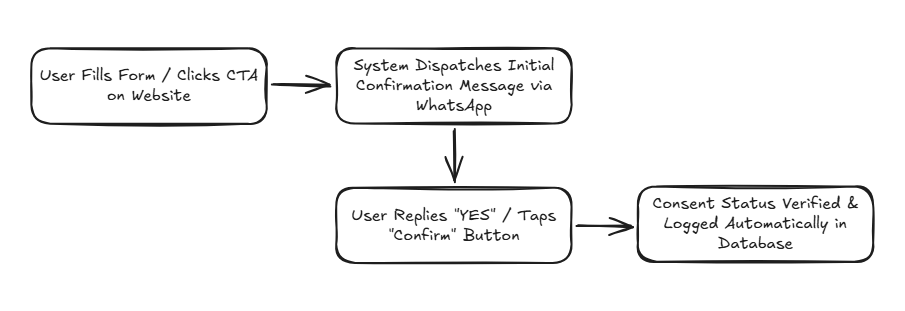
    • Explicit secondary confirmation via initial chat message (Double Opt-In).

    Invalid / High-Risk Opt-In Methods:

    • Implied consent without any active user checking or clicking action.
    • Forced opt-in required as an unrelated prerequisite for basic service access.
    • Consent clauses hidden deep within confusing legal terms and conditions.

    Double Opt-In: Recommended Industry Best Practice

    Double opt-in adds a secondary verification layer to confirm that the registered phone number belongs to the user and that they genuinely wish to receive communications.

    Double Opt-In Workflow:

    Double Opt In flow

    Primary benefits of Double Opt-In include creating rock-solid legal audit proof, eliminating wrong-number dispatches, and building exceptional UX transparency.

    Designing High-Converting, Compliant Opt-In UX

    A common operational mistake is assuming legal compliance destroys interface user experience (UX). In reality, clear and transparent UX design actively increases opt-in conversion rates.

    Effective Opt-In UX Principles:

    • Use plain, helpful language rather than dense legal jargon.
    • Specify exact message categories (order alerts, CS support, or promotional deals).
    • Provide estimated message frequency expectations.
    • Display prominent, intuitive opt-out instructions.

    Example Microcopy:
    “We’ll send order delivery updates and customer support via WhatsApp. Reply STOP at any time to unsubscribe.”

    Opt-Out Management: Mandatory, Simple, & Real-Time

    Opt-out functionality is the mandatory counterpart to opt-in consent. Meta guidelines require businesses to honor user stop requests without technical friction.

    Opt-Out Best Practices:

    • Support simple keywords like STOP, UNSUBSCRIBE, or CANCEL.
    • Provide interactive “Unsubscribe” buttons on promotional whatsapp broadcast campaigns.
    • Process opt-out requests instantly in real-time via workflow automation to exclude numbers from future dispatches immediately.

    Technical Consent Management Implementation

    To remain audit-ready and secure long-term, organizations must log consent records systematically within their CRM platform.

    Essential Consent Audit Trail Parameters:

    Data Parameter Audit Function & Purpose
    Phone Number Recipient’s verified WhatsApp phone number.
    Timestamp Exact time and date consent was granted.
    Opt-In Source Origin touchpoint (Website Form, QR Code, Checkout Page, etc.).
    Consent Type Verification level (Single Opt-In or Double Opt-In).
    Opt-Out Status Real-time active/revoked consent status.

    Common Consent Management Mistakes to Avoid

    • Importing legacy contact databases from spreadsheets without re-verifying consent.
    • Treating business card exchanges or old support chats as promotional marketing consent.
    • Failing to sync opt-out statuses in real-time across all marketing software systems.
    • Sending promotional marketing blasts when users only consented to transactional utility alerts.

    Learn how to avoid account suspensions in our guide on how to avoid spam flags on WhatsApp API.

    Manage Compliant WhatsApp API Opt-Ins with Cekat.ai

    Managing legal, secure WhatsApp API opt-ins combines regulatory compliance with smart UX design. Enterprise organizations building long-term communication strategies must view consent not as an obstacle, but as a core customer trust asset.

    The Cekat.ai platform empowers your enterprise to design compliant, transparent, and user-friendly opt-in workflows. Complete with automated Double Opt-In verification, CRM digital audit trails, and real-time opt-out execution, Cekat.ai ensures messaging campaigns operate safely without phone number suspension risks.

    Manage customer consent and execute secure WhatsApp API communications today with Cekat.ai.


    Frequently Asked Questions (FAQ)

    1. Can I send WhatsApp messages to previous customers without explicit opt-in consent?

    For transactional utility notifications (like receipts or order updates), implied transactional consent applies. However, for promotional marketing messages, you must acquire explicit opt-in consent separately.

    2. What is the difference between Single Opt-In and Double Opt-In?

    Single Opt-In occurs when a user checks a form box on a website. Double Opt-In requires the user to confirm their consent secondary by replying to an initial WhatsApp message.

    3. What happens if a business continues messaging a user after they opt-out?

    Ignoring opt-outs severely violates Meta policies. Users will report your number as spam, leading to rapid Quality Rating degradation and permanent business account bans.

    4. How does Cekat.ai automate customer consent management?

    Cekat.ai automatically logs timestamps, sources, and consent statuses in its unified CRM dashboard, instantly excluding contacts from future messaging queues if opt-out keywords are triggered.


  • AI Agent for Clinic & Salon Reservation Systems: 24/7 Automated Booking Without Admin Staff

    AI Agent for Clinic & Salon Reservation Systems: 24/7 Automated Booking Without Admin Staff

    Imagine this. A prospective patient wants to book a treatment at eleven at night. They open your clinic’s WhatsApp, type a message, and get no reply until the next morning. There’s a good chance they’ve already booked somewhere else before your admin even starts work.

    This problem isn’t trivial. In the beauty clinic and salon business, response speed often determines whether a transaction happens or not.

    This is where an AI agent for clinic and salon reservations starts to make a difference. Not just a tool, but a system that truly changes how a business serves its customers.

    AI Agent for Clinic Reservations

    An AI Agent for clinic reservations is a system that automatically receives, confirms, and reminds patients about bookings via WhatsApp, Instagram, or a website, without needing admin staff on standby 24 hours a day.

    Unlike a rigid, ordinary chatbot, an AI Agent can understand conversational context. Customers can type naturally, like:

    “I’d like a facial tomorrow afternoon”

    and the system immediately directs them to an available slot.

    This technology is typically used as:

    • an automated clinic booking system

    • a chat-based AI salon reservation tool

    • a schedule-integrated reservation chatbot

    • a digital clinic queue system

    Why Manual Reservation Systems Are Becoming Irrelevant

    Many clinic owners think a manual system is still good enough. But if you look closer, there are some assumptions that are often wrong.

    • The first assumption is that all customers book during working hours. In fact, a lot of bookings happen at night.

    • The second assumption is that admin staff can always respond quickly. During busy hours, this is nearly impossible.

    • The third assumption is that manual record-keeping is still safe. In reality, the risk of double bookings and input errors is very high.

    From this, it’s clear the problem isn’t with your team, but with the system being used.

    How Automated Booking with an AI Agent Works

    To make this more concrete, here’s a simple walkthrough of how this system works in practice:

    Step 1
    The patient sends a message, even outside operating hours

    Step 2
    The AI immediately understands the patient wants to book

    Step 3
    The system checks the clinic’s schedule automatically in real time

    Step 4
    The AI offers available slots and confirms the booking

    Step 5
    The patient receives an automatic reminder before their scheduled visit

    This process happens in a matter of seconds, without any admin involvement.

    The Real Impact That Matters Most

    Rather than discuss features, it’s more important to look at the impact a business actually feels.

    1. No More Missed Bookings

    Every incoming chat is handled immediately, no matter the time. This directly boosts conversion.

    2. Admin Staff Can Focus on More Important Things

    Tasks like answering repetitive questions and managing schedules can be taken over by AI. Your team can focus on in-location service and direct customer interaction.

    3. Neater Schedules with Fewer Errors

    With a system directly connected to slot availability:

    • no double bookings

    • no incorrect record-keeping

    • all schedules are recorded automatically

    4. Fewer No-Shows Without Manual Follow-Up

    Automatic reminders help customers remember their schedule. It’s a simple thing, but it has a big impact on revenue.

    5. Customers Feel They’re Getting Personal Service

    AI stores customer history. From this, the system can provide relevant treatment recommendations, not just generic responses.

    A Simple Case Study

    One beauty clinic that started using an automated beauty clinic booking system saw a fairly clear change within a short time.

    Indicator

    Before

    After

    Response time

    about 15 minutes

    less than 1 minute

    Incoming bookings

    limited to working hours

    coming in 24 hours a day

    Admin workload

    high

    much lower

    No-shows

    fairly frequent

    reduced

    What’s interesting is that this improvement didn’t come from adding more staff, but from changing the way of working.

    Does Every Clinic Need an AI Agent?

    Not every business needs this right away. This is where it’s important to think critically.

    If your booking volume is still very small, automation might not yet have a major impact.

    But if you’re starting to experience:

    • unanswered chats

    • a messy schedule

    • an overwhelmed admin team

    • customers who frequently have to wait

    then the problem clearly lies in the system, not the people.

    FAQ About AI Agents for Clinic & Salon Reservations

    Can an AI agent handle bookings outside working hours?
    Yes. The system runs 24 hours a day so no chat is missed.

    What if the schedule is full — can the AI offer alternatives?
    Yes. The AI will offer other available time slots.

    Can the AI send automatic reminders?
    Yes. Reminders are sent before the scheduled visit without needing a manual nudge.

    How much does an AI booking system for clinics cost?
    Cost depends on your needs and scale, but it’s usually more cost-effective than hiring additional admin staff.

    Can it integrate with Google Calendar or other software?
    Yes. The system can connect with the tools you already use.

    How secure is patient data?
    Data is stored with security systems and encryption that meet industry standards.

    Using AI for schedule management is no longer about following a trend. It’s about fixing the bottleneck that has been holding back business growth.

    An AI Agent helps ensure every booking opportunity is captured, every schedule is neatly recorded, and every customer gets a fast response without depending on admin availability.

    Time to Switch to a More Efficient Booking System

    Cekat.ai is specifically designed to help clinics and salons run a simple yet powerful automated booking system. You don’t need to overhaul your entire operation — just start with the most critical point: reservations.

    With integration into WhatsApp, Instagram, and your website, your business still feels personal to customers, while running far more efficiently behind the scenes.

    Try the free demo and see for yourself how a small change in your system can make a big impact on your business operations and revenue.

  • Optimizing Time for Patient Consultations & Follow-Ups in the Health & Beauty Business with AI Technology

    Optimizing Time for Patient Consultations & Follow-Ups in the Health & Beauty Business with AI Technology

    In the health & beauty industry, time is one of the most important assets. Whether it’s a beauty clinic, spa, health salon, or skincare center, all of them need efficient time management to maintain service quality and patient satisfaction. The main challenge faced by many businesses in this sector is how to deliver personal consultations, carry out consistent follow-ups, and keep operations running smoothly at the same time. Many professionals have to split their focus between direct patient service and administrative tasks, such as recording data, answering patient questions, and scheduling check-ups. This often results in suboptimal service, slower responses to patients, and even a decline in the overall customer experience.

    Artificial Intelligence (AI) technology offers an innovative solution to these challenges. One AI product specifically designed to support business operational efficiency is Cekat.AI. As an AI agent and service, Cekat.AI helps health & beauty businesses automatically optimize the patient consultation and follow-up process, without reducing the quality of the personal interaction that lies at the core of health and beauty services. By leveraging AI, businesses not only speed up internal processes but also create a more responsive, comfortable, and trustworthy patient experience.

    Why Time Efficiency Is a Priority in the Health & Beauty Business

    Time efficiency isn’t just about internal productivity, it’s also a critical factor in building patient loyalty and business reputation. Long consultations or delayed follow-ups can lower patient satisfaction and even cause patients to switch to a competitor.

    A study published in the Journal of Cosmetic Dermatology (2022) found that patients rate response speed, service personalization, and ease of communication as the three main factors when choosing a beauty clinic. This means a business’s ability to respond quickly to patient questions and provide recommendations tailored to their needs has a direct impact on customer retention.

    In addition, professionals in the health & beauty business often face time pressure because they must handle patients directly, manage schedules, and ensure medical or treatment documentation is done correctly. Without the right solution, this can lead to staff burnout, a decline in service quality, and a risk of administrative errors.

    How Cekat.AI Helps Streamline the Patient Consultation Process

    Cekat.AI serves as a tool that enables the patient consultation process to happen faster, more accurately, and more personally. Here’s a detailed explanation of how this AI works:

    1. AI-Powered Chat for Initial Consultation

    Cekat.AI can be used for a patient’s initial consultation via digital chat, whether on a website, app, or instant messaging platform. This AI system asks important information such as:

    • The patient’s health history

    • Skin type or body condition

    • Specific complaints or treatment goals

    The data collected by the AI is then analyzed and prepared for the professional before the face-to-face consultation. This way, the doctor or therapist already has a complete picture of the patient, so the consultation session can focus more on treatment solutions rather than repeating basic questions. This process significantly reduces consultation duration and improves staff productivity.

    2. Personalization of Treatment Recommendations

    One of Cekat.AI’s key strengths is its ability to provide personalized recommendations based on a patient’s profile. For example:

    • For patients seeking anti-aging treatment, the AI analyzes skin condition, sensitivity, and previous treatment history.

    • The AI can recommend the most suitable combination of clinical treatments and at-home care products.

    This personalization not only speeds up the consultation process but also improves treatment success rates and patient satisfaction. Patients feel individually cared for, rather than simply receiving generic advice.

    Optimizing Patient Follow-Up with Cekat.AI

    Patient follow-up is a crucial process in the health & beauty business because it helps monitor treatment results and ensures patients receive appropriate continued care. With Cekat.AI, follow-up becomes more efficient in several ways:

    1. Automated Schedule Reminders

    The AI sends automatic reminders via SMS, email, or chat apps about:

    • Routine check-up schedules

    • Follow-up treatment actions

    • Use of recommended products

    This automation reduces the risk of patients forgetting appointments, minimizes cancellations, and ensures the follow-up process runs consistently.

    2. Patient Status Analysis and Reporting

    Cekat.AI can monitor patient feedback and record responses to treatment. This data is analyzed to generate reports that help staff:

    • Identify patients who need special attention

    • Adjust treatment recommendations based on the latest condition

    • Identify trends and patterns in patient needs

    These reports are generated automatically, allowing professionals to make data-driven decisions quickly and accurately.

    3. Real-Time Interaction for Patient Questions

    Patients often have additional questions after treatment, for example regarding side effects or the products used. Cekat.AI can answer basic questions in real time, providing accurate information and helping patients feel reassured without having to wait for direct interaction with staff. This reduces the burden on staff and improves service quality.

    Benefits of Implementing Cekat.AI in the Health & Beauty Business

    Implementing Cekat.AI provides significant strategic and operational benefits:

    1. Operational Efficiency:
      Reduces the time staff spend on administrative tasks so they can focus on core services.

    2. Improved Patient Satisfaction:
      Fast, personal, and consistent interaction boosts patient loyalty and business reputation.

    3. Data-Driven Decision Making:
      AI provides insights for treatment planning and business strategy, resulting in more accurate and effective decisions.

    4. Service Flexibility:
      Patients can access consultation and follow-up services anytime, increasing patient convenience and engagement.

    5. Reduced Risk of Errors:
      AI helps record patient data accurately and ensures no information is missed.

    In the health & beauty business, time efficiency in patient consultations and follow-ups is not just an operational need, but also a strategy for boosting patient satisfaction and loyalty. Cekat.AI provides an AI-based solution that enables businesses to:

    • Conduct initial consultations more quickly and personally

    • Provide treatment recommendations suited to individual needs

    • Carry out patient follow-up automatically and consistently

    By adopting this technology, health & beauty businesses not only work more efficiently but also deliver a more professional and satisfying patient experience. Cekat.AI is an innovative tool that transforms how businesses manage communication, service, and patient data, allowing businesses to focus on service development and long-term growth.

    References

    1. Journal of Cosmetic Dermatology, “Patient Satisfaction and Time Efficiency in Aesthetic Clinics,” 2022.

    2. Google AI Overview, “AI in Healthcare and Customer Experience Optimization,” 2023.

    3. Harvard Business Review, “How AI Improves Customer Engagement and Operational Efficiency,” 2021.

  • 24-Hour Window WhatsApp API: How It Works & Strategies to Avoid Extra Costs

    24-Hour Window WhatsApp API: How It Works & Strategies to Avoid Extra Costs

    Key Advantages

    • Free-Form Outbound Cost Containment: Maximizes the active 24-hour customer service window to exchange messages without recurring template submission fees.
    • Automated Rolling Window Resets: Uses interactive action buttons to prompt incoming customer responses, automatically extending the session timer.
    • Marketing Budget Leakage Prevention: Eliminates the need to initiate expensive marketing conversation templates for ongoing customer support threads.
    • Elevated Commercial Closing Velocity: Capitalizes on prospective buyer interest while communication channels remain friction-free and active.

    Within modern enterprise messaging operations, customer interaction cadences are governed by strict session parameters established by Meta. Among the most critical operational rules, and a frequent driver of unmanaged budget inflation, is the 24-hour customer care window. Many commercial organizations utilize verified messaging tools without understanding how session timers trigger, how resets function, or how automated conversation flows maintain cost efficiency without compromising customer experience. Navigating these commercial billing tiers connects directly with our analysis of WhatsApp API cost structures.

    When the 24-hour timer expires, businesses forfeit the ability to send free-form replies and must rely on pre-approved, paid message templates. Managing the whatsapp api 24 hour window rigorously across production whatsapp api endpoints enables revenue teams to maintain continuous engagement while containing outbound expenses. This operational framework reinforces strategies examined in our guide on controlling WhatsApp API costs efficiently.

    What Is the WhatsApp API 24-Hour Window?

    The 24-hour customer care window is an operational session that opens the moment an end user sends an inbound message to an official business profile. While this window remains open, the organization can send free-form text messages, images, audio files, and documents without prior template curation.

    Three operational realities define this framework:

    • Measured from User Ingestion: The 24-hour timer begins on the server timestamp of the customer’s incoming message, not when a representative submits a reply.
    • Dynamic Rolling Resets: Every subsequent message received from the customer completely resets the countdown clock back to a full 24 hours.
    • Mandatory Template Enforcement Post-Expiry: Once the timer lapses without user interaction, free-form dispatches lock down, requiring pre-approved templates as outlined in our guide on official WhatsApp message template approval.

    Comparative Matrix: Active Service Session vs. Expired Session Window

    Session Parameter Inside the 24-Hour Window (Active) Outside the 24-Hour Window (Expired)
    Permitted Message Syntax Free-form plain text, PDFs, audio, and media attachments. Restricted strictly to Meta-approved message templates.
    Outbound Billing Overhead No additional initiation charges for active service threads. Initiates a paid conversation charge per template category.
    Follow-Up Flexibility Casual, dynamic conversational responses. Structured outreach governed by an automated follow-up engine.
    Representative Interface Managed directly inside an omnichannel application. Requires pre-configured template selection menus.

    How Do Rolling Window Resets Function?

    The 24-hour timer resets through various user actions beyond standard manual text replies. Any active inbound interaction initiated by the customer resets the timer back to a full 24 hours:

    • The customer taps a Quick Reply action button inside the chat interface.
    • The customer engages a Call to Action button embedded within an outbound message.
    • The customer selects an item from an interactive product catalog menu.

    High-converting communication workflows do not simply deliver cold answers; they structure conversation endings with engaging prompts that encourage user responses, keeping the free-form service session open.

    3 Automation Tactics to Maintain Continuous Conversation Windows

    Deploying automated conversation workflows enables organizations to maintain open interaction sessions naturally without generating customer friction:

    1. Incorporate Interactive Quick Reply Prompts

    When sending pricing details or service specifications, conclude the message with quick-action buttons such as “Check Product Sizing” or “Select Demo Date”. When the customer clicks, the system resets the 24-hour window automatically.

    2. Deploy Contextual Re-Engagement Prompts

    Configure automated check-ins scheduled for the 20th or 22nd hour after the user’s last message. Deliver a helpful prompt asking if they require further assistance before the session closes.

    3. Automate Escalations to Frontline Representatives

    If machine learning models identify high commercial purchase intent while response cadences slow down, reassign the thread to a human sales representative to finalize the opportunity while the active window remains open.

    Optimize Your Commercial Messaging Strategy with Cekat.ai

    Managing messaging session timers does not require restricting your team’s customer engagement. True operational efficiency comes from structuring communication workflows that maintain customer interest naturally.

    The enterprise platform at Cekat.ai provides verified WhatsApp Business API infrastructure equipped with real-time session countdown tracking, smart pre-expiry prompts, and automated workflow integrations to ensure high conversion rates at manageable costs.

    Visit the official Cekat.ai website to evaluate our platform capabilities or book an introductory discovery consultation with our technical team to optimize your business messaging operations today.

    Frequently Asked Questions (FAQ)

    1. When exactly does the 24-hour customer care window begin?

    The 24-hour service timer begins the moment an inbound message from a customer reaches the official WhatsApp Business API servers, not when an internal representative or bot submits a reply.

    2. Can businesses dispatch free-form messages after the 24-hour timer lapses?

    No. Once the 24-hour window lapses, systems reject free-form messages, requiring organizations to send pre-approved message templates that trigger new billable conversation sessions.

    3. Does sending an approved marketing template inside an active service session incur billing charges?

    Yes. If an organization dispatches a marketing template while an inbound customer service session is running, Meta initiates a separate marketing conversation charge.

    4. How can businesses prevent interaction sessions from expiring prematurely?

    Businesses can utilize interactive message formats equipped with Quick Reply buttons, prompting customers to respond easily and resetting the 24-hour timer back to full capacity.

  • AI Agent for Retail Businesses: Boost Sales and Store Efficiency with AI

    AI Agent for Retail Businesses: Boost Sales and Store Efficiency with AI

    Key Advantages

    • Real-Time Inventory Telemetry Inquiries: Bridges conversational assistants directly with stock databases to deliver instant product variant confirmations.
    • Automated Abandoned Cart Recovery: Dispatches contextual cart abandonment reminders with timely promotional incentives to recapture missed revenue.
    • Uninterrupted 24/7 Customer Care Desk: Resolves buyer sizing queries, technical specifications, and shipping estimates without operational downtime.
    • Centralized Account Profiling in CRM: Automatically synchronizes purchase histories and customer preferences to power personalized upsell sequences.

    Modern commercial retail operations navigate demanding consumer expectations. Prospective buyers demand sub-minute chat response times, verified inventory availability, and personalized shopping recommendations. However, incoming inquiry volumes across digital messaging channels frequently outpace the daily capacity of support personnel. Resolving these operational communication backlogs connects directly with frameworks covered in our guide on AI agents for retail businesses.

    Retail brands lose substantial potential revenue when prospective shoppers abandon shopping carts due to delayed response times. Integrating modern ai in retail with verified messaging endpoints delivers immediate transaction velocity. Deploying these conversational agents establishes a scalable commercial foundation, reflecting principles detailed in our analysis of smart automated product recommendations.

    Retail Operational Bottlenecks and Automated AI Resolutions

    Manual communication workflows introduce severe structural friction that directly suppresses digital conversion benchmarks:

    • Time-Consuming Repetitive Inquiries: Repetitive sizing questions, stock level checks, and shipping policies consume up to 80 percent of agent bandwidth.
    • High Cart Abandonment Drop-Off: Shoppers frequently abandon checkouts due to brief distractions or unaddressed technical queries.
    • Fragmented Logistics Update Tracking: Support representatives waste valuable hours copying tracking numbers into individual customer chat windows.

    Delivering instantaneous replies upon initial inquiry is crucial for preserving prospective buyer purchase intent, as outlined in our guide on fast response standards.

    Comparative Matrix: Conventional Manual Retail vs. Automated AI Agent Systems

    Retail Operational Milestone Conventional Manual Workflows Automated Retail AI Agent Integration
    Stock Availability Lookup Staff check spreadsheets manually; response takes 10 to 30 minutes. Instant catalog queries executed in seconds via automated bots.
    Stalled Account Nurturing Rarely executed due to lack of time to segment buyer records. Automated checkouts triggered via an automated follow-up engine.
    Order Tracking Updates Tracking codes typed out manually into each customer thread. Transit updates and tracking notifications pushed automatically.
    Customer Preference Capture Unstructured chat notes scattered across representative devices. Recorded directly into customer data management software.

    10 Essential Retail AI Agent Use Cases to Scale Revenue

    Autonomous conversational intelligence drives measurable commercial impact across ten primary retail touchpoints:

    1. Automated Variant Stock Checking: Virtual assistants query inventory databases directly to confirm sizing and color availability.
    2. Personalized Recommendation Engines: Analyzes prior buyer baskets to suggest complementary products, driving higher average order values.
    3. Real-Time Parcel Tracking Lookups: Delivers carrier milestone updates instantly whenever customers inquire about package delivery status.
    4. Unified 24/7 Multi-Channel Support: Handles buyer conversations from WhatsApp, social media DMs, and web chat within one centralized workspace.
    5. Automated Abandoned Cart Recovery: Dispatches personalized recovery alerts with limited-time discount incentives to shoppers who drop off.
    6. Segmented Promotional Messaging: Targets marketing broadcasts based on historical order values and categories to prevent spam complaints.
    7. Automated Post-Purchase Review Collection: Solicits merchant reviews a few days after order delivery when buyer satisfaction is high.
    8. Back-in-Stock Product Alerts: Automatically notifies interested shoppers the moment sold-out product variants return to inventory shelves.
    9. Loyalty Points and Membership Management: Alerts registered members regarding expiring reward balances and delivers automated birthday promotions.
    10. First-Time Buyer Onboarding Flows: Welcomes new accounts with clear purchasing guidelines and introductory vouchers.

    5 Practical Steps to Deploy Retail Conversational AI

    Implementing retail artificial intelligence can be executed smoothly through a structured rollout roadmap:

    1. Audit Common Frontline Inquiries

    Compile the 50 most frequent customer questions regarding dimensions, fabrics, shipping schedules, and refund policies to establish the core knowledge base.

    2. Connect Official Business Messaging Endpoints

    Implement verified enterprise messaging channels to ensure transactional alerts and promotional sequences reach client inboxes reliably.

    3. Ingest Digital Catalog Records

    Upload stock-keeping unit (SKU) lists, pricing rules, and item descriptions so the conversational model provides reliable answers.

    4. Structure Cart Recovery Triggers

    Deploy automated engagement sequences configured to dispatch two hours after a customer abandons a shopping cart without completing checkout.

    5. Audit Conversation Telemetry Regularly

    Evaluate weekly resolution metrics and refine knowledge base entries whenever new inventory items or special promotions enter your catalog.

    Scale Your Retail Operations Smarter with Cekat.ai

    Handling heavy transaction volumes does not require overwhelming your frontline team with repetitive administrative overhead. Deploying conversational intelligence transforms shopper inquiries into dependable revenue growth.

    The enterprise platform at Cekat.ai provides a comprehensive retail automation workspace uniting verified WhatsApp Business API access, real-time inventory queries, centralized customer data, and automated follow-up workflows.

    Visit the official Cekat.ai website to explore our platform modules or book an introductory discovery consultation with our technical solutions team to accelerate your retail sales performance today.

    Frequently Asked Questions (FAQ)

    1. What is an AI Agent for retail businesses?

    A retail AI Agent is an autonomous conversational system that manages customer inquiries, confirms warehouse stock levels, recovers abandoned checkouts, and delivers order tracking updates automatically 24/7.

    2. How does conversational AI recover abandoned shopping carts?

    The system monitors unfinalized checkouts and dispatches context-aware follow-up messages featuring limited-time discounts or free shipping incentives at the optimal time.

    3. Can the virtual assistant identify specific product sizes and colors?

    Yes. The software queries real-time inventory data directly, allowing it to confirm exact size availability, alternative color options, and sizing measurements accurately.

    4. Is conversational retail AI suitable for growing small and medium businesses?

    Yes. Growing retail brands benefit significantly by handling thousands of simultaneous customer conversations without needing to recruit additional customer service staff.